
このページはアプリまたはその開発者の公式ページではなく、情報提供および論評を目的として作成された独立した編集出版物です。明示的に別段の記載がない限り、アプリおよびその開発者は、MWM、Apple、Google Play、アプリのパブリッシャー、またはアプリの開発者と提携、承認、後援、認可、またはその他の公式的な関係はなく、このページのいかなる内容も、アプリがMWMのサービスを使用して開発されたことを意味するものではありません。すべての商標、ロゴ、スクリーンショット、その他のコンテンツはそれぞれの所有者の財産です。


ダウンロード
2.5M+ユーザー評価
評価数
82.8K開発元
カテゴリ
Music対応言語
2最新バージョン
2.0.9サイズ
74.8 MBリリース日
2016年11月24日初心者DJや音楽愛好家向けのポータブルDJ体験
「WeDJ for iPhone」機能分析
主要ストリーミングサービス連携
本アプリは、Beatport StreamingやSoundCloud Go+/DJなどの主要なストリーミングサービスから楽曲を再生し、ミックスに活用することが可能です。
自動ビートシンク
本アプリは、ボタン一つで2つのトラックのテンポを自動的に同期させることができ、初心者でも簡単にスムーズなミックスを実現します。
ミックス録音とソーシャル共有
本アプリは、作成したミックスを録音する機能を提供しており、ユーザーは録音した音源をMixcloudやSoundCloudを通じて簡単に友人や音楽コミュニティと共有することが可能です。
プロフェッショナルDJ機器連携
本アプリは、DDJ-200などのPioneer DJ製対応機器と接続することで、より本格的かつ直感的なハードウェア操作でのDJプレイを可能にします。
3バンドイコライザー
ユーザーは、高域、中域、低域の3つの音域を個別に調整することで、トラック間のサウンドバランスを最適化し、洗練されたミックスを作成できます。
クロスフェーダーとトランジションFX
ユーザーは、クロスフェーダーを操作するだけで2つのトラックの音量バランスを調整でき、さらに「Transition FX」を使用することで、プロフェッショナルなトラック間の移行を容易に実現できます。
ループとホットキュー
本アプリは、ユーザーがトラックの特定部分をループ再生したり、指定したポイントに瞬時にジャンプできるホットキュー機能を提供し、創造的なパフォーマンスや練習をサポートします。
多彩なエフェクト(FX)
本アプリは、エコーやリバーブなど多様なエフェクト機能を備えており、ユーザーはサウンドの質感や雰囲気を自在に変化させ、オリジナリティあふれるミックスを生み出すことができます。
よくある質問
について知っておくべきこと WeDJ for iPhone
What is WeDJ for iPhone?
WeDJ for iPhone is a DJ application developed by Pioneer DJ. It provides a flexible and seamless DJ experience, allowing users to play and mix music from streaming services and tracks stored on their iPhone.
What music sources does WeDJ for iPhone support?
WeDJ for iPhone supports music from iTunes, Beatport Streaming, SoundCloud Go+/DJ, and other iPhone locations such as Dropbox. Streaming services require separate subscriptions.
Can I connect external DJ hardware to WeDJ for iPhone?
Yes, WeDJ for iPhone connects to compatible Pioneer DJ hardware. Supported units include the DDJ-200, DDJ-WeGO4, and DDJ-WeGO3, allowing for hands-on control during performances.
What effects are available in WeDJ for iPhone?
WeDJ for iPhone offers various effects (FX) to modify sound texture. These include Echo, Reverb, Roll, Sweep, Flanger, V.Brake, and R.Echo, enabling users to create unique sounds.
Does WeDJ for iPhone include a sampler?
Yes, WeDJ for iPhone includes a sampler feature. Users can trigger built-in sounds such as Horn, Siren, Clapsnare, Drop FX, Kick, Hat, and Razer to enhance their mixes creatively.
How do I record my DJ mix in WeDJ for iPhone?
WeDJ for iPhone allows users to record their mixes. This feature captures the audio output, but recording is disabled when playing music from supported streaming services like Beatport or SoundCloud.
Can WeDJ for iPhone automatically mix tracks?
Yes, WeDJ for iPhone features an Automix function. This allows the application to automatically perform the mixing between tracks, enabling users to enjoy their playlists without manual intervention.
What is Phrase Sync in WeDJ for iPhone?
Phrase Sync in WeDJ for iPhone helps achieve smooth transitions by matching the starting points of musical phrases between tracks on different decks. It provides visual cues and a countdown.
How can I use loops in WeDJ for iPhone?
WeDJ for iPhone allows users to loop specific sections of a track, playing them repeatedly. The app provides various beat loop options, including 1/16, 1/8, 1/4, 1/2, 1, 2, 4, and 8 beats.
What is the purpose of the 3-band EQ in WeDJ for iPhone?
The 3-band EQ in WeDJ for iPhone enables users to adjust the volume of high, medium, and low sound ranges. This allows for smooth mixing and balanced audio transitions between tracks.
以下のスクリーンショットと説明は、アプリの公式ストアリスティングから直接取得されたものであり、アプリ開発者の所有物です。
アプリストア
スクリーンショット
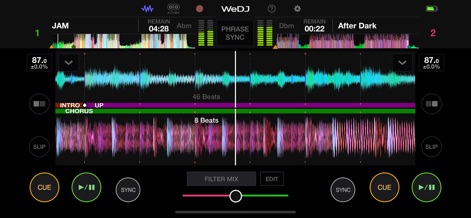
このアプリは、拡大された波形表示により楽曲の構成を視覚的に捉え、テンポ調整機能でスムーズなミックスを実現します。
直感的なDJミキシング
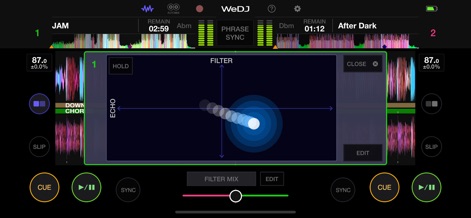
ユーザーは、Filter Mixオーバーレイを使用してサウンドをリアルタイムで操作し、エコーエフェクトにより創造的な音響効果を加えることができます。
サウンドに深みを
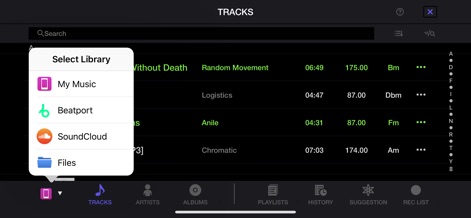
このツールは、BeatportやSoundCloudなどの複数の音源ライブラリから楽曲を選択でき、iTunesやデバイス内のファイルにもアクセス可能です。
豊富な音源ライブラリ
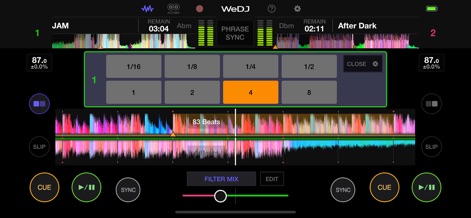
本アプリでは、ユーザーがビートを指定してループを瞬時に設定でき、波形上のループ範囲表示で視覚的に確認しながらトラックを編集できます。
精確なループコントロール
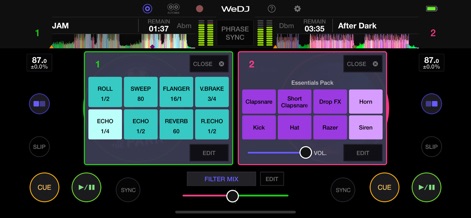
多様なエフェクトパッドでサウンドテクスチャを変更し、サンプラーパッドでホーンやサイレンなどの付属サウンドをトリガーして創造性を高めます。
創造的なFXとサンプラー
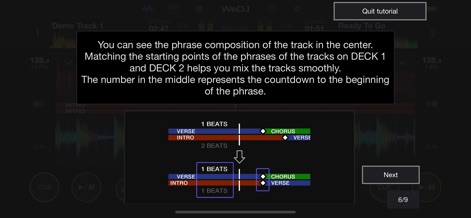
ユーザーは、フレーズ構成の視覚化によって楽曲の構造を理解し、スムーズなミックスのためのチュートリアルで実践的なヒントを得られます。
ミックスの学習ガイド
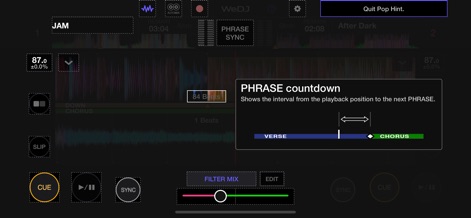
この機能は、PHRASEカウントダウン表示で次のフレーズまでのタイミングを知らせ、楽曲構成の視覚的ガイドでDJプレイをアシストします。
フレーズシンクアシスト
説明
Download
類似アプリ
似た機能とユーザー体験を持つアプリ
YouDJ Mixer - Easy DJ app
Wurth Adrien
Jammable - Mashups
Jammable Limited
Edjing Mix - DJ Music Mixer
MWM
djay - DJ App & AI Mixer
Algoriddim GmbH
DJ Mixer Studio:Remix Music
MVTrail Tech Co., Ltd.

DJDJ Mixing App
Rodrigo Yanez

rekordbox - DJ App & DJ Mixer
AlphaTheta Corporation
DJ it! Virtual Music Mixer app
Gismart Ltd

Mixy - Make Mashups
Mixy, Inc.
このページはアプリまたはその開発者の公式ページではなく、情報提供および論評を目的として作成された独立した編集出版物です。明示的に別段の記載がない限り、アプリおよびその開発者は、MWM、Apple、Google Play、アプリのパブリッシャー、またはアプリの開発者と提携、承認、後援、認可、またはその他の公式的な関係はなく、このページのいかなる内容も、アプリがMWMのサービスを使用して開発されたことを意味するものではありません。すべての商標、ロゴ、スクリーンショット、その他のコンテンツはそれぞれの所有者の財産です。