Widget for Messages
Widget for Messages
ダウンロード: App Store

このページはアプリまたはその開発者の公式ページではなく、情報提供および論評を目的として作成された独立した編集出版物です。明示的に別段の記載がない限り、アプリおよびその開発者は、MWM、Apple、Google Play、アプリのパブリッシャー、またはアプリの開発者と提携、承認、後援、認可、またはその他の公式的な関係はなく、このページのいかなる内容も、アプリがMWMのサービスを使用して開発されたことを意味するものではありません。すべての商標、ロゴ、スクリーンショット、その他のコンテンツはそれぞれの所有者の財産です。

ロゴ: Widget for Messages
ダウンロード: App Store

Widget for Messages

最新の会話を表示する美しいウィジェットでホーム画面をパーソナライズしましょう。StandByのサポートでつながりを保ち、ワンタップでチャットに直接飛び込みましょう。

主要数値

ダウンロード

1K+

ユーザー評価

1.0/5

評価数

0

開発元

Jerrod Banks

カテゴリ

Social Networking

対応言語

11

最新バージョン

1.03.1

サイズ

22.0 MB

リリース日

2025年9月14日
機能

あなたの会話を、ホーム画面でそのまま

iPhone独自のスタイルに合わせた、美しくカスタマイズ可能なウィジェットで、最新メッセージにすぐにアクセスしましょう。

おしゃれなホーム画面ウィジェット

小、中、大のサイズからレイアウトに合わせて選択し、最新のテキストを一目で確認できます。

タップしてすぐにチャット

検索は不要です。ウィジェット上のメッセージをタップするだけで、メッセージアプリ内の会話に直接飛び込めます。

以下のスクリーンショットと説明は、アプリの公式ストアリスティングから直接取得されたものであり、アプリ開発者の所有物です。

アプリストア

スクリーンショット
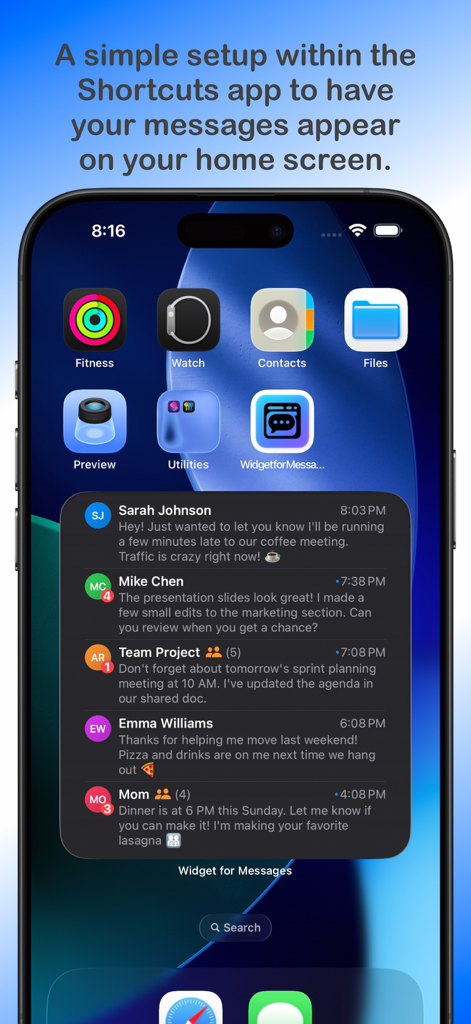
Widget for Messages - 未読バッジ付きの複数の連絡先からの最近のメッセージプレビューを表示する大きなウィジェットを特徴とするiPhoneホーム画面
未読バッジ付きの複数の連絡先からの最近のメッセージプレビューを表示する大きなウィジェットを特徴とするiPhoneホーム画面

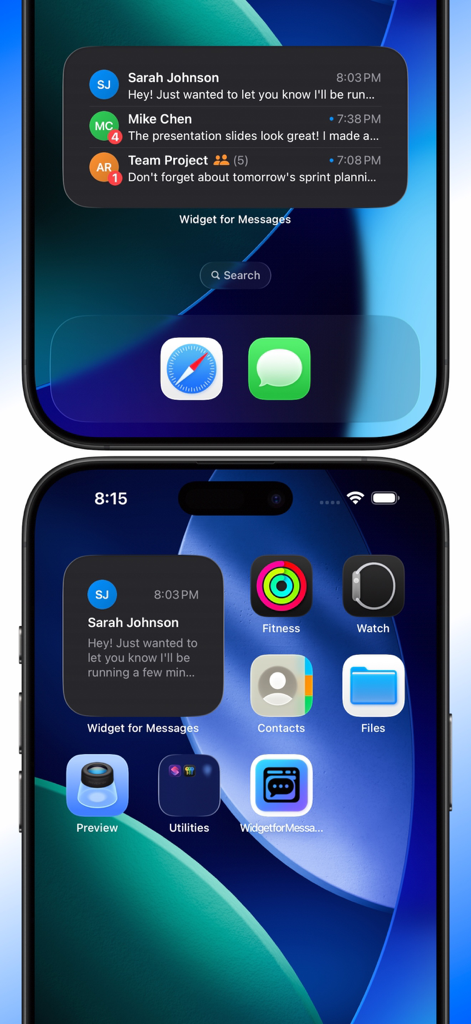
Widget for Messages - Sarah JohnsonとMike Chenからの最近のテキストメッセージを表示する小中サイズのウィジェットを示すiPhoneホーム画面
Sarah JohnsonとMike Chenからの最近のテキストメッセージを表示する小中サイズのウィジェットを示すiPhoneホーム画面

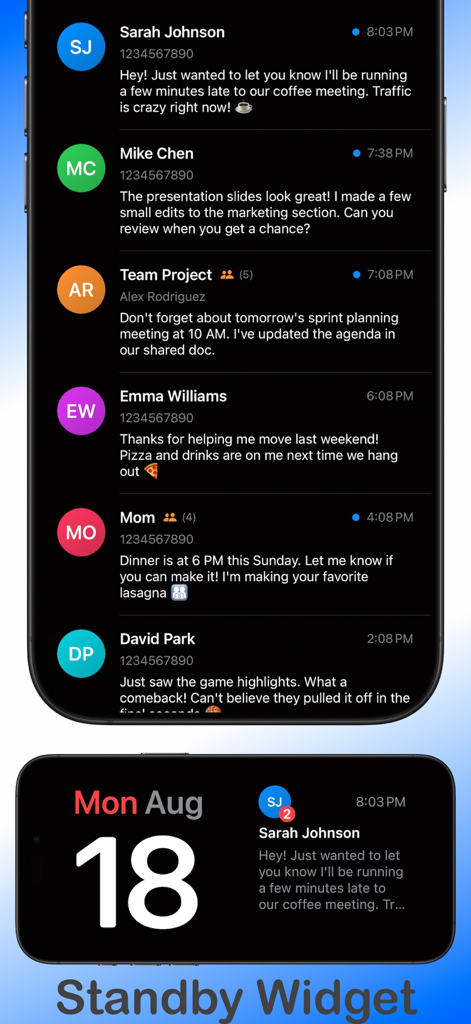
Widget for Messages - メッセージプレビューのリストと、メッセージ通知付きのiOS StandByモードウィジェットのビューを示すメッセージ用ウィジェットアプリのスクリーンショット
メッセージプレビューのリストと、メッセージ通知付きのiOS StandByモードウィジェットのビューを示すメッセージ用ウィジェットアプリのスクリーンショット

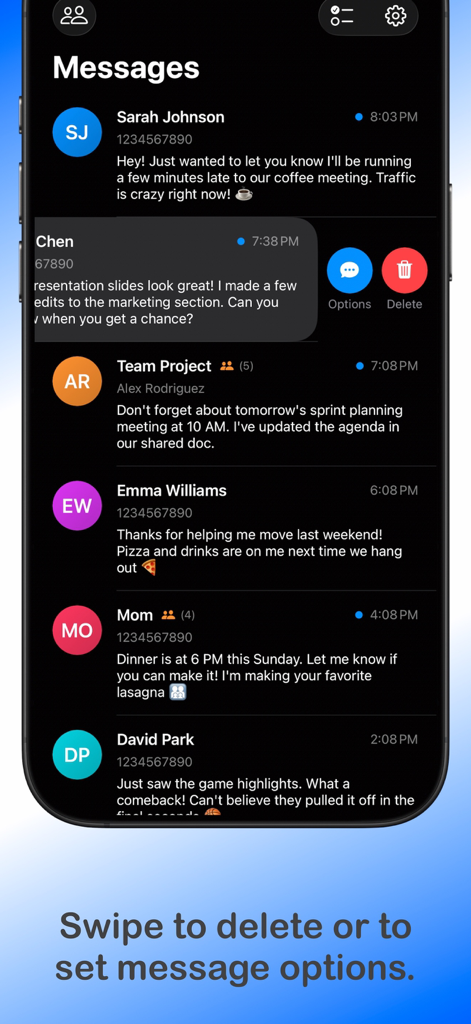
Widget for Messages - 削除およびオプションボタンにアクセスするためのスワイプジェスチャーを備えたテキスト会話のリストを示すメッセージ用ウィジェットアプリのインターフェース
削除およびオプションボタンにアクセスするためのスワイプジェスチャーを備えたテキスト会話のリストを示すメッセージ用ウィジェットアプリのインターフェース

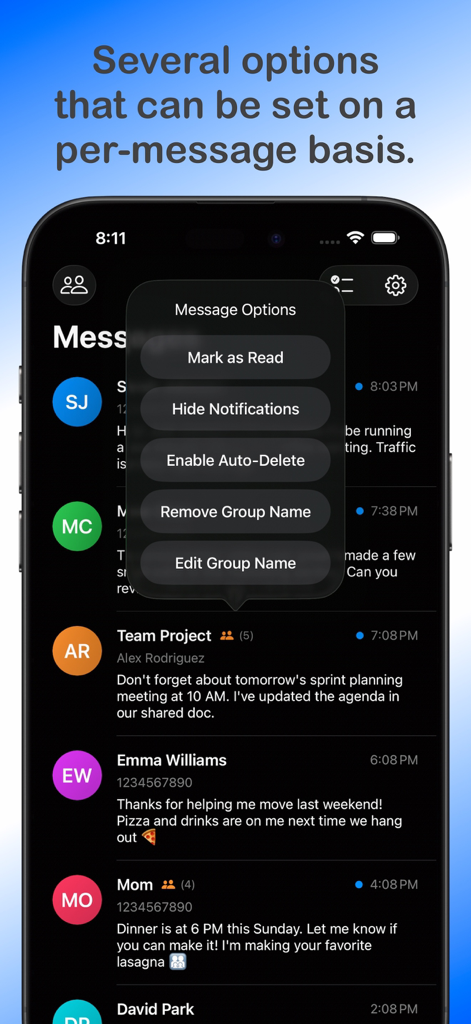
Widget for Messages - 既読にする、自動削除などの設定を表示するメッセージオプションメニューを示すスマートフォン画面

既読にする、自動削除などの設定を表示するメッセージオプションメニューを示すスマートフォン画面

説明

Widget for Messages utilizes the Shortcuts app and Shortcuts automations to display messages from the Messages app onto a widget on the Home Screen. The widget will display only the most recent message from each user; tapping the message on the widget will take you to the conversation in the Messages app. Please review the limitations listed below before purchasing the app. This app may not suit your needs due to these limitations. Important Note: Please review the limitations of the app found within this description below or at the support URL listed below prior to purchasing, as the app may not be suitable for your needs. The app does not collect or provide me or anyone else any of your message, contacts or personal contact information in any way. The app requires such information in order to display your conversation data into the widget and to properly work with group conversations. Features - Small, medium, and large widgets. - Open directly to a chat conversation within the Messages app just by tapping on the conversation in the widget. - Badge that displays the unread messages count that can be toggled on/off. - Push Notifications for messages to open directly to the conversation. - Push Notifications can be on a per-message basis, selectable in the three dots on the conversation row. - Group Message support - Display only messages received from different contact groups. - Ties directly into the Contacts app to allow for modifying and creating groups. - Support for international numbers using native iOS APIs. - Support for short codes that the companies and the lame spammers use. - Support for email addresses used for iMessages. - Automatically delete specific or all messages after opening it and it is marked as read. - Supports StandBy widgets. - Support for over 100 countries/regions and the following languages English Spanish German French Japanese Arabic Portuguese Italian Russian Korean Chinese Simplified Limitations *The limitations listed below are due to system level features, functions, or APIs that my app does not have access to or are required in the currently released Apple Operating Systems* - Photos and Videos within messages will not display in the widget or the app. - One-word messages likely won’t come through as the message received trigger relies on having at least one space in the message. - The Widget for Messages app must open first in order to open to the conversation in the Messages app when tapping a message on the widget. - There’s no easy way to detect group messages, but I’ve tried my best with a workaround; therefore, it may or may not work correctly. Apple does not provide an API to achieve this. - Shortcuts will always display a notification when the automation runs; Apple does not offer a toggle to disable it for this automation trigger. - Reading a message in the Messages app without going through the widget does not mark the message read in the Widget for Messages app as this is not possible. - Conversations of group chats with custom group names aren’t able to be opened directly as there is no API to do so.

Download

ダウンロード: App Store

このページはアプリまたはその開発者の公式ページではなく、情報提供および論評を目的として作成された独立した編集出版物です。明示的に別段の記載がない限り、アプリおよびその開発者は、MWM、Apple、Google Play、アプリのパブリッシャー、またはアプリの開発者と提携、承認、後援、認可、またはその他の公式的な関係はなく、このページのいかなる内容も、アプリがMWMのサービスを使用して開発されたことを意味するものではありません。すべての商標、ロゴ、スクリーンショット、その他のコンテンツはそれぞれの所有者の財産です。








