
このページはアプリまたはその開発者の公式ページではなく、情報提供および論評を目的として作成された独立した編集出版物です。明示的に別段の記載がない限り、アプリおよびその開発者は、MWM、Apple、Google Play、アプリのパブリッシャー、またはアプリの開発者と提携、承認、後援、認可、またはその他の公式的な関係はなく、このページのいかなる内容も、アプリがMWMのサービスを使用して開発されたことを意味するものではありません。すべての商標、ロゴ、スクリーンショット、その他のコンテンツはそれぞれの所有者の財産です。


ダウンロード
100k+ユーザー評価
評価数
2.6K開発元
カテゴリ
Productivity対応言語
10最新バージョン
7.10.0サイズ
116.7 MBリリース日
2024年6月12日時給制、シフト制、または柔軟な勤務形態の個人向けタイムシート管理アプリ「Work Hours Tracker - Timesheet」の主要機能分析。
Work Hours Tracker - Timesheet: 主な機能評価
自動賃金計算
ユーザーは、記録された労働時間に基づいて、自動的に収入を計算することが可能です。
自動労働時間計算
本ツールは、シフトの開始時刻と終了時刻を入力するだけで、自動的に労働時間を計算します。
勤怠カレンダー記録
このアプリは、カレンダー形式で勤務時間と勤務日を正確に追跡し、視覚的に管理できるようにします。
柔軟な期間設定
このアプリは、週ごと、半月ごと、または任意の日から始まるカスタム期間で勤務を追跡する柔軟性を提供します。
クイック入力テンプレート
本ツールは、以前に入力されたデータを再利用できる便利なテンプレートを備え、迅速なデータ入力を実現します。
ボーナスと調整
ユーザーは、ボーナス、控除、前払い、および給与支払いを追加して、収入計算に含めることができます。
収入統計
このアプリは、過去の週や月と比較して、労働時間と収益の統計データを提供します。
年次レポート
本ツールは、月ごとおよび年ごとの総労働時間、勤務日数、および収入の自動計算レポートを生成します。
データエクスポート
ユーザーは、データをXLSX、PDF、およびHTML形式でエクスポートし、共有や詳細な分析を容易に行うことが可能です。
iCloud同期
このアプリは、iCloudを使用してデバイス間でデータを安全に同期させ、どこからでもアクセスできるようにします。
よくある質問
について知っておくべきこと Work Hours Tracker - Timesheet
What is the Work hours tracker - Timesheet app?
Work hours tracker - Timesheet is an application designed for tracking working hours and calculating wages for employees with hourly pay and flexible schedules. It automatically calculates income based on recorded hours in a convenient calendar format.
How does the Timesheet app calculate wages?
The Timesheet app automatically calculates wages by allowing users to enter the start and end times of a shift. It also supports calculating earnings by rate, percentage, or coefficient, as shown in the detailed entry screen.
Can I track flexible work schedules with the Work hours tracker - Timesheet app?
Yes, the Work hours tracker - Timesheet app supports flexible work schedules. It allows tracking work by weekly, half-month, or custom periods and helps plan work shifts efficiently through features like defining consecutive working/non-working days.
Does the Timesheet app provide annual income reports?
Yes, the Timesheet app provides annual reports. It automatically calculates total hours, working days, and income by month and year, offering comprehensive statistics for review.
What are the export options available in the Work hours tracker - Timesheet app?
The Work hours tracker - Timesheet app offers various export options. Users can export their data to XLSX (Excel), PDF, and HTML formats for easy sharing and analysis.
Is there a cost to use the Work hours tracker - Timesheet app?
The Work hours tracker - Timesheet app is available for free with ads and basic features. Users can upgrade to TIMESHEET PRO via a monthly or annual subscription for full access to advanced features.
Does the Timesheet app support data synchronization across multiple devices?
Yes, the Timesheet app supports secure data synchronization. It uses iCloud to sync data across a user's devices, ensuring consistency and accessibility of all recorded information.
Can users add bonuses or deductions in the Work hours tracker - Timesheet app?
Yes, users can add bonuses and adjustments in the Work hours tracker - Timesheet app. It supports adding bonuses, deductions, advances, and salary payments to income calculations.
Does Work hours tracker - Timesheet have quick entry options for shift data?
Yes, Work hours tracker - Timesheet includes quick entry templates. These convenient templates allow for faster data entry by reusing previously entered information, streamlining the tracking process.
Can I manage my Timesheet Pro subscription?
Yes, users can manage their Timesheet Pro subscription. Auto-renewal may be turned off by going to the user's Account Settings after purchase, providing full control over the subscription.
以下のスクリーンショットと説明は、アプリの公式ストアリスティングから直接取得されたものであり、アプリ開発者の所有物です。
アプリストア
スクリーンショット

本アプリは、カレンダー形式で勤務日と時間を一覧表示し、月の合計勤務日数と収入額を分かりやすく示します。
勤務時間を視覚的に追跡
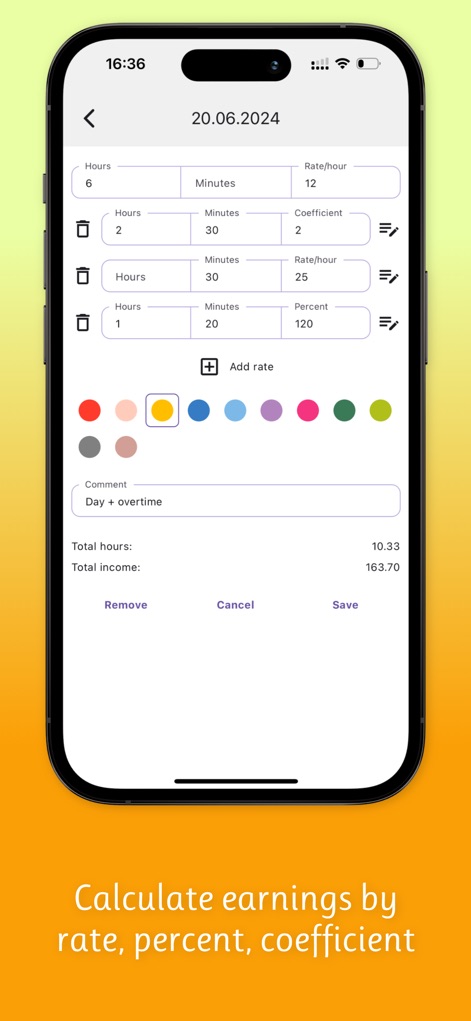
ユーザーは時間、分、レート、パーセント、係数などの詳細項目を入力して賃金を計算し、各入力項目に色分けを設定できます。
詳細な賃金計算

月ごとの勤務日数、勤務時間、収入が一覧できる年間レポートを提供し、画面下部には年度の総計データが表示されます。
年間レポートで分析

ユーザーは日付範囲と曜日を選択してシフトパターンを構築でき、連続する勤務日や非勤務日数を容易に設定可能です。
シフトを柔軟に設定

目に優しいダークテーマで勤務時間を追跡でき、カレンダー表示と月ごとの合計データも明確に確認できます。
ダークモードに対応
説明
Download
類似アプリ
似た機能とユーザー体験を持つアプリ

Supershift Shift Work Calendar
Supershift GmbH

安心记加班-记考勤加班工资记录记账记工本
Shanghai Anjiaxin Network Technology Co., Ltd

Work Shift Calendar (Shifter)
Luis Alberto Reyes Halaby

极简记工时·小时工记加班
敏强 李

My Shift Planner - Calendar
MyBuzz Technologies Limited

Punch Time Clock
Trent Morris

记工时考勤
Beijing Chejiang Internet Technology Co., Ltd.

wac - shift & earnings tracker
Work and Communications Ltd

Working Hours 4b
BUDESCU SORIN GEORGE
このページはアプリまたはその開発者の公式ページではなく、情報提供および論評を目的として作成された独立した編集出版物です。明示的に別段の記載がない限り、アプリおよびその開発者は、MWM、Apple、Google Play、アプリのパブリッシャー、またはアプリの開発者と提携、承認、後援、認可、またはその他の公式的な関係はなく、このページのいかなる内容も、アプリがMWMのサービスを使用して開発されたことを意味するものではありません。すべての商標、ロゴ、スクリーンショット、その他のコンテンツはそれぞれの所有者の財産です。