
이 페이지는 앱이나 개발자의 공식 페이지가 아니며, 정보 제공 및 논평을 목적으로 작성된 독립 편집 간행물입니다. 명시적으로 달리 언급되지 않는 한, 해당 앱이나 개발자는 MWM, Apple, Google Play, 앱 퍼블리셔 또는 앱 개발자와 제휴, 보증, 후원, 승인 또는 공식적으로 연결되어 있지 않으며, 이 페이지의 어떤 내용도 해당 앱이 MWM의 서비스를 사용하여 개발되었음을 의미하지 않습니다. 모든 상표, 로고, 스크린샷 및 기타 콘텐츠는 해당 소유자의 자산입니다.


다운로드
5M+사용자 평점
총 평가 수
47.0K개발사
카테고리
Productivity지원 언어
12최신 버전
8.12.10크기
381.2 MB출시일
2022년 8월 9일보안 전문가의 관점에서 주요 기능 및 영향력 평가
'1Password: Password Manager' 앱 심층 분석
민감한 정보 안전하게 저장
이 앱은 비밀번호와 패스키 외에도 신용카드, 보안 메모, 은행 정보, 의료 기록 등 다양한 민감한 정보를 안전하게 보관하여 사용자의 디지털 라이프를 정리하고 보호합니다.
자동 로그인 및 양식 채우기
이 도구는 웹사이트나 앱에 로그인할 때 사용자 이름과 저장된 비밀번호를 자동으로 채워주어 로그인 과정을 간소화하고 시간을 절약할 수 있게 합니다.
내장된 2단계 인증
이 앱은 2단계 인증(2FA)을 지원하는 서비스에 대해 일회성 인증 코드를 생성하고 자동으로 채워주므로, 별도의 인증 앱 없이 보안을 강화하고 편의성을 높입니다.
간편한 보안 기능 및 Watchtower
이 앱은 생체 인증(Touch ID 또는 Face ID)을 통한 잠금 해제와 Watchtower를 통한 실시간 보안 경고 및 보고서 기능을 제공하여 사용자가 계정 침해 여부를 즉시 파악하고 조치할 수 있도록 돕습니다.
업계 선도적인 패스키 지원
이 앱은 비밀번호보다 더 편리하고 안전한 대안인 패스키를 생성하고 저장할 수 있도록 지원하며, 향후 더 간편하고 강화된 보안을 제공합니다.
강력한 비밀번호 생성
이 앱은 내장된 비밀번호 생성기를 통해 강력하고 추측 불가능한 비밀번호를 손쉽게 만들 수 있도록 지원하며, 모든 기기에서 접근할 수 있게 합니다.
안전한 정보 공유
이 앱은 비밀번호를 포함하여 사용자가 저장한 모든 정보를 가족, 친구 또는 동료와 안전하게 공유할 수 있도록 해주어, 안전하지 않은 채널을 통한 정보 유출을 방지합니다.
여행 모드
이 도구는 여행 중 민감한 정보가 포함된 보관소를 일시적으로 숨기고 귀가 시 복원할 수 있는 여행 모드를 제공하여 사용자의 데이터를 잠재적인 위험으로부터 보호합니다.
자주 묻는 질문
에 대해 알아야 할 모든 것 1Password: Password Manager
What is 1Password?
1Password is a password manager that helps users generate strong passwords, autofill login details, and securely store sensitive digital information. It manages various data types including passkeys, credit cards, and secure notes.
Can 1Password generate strong passwords?
Yes, 1Password includes a built-in password generator. It creates strong, unguessable passwords with a single tap, which are then accessible across all user devices and operating systems.
Does 1Password autofill passwords and usernames?
Yes, 1Password automatically autofills usernames and saved passwords when signing into websites or apps. It works with Safari and other apps on iPhone and iPad, offering seamless integration.
Does 1Password support two-factor authentication?
Yes, 1Password features built-in two-factor authentication. It generates and autofills one-time 2FA codes for supported services, eliminating the need for a separate authenticator app.
Can I use passkeys with 1Password?
Yes, 1Password offers industry-leading passkey support. Users can generate, save, and use passkeys within the app, even employing them to unlock 1Password itself for sites that support passkeys.
What types of information can I store in 1Password besides passwords?
In addition to passwords and passkeys, 1Password securely stores credit cards, secure notes, banking information, and medical records. This keeps your valuable personal data available on any device.
How can I share information securely using 1Password?
1Password allows secure sharing of passwords and other stored items via temporary links. Users can share Wi-Fi details or financial information with others, even non-users, avoiding insecure communication channels.
What security features does 1Password offer?
1Password provides biometric authentication (Touch ID/Face ID) for unlocking and real-time security alerts through Watchtower. It notifies users of compromised accounts in data breaches, enabling timely action.
Does 1Password have a Travel Mode?
Yes, 1Password includes a Travel Mode. This feature temporarily hides vaults containing sensitive information, protecting user data from unauthorized access while traveling, and restores them upon return.
Does 1Password access user data?
No, 1Password confirms it cannot see user data. This ensures maximum privacy, meaning the company cannot use, share, or sell any information stored by its users.
Is there a free trial for 1Password?
Yes, users can try 1Password free for 14 days. After the trial period, individuals or businesses can select a suitable plan that meets their specific needs.
다음 스크린샷과 설명은 앱의 공식 스토어 목록에서 직접 가져온 것이며 앱 개발자의 자산입니다.
앱 스토어
스크린샷
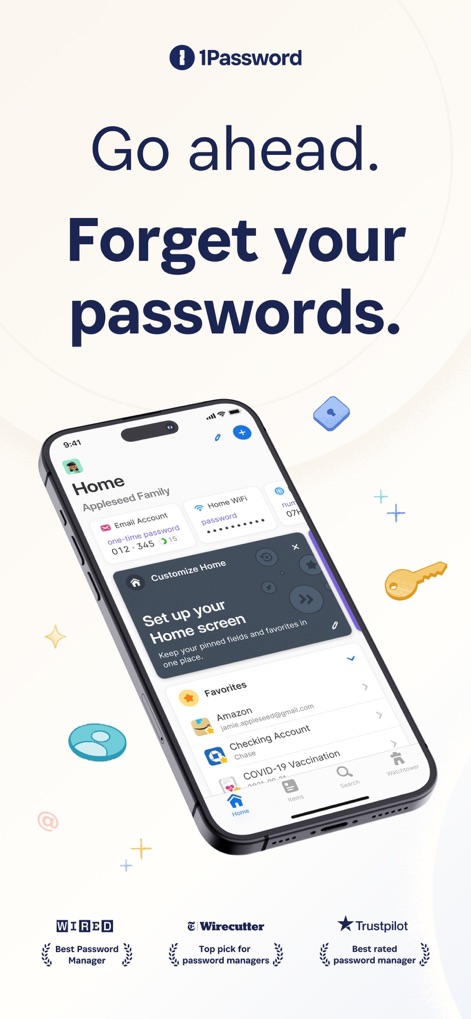
이 앱은 사용자 친화적인 홈 화면을 제공하여 '홈 화면 맞춤 설정'을 통해 중요한 정보를 쉽게 구성하고 '즐겨찾기'에서 계정과 같은 항목에 빠르게 접근할 수 있도록 돕습니다.
비밀번호를 잊으세요

이 앱은 계정에 대한 모든 필수 정보를 기억하며, '이중 인증 코드'를 자동으로 제공하고 '연결된 앱'을 통해 관련 서비스에 쉽게 접근할 수 있도록 지원합니다.
모든 세부 정보 기억

이 도구는 예측 불가능한 비밀번호를 손쉽게 생성하도록 돕습니다. 사용자는 '임의 비밀번호' 옵션을 통해 길이와 '기호' 포함 여부를 설정하여 보안을 강화할 수 있습니다.
강력한 비밀번호 생성
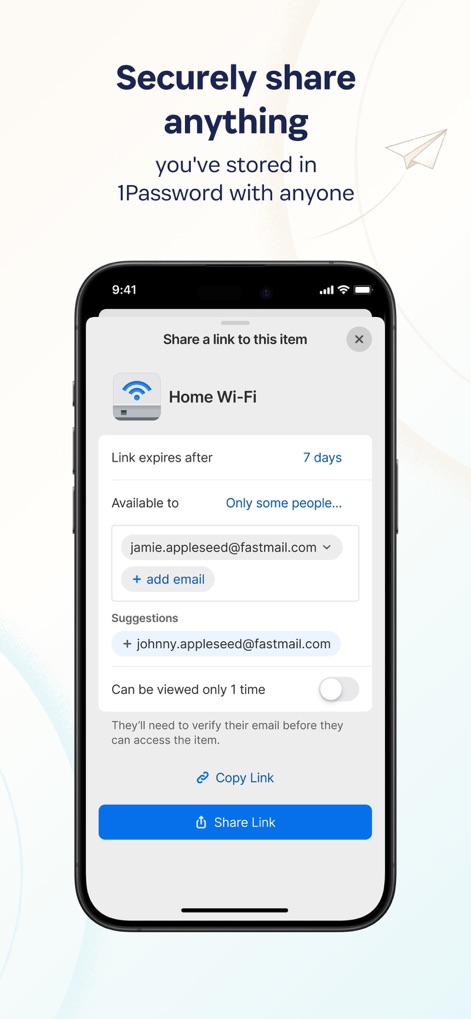
사용자는 이 앱을 통해 중요한 정보를 안전하게 공유할 수 있습니다. '링크 만료 기간'을 설정하고 '특정 이메일 주소'로만 접근을 허용하여 데이터 보안을 유지합니다.
안전한 정보 공유

이 앱의 Watchtower 기능은 사용자의 전반적인 보안 상태를 명확히 보여줍니다. '비밀번호 강도 점수'와 '유출된 웹사이트'에 대한 경고를 통해 사용자는 자신의 디지털 보안을 능동적으로 관리할 수 있습니다.
Watchtower 보안 분석
설명
Download
비슷한 앱
유사한 기능과 사용자 경험을 가진 앱

Proton Pass - Password Manager
Proton AG

Dashlane Password Manager
Dashlane

Password Manager - mSecure
mSeven Software, LLC

Kepttor Password Manager
MACREL SRL SEMPLIFICATA

DataVault Manager - Encrypted
MIKHAIL SHERSHNEV

Authenticator ·
SMM service, s.r.o.

Bitwarden Password Manager
Bitwarden Inc

Authenticator App ⁸
AGILE CODE LIMITED

Authenticator App ℗
RHO DEVELOPERS LLC
이 페이지는 앱이나 개발자의 공식 페이지가 아니며, 정보 제공 및 논평을 목적으로 작성된 독립 편집 간행물입니다. 명시적으로 달리 언급되지 않는 한, 해당 앱이나 개발자는 MWM, Apple, Google Play, 앱 퍼블리셔 또는 앱 개발자와 제휴, 보증, 후원, 승인 또는 공식적으로 연결되어 있지 않으며, 이 페이지의 어떤 내용도 해당 앱이 MWM의 서비스를 사용하여 개발되었음을 의미하지 않습니다. 모든 상표, 로고, 스크린샷 및 기타 콘텐츠는 해당 소유자의 자산입니다.