
이 페이지는 앱이나 개발자의 공식 페이지가 아니며, 정보 제공 및 논평을 목적으로 작성된 독립 편집 간행물입니다. 명시적으로 달리 언급되지 않는 한, 해당 앱이나 개발자는 MWM, Apple, Google Play, 앱 퍼블리셔 또는 앱 개발자와 제휴, 보증, 후원, 승인 또는 공식적으로 연결되어 있지 않으며, 이 페이지의 어떤 내용도 해당 앱이 MWM의 서비스를 사용하여 개발되었음을 의미하지 않습니다. 모든 상표, 로고, 스크린샷 및 기타 콘텐츠는 해당 소유자의 자산입니다.

Adobe Acrobat Sign
전 세계 수백만 명의 비즈니스 리더와 함께 어디서든 문서를 서명, 전송 및 추적하는 글로벌 표준을 신뢰하세요. 거래를 더 빠르게 완료하고, HR 온보딩을 자동화하며, 기업급 보안으로 문서를 PDF로 스캔하세요.
다운로드
1M+사용자 평점
총 평가 수
1K+개발사
카테고리
Business지원 언어
19최신 버전
3.33.1크기
137.7 MB출시일
2011년 12월 20일어디서든 더 빠르게 거래 완료
속도, 보안 및 이동성을 중시하는 전문가를 위한 올인원 모바일 서명 도구입니다. 보안 디지털 문서 분야의 글로벌 리더를 경험하세요.
몇 초 만에 문서 서명
손가락이나 스타일러스로 계약을 즉시 완료하세요. 오프라인으로 작업하고 온라인으로 돌아오면 자동으로 동기화되어 비즈니스를 계속 진행하세요.
법적 효력 및 보안
미국 ESIGN 및 EU eIDAS를 포함한 글로벌 전자 서명 법규를 준수합니다. 암호화된 PDF 및 전체 감사 추적으로 거래를 보호하세요.
자주 묻는 질문
에 대해 알아야 할 모든 것 Adobe Acrobat Sign
Adobe Acrobat Sign은 무엇인가요?
Adobe Acrobat Sign은 전자 서명 서비스의 모바일 동반자로, 쉽고 안전하게 어디서든 문서 서명을 할 수 있습니다. 디지털 문서 분야의 글로벌 리더가 제공하는 신뢰할 수 있는 전자 서명 솔루션입니다.
Adobe Acrobat Sign은 문서 보안을 어떻게 보장하나요?
Adobe Acrobat Sign은 서명된 문서를 인증된 PDF로 암호화하고 완전한 감사 추적을 제공합니다. 글로벌 전자 서명법을 준수하며 ISO 27001, SOC 2 Type 2, HIPAA 및 PCI DSS v3.0 표준 인증을 받았습니다.
Adobe Acrobat Sign으로 오프라인에서 문서를 서명할 수 있나요?
네, Adobe Acrobat Sign을 사용하면 오프라인에서도 문서를 서명할 수 있습니다. 기기가 다시 온라인 상태가 되면 앱이 자동으로 모든 변경 사항을 동기화하여 중단 없이 계속 작업할 수 있습니다.
어떤 종류의 조직에서 Adobe Acrobat Sign을 사용하나요?
Fortune 1000 기업, 의료 기관, 금융 기관 등 모든 규모의 기업에서 Adobe Acrobat Sign을 사용합니다. 다양한 부서에서 중요한 비즈니스 프로세스를 가속화하기 위해 활용하고 있습니다.
Adobe Acrobat Sign으로 다른 사람에게 서명을 받으려면 어떻게 해야 하나요?
사용자는 온라인 문서 라이브러리, 기기 또는 이메일 첨부 파일에서 서명할 문서를 보낼 수 있습니다. 또한 Google Drive, Box, Dropbox 또는 Adobe Document Cloud의 문서도 지원합니다.
Adobe Acrobat Sign은 법적 구속력이 있나요?
네, Adobe Acrobat Sign은 법적 구속력이 있습니다. 미국 ESIGN법 및 유럽 연합 eIDAS 규정을 포함한 전 세계 전자 서명법을 준수하여 인증되고 정식적인 프로세스를 제공합니다.
Adobe Acrobat Sign 앱으로 문서를 스캔할 수 있나요?
네, Adobe Acrobat Sign을 사용하면 종이 문서를 PDF로 스캔하여 전자 서명할 수 있습니다. 여러 페이지를 스캔하고 순서를 재정렬하며, 경계 감지 및 원근 보정으로 이미지 품질을 향상시키는 것을 지원합니다.
iPhone 또는 iPad용 Adobe Acrobat Sign의 구독 요건은 무엇인가요?
iPhone 및 iPad용 Adobe Acrobat Sign은 다음 Adobe 제품 중 하나에 대한 활성 구독이 필요합니다: Adobe Acrobat Sign 솔루션, Adobe PDF Pack, Adobe Acrobat DC 또는 Adobe Creative Cloud Complete.
Adobe Acrobat Sign에서 서명된 계약의 진행 상황을 어떻게 추적할 수 있나요?
Adobe Acrobat Sign을 사용하면 실시간 상태 업데이트를 통해 진행 상황을 추적하고 계약을 관리할 수 있습니다. 사용자는 온라인 계정에서 계약을 확인하고 아직 서명하지 않은 사람들에게 미리 알림을 보낼 수 있습니다.
Adobe Acrobat Sign으로 기기 화면에서 직접 문서를 서명할 수 있나요?
네, 사용자는 손가락이나 스타일러스를 사용하여 화면에서 직접 문서를 서명할 수 있습니다. 이 기능을 통해 Adobe Acrobat Sign 앱 내에서 즉각적이고 편리하게 전자 서명을 할 수 있습니다.
Adobe Acrobat Sign은 문서에 대해 어떤 타사 클라우드 서비스와 통합되나요?
Adobe Acrobat Sign은 Google Drive, Box, Dropbox 및 Adobe Document Cloud와 통합됩니다. 이를 통해 사용자는 이러한 서비스에 저장된 문서를 사용하여 서명 요청을 처리할 수 있습니다.
다음 스크린샷과 설명은 앱의 공식 스토어 목록에서 직접 가져온 것이며 앱 개발자의 자산입니다.
앱 스토어
스크린샷
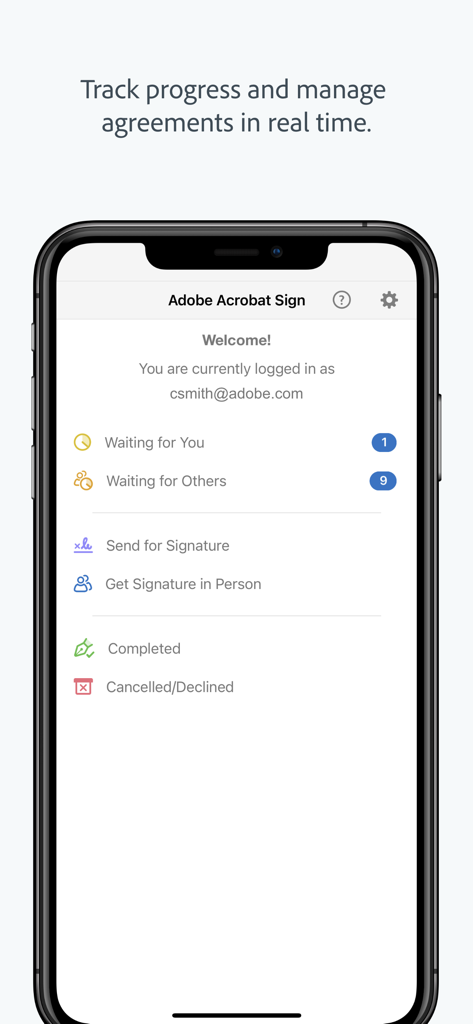
Adobe Acrobat Sign 모바일 대시보드로 계약 상태 및 실시간 추적 옵션 표시
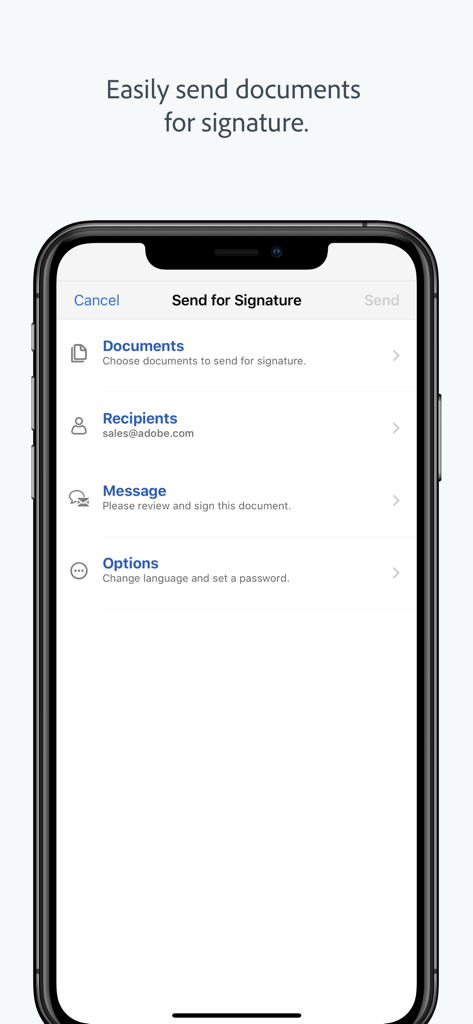
문서 및 수신자 필드가 있는 서명용 보내기 워크플로를 보여주는 스마트폰의 Adobe Acrobat Sign 앱 인터페이스.
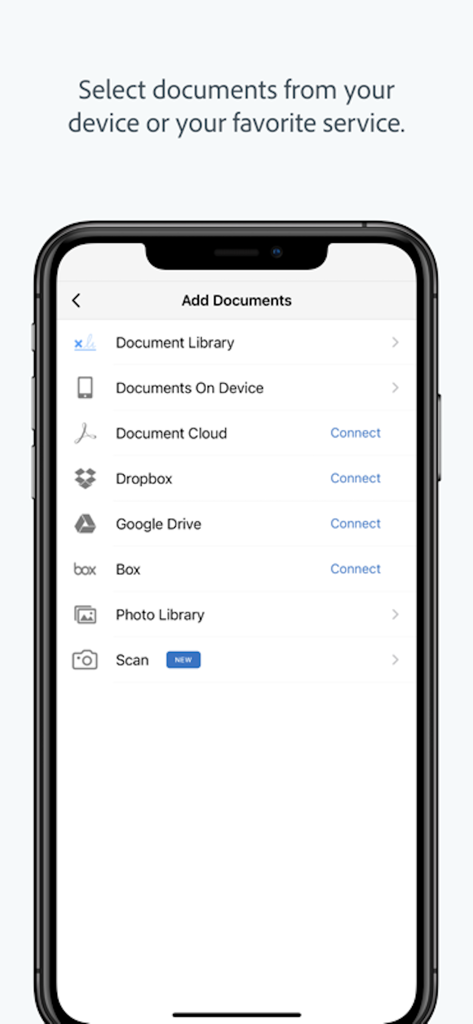
Dropbox 및 Google Drive와 같은 클라우드 서비스에서 문서를 추가하는 옵션을 보여주는 Adobe Acrobat Sign 모바일 인터페이스
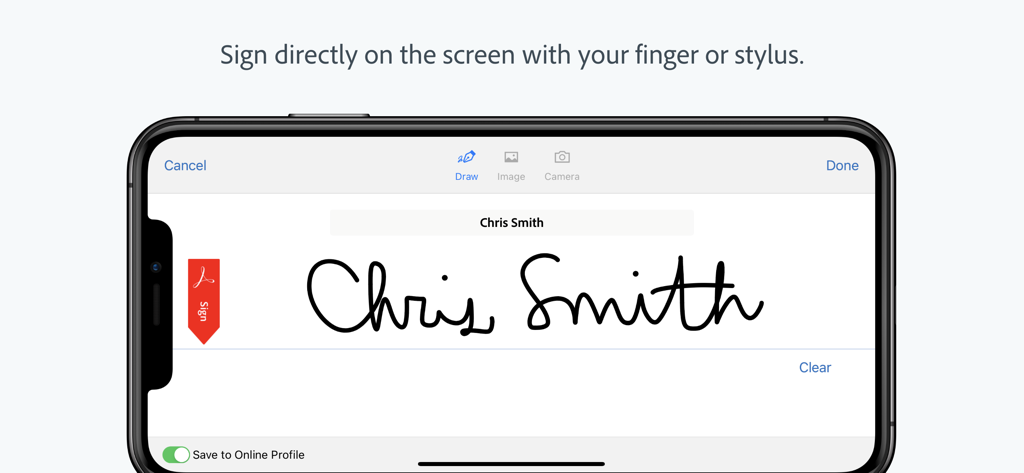
Adobe Acrobat Sign 앱에서 전자 서명을 표시하는 스마트폰 화면
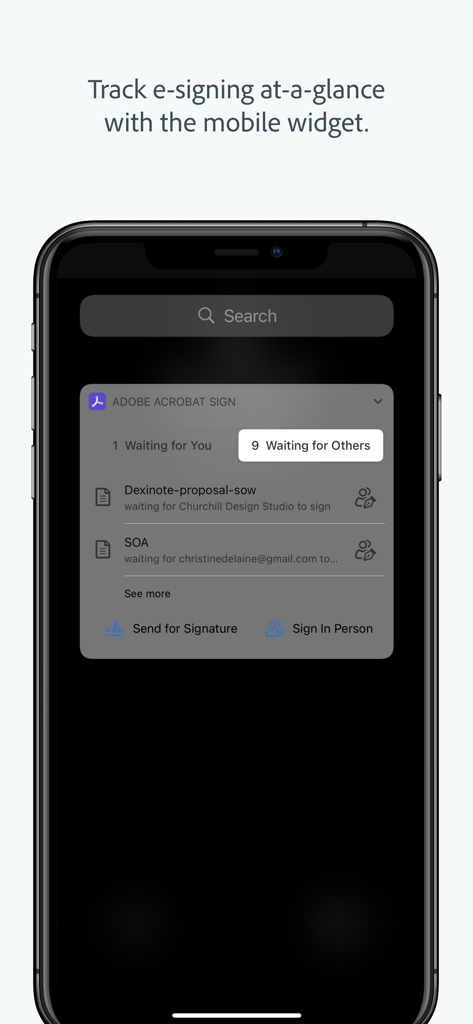
iPhone 화면에서 문서 상태를 표시하는 Adobe Acrobat Sign 모바일 위젯
설명
Download
비슷한 앱
유사한 기능과 사용자 경험을 가진 앱

Docusign - Upload & Sign Docs
Docusign

Sign.Me
SM, OOO (Apps)

Signeasy-Sign Documents App
Glykka LLC

Genius Sign: PDF doc signature
The Grizzly Labs

eSign - Fill & Sign Form Docs
B TO J PTY LTD

Sign Documents: PDF Signature
MR BIKRAMJIT SINGH

Fill & Sign Documents PDF Scan
Upsquare Technosys Private Limited

Receipt Maker - Sign & Send
SVG Apps

Sign Documents - eSign PDF
Tola Marciniak
이 페이지는 앱이나 개발자의 공식 페이지가 아니며, 정보 제공 및 논평을 목적으로 작성된 독립 편집 간행물입니다. 명시적으로 달리 언급되지 않는 한, 해당 앱이나 개발자는 MWM, Apple, Google Play, 앱 퍼블리셔 또는 앱 개발자와 제휴, 보증, 후원, 승인 또는 공식적으로 연결되어 있지 않으며, 이 페이지의 어떤 내용도 해당 앱이 MWM의 서비스를 사용하여 개발되었음을 의미하지 않습니다. 모든 상표, 로고, 스크린샷 및 기타 콘텐츠는 해당 소유자의 자산입니다.