
이 페이지는 앱이나 개발자의 공식 페이지가 아니며, 정보 제공 및 논평을 목적으로 작성된 독립 편집 간행물입니다. 명시적으로 달리 언급되지 않는 한, 해당 앱이나 개발자는 MWM, Apple, Google Play, 앱 퍼블리셔 또는 앱 개발자와 제휴, 보증, 후원, 승인 또는 공식적으로 연결되어 있지 않으며, 이 페이지의 어떤 내용도 해당 앱이 MWM의 서비스를 사용하여 개발되었음을 의미하지 않습니다. 모든 상표, 로고, 스크린샷 및 기타 콘텐츠는 해당 소유자의 자산입니다.


Affinity Publisher 2 for iPad
아이패드는 장난감이 아니다. 이제 당신의 기기가 진정한 퍼블리싱 파워하우스가 되는 것을 목격하십시오.
다운로드
1M+사용자 평점
총 평가 수
807개발사
카테고리
Graphics & Design지원 언어
8최신 버전
2.6.4크기
1.7 GB출시일
2022년 11월 9일이 iPad 앱은 창의적인 전문가와 소규모 비즈니스 사용자를 위한 고급 데스크톱 퍼블리싱 기능을 제공합니다.
Affinity Publisher 2 for iPad: 전문가용 퍼블리싱 솔루션 분석
iPad 최적화 및 Apple Pencil 지원
이 앱은 iPad 제스처 제어, Metal 가속 성능, Apple Pencil의 압력, 기울기 및 각도 감지를 완벽하게 활용하여 유연하고 정밀한 디자인 경험을 제공합니다.
StudioLink를 통한 원활한 통합
이 도구는 Affinity Photo 및 Affinity Designer와 원활하게 연동되는 StudioLink 기능을 제공하여, 사용자가 앱을 전환하지 않고도 고급 사진 편집 및 정밀한 벡터 도구를 활용할 수 있게 합니다.
전문적인 출력 및 색상 관리
이 앱은 최종 인쇄물 또는 디지털 결과물의 품질을 보장하기 위해 CMYK, PANTONE 및 별색 지원과 PDF/X-1a, PDF/X-3, PDF/X-4와 같은 전문적인 출력 옵션을 제공합니다.
고급 페이지 레이아웃 도구
이 도구는 마스터 페이지, 마주보는 페이지 펼치기, 고급 안내선 및 스내핑, 객체 주위 텍스트 감싸기 기능 등을 갖추어 사용자가 복잡한 페이지 레이아웃을 정밀하게 구성할 수 있도록 지원합니다.
다양한 이미지 및 벡터 그래픽 지원
이 앱은 PSD, AI, PDF를 포함한 다양한 파일 형식을 배치하고, 비파괴 조정 레이어를 통해 이미지를 보정하며, 정밀한 펜 및 노드 도구로 벡터 곡선과 도형을 생성할 수 있도록 합니다.
광범위한 파일 가져오기 및 내보내기
이 플랫폼은 IDML, XLSX, DWG/DXF 가져오기 기능과 Dropbox 통합을 통해 다른 프로그램과의 호환성을 높이고 다양한 소스의 콘텐츠를 원활하게 통합할 수 있도록 돕습니다.
고급 타이포그래피 제어
이 도구는 문자 및 단락 스타일, 포괄적인 OpenType 지원, 경로를 따라 텍스트 작성 기능 등을 통해 사용자가 인쇄물의 미적 완성도를 높이는 데 필요한 강력한 타이포그래피 제어 기능을 제공합니다.
생산성 향상 도구
이 앱은 섹션 관리, 저장 가능한 실행 취소 기록, 목차 및 인덱스 자동 생성, 문서 패키지화 기능 등을 통해 사용자의 작업 효율성을 극대화합니다.
자주 묻는 질문
에 대해 알아야 할 모든 것 Affinity Publisher 2 for iPad
What is Affinity Publisher 2 for iPad?
Affinity Publisher 2 for iPad is an on-the-go page layout and design app. It enables users to create books, brochures, posters, reports, and more, offering the power of its desktop publishing software.
Is Affinity Publisher 2 for iPad optimized for iPad features?
Yes, Affinity Publisher 2 for iPad is optimized for iPad. It features gesture controls, a Quick Menu, Apple Pencil support, Metal acceleration for performance, and iCloud Drive integration for file management.
Does Affinity Publisher 2 for iPad support Apple Pencil?
Yes, Affinity Publisher 2 for iPad supports Apple Pencil. The app is sensitive to pressure, tilt, and angle, harnessing the full power and precision of the Apple Pencil for design tasks.
Does Affinity Publisher 2 for iPad integrate with iCloud Drive?
Yes, Affinity Publisher 2 for iPad includes full iCloud Drive integration. This feature allows for seamless file management, storage, and sharing of documents directly within the app.
Can Affinity Publisher 2 for iPad handle professional page layouts?
Yes, Affinity Publisher 2 for iPad provides professional layout tools. These include facing page spreads, live master pages, advanced guides, tables, text wrapping, and the ability to link multiple text frames.
Does Affinity Publisher 2 for iPad support footnotes and endnotes?
Yes, Affinity Publisher 2 for iPad supports footnotes, sidenotes, and endnotes. Users can incorporate these elements into their documents for academic or reference purposes.
What typography features does Affinity Publisher 2 for iPad offer?
Affinity Publisher 2 for iPad offers advanced typography features. These include full control over character and paragraph styles, comprehensive OpenType support, text along any path, and advanced flow options.
Does Affinity Publisher 2 for iPad support OpenType fonts?
Yes, Affinity Publisher 2 for iPad provides comprehensive OpenType support. This allows users to access advanced typographic features for detailed text formatting in their designs.
What image and graphic formats can Affinity Publisher 2 for iPad import?
Affinity Publisher 2 for iPad can import PSD, AI, PDF, JPG, TIFF, PNG, DWG, or Affinity files. Users can link or embed these images and graphics into their documents.
Does Affinity Publisher 2 for iPad support non-destructive image editing?
Yes, Affinity Publisher 2 for iPad supports non-destructive image editing. Users can correct and enhance images using adjustment layers, preserving original image data.
How does Affinity Publisher 2 for iPad enhance productivity?
Affinity Publisher 2 for iPad enhances productivity with features like a section manager, savable undo history, smart master pages, automatic index/TOC generation, and the Package feature for collating document resources.
Can Affinity Publisher 2 for iPad package documents for sharing?
Yes, Affinity Publisher 2 for iPad can package documents. The Package feature collates the document with all used image and font resources into a folder, facilitating collaboration and sharing.
Does Affinity Publisher 2 for iPad have PDF passthrough?
Yes, Affinity Publisher 2 for iPad features PDF passthrough. This allows users to flag imported PDFs, ensuring professional output and integration within their layouts.
Does Affinity Publisher 2 for iPad support auto-flow for content?
Yes, Affinity Publisher 2 for iPad supports auto-flow. It offers autoflow for multiple images and multi-page PDFs, which helps save time during document creation and layout.
Can Affinity Publisher 2 for iPad create multi-page spreads?
Yes, Affinity Publisher 2 for iPad allows users to easily create multi-page spreads. This feature is part of its professional layout tools for designing publications effectively.
Can Affinity Publisher 2 for iPad import InDesign files?
Yes, Affinity Publisher 2 for iPad supports importing from Adobe InDesign® and other programs via IDML. This facilitates transferring existing projects into the application.
Does Affinity Publisher 2 for iPad integrate with Dropbox?
Yes, Affinity Publisher 2 for iPad includes Dropbox API integration. This feature helps retain placed resource linkage across multiple devices for seamless workflow and collaboration.
What professional output options are available in Affinity Publisher 2 for iPad?
Affinity Publisher 2 for iPad offers professional output options. These include end-to-end CMYK, PANTONE©, spot color, live preflight checking, and PDF/X-1a, PDF/X-3, PDF/X-4 output.
Does Affinity Publisher 2 for iPad support PANTONE colors?
Yes, Affinity Publisher 2 for iPad supports PANTONE© and spot colors. It provides end-to-end CMYK and color management for professional print output.
Does Affinity Publisher 2 for iPad integrate with other Affinity apps?
Yes, Affinity Publisher 2 for iPad integrates fully with other Affinity apps via StudioLink. Users can instantly switch to Affinity Photo's photo editing or Affinity Designer's vector tools without leaving Publisher.
What is StudioLink in Affinity Publisher 2 for iPad?
StudioLink is a feature in Affinity Publisher 2 for iPad that enables seamless integration with other Affinity apps. It allows users to access Affinity Photo's and Designer's tools directly within Publisher.
Does Affinity Publisher 2 for iPad offer extensive color control?
Yes, Affinity Publisher 2 for iPad provides full color control. It supports end-to-end CMYK, PANTONE©, spot color, and includes vast swatch libraries for precise color management.
Can users create and format tables in Affinity Publisher 2 for iPad?
Yes, Affinity Publisher 2 for iPad allows users to create and format tables. The app provides tools for custom table formats, enhancing document organization and presentation.
다음 스크린샷과 설명은 앱의 공식 스토어 목록에서 직접 가져온 것이며 앱 개발자의 자산입니다.
앱 스토어
스크린샷

이 앱은 라이브 마스터 페이지를 활용하여 복잡한 레이아웃을 효율적으로 관리할 수 있게 하며, 글자 및 단락 스타일을 통해 텍스트 프레임의 모든 서식을 완벽하게 제어합니다.
라이브 마스터 페이지

사용자는 페이지 관리 패널에서 마스터 페이지를 손쉽게 적용하여 일관성 있는 디자인을 유지하며, 정교한 상품 레이아웃을 빠르게 구성할 수 있습니다.
마스터 페이지 활용

이 도구는 주석 설정 패널을 통해 각주, 미주, 옆주를 추가할 수 있게 하여 문서의 전문성을 높이며, 데이터 그래프와 함께 정보를 효과적으로 전달합니다.
주석 기능으로 완성도 높이기

사용자는 OpenType 패널을 활용하여 고급 서체 기능을 세밀하게 제어하며, 복잡한 리가처와 스타일 대안 옵션으로 정교한 책 표지 디자인을 구현할 수 있습니다.
고급 타이포그래피 제어

이 도구는 PDF 패스스루 기능을 지원하여 외부 PDF 파일을 정확하게 배치하고, 레이어 패널에서 가져온 파일의 가시성을 세밀하게 제어할 수 있습니다.
PDF 패스스루로 정확하게

사용자는 패키징 기능을 통해 문서와 모든 리소스를 손쉽게 통합하여 협업을 용이하게 하며, 섹션 관리 도구로 다중 페이지 레이아웃을 체계적으로 구성할 수 있습니다.
효율적인 문서 패키징

이 앱은 이미지 자동 흐름 기능을 제공하여 여러 이미지를 미리 정의된 프레임에 빠르게 배치하며, 배치 패널에서 콘텐츠를 효율적으로 관리하여 작업 시간을 단축합니다.
이미지 자동 흐름으로 시간 절약
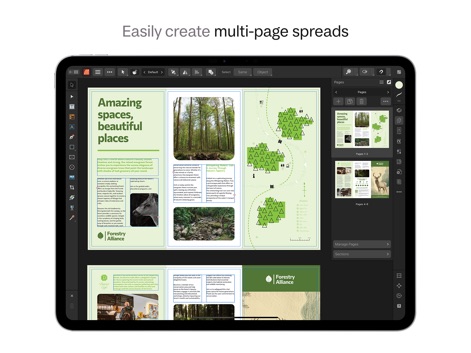
사용자는 이 도구로 다중 페이지 스프레드를 손쉽게 구성하여 3단 접지 레이아웃과 같은 복잡한 디자인을 구현하며, 페이지 관리 패널로 문서 구조를 효율적으로 제어할 수 있습니다.
다중 페이지 스프레드 제작

이 앱은 방대한 스와치 라이브러리와 PANTONE 지원을 통해 완벽한 색상 제어 기능을 제공하여, CMYK 및 별색 환경에서 인쇄 준비된 고품질 디자인을 구현합니다.
완벽한 색상 제어

사용자는 이 도구로 맞춤형 테이블을 손쉽게 생성하고, 표 서식 패널의 다양한 옵션을 활용하여 요가 시간표와 같은 복잡한 데이터 구조를 효율적으로 디자인할 수 있습니다.
맞춤형 테이블 생성
설명
Download
비슷한 앱
유사한 기능과 사용자 경험을 가진 앱

Brochure Maker, Pamphlet Maker
Bhavesh Gabani

Zine - Enjoy Writing
Aura Marker Studio Co., Ltd.

Pages: Create Documents
Apple Inc.

Price List & Menu Maker
Desygner Pty Ltd

Story Creator - Easy Story Book Maker for Kids
Innovative Mobile Apps Ltd

Book Creator for iPad
Tools for Schools Limited

Book Creator One
Tools for Schools Limited
이 페이지는 앱이나 개발자의 공식 페이지가 아니며, 정보 제공 및 논평을 목적으로 작성된 독립 편집 간행물입니다. 명시적으로 달리 언급되지 않는 한, 해당 앱이나 개발자는 MWM, Apple, Google Play, 앱 퍼블리셔 또는 앱 개발자와 제휴, 보증, 후원, 승인 또는 공식적으로 연결되어 있지 않으며, 이 페이지의 어떤 내용도 해당 앱이 MWM의 서비스를 사용하여 개발되었음을 의미하지 않습니다. 모든 상표, 로고, 스크린샷 및 기타 콘텐츠는 해당 소유자의 자산입니다.