Book Creator One

Book Creator One

다운로드: App Store
로고: Book Creator One

Book Creator One: 학생과 어린이가 출판 작가가 되도록 힘을 실어줍니다

iPad에서 아름답고 멀티모달한 전자책을 만드는 가장 쉬운 방법. 수백만 명의 교육자와 학부모와 함께 수업을 대화형 스토리, 저널, 만화로 바꿔보세요.

다운로드: App Store

개발사

Tools for Schools Limited

카테고리

Education

다운로드

1M+

사용자 평점

3.4/5

총 평가 수

1K+

지원 언어

11

이야기가 생생하게 살아나는 곳

이 인터페이스를 사용하는 1M+ 명의 사용자.

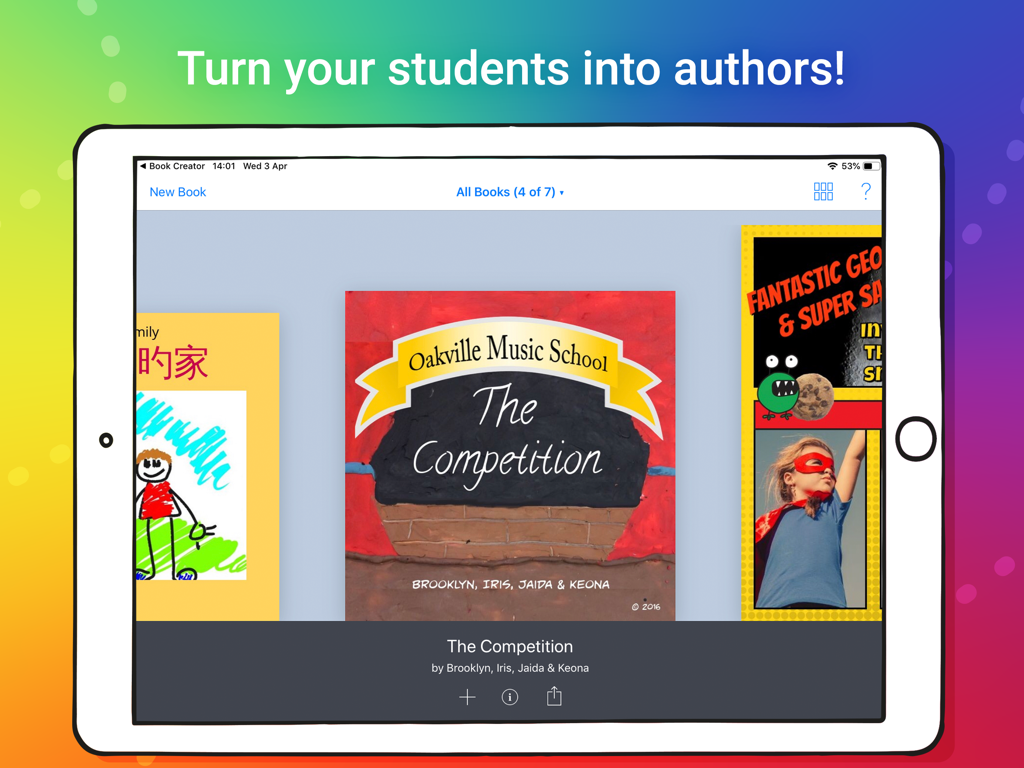
학생들이 Book Creator One 앱에서 만든 창의적인 디지털 책 라이브러리를 보여주는 iPad
학생들이 Book Creator One 앱에서 만든 창의적인 디지털 책 라이브러리를 보여주는 iPad

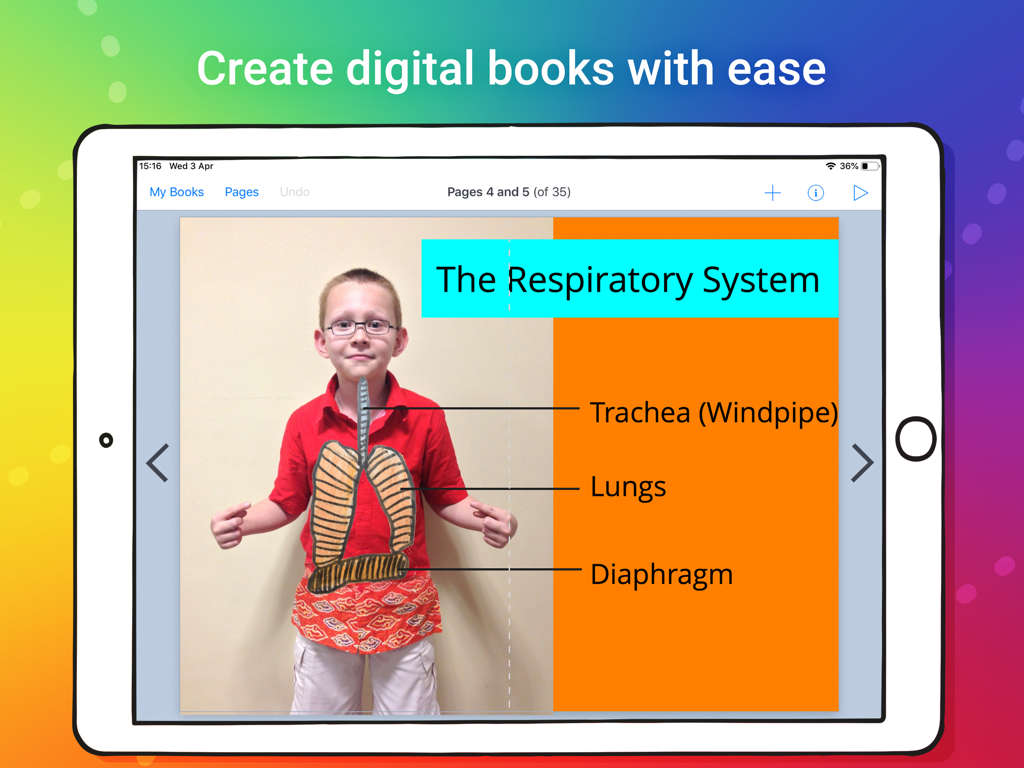
iPad의 Book Creator One으로 만든 호흡기에 관한 학생 디지털 책
iPad의 Book Creator One으로 만든 호흡기에 관한 학생 디지털 책

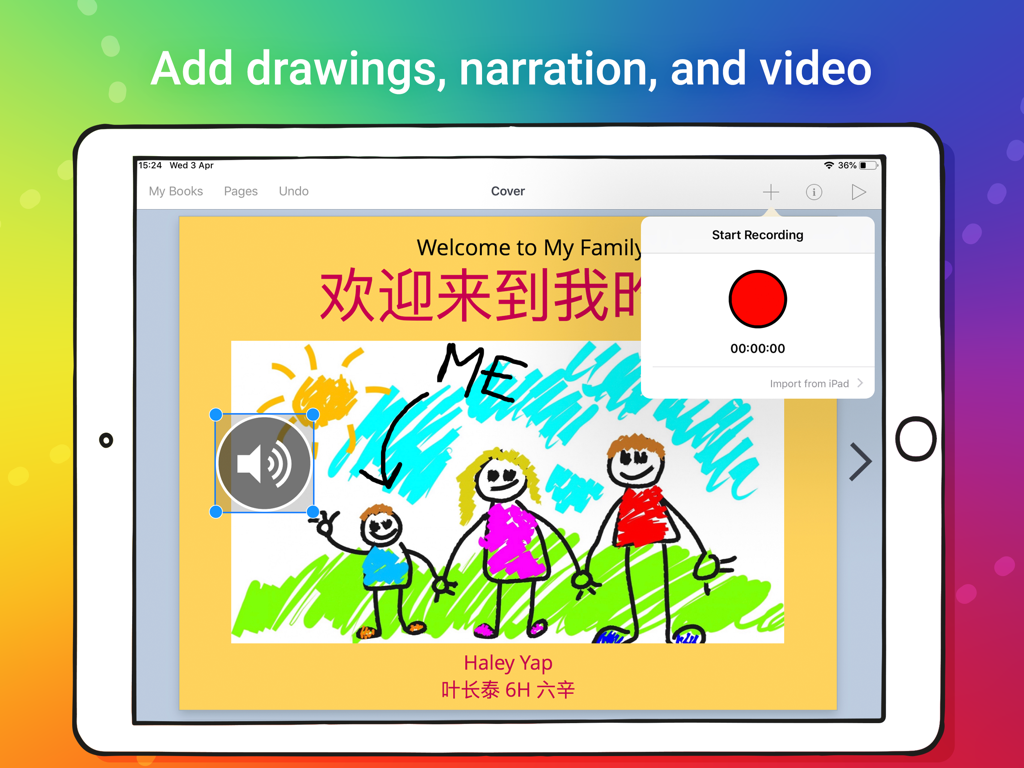
어린이 그림과 음성 녹음 인터페이스가 있는 디지털 책 페이지를 보여주는 iPad
어린이 그림과 음성 녹음 인터페이스가 있는 디지털 책 페이지를 보여주는 iPad

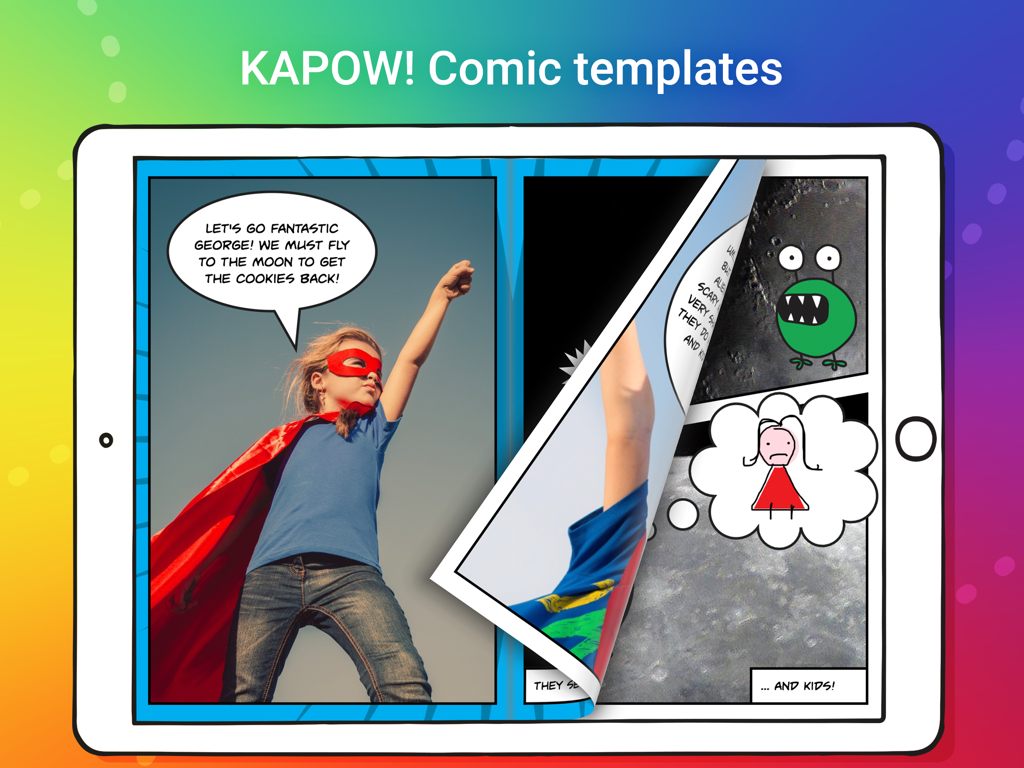
어린이 슈퍼히어로와 말풍선이 있는 만화책 템플릿이 있는 Book Creator One 앱을 보여주는 iPad 화면
어린이 슈퍼히어로와 말풍선이 있는 만화책 템플릿이 있는 Book Creator One 앱을 보여주는 iPad 화면

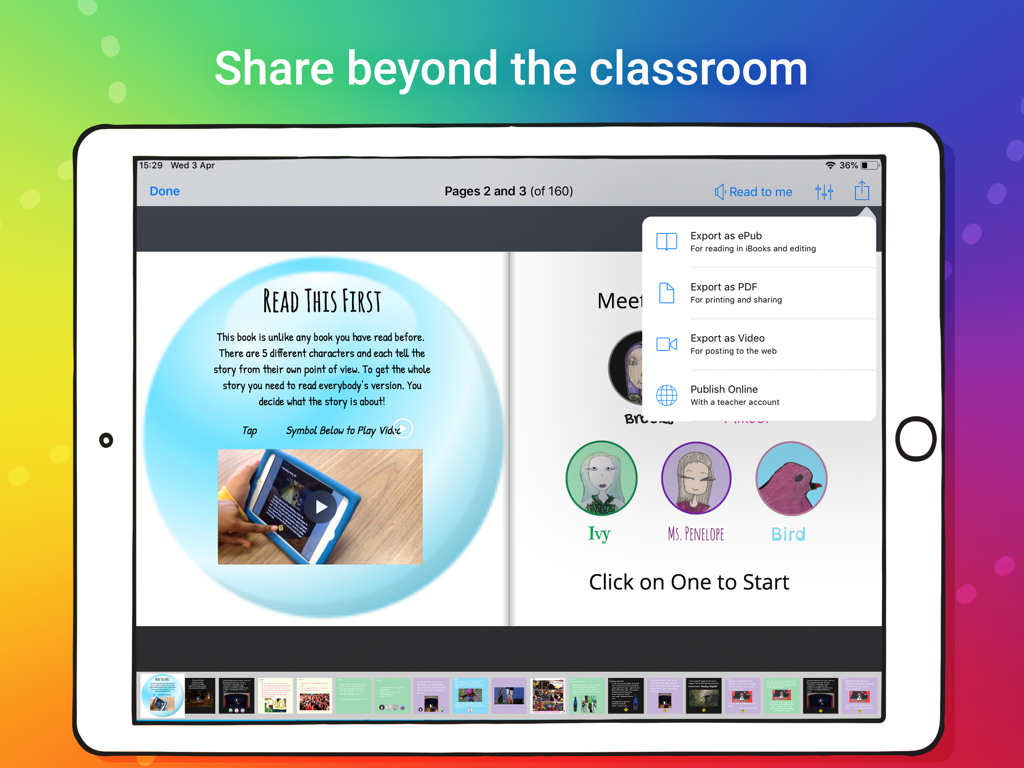
ePub, PDF 또는 비디오로 디지털 책을 내보내는 옵션이 있는 Book Creator One 앱을 보여주는 iPad 화면.

ePub, PDF 또는 비디오로 디지털 책을 내보내는 옵션이 있는 Book Creator One 앱을 보여주는 iPad 화면.

빈 페이지에서 출판 작가까지

이 앱을 돋보이게 하는 도구, 1M+ 명의 사용자가 선택.

🎨

모든 학습자 참여 유도

텍스트, 50개 이상의 글꼴, 손으로 그린 주석을 음성 녹음 및 비디오와 혼합하여 멀티모달 문해력을 지원합니다.

놀랍도록 단순한 디자인

직관적인 인터페이스로 요소를 드래그 앤 드롭하여 배치할 수 있어 학생들이 도구가 아닌 콘텐츠에 집중할 수 있습니다.

🌍

세상과 공유하기

Apple Books에 직접 게시하거나 PDF로 내보내거나 AirDrop을 사용하여 학생들의 작품을 실제 전 세계 청중에게 선보이세요.

리뷰 분석

사용자 리뷰 인사이트.

감정 점수

16%
부정적

요약

The Book Creator app generally receives negative feedback, predominantly due to its restrictive monetization model. Users are highly frustrated by the severe limitation on the number of free books, often only one or two, which necessitates payment for upgrades or additional content. While some appreciate the core book creation process as creative and engaging, many report significant bugs, including issues with drawing functionality, inability to delete books, and UI glitches like emoji skin tone changes. Furthermore, users frequently request an expanded set of features, such as more diverse fonts, improved text-to-speech, and better editing tools like zoom capabilities.

주요 테마

Free Book Limit(25)
Monetization Model(20)
Book Creation Process(15)
App Performance & Bugs(8)
Lacking Features & Tools(7)
Educational Suitability(5)

앱 소개

에 대해 알아야 할 모든 것 Book Creator One.

설명

Keen to try Book Creator? This app allows you to create one book. Unlock unlimited books (and comic templates!) with the in-app purchase. For schools, we recommend our full app "Book Creator for iPad" with unlimited books and no in-app purchases. *** THE No.1 Book creation app for the iPad in 90+ countries *** Book Creator is the simple way to make your own beautiful ebooks, right on your iPad. With over 30 million ebooks created so far, Book Creator is ideal for making all kinds of books, including children's picture books, photo books, comic books, journals, textbooks and more. And when you're done, share your book with ease, or even publish it to the iBooks Store! - Book Creator makes ebook publishing easy - wired.com - One of the Top 50 Apps for the iPad - The Guardian - Winner of a Parents' Choice Gold Award FEATURES: * Add text, choosing from 50 fonts on the iPad. * Add photos and images from your iPad's photo library, from the web, or use the iPad's Camera. * Resize, rotate and position images as you like with guidelines and snap positioning. * Add video and music, and even record your voice. * Use the pen tool to draw and annotate your book. * Choose from portrait, landscape or square book sizes. * Have Siri read your book to you in multiple languages with the Reading mode. MANY WAYS TO SHARE YOUR BOOK: * Send your book by email. * AirDrop to iPhone, iPad or Macbook. * Use a cloud service such as Dropbox, Google Drive, iCloud Drive (and more). * Save your book as a movie file and upload to the web. * Print using AirPrint or other printer apps, or export as a PDF. * Ability to send via WebDav server, or simply connect your iPad and transfer to iTunes. BECOME A PUBLISHED AUTHOR! Book Creator ebooks are created using the international ePub standard, so you know they will be readable now and in the future. Book Creator books are optimized for easy publishing to the iBooks Store. See examples of published books at pinterest.com/bookcreator NOTE - FIXED LAYOUT EBOOKS: Book Creator supports iBooks' fixed layout format, including double page images and soundtracks. Fixed layout books are not suitable if you want to create novels, where text flows from page to page. You will not be able to copy in large amounts of text from other documents. FIRST CLASS SUPPORT: - The app includes a Getting Started manual, plus we have an online support forum at bookcreator.com/support with how-to articles and email support. - We love to talk via Twitter - say hello @BookCreatorApp PERFECT FOR THE CLASSROOM: Book Creator is open-ended, creative and cross curriculum, and is one of the most popular iPad apps for teachers across the world. “Book Creator sits atop my list of the best educational apps. I’ve used Book Creator with learners of all ages, from kindergarten to adults. Its simplicity is refreshing, allowing authors to focus on their content.” - Tony Vincent, Learning and Technology Consultant, learninginhand.com “Book Creator is one of the most powerful tools I’ve seen to help turn reading and writing into a fun, collaborative project, that even kids who struggle will just love doing.” - Vicki Davis, @CoolCatTeacher “I love this app. It’s an incredibly powerful app with a deceptively easy to use interface. One of the three iPad apps every elementary school should buy.” - Dan Callahan, Instructional Technology Specialist K-5 with 1:1 iPads “A must for anyone in education. I love this app!” - Joe Moretti, Apple UK Education Mentor Read case studies and lesson plans from teachers using Book Creator at bookcreator.com/blog.

최신 버전

5.5.6

크기

179.3 MB

출시일

2013년 8월 15일

첫 책을 출판할 준비가 되셨나요?

수백만 명의 교육자와 학부모와 함께 학생들을 작가로 만들어 보세요. 지금 iPad에서 Book Creator One을 다운로드하고 첫 번째 창작 프로젝트를 무료로 시작하세요.

다운로드: App Store
FAQ

자주 묻는 질문

에 대해 알아야 할 모든 것 Book Creator One

Book Creator One은 무엇을 위해 사용되나요?

Book Creator One은 ebooks를 만들기 위한 iPad 앱입니다. 사용자는 어린이 그림책, 사진 앨범, 만화책, 일지, 교과서 등을 만들 수 있습니다.

Book Creator One으로 무료로 몇 권의 책을 만들 수 있나요?

Book Creator One은 사용자에게 무료로 한 권의 책을 만들 수 있도록 합니다. 앱 내 구매를 통해 무제한 책 및 만화 템플릿을 사용할 수 있습니다.

Book Creator One은 만화책 템플릿을 제공하나요?

네, Book Creator One은 만화책 템플릿을 제공합니다. 이 템플릿과 무제한 책 제작 기능은 인앱 구매를 통해 잠금 해제됩니다.

Book Creator One에서 책에 오디오 및 비디오를 추가할 수 있나요?

네, Book Creator One은 사용자가 비디오와 음악을 추가할 수 있도록 합니다. 또한 자신의 목소리를 녹음하여 책에 내레이션을 포함시킬 수도 있습니다.

Book Creator One으로 만든 책은 어떻게 공유할 수 있나요?

Book Creator One은 여러 공유 옵션을 제공합니다. 사용자는 이메일, AirDrop 또는 클라우드 서비스를 통해 책을 보낼 수 있습니다. ePub, PDF 또는 비디오로 내보내는 기능도 지원됩니다.

Book Creator One은 학교에서 교육용으로 적합한가요?

네, Book Creator One은 개방적이고 창의적이며 여러 커리큘럼에 걸쳐 사용할 수 있어 교육에 매우 적합합니다. 인앱 구매 없이 무제한 책 제작이 필요한 학교에는 전체 "Book Creator for iPad" 앱을 권장합니다.

Book Creator One으로 만든 책을 iBooks Store에 게시할 수 있나요?

네, Book Creator One은 국제 ePub 표준을 사용하여 ebooks를 만듭니다. 책은 iBooks Store에 쉽게 게시할 수 있도록 최적화되어 있습니다.

Book Creator One은 고정 레이아웃 ebooks를 지원하나요?

네, Book Creator One은 두 페이지 이미지 및 사운드트랙을 포함하는 iBooks의 고정 레이아웃 형식을 지원합니다. 텍스트 중심의 소설을 만드는 데는 적합하지 않습니다.

Siri가 Book Creator One에서 책을 소리 내어 읽을 수 있나요?

네, Book Creator One에는 Siri가 사용자에게 책을 읽어주는 읽기 모드가 있습니다. 이 기능은 여러 언어를 지원합니다.

Book Creator One에서 책에 어떤 종류의 이미지를 추가할 수 있나요?

Book Creator One은 사용자가 사진과 이미지를 추가할 수 있도록 합니다. 이 이미지들은 iPad의 사진 라이브러리, 웹 또는 iPad 카메라에서 직접 가져올 수 있습니다.

App information, icons, screenshots, and descriptions displayed on this page are sourced from the Apple App Store and are the property of their respective developers. Download estimates and rankings are based on MWM's proprietary models and may not reflect actual figures. This page is provided for informational and analytical purposes only.

Believe this page infringes your intellectual property? File a dispute