이 페이지는 앱이나 개발자의 공식 페이지가 아니며, 정보 제공 및 논평을 목적으로 작성된 독립 편집 간행물입니다. 명시적으로 달리 언급되지 않는 한, 해당 앱이나 개발자는 MWM, Apple, Google Play, 앱 퍼블리셔 또는 앱 개발자와 제휴, 보증, 후원, 승인 또는 공식적으로 연결되어 있지 않으며, 이 페이지의 어떤 내용도 해당 앱이 MWM의 서비스를 사용하여 개발되었음을 의미하지 않습니다. 모든 상표, 로고, 스크린샷 및 기타 콘텐츠는 해당 소유자의 자산입니다.
AI Photo Culling — PhotoPicker
노트북은 잊고 시간을 되찾으세요. 스마트 AI 분석과 원활한 Lightroom 통합으로 이동 중에 최고의 사진을 선별, 평가, 플래그 지정하세요.
주요 수치
다운로드
22K+
사용자 평점
4.4/5
총 평가 수
200
개발사
Roman Gishtimulat
카테고리
Photo & Video
지원 언어
23
최신 버전
3.5.4
크기
65.0 MB
출시일
2013년 6월 20일
기능
더 많은 시간을 창작에, 더 적은 시간을 선별에
가볍게 여행하는 전문가 사진가를 위한 최고의 AI 기반 워크플로우. 노트북이나 인터넷 연결 없이 iPad 또는 iPhone에서 수천 장의 사진을 선별하세요.
AI 기반 스마트 선택
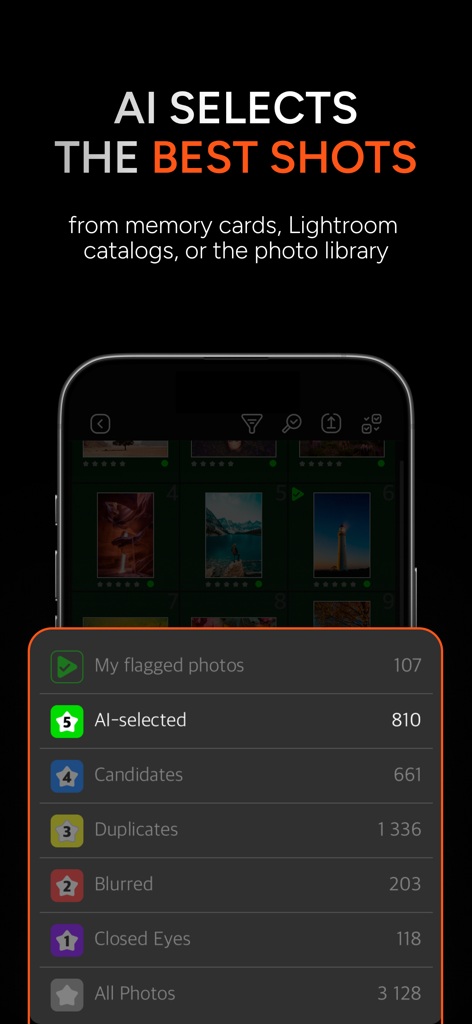
몇 시간 동안 픽셀을 하나하나 보지 마세요. AI가 흐릿함, 눈 감음, 중복을 즉시 감지하여 최고의 프레임을 플래그 지정하므로 몇 분 안에 하루 작업을 완료할 수 있습니다.
제로 임포트 워크플로우
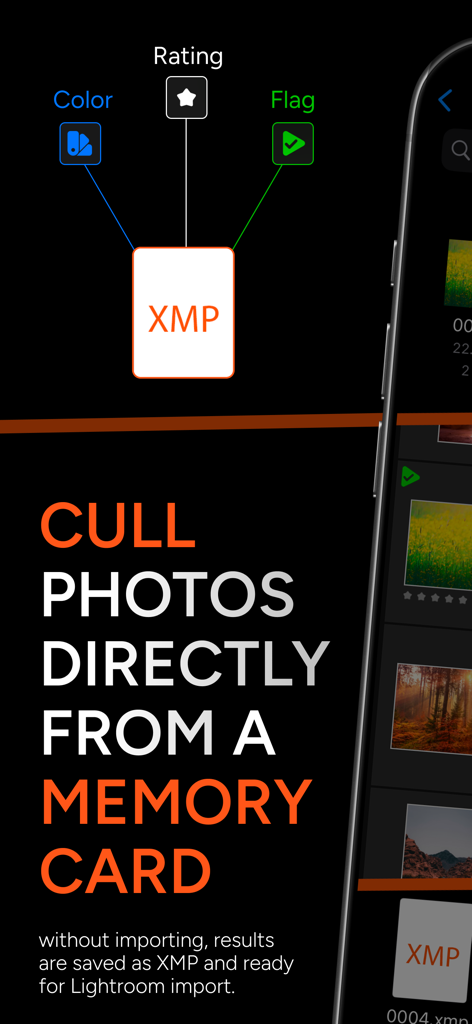
SD 카드 또는 SSD를 연결하고 즉시 정리를 시작하세요. 저장 공간을 낭비하거나 가져오기를 기다릴 필요 없이 파일 앱을 통해 RAW 파일에 직접 액세스하세요.
다음 스크린샷과 설명은 앱의 공식 스토어 목록에서 직접 가져온 것이며 앱 개발자의 자산입니다.
앱 스토어
스크린샷
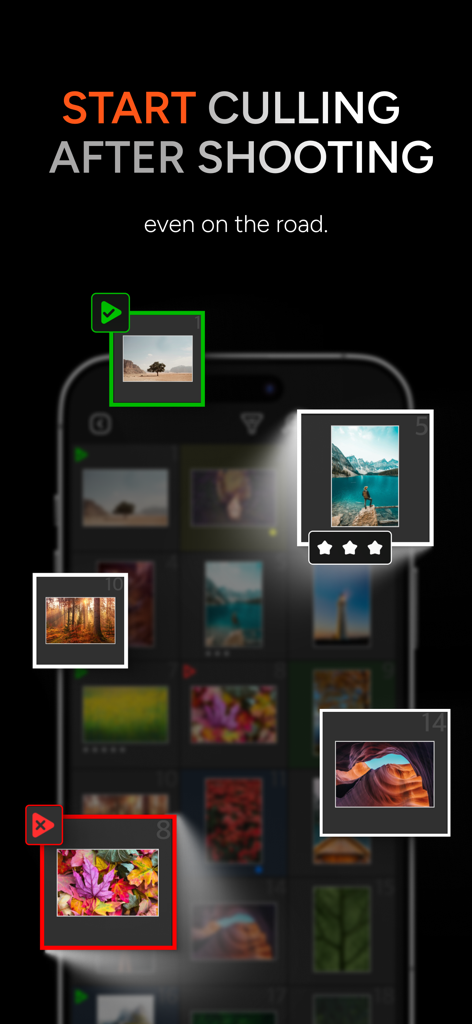
이동 중에 AI 사진 선별 및 등급 지정용 모바일 앱 인터페이스
AI 사진 선별 앱 인터페이스: AI 선택, 중복, 흐릿한 사진 등의 범주를 표시하여 빠른 선택 가능
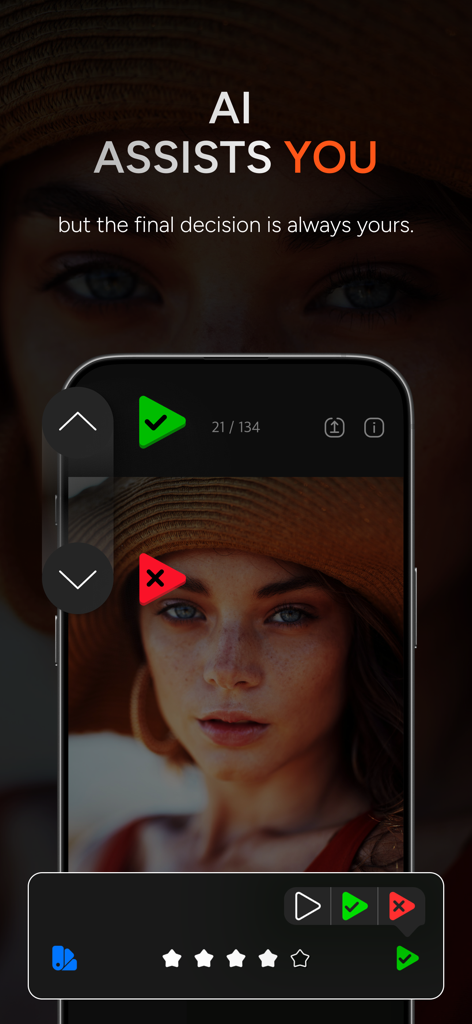
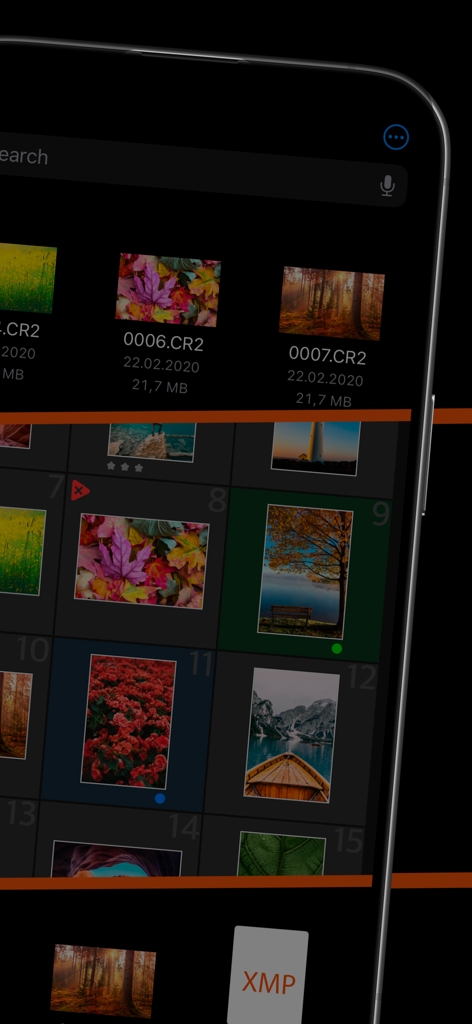
스마트폰 화면에서 AI 지원 사진 정렬 및 수동 선별 옵션을 보여주는 PhotoPicker 앱 인터페이스
XMP 통합 및 Lightroom용 메모리 카드에서 직접 사진을 선별하는 방법을 설명하는 PhotoPicker 앱 스크린샷
XMP 파일 지원을 통한 RAW 사진 선별을 위한 PhotoPicker 모바일 앱 인터페이스
설명
PhotoPicker is a powerful iOS app built for photographers who travel light — without a laptop.
It helps you quickly pick your best shots right after the shoot — on the go, with no need to import files or connect to the internet. Built-in AI analyzes your photos for sharpness, closed eyes, duplicates, facial expressions, and movement to help you select the best images in seconds.
Access photos directly from memory cards, external SSDs, or folders — sort them on your iPhone or iPad, and once you’re home, simply transfer the results into Lightroom, Capture One, or any other editor that supports XMP.
Also works with the standard iOS photo library — including automatic AI photo analysis.
Key Features of PhotoPicker:
1. AI & Manual Culling
• Smart AI detects blur, closed eyes, duplicates, facial expressions, and motion to find the best shots in a series.
• Prefer manual culling? Swipe up to keep, down to reject.
• Apply flags, star ratings (1–5), and color labels — all saved to XMP automatically.
2. No Import Needed
• Cull photos directly from memory cards, external drives, or any folder in the Files app.
• XMP files are saved alongside your images — ready for import into your favorite editor.
3. Lightroom Classic Integration
• Open and cull Lightroom Classic catalogs right in the app.
• Flags, ratings, and color labels are synced back to the catalog.
4. Custom Catalogs
• Create your own catalogs with JPEG and RAW files.
• RAWs are not duplicated — the app works with file references.
• Use flexible export options: copy XMPs, remove rejected files, and more.
5. Fast Compare & Review
• Tap to quickly flip between photos, even in zoomed-in view.
• Check focus and expressions in detail without leaving review mode.
Why Photographers Choose PhotoPicker:
Designed by photographers, for photographers, PhotoPicker gives you maximum freedom to sort, flag, and rate — no extra steps, no clutter. With fast AI-based culling, full XMP support, and seamless access to memory cards and external drives, it’s the perfect solution for travel shoots, expeditions, and everyday workflows.
Join thousands of professional photographers already using PhotoPicker — try it now!
Subscription
• The subscription gives you unlimited access to work with catalogs, regardless of the number of photos they contain
• Subscriptions are billed monthly or annually at the rate selected depending on the subscription plan. Alternatively a one-time payment plan is available (this is not a subscription).
• Subscriptions auto-renew at the cost of the chosen package, unless cancelled 24-hours in advance prior to the end of the current period. The subscription fee is charged to your iTunes account at confirmation of purchase. You may manage your subscription and turn off auto-renewal by going to your Account Settings after purchase. Per Apple policy, no cancellation of the current subscription is allowed during active subscription period. Once purchased, refunds will not be provided for any unused portion of the term.
• Terms of use: https://photopicker.gitbook.io/tos
• Privacy policy: https://photopicker.gitbook.io/privacy
Lightroom, XMP are registered trademarks of Adobe Systems, Inc.
이 페이지는 앱이나 개발자의 공식 페이지가 아니며, 정보 제공 및 논평을 목적으로 작성된 독립 편집 간행물입니다. 명시적으로 달리 언급되지 않는 한, 해당 앱이나 개발자는 MWM, Apple, Google Play, 앱 퍼블리셔 또는 앱 개발자와 제휴, 보증, 후원, 승인 또는 공식적으로 연결되어 있지 않으며, 이 페이지의 어떤 내용도 해당 앱이 MWM의 서비스를 사용하여 개발되었음을 의미하지 않습니다. 모든 상표, 로고, 스크린샷 및 기타 콘텐츠는 해당 소유자의 자산입니다.