
이 페이지는 앱이나 개발자의 공식 페이지가 아니며, 정보 제공 및 논평을 목적으로 작성된 독립 편집 간행물입니다. 명시적으로 달리 언급되지 않는 한, 해당 앱이나 개발자는 MWM, Apple, Google Play, 앱 퍼블리셔 또는 앱 개발자와 제휴, 보증, 후원, 승인 또는 공식적으로 연결되어 있지 않으며, 이 페이지의 어떤 내용도 해당 앱이 MWM의 서비스를 사용하여 개발되었음을 의미하지 않습니다. 모든 상표, 로고, 스크린샷 및 기타 콘텐츠는 해당 소유자의 자산입니다.


AnyDesk Remote Desktop
지리적 한계를 부수는 디지털 권력. 이 앱은 당신의 컴퓨터를 손안에 가져다 놓는 냉정한 도구임이 확인됩니다.
다운로드
12.5M+사용자 평점
총 평가 수
256.3K개발사
카테고리
Utilities지원 언어
28최신 버전
8.1.0크기
47.1 MB출시일
2017년 1월 26일AnyDesk Remote Desktop 주요 기능 분석
강력한 원격 지원 소프트웨어의 핵심 역량
안정적인 원격 접속
사용자는 어느 장소에서든 원격 기기에 접속하여 업무를 처리하거나 기술 지원을 제공할 수 있습니다.
뛰어난 성능
이 앱은 고속 프레임률과 낮은 지연 시간을 제공하여 부드러운 원격 제어 경험을 가능하게 합니다.
강력한 보안 및 신뢰성
이 도구는 은행 수준의 암호화를 제공하여 안전하고 신뢰할 수 있는 연결을 보장합니다.
유연한 배포 옵션
이 도구는 클라우드 또는 온프레미스 환경에서 배포될 수 있어 다양한 기업 환경에 적합합니다.
간편한 연결 설정
사용자는 간단한 단계로 원격 기기에 빠르게 연결할 수 있습니다.
개인 사용 무료 및 광고 없음
개인 사용자는 비용 부담 없이 이 앱을 무료로 사용할 수 있으며, 방해되는 광고가 없습니다.
자주 묻는 질문
에 대해 알아야 할 모든 것 AnyDesk Remote Desktop
Is AnyDesk Remote Desktop free for personal use?
Yes, AnyDesk is ad-free and free for personal use. It connects remote devices securely for individuals, IT professionals, and students.
What is AnyDesk Remote Desktop software used for?
AnyDesk Remote Desktop is powerful remote assistance software. It enables secure and reliable remote access between devices, connecting users whether they are nearby or globally.
How do I initiate a remote connection using AnyDesk?
To initiate a connection with AnyDesk, install and launch the app on both devices. Enter the AnyDesk-ID from the remote device, then confirm the access request to establish control.
Does AnyDesk Remote Desktop allow file transfer?
Yes, AnyDesk Remote Desktop supports file transfer. Users can access and manage files on remote devices, as evidenced by the file browsing interface during a session.
Is AnyDesk a secure remote access solution?
Yes, AnyDesk provides banking-standard encryption to ensure secure and reliable remote access. This protects data during connections for both IT professionals and private users.
What are the performance benefits of AnyDesk?
AnyDesk offers outstanding performance with high frame rates and low latency. It provides a smooth remote experience, suitable for various users including IT support and students.
Can AnyDesk connect to different types of devices?
Yes, AnyDesk connects to various remote devices. It supports cross-platform access, allowing users to control computers like MacBooks, home fileservers, and office PCs.
What kind of encryption does AnyDesk use?
AnyDesk utilizes banking-standard encryption. This security measure ensures that all remote connections are protected and reliable, safeguarding user data during access sessions.
다음 스크린샷과 설명은 앱의 공식 스토어 목록에서 직접 가져온 것이며 앱 개발자의 자산입니다.
앱 스토어
스크린샷
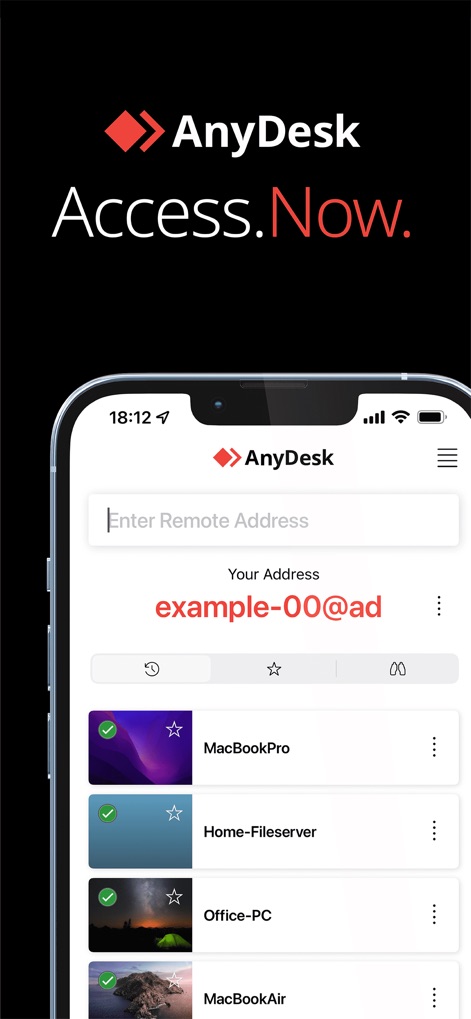
즉각적인 원격 접속
이 앱은 사용자 친화적인 인터페이스를 통해 원격 장치 주소를 입력할 수 있으며, 이전에 연결했던 다양한 장치 목록(MacBookPro 및 Home-Fileserver 등)을 명확하게 보여줍니다.
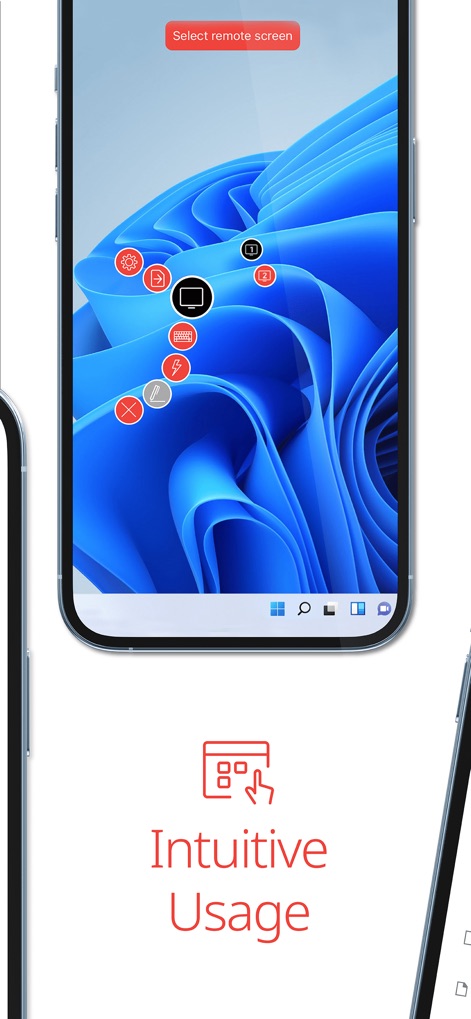
직관적인 제어
이 도구는 원격 데스크톱 세션 중 사용자에게 다양한 제어 옵션을 제공하며, 화면 상단에 원격 화면 선택 프롬프트와 중앙에 설정 및 파일 전송 등의 기능 아이콘이 표시됩니다.

간편한 파일 전송
이 앱은 사용자에게 원격 장치에서 파일 전송 기능을 제공하며, 'User (Home-Fileserver)' 경로를 통해 파일 목록과 각 파일의 크기(예: 2.14 MiB 이미지 파일)를 명확하게 보여줍니다.

모든 장치에서
이 소프트웨어는 다양한 기기에서 원활한 원격 접속을 지원하며, 아이폰과 아이패드에서 macOS 환경의 Finder 창과 애플리케이션 폴더를 동시에 실행하는 모습을 확인할 수 있습니다.
설명
Download
비슷한 앱
유사한 기능과 사용자 경험을 가진 앱

向日葵远程控制-Sunlogin remotecontrol
Shanghai best oray information s&t co.,ltd

UU远程-远程办公/游戏串流
Guangzhou NetEase Computer System Co.Ltd

AweSun Remote Desktop
AWERAY PTE. LTD.

TeamViewer Remote Control
TeamViewer Germany GmbH

ToDesk远程控制
Hainan Youqu Technology Co., Ltd.

DeskIn Remote Desktop
ZULER TECHNOLOGY PTE. LTD.

Termius - Modern SSH Client
Termius Corporation

RealVNC Viewer: Remote Desktop
RealVNC Limited

LogMeIn Pro & Central
GoTo Group, Inc.
이 페이지는 앱이나 개발자의 공식 페이지가 아니며, 정보 제공 및 논평을 목적으로 작성된 독립 편집 간행물입니다. 명시적으로 달리 언급되지 않는 한, 해당 앱이나 개발자는 MWM, Apple, Google Play, 앱 퍼블리셔 또는 앱 개발자와 제휴, 보증, 후원, 승인 또는 공식적으로 연결되어 있지 않으며, 이 페이지의 어떤 내용도 해당 앱이 MWM의 서비스를 사용하여 개발되었음을 의미하지 않습니다. 모든 상표, 로고, 스크린샷 및 기타 콘텐츠는 해당 소유자의 자산입니다.