
이 페이지는 앱이나 개발자의 공식 페이지가 아니며, 정보 제공 및 논평을 목적으로 작성된 독립 편집 간행물입니다. 명시적으로 달리 언급되지 않는 한, 해당 앱이나 개발자는 MWM, Apple, Google Play, 앱 퍼블리셔 또는 앱 개발자와 제휴, 보증, 후원, 승인 또는 공식적으로 연결되어 있지 않으며, 이 페이지의 어떤 내용도 해당 앱이 MWM의 서비스를 사용하여 개발되었음을 의미하지 않습니다. 모든 상표, 로고, 스크린샷 및 기타 콘텐츠는 해당 소유자의 자산입니다.


Auri AI Keyboard & Assistant
모든 앱에서 완벽한 이메일을 초안 작성하고, 음성 메모를 녹음하며, 글쓰기를 즉시 다듬으세요. 더 빠르고 스마트한 워크플로우를 위해 키보드에 직접 통합된 비공개 최첨단 AI 비서의 힘을 경험하세요.
다운로드
117K+사용자 평점
총 평가 수
1K+개발사
카테고리
Productivity지원 언어
14최신 버전
3.2.6크기
139.0 MB출시일
2023년 1월 9일궁극의 생산성 멀티툴
Auri AI는 키보드에 직접 통합되어 모든 앱을 글쓰기, 녹음 및 전문적인 커뮤니케이션을 위한 강력한 도구로 바꿔줍니다.
AI 키보드 통합
화면을 전환하거나 텍스트를 복사할 필요 없이 모든 앱에서 이메일을 초안 작성하고, 메시지에 답장하고, 계속해서 글을 쓰세요.
엘리트 음성 녹음
이동 중에도 업계 최고의 정확도로 음성 메모, 강의 및 회의를 구조화된 메모 또는 할 일 목록으로 변환하세요.
자주 묻는 질문
에 대해 알아야 할 모든 것 Auri AI Keyboard & Assistant
Auri AI는 무엇인가요?
Auri AI는 이메일을 작성하고, 음성 메모를 녹취하고, 노트를 만들고, 에세이를 작성하고, 문법 및 철자를 검사하는 올인원 개인 AI 비서 및 키보드입니다.
Auri AI 키보드는 어떤 언어를 지원하나요?
Auri AI 키보드는 80개 이상의 언어로 작성을 지원하므로 사용자는 모든 애플리케이션에서 더 빠르고 스마트하며 오류 없이 입력할 수 있습니다.
Auri AI 키보드에는 음성 입력 기능이 포함되어 있나요?
네, Auri AI 키보드는 매우 정확한 음성-텍스트 변환 기술을 제공하는 최첨단 Keyboard Dictation Pro를 제공합니다. 사용자는 수동으로 입력하지 않고도 말하는 단어를 텍스트로 변환할 수 있습니다.
Auri AI가 제 텍스트를 작성해 줄 수 있나요?
네, Auri AI는 모든 앱과 모든 언어로 주어진 주제에 대해 글을 작성할 수 있습니다. 사용자는 버튼을 탭하고 주제를 말하면 AI가 텍스트를 생성합니다.
Auri AI 키보드는 문법과 철자를 수정해주나요?
네, Auri AI 키보드는 탭 한 번으로 문법, 구두점, 철자 오류를 수정해 줍니다. 이 기능을 통해 모든 앱에서 텍스트를 오류 없이 사용할 수 있습니다.
Auri AI가 이메일 응답 초안 작성을 도와줄 수 있나요?
네, Auri AI는 거의 모든 이메일 앱에서 이메일 응답 초안을 작성합니다. 사용자가 톤을 선택하면 AI가 적절한 답장을 생성하여 시간을 절약해 줍니다.
Auri AI에는 "계속 작성" 기능이 있나요?
네, Auri AI에는 "계속 작성" 기능이 있습니다. AI가 탭 한 번으로 다음 몇 문장을 생성하여 사용자가 작가의 벽을 극복하고 생각을 완성하도록 도와줍니다.
Auri AI는 몇 개의 언어로 번역할 수 있나요?
Auri AI는 키보드에서 직접 20개 이상의 언어로 텍스트를 번역할 수 있습니다. 이를 통해 국제 연락처와의 커뮤니케이션을 촉진합니다.
Auri AI가 텍스트를 다른 스타일로 바꿔 쓸 수 있나요?
네, Auri AI의 바꾸기 기능은 문장과 단락을 전문적, 재미, 풍자, 창의적 및 기타 25가지 옵션을 포함한 다양한 스타일로 다시 작성합니다.
Auri AI 키보드에 클립보드 기능이 있나요?
네, Auri AI 키보드에는 키보드 클립보드가 포함되어 있습니다. 사용자는 이메일, 문구, 메시지, URL과 같이 자주 입력하는 텍스트를 저장하여 빠르게 액세스하고 시간을 절약할 수 있습니다.
Auri AI 채팅으로 무엇을 할 수 있나요?
Auri AI 채팅을 통해 사용자는 질문하고, 아이디어를 브레인스토밍하고, 새로운 것을 배울 수 있습니다. 18가지 채팅 유형, 두 가지 엔진, 메시지 저장 및 공유와 같은 기능을 제공합니다.
Auri AI가 녹음을 다른 문서 유형으로 변환할 수 있나요?
네, Auri AI는 음성 녹음을 다양한 문서로 변환합니다. 녹음을 요약, 할 일 목록, 회의록, 팟캐스트 메모 또는 대학 에세이로 변환할 수 있습니다.
Auri AI 스마트 노트에는 어떤 AI 작문 도구가 있나요?
Auri AI 스마트 노트에는 여러 AI 작문 도구가 있습니다. 여기에는 문법 및 철자 검사, 작문 도움, 계속 작성, 번역, 요약 및 텍스트 바꾸기 기능이 포함됩니다.
Auri AI가 사용자 데이터를 수집하거나 저장하나요?
아니요, Auri AI는 사용자가 입력하거나 말하는 내용을 추적, 수집 또는 저장하지 않습니다. 설계상 개인 정보 보호 우선이며 사용자 데이터를 임대하거나 판매하지 않습니다.
Auri AI Pro에는 어떤 기능이 포함되어 있나요?
Auri AI Pro는 모든 AI 키보드 기능의 무제한 사용, 무제한 AI 채팅, 스마트 노트 AI 작문 도구 및 25개 이상의 키보드 테마를 제공합니다. 또한 향후 Pro 기능도 포함됩니다.
Auri AI Pro 구독 갱신은 어떻게 작동하나요?
Auri AI Pro 구독은 자동으로 갱신됩니다. 갱신이 최소 24시간 전에 Apple ID 설정에서 비활성화되지 않는 한, 기간이 끝나기 24시간 전에 요금이 청구됩니다.
Auri AI 지원팀에 어떻게 연락하나요?
사용자는 hi@auri.ai로 이메일을 보내거나 공식 지원 페이지 https://auri.ai/support를 방문하여 Auri AI 지원팀에 연락할 수 있습니다.
Auri AI가 여러 Apple 기기와 호환되나요?
네, Auri AI는 여러 Apple 기기에서 작동합니다. iPhone, iPad, Apple Watch와 호환되어 모든 앱에서 기능을 사용할 수 있습니다.
Auri AI 키보드로 전환하는 방법은 무엇인가요?
Auri AI 키보드로 전환하려면 지구본 키보드 키를 길게 누른 다음 표시되는 옵션에서 "Auri AI"를 선택하십시오. 그러면 키보드 상태가 "실행 중"으로 표시됩니다.
다음 스크린샷과 설명은 앱의 공식 스토어 목록에서 직접 가져온 것이며 앱 개발자의 자산입니다.
앱 스토어
스크린샷
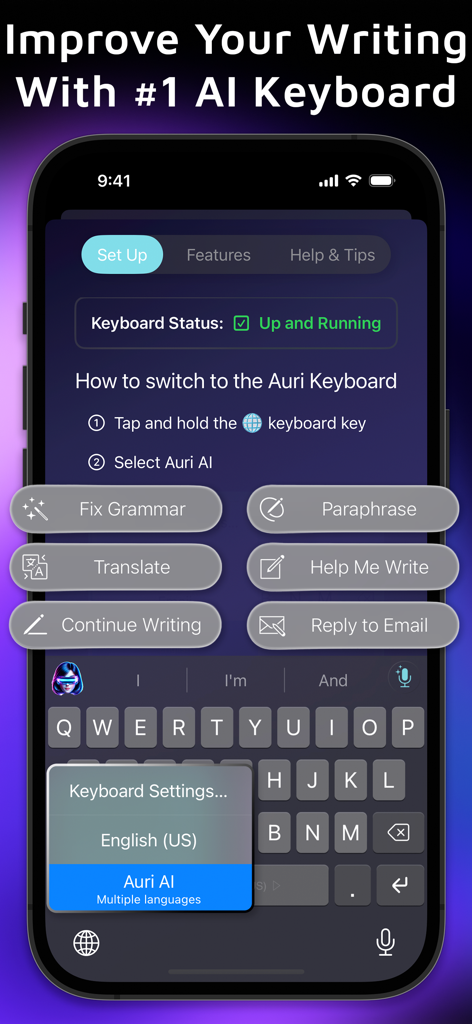
Auri AI 키보드 앱이 문법 검사 및 번역과 같은 글쓰기 도구를 보여줌
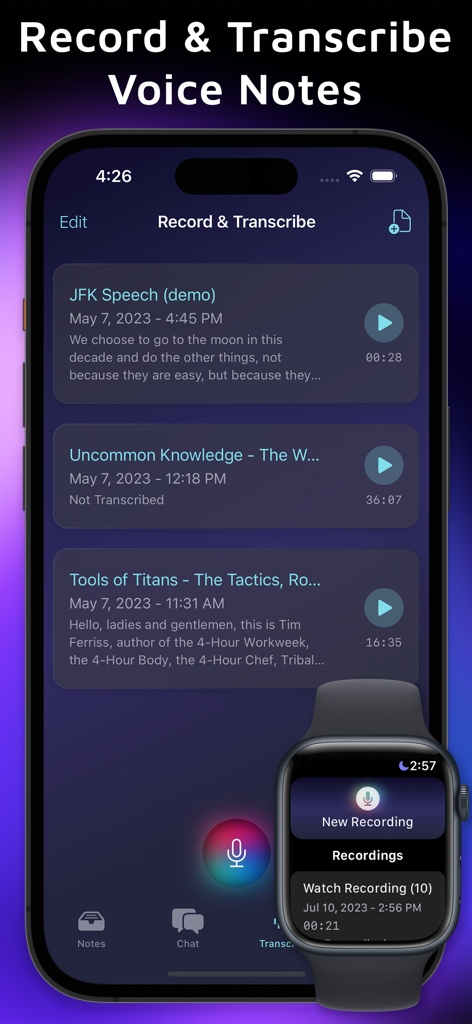
iPhone 및 Apple Watch에서 Auri AI 음성 메모 및 녹음 인터페이스
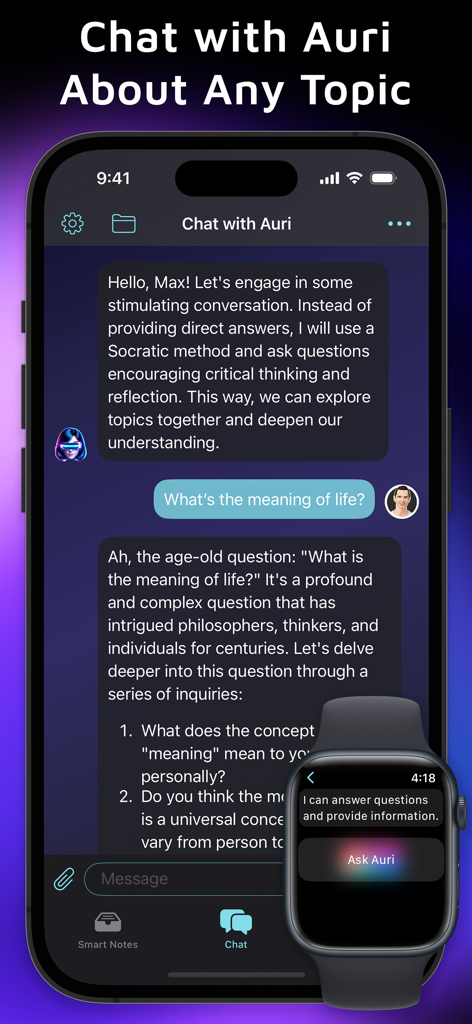
iPhone 및 Apple Watch에서 Auri AI 비서 채팅 인터페이스
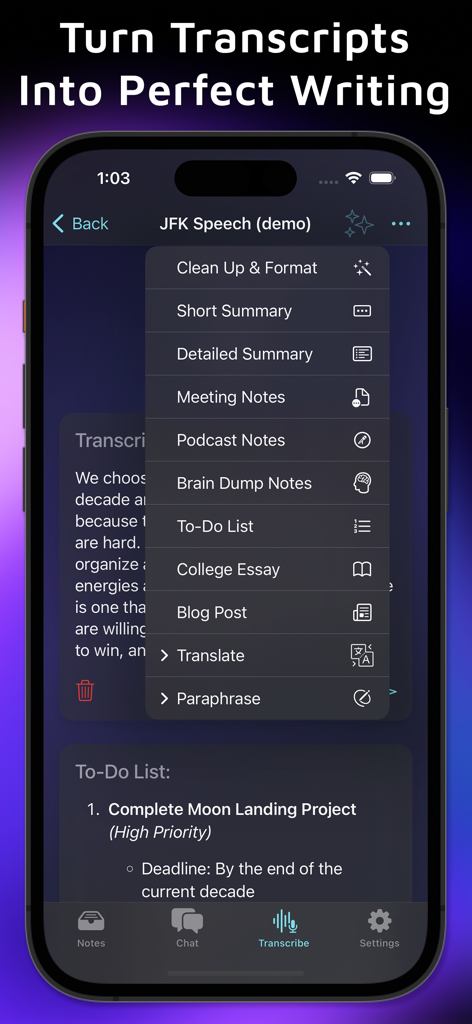
Auri AI 앱 인터페이스가 녹취록을 요약, 회의 메모, 블로그 게시물 및 에세이로 변환하는 옵션을 보여줌
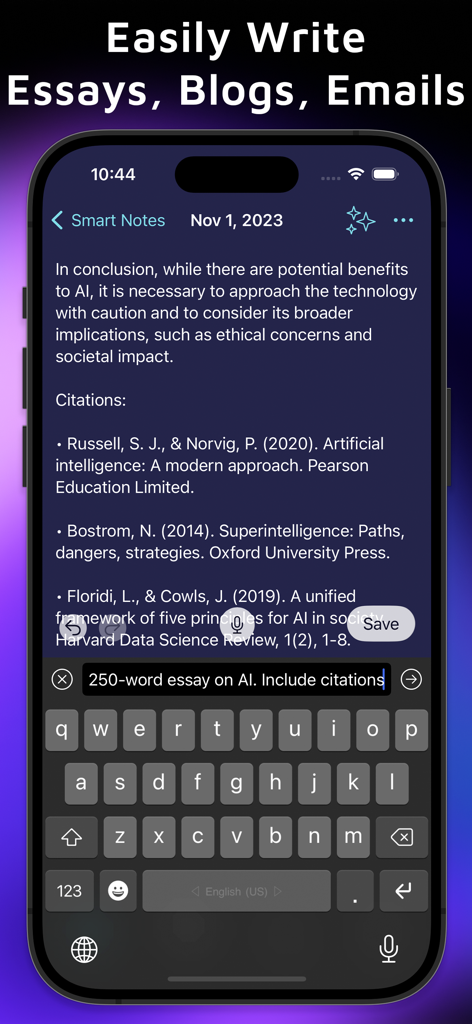
Auri AI 키보드가 스마트 노트 기능에서 인용이 포함된 상세한 에세이를 스마트폰에 생성함
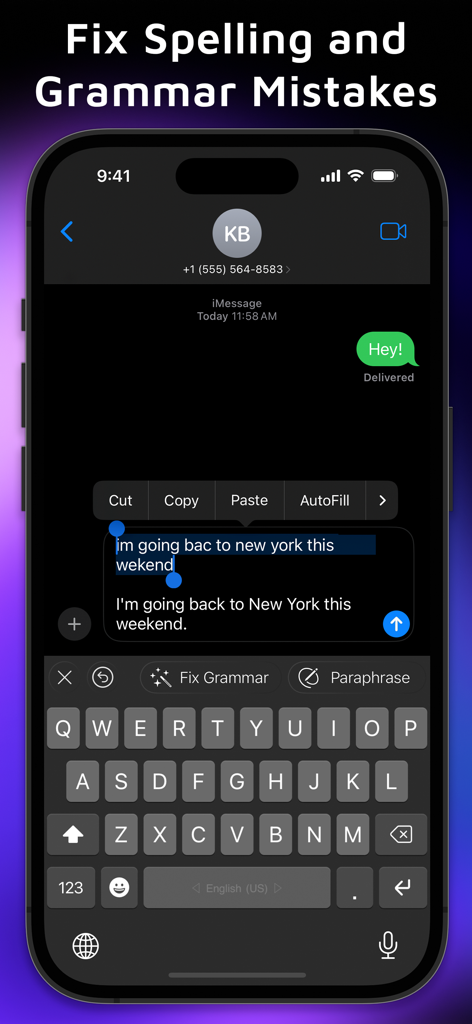
Auri AI 키보드가 채팅 메시지의 맞춤법 및 문법 오류를 수정함
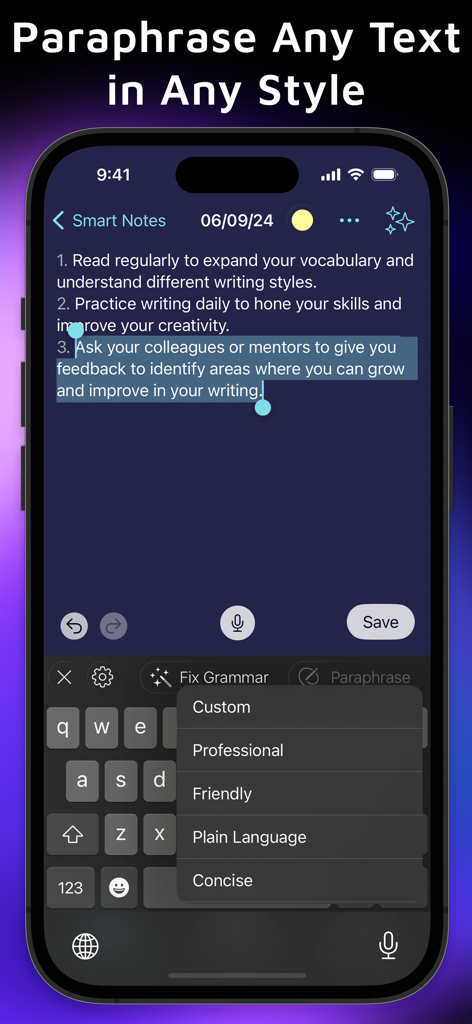
Auri AI 키보드가 스마트 메모에 대해 전문적이고 친근한 의역 옵션을 보여줌
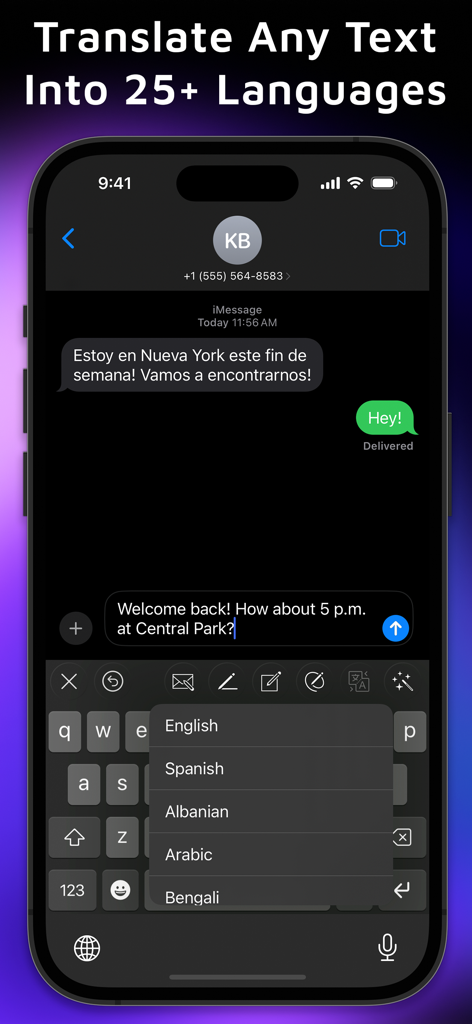
Auri AI 키보드가 iMessage 앱에서 실시간 번역 메뉴를 보여줌
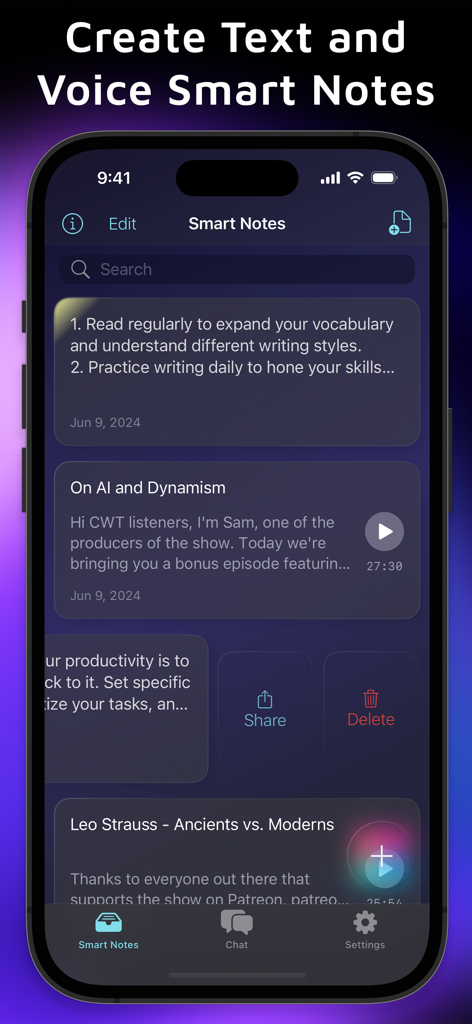
스마트 메모 및 음성 녹음 녹음 관리를 위한 Auri AI 앱 인터페이스
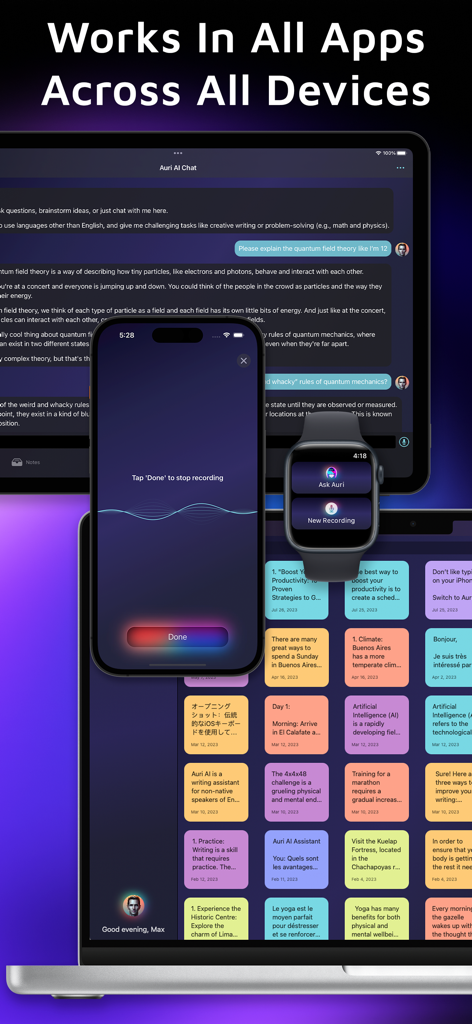
iPhone, iPad, Apple Watch 및 Mac에서 작동하는 Auri AI 키보드 및 비서
설명
Download
비슷한 앱
유사한 기능과 사용자 경험을 가진 앱

AiText: Grammar & Spell Check
Mikhail Chelbaev
Grammar Check Corrector AI
DAMIEN, NATHANAEL ELLEDGE

LanguageTool - Grammar Checker
LanguageTooler GmbH

AI Email Writer - Boss
Curious Creators Co.
AI Keyboard Type AI – AnyWrite
Appnest Technologies LLC

TypeEasy-AI Keyboard & Writer
Jie Huang
Grammarly: AI Writing Keyboard
Grammarly, Inc

微信输入法
Tencent Technology (Shenzhen) Company Limited

QuillBot: AI Writing, Keyboard
QuillBot, a Learneo Inc. business
이 페이지는 앱이나 개발자의 공식 페이지가 아니며, 정보 제공 및 논평을 목적으로 작성된 독립 편집 간행물입니다. 명시적으로 달리 언급되지 않는 한, 해당 앱이나 개발자는 MWM, Apple, Google Play, 앱 퍼블리셔 또는 앱 개발자와 제휴, 보증, 후원, 승인 또는 공식적으로 연결되어 있지 않으며, 이 페이지의 어떤 내용도 해당 앱이 MWM의 서비스를 사용하여 개발되었음을 의미하지 않습니다. 모든 상표, 로고, 스크린샷 및 기타 콘텐츠는 해당 소유자의 자산입니다.