
이 페이지는 앱이나 개발자의 공식 페이지가 아니며, 정보 제공 및 논평을 목적으로 작성된 독립 편집 간행물입니다. 명시적으로 달리 언급되지 않는 한, 해당 앱이나 개발자는 MWM, Apple, Google Play, 앱 퍼블리셔 또는 앱 개발자와 제휴, 보증, 후원, 승인 또는 공식적으로 연결되어 있지 않으며, 이 페이지의 어떤 내용도 해당 앱이 MWM의 서비스를 사용하여 개발되었음을 의미하지 않습니다. 모든 상표, 로고, 스크린샷 및 기타 콘텐츠는 해당 소유자의 자산입니다.


다운로드
250k+사용자 평점
총 평가 수
634개발사
카테고리
Utilities지원 언어
8최신 버전
1.0.6크기
212.4 MB출시일
2025년 7월 22일Auto Clicker - AutoTap App의 핵심 역량 분석
주요 기능 및 이점
백그라운드 자동화 실행
다른 앱을 사용하거나 화면이 잠겨 있어도 설정된 탭 패턴이 중단 없이 백그라운드에서 실행됩니다.
맞춤형 탭 시퀀스 기록
다양한 위치, 지연 시간 및 반복 횟수를 포함하는 다단계 탭 패턴을 기록하여 복잡한 게임 및 앱 상호작용을 자동화할 수 있습니다.
무제한 패턴 저장 및 관리
무제한으로 탭 시퀀스를 저장하고 관리하며, 필요에 따라 다양한 게임이나 작업에 맞는 패턴을 쉽게 전환하여 사용할 수 있습니다.
정밀한 타이밍 제어
100밀리초부터 60초까지 탭 사이의 정확한 지연 시간을 설정하여 게임의 쿨다운 기간이나 앱 로딩 시간을 효율적으로 관리할 수 있습니다.
반복 및 실행 시간 설정
특정 시간이나 탭 횟수만큼 패턴을 실행하거나, 수동으로 중지할 때까지 계속 반복하여 유연한 자동화 운용이 가능합니다.
탈옥 없는 iOS 자동화
iOS 접근성 기능을 활용하여 기기를 탈옥할 필요 없이 안전하고 쉽게 반복적인 터치 상호작용을 자동화할 수 있습니다.
자주 묻는 질문
에 대해 알아야 할 모든 것 Auto Clicker - AutoTap App
What is the Auto Clicker - AutoTap App?
The Auto Clicker - AutoTap App automates repetitive mobile tasks and minimizes manual input. It boosts gaming performance, streamlines workflows, and eliminates tedious tapping for enhanced productivity.
How does the Auto Clicker - AutoTap App work?
The Auto Clicker - AutoTap App works by automating screen taps. Users can customize settings like the number of pointers, clicks per second, and interval time to perform repetitive actions automatically.
Is the Auto Clicker - AutoTap App suitable for gaming?
Yes, the Auto Clicker - AutoTap App is suitable for gaming. It boosts gaming performance by automating repetitive tasks and minimizing manual input, allowing users to focus on other aspects of gameplay.
What is the cost of the Auto Clicker - AutoTap App subscription?
The Auto Clicker - AutoTap App offers a Weekly Plan subscription for full access at $4.99 per week. This subscription unlocks all unlimited automation features.
How can I enable auto-tap functionality in the Auto Clicker - AutoTap App?
The Auto Clicker - AutoTap App provides step-by-step instructions on how to enable auto-tap functionality. This guidance is accessible directly within the app's interface for user convenience.
Does the Auto Clicker - AutoTap App have custom click settings?
Yes, the Auto Clicker - AutoTap App offers custom click settings. Users can adjust parameters such as the number of pointers, the speed of clicks per second, and the interval time between actions.
Is the Auto Clicker - AutoTap App trusted by users?
Yes, the Auto Clicker - AutoTap App is trusted by a significant user base. The app is explicitly stated as being 'TRUSTED BY 100K+ USERS'.
How do I manage my subscription for the Auto Clicker - AutoTap App?
Users can manage their Auto Clicker - AutoTap App subscription and turn off auto-renewal through their iTunes Account settings. This ensures control over payment and renewal preferences.
다음 스크린샷과 설명은 앱의 공식 스토어 목록에서 직접 가져온 것이며 앱 개발자의 자산입니다.
앱 스토어
스크린샷

이 앱은 사용자가 설정한 위치에 자동으로 탭하여, 화면에 표시되는 가상 손가락 탭 아이콘과 '+1' 숫자 피드백으로 과정을 시각적으로 보여줍니다.
반복 탭 자동화

이 앱은 사용자에게 필요한 정보를 제공하며, '자동 탭 활성화 방법'과 같은 사용 가이드 카드와 다양한 인기 앱 아이콘을 통해 그 활용성을 보여줍니다.
간편한 사용 시작
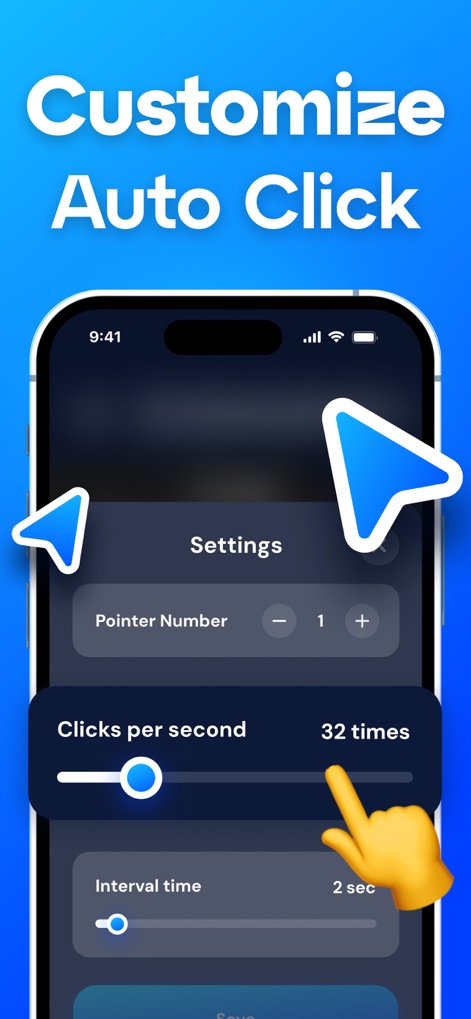
사용자는 이 앱에서 자신에게 맞는 자동 클릭 환경을 구축할 수 있으며, '초당 클릭 수' 슬라이더를 통해 속도를 조절하고 '간격 시간'을 정밀하게 설정할 수 있습니다.
맞춤형 탭 설정
설명
Download
비슷한 앱
유사한 기능과 사용자 경험을 가진 앱

自动ּ连点器 - 自动点击器
壮壮 彭

连点器-高效自动点击按键辅助工具
和圆 魏

连点器 - 自动点击持续滚动刷新&旋转指针工具
源 韦

自动点击器·连点器
磊 赵

Auto Clicker-Auto Tapper tool
佳豪 张

Auto Clicker: Click Automatic
RH LANDSCAPING LLC

连点器-自动连点神器&点赞抢购助手
倩格 刘

Auto Clicker - Tap Assistant
乐飞 张

Auto Tapper Assistant App
KUPERTINO BIL. YAZ. HALIL IBRAHIM KARAHAN SAFFET ARSLAN MUSTAFA AYTEN MUHAMMET YALCIN OZDEMIR K. S.
이 페이지는 앱이나 개발자의 공식 페이지가 아니며, 정보 제공 및 논평을 목적으로 작성된 독립 편집 간행물입니다. 명시적으로 달리 언급되지 않는 한, 해당 앱이나 개발자는 MWM, Apple, Google Play, 앱 퍼블리셔 또는 앱 개발자와 제휴, 보증, 후원, 승인 또는 공식적으로 연결되어 있지 않으며, 이 페이지의 어떤 내용도 해당 앱이 MWM의 서비스를 사용하여 개발되었음을 의미하지 않습니다. 모든 상표, 로고, 스크린샷 및 기타 콘텐츠는 해당 소유자의 자산입니다.