
이 페이지는 앱이나 개발자의 공식 페이지가 아니며, 정보 제공 및 논평을 목적으로 작성된 독립 편집 간행물입니다. 명시적으로 달리 언급되지 않는 한, 해당 앱이나 개발자는 MWM, Apple, Google Play, 앱 퍼블리셔 또는 앱 개발자와 제휴, 보증, 후원, 승인 또는 공식적으로 연결되어 있지 않으며, 이 페이지의 어떤 내용도 해당 앱이 MWM의 서비스를 사용하여 개발되었음을 의미하지 않습니다. 모든 상표, 로고, 스크린샷 및 기타 콘텐츠는 해당 소유자의 자산입니다.


Auto Clicker・Click Assistant
반복적인 터치에서 해방: 이 앱은 당신의 손가락을 쉬게 하고, 화면 노동을 기계적인 명령으로 대체합니다. 게이머, 앱 중독자, 그리고 시간을 아끼고 싶은 사람들을 위한 무미건조한 효율성을 제공합니다.
다운로드
1M+사용자 평점
총 평가 수
949개발사
카테고리
Productivity지원 언어
22최신 버전
1.3크기
46.7 MB출시일
2024년 9월 20일자동화된 터치를 통해 디지털 활동을 최적화하는 도구 평가
"Auto Clicker・Click Assistant" 핵심 기능 분석
시간 절약 및 멀티태스킹
이 앱은 사용자가 반복적인 작업을 자동화하여 귀중한 시간을 절약하고, 기기가 작업을 수행하는 동안 다른 활동에 집중할 수 있게 해줍니다.
자동 탭 스크립트 생성 및 맞춤 설정
이 도구는 사용자가 맞춤형 타이밍과 위치를 지정하여 자동 탭 스크립트를 생성함으로써 게임, 소셜 미디어 또는 테스트와 같은 반복적인 디지털 활동을 효율적으로 자동화할 수 있도록 지원합니다.
정밀한 탭 위치 설정
이 앱은 화면 안내 기능을 통해 사용자가 정확한 탭 위치를 설정할 수 있도록 하여, 게임 내 특정 요소 클릭이나 앱 내 정밀한 상호작용과 같은 자동화 작업의 정확성을 높여줍니다.
간결한 인터페이스 및 안정적인 성능
이 도구는 빠른 설정과 안정적인 성능을 위해 설계된 간결한 인터페이스를 제공하여, 사용자가 복잡한 설정 없이도 자동화 기능을 쉽게 시작하고 활용할 수 있도록 돕습니다.
간편한 자동화 제어
이 앱은 사용자가 자동화 스크립트를 쉽게 시작하고, 일시 중지하며, 중지할 수 있는 직관적인 제어 기능을 제공하여 자동화 과정을 유연하게 관리할 수 있도록 지원합니다.
즐겨찾는 앱 및 웹사이트 빠른 접근
이 도구는 사용자가 자주 사용하는 앱과 웹사이트를 추가하여, 자동화 기능을 더 빠르게 적용하고 접근성을 높일 수 있도록 합니다.
자주 묻는 질문
에 대해 알아야 할 모든 것 Auto Clicker・Click Assistant
What is Auto Clicker・Click Assistant?
Auto Clicker・Click Assistant automates repeated screen taps on your device. It saves time by executing tap sequences automatically in games, apps, or during testing.
How does Auto Clicker・Click Assistant help automate tasks?
Auto Clicker・Click Assistant automates tasks by allowing users to create custom tap scripts with specific timings and positions. It uses an on-screen guide for precise tap location settings.
Can Auto Clicker・Click Assistant be used in games?
Yes, Auto Clicker・Click Assistant can be used in games to automate repeated screen taps and tasks. Screenshot #1 demonstrates its application in a shooter game.
Does Auto Clicker・Click Assistant support dating apps or other applications?
Yes, Auto Clicker・Click Assistant supports all applications, including dating apps and websites. Users can add favorite apps and websites for quick access, as shown in Screenshot #2 and #3.
How do I manage my subscription for Auto Clicker・Click Assistant?
You manage your Auto Clicker・Click Assistant subscription and auto-renewal through your iTunes Account Settings after purchase. Auto-renewal must be turned off 24 hours before the current period ends.
What happens if I have a free trial and purchase a subscription for Auto Clicker・Click Assistant?
Any unused portion of a free trial period for Auto Clicker・Click Assistant is forfeited when you purchase a subscription. This applies where a free trial is offered.
Where can I find the Privacy Policy for Auto Clicker・Click Assistant?
The Privacy Policy for Auto Clicker・Click Assistant is available at the following URL: https://1drv.ms/w/s!AtEh75onyRbqbHBCMepyr5VmNk4?e=PoUEjQ.
Can Auto Clicker・Click Assistant set multiple tap points?
Yes, Auto Clicker・Click Assistant allows users to set multiple tap points for automation. Screenshot #4 visually confirms the ability to set auto-clicks multiple times.
다음 스크린샷과 설명은 앱의 공식 스토어 목록에서 직접 가져온 것이며 앱 개발자의 자산입니다.
앱 스토어
스크린샷

이 앱은 게임 내 컨트롤러 영역에서 반복적인 동작을 쉽게 자동화하며, 번호가 매겨진 탭 시퀀스를 통해 사용자가 효율적으로 게임을 즐길 수 있도록 돕습니다.
게임 자동화 시작
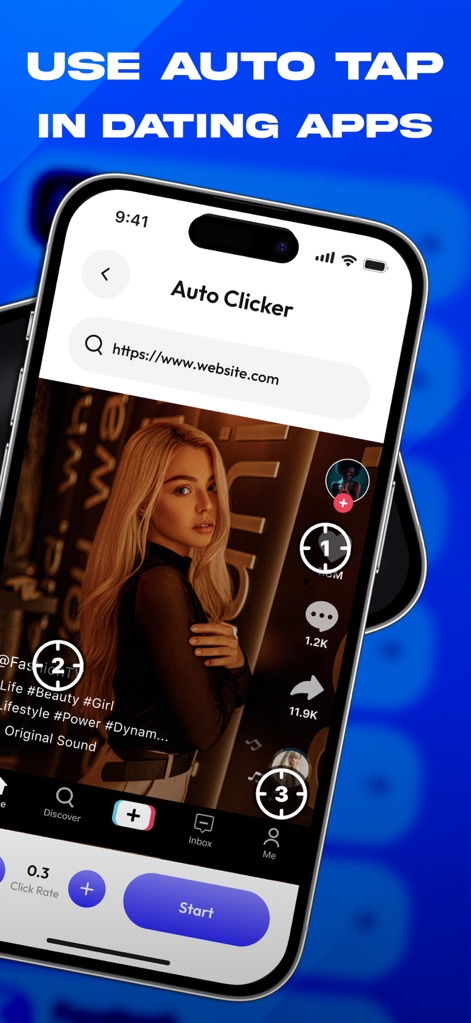
사용자는 이 도구를 활용하여 데이팅 앱이나 소셜 미디어에서 프로필 탐색과 같은 반복 작업을 자동화하며, 자동 탭 지점과 상호작용 버튼을 효율적으로 사용할 수 있습니다.
데이팅 앱 최적화

이 앱은 '웹사이트 추가' 인터페이스를 통해 다양한 애플리케이션 및 웹사이트를 지원하며, 사용자는 텍스트 입력 필드와 가상 키보드를 사용하여 맞춤형 자동화 대상을 설정할 수 있습니다.
모든 앱 지원

사용자는 이 기능을 통해 게임 환경 내에서 특정 위치에 여러 번의 반복 탭을 쉽게 설정할 수 있으며, 화면에 표시된 반복 탭 시각 효과와 정밀 탭 지점을 통해 정확한 자동화를 구현합니다.
반복 탭 설정
설명
Download
비슷한 앱
유사한 기능과 사용자 경험을 가진 앱

自动ּ连点器 - 自动点击器
壮壮 彭

连点器-高效自动点击按键辅助工具
和圆 魏

连点器 - 自动点击持续滚动刷新&旋转指针工具
源 韦

自动点击器·连点器
磊 赵

Auto Clicker-Auto Tapper tool
佳豪 张

Auto Clicker: Click Automatic
RH LANDSCAPING LLC

连点器-自动连点神器&点赞抢购助手
倩格 刘

Auto Clicker - Tap Assistant
乐飞 张

Auto Tapper Assistant App
KUPERTINO BIL. YAZ. HALIL IBRAHIM KARAHAN SAFFET ARSLAN MUSTAFA AYTEN MUHAMMET YALCIN OZDEMIR K. S.
이 페이지는 앱이나 개발자의 공식 페이지가 아니며, 정보 제공 및 논평을 목적으로 작성된 독립 편집 간행물입니다. 명시적으로 달리 언급되지 않는 한, 해당 앱이나 개발자는 MWM, Apple, Google Play, 앱 퍼블리셔 또는 앱 개발자와 제휴, 보증, 후원, 승인 또는 공식적으로 연결되어 있지 않으며, 이 페이지의 어떤 내용도 해당 앱이 MWM의 서비스를 사용하여 개발되었음을 의미하지 않습니다. 모든 상표, 로고, 스크린샷 및 기타 콘텐츠는 해당 소유자의 자산입니다.