Awesome Voice Recorder PRO AVR
다운로드: App Store

이 페이지는 앱이나 개발자의 공식 페이지가 아니며, 정보 제공 및 논평을 목적으로 작성된 독립 편집 간행물입니다. 명시적으로 달리 언급되지 않는 한, 해당 앱이나 개발자는 MWM, Apple, Google Play, 앱 퍼블리셔 또는 앱 개발자와 제휴, 보증, 후원, 승인 또는 공식적으로 연결되어 있지 않으며, 이 페이지의 어떤 내용도 해당 앱이 MWM의 서비스를 사용하여 개발되었음을 의미하지 않습니다. 모든 상표, 로고, 스크린샷 및 기타 콘텐츠는 해당 소유자의 자산입니다.

로고: Awesome Voice Recorder PRO AVR
다운로드: App Store

Awesome Voice Recorder PRO AVR

고위험 전문가 및 학생을 위해 설계된 스튜디오 품질 녹음, 즉각적인 전사 및 엘리트 파일 관리를 위한 최고의 비즈니스 등급 도구입니다.

주요 수치

다운로드

369K+

사용자 평점

4.6/5

총 평가 수

6K+

개발사

Newkline Co., Ltd.

카테고리

Business

지원 언어

23

최신 버전

8.4.0

크기

45.1 MB

출시일

2014년 7월 6일
기능

음성 관리를 위한 전문가 표준

기본 녹음 도구에 만족하지 마세요. AVR PRO는 스튜디오 품질 오디오, 즉각적인 전사 및 엘리트 구성을 통해 전문가와 학생에게 힘을 실어줍니다.

즉각적인 음성-텍스트 변환

수동 입력을 건너뛰세요. 강의, 인터뷰 및 회의를 정확한 텍스트 전사로 변환하여 문서 워크플로우를 간소화하세요.

스마트 폴더 구성

파일을 뒤지는 것을 멈추세요. 프로젝트별로 녹음을 분류하고 iCloud, Dropbox 또는 Google Drive와 자동으로 동기화하여 즉시 액세스하세요.

다음 스크린샷과 설명은 앱의 공식 스토어 목록에서 직접 가져온 것이며 앱 개발자의 자산입니다.

앱 스토어

스크린샷
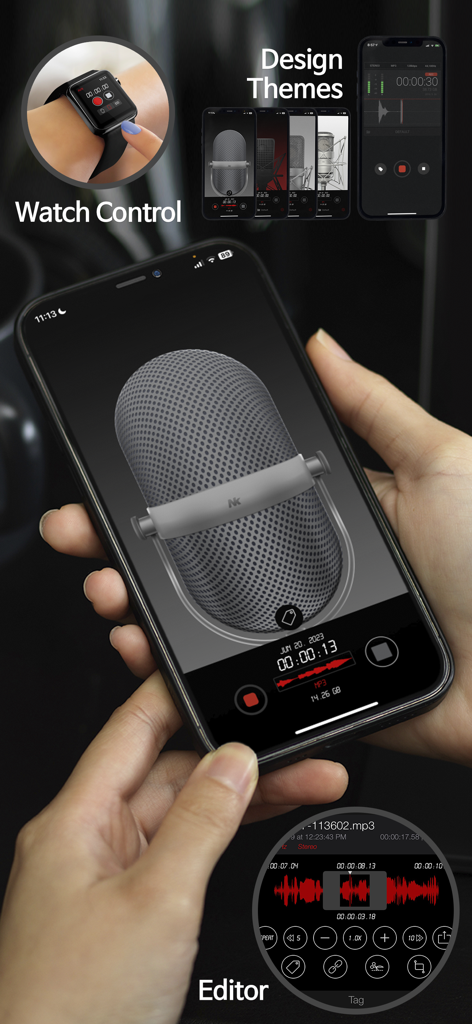
Awesome Voice Recorder PRO AVR - Awesome Voice Recorder PRO 앱 인터페이스(iPhone 및 Apple Watch) - 녹음 기능, 디자인 테마 및 오디오 편집기 표시.
Awesome Voice Recorder PRO 앱 인터페이스(iPhone 및 Apple Watch) - 녹음 기능, 디자인 테마 및 오디오 편집기 표시.

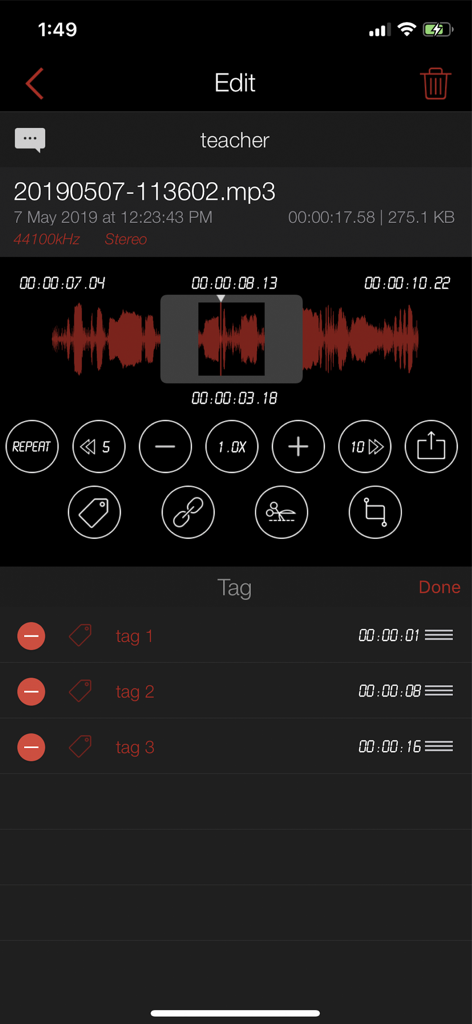
Awesome Voice Recorder PRO AVR - Awesome Voice Recorder PRO의 오디오 파형 편집 및 태그 목록을 보여주는 인터페이스
Awesome Voice Recorder PRO의 오디오 파형 편집 및 태그 목록을 보여주는 인터페이스

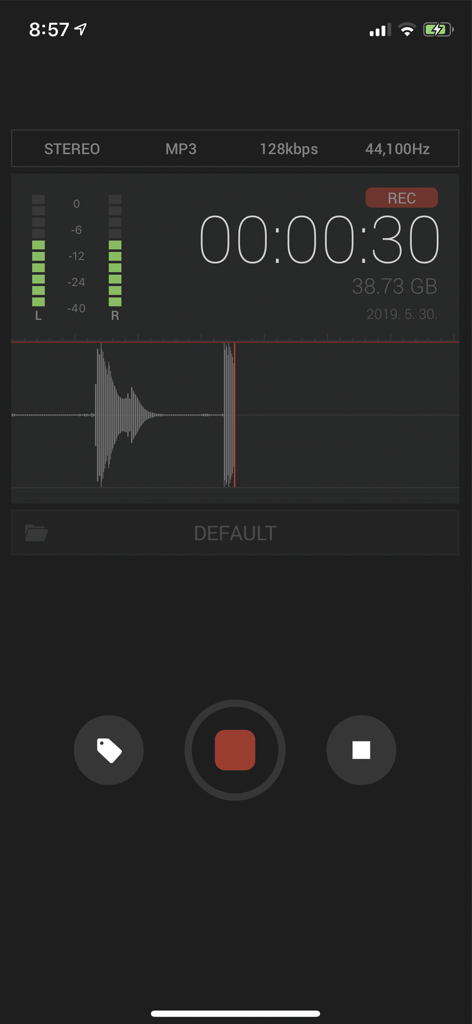
Awesome Voice Recorder PRO AVR - Awesome Voice Recorder PRO AVR 인터페이스 - 파형 및 스테레오 미터가 있는 활성 오디오 녹음 표시
Awesome Voice Recorder PRO AVR 인터페이스 - 파형 및 스테레오 미터가 있는 활성 오디오 녹음 표시

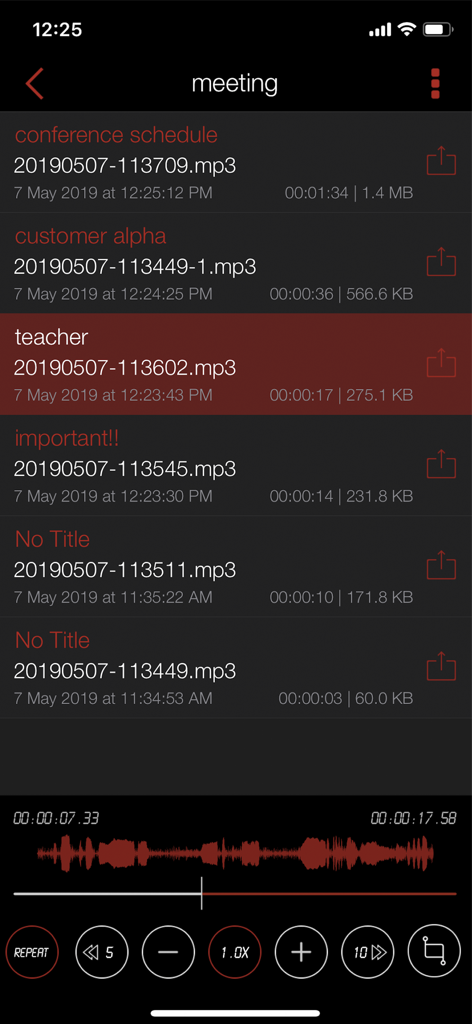
Awesome Voice Recorder PRO AVR - Awesome Voice Recorder PRO의 음성 녹음 목록 및 오디오 재생 인터페이스.
Awesome Voice Recorder PRO의 음성 녹음 목록 및 오디오 재생 인터페이스.

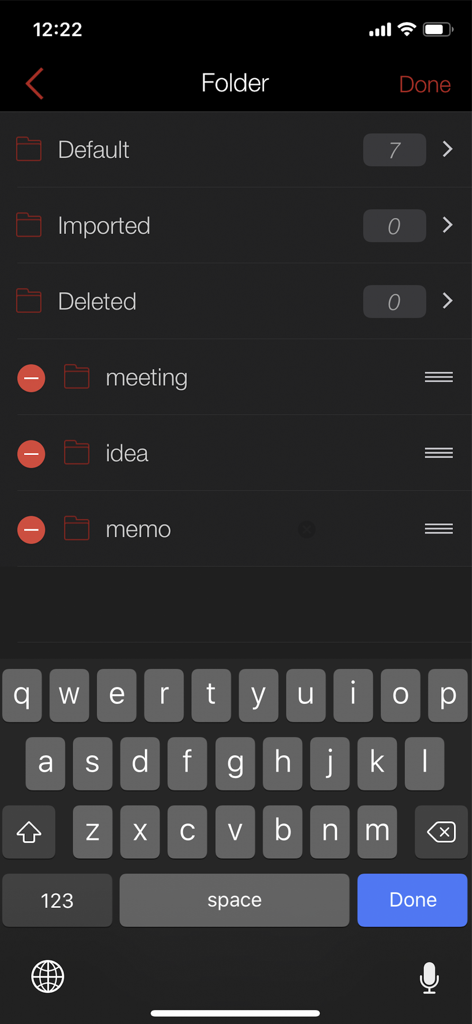
Awesome Voice Recorder PRO AVR - Awesome Voice Recorder PRO의 폴더 관리 화면 - 정리된 녹음 범주 표시
Awesome Voice Recorder PRO의 폴더 관리 화면 - 정리된 녹음 범주 표시

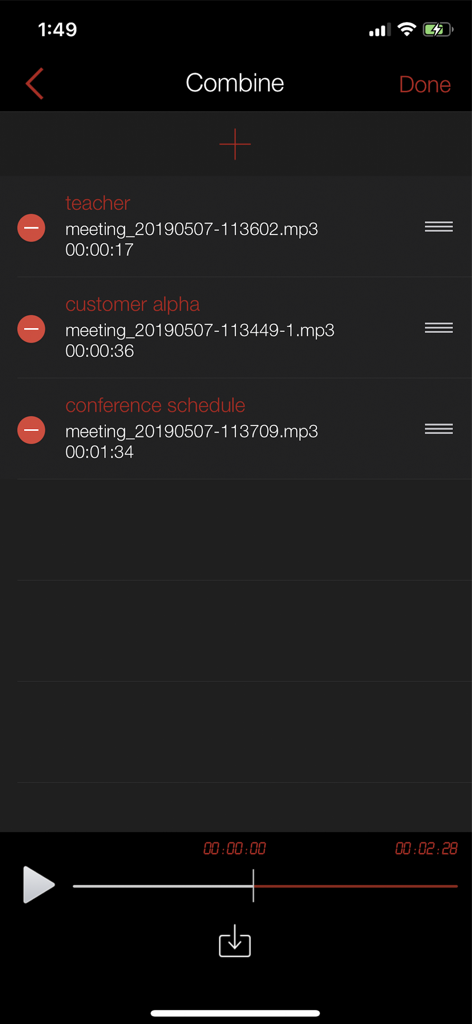
Awesome Voice Recorder PRO AVR - Awesome Voice Recorder PRO 인터페이스 - 여러 오디오 녹음을 하나의 파일로 결합하는 기능 표시
Awesome Voice Recorder PRO 인터페이스 - 여러 오디오 녹음을 하나의 파일로 결합하는 기능 표시

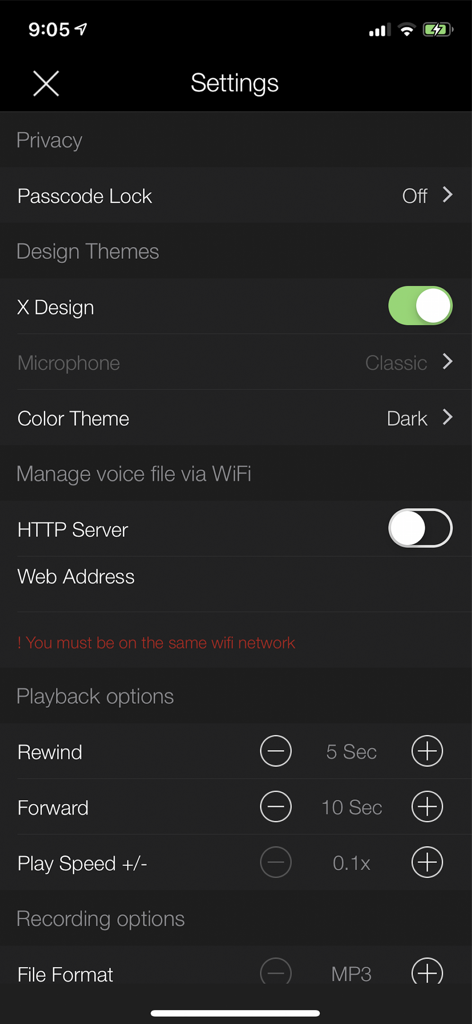
Awesome Voice Recorder PRO AVR - Awesome Voice Recorder PRO 앱 설정 화면 - 녹음 형식, 재생 속도 및 디자인 테마 옵션 표시

Awesome Voice Recorder PRO 앱 설정 화면 - 녹음 형식, 재생 속도 및 디자인 테마 옵션 표시

설명

■■■ #Rank 1 Business app in 35 Countries ■■■ ■■■ #Rank 5 Business app in 85 Countries ■■■ AVR is the best voice recording application with a cool interface and perfect functionality for business people, reporters, tutors, audio experts, sound engineers, school personnel, university students and those who need to manage voice memos. Support for Apple Watch Available on both iPhone and iPad. ■ Main functions - Direct recording MP3, WAV, M4A audio format - Voice to text transcription - High quality audio recording - Unlimited recording time - Background recording - Wave display for recording status - Various audio quality options (11,025KHz, 22,050KHz, 44,100KHz,48,000KHz) - Mono/stereo recording - Records playable in various media - Restart voice recordings after phone call pause (Up to 3 minutes recording pause) - Add description to voice records - Fast and easy to use - Display recording file size - Safe stop for low battery and storage space - Bluetooth support - Supported audio formats (MP3,WAV,M4A,M4R) - 5 microphone designs. (Professional,Classic,Studio,Studio Pro) - App colour Themes (Dark / Light) - Added music library import function - Create a ringtone - File creation function with noise reduction - Sorting file function - Earphone remote control playback - Waveform pinch to zoom , Swipe to scroll ,Tap to set cursor ■ Powerful file Sharing & Management - Transfer files using iTunes - iCloud Drive , Dropbox , Box , GoogleDrive , OneDrive , SoundCloud - Email - AirDrop - Wi-Fi file management (upload,download,edit...) - File sharing / send files in another app “Open in” ■ Folder management You can create folders to save and control files Creating/editing/deleting/changing/moving ■ Repeated, slow or fast play You play repeatedly, slow or fast. Replay,Rewind,Forward / 0.1x ~ Play Fine-tune the playback speed ■ Trim&cut audio records You can trim&cut the voice records as you want. You can use the left/right pointers to trim&cut the voice records and save it (mp3,wav,m4a,m4r) ■ Audio visualisation Voice records are visualised so that you can easily identify voice sections Sound visualization ■ Sound tag You can play immediately by adding several tags to one audio file at selected time Play at the location of tag ■ Sound file combination You can create one new file out of several audio file. Create a file by setting play sequence of several files ■ Noise Reduction Noise Reduction can reduce constant background sounds

Download

다운로드: App Store

이 페이지는 앱이나 개발자의 공식 페이지가 아니며, 정보 제공 및 논평을 목적으로 작성된 독립 편집 간행물입니다. 명시적으로 달리 언급되지 않는 한, 해당 앱이나 개발자는 MWM, Apple, Google Play, 앱 퍼블리셔 또는 앱 개발자와 제휴, 보증, 후원, 승인 또는 공식적으로 연결되어 있지 않으며, 이 페이지의 어떤 내용도 해당 앱이 MWM의 서비스를 사용하여 개발되었음을 의미하지 않습니다. 모든 상표, 로고, 스크린샷 및 기타 콘텐츠는 해당 소유자의 자산입니다.