Voice Recorder & Memos
다운로드: App Store

이 페이지는 앱이나 개발자의 공식 페이지가 아니며, 정보 제공 및 논평을 목적으로 작성된 독립 편집 간행물입니다. 명시적으로 달리 언급되지 않는 한, 해당 앱이나 개발자는 MWM, Apple, Google Play, 앱 퍼블리셔 또는 앱 개발자와 제휴, 보증, 후원, 승인 또는 공식적으로 연결되어 있지 않으며, 이 페이지의 어떤 내용도 해당 앱이 MWM의 서비스를 사용하여 개발되었음을 의미하지 않습니다. 모든 상표, 로고, 스크린샷 및 기타 콘텐츠는 해당 소유자의 자산입니다.

로고: Voice Recorder & Memos
다운로드: App Store

Voice Recorder & Memos

AI 기반 전사, 고급 노이즈 제거 및 전문가용 편집 도구로 기본 녹음을 넘어서세요. 기본 메모 이상의 기능을 필요로 하는 저널리스트, 학생 및 크리에이터에게 적합합니다.

주요 수치

다운로드

1M+

사용자 평점

4.6/5

총 평가 수

5K+

개발사

SMM service, s.r.o.

카테고리

Productivity

지원 언어

33

최신 버전

2.1.6

크기

254.8 MB

출시일

2021년 9월 10일
기능

오디오 워크플로우 마스터하기

기본 녹음에 만족하지 마세요. 당사의 프로급 도구를 사용하면 음성을 캡처, 개선 및 변환하여 실행 가능한 통찰력을 얻을 수 있습니다.

AI 기반 전사

정확한 다국어 지원으로 인터뷰와 강의를 텍스트로 즉시 변환하여 수동 작업을 절약하세요.

정밀 편집 스위트

무음 제거, 노이즈 감소 및 트랙 병합 도구로 완벽한 사운드를 만드세요. 데스크톱 소프트웨어가 필요 없습니다.

다음 스크린샷과 설명은 앱의 공식 스토어 목록에서 직접 가져온 것이며 앱 개발자의 자산입니다.

앱 스토어

스크린샷
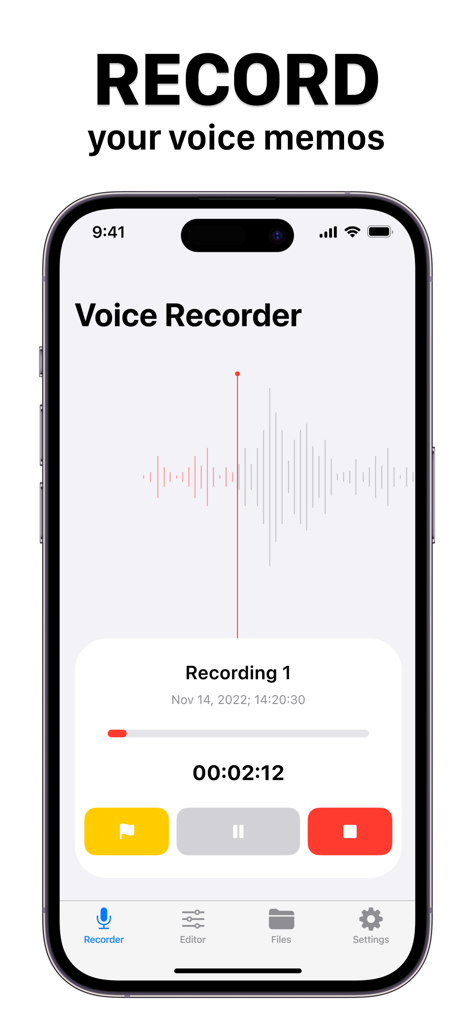
Voice Recorder & Memos - Voice Recorder 앱 인터페이스, iPhone에서 파형 및 재생 컨트롤이 표시된 오디오 녹음 진행 중
Voice Recorder 앱 인터페이스, iPhone에서 파형 및 재생 컨트롤이 표시된 오디오 녹음 진행 중

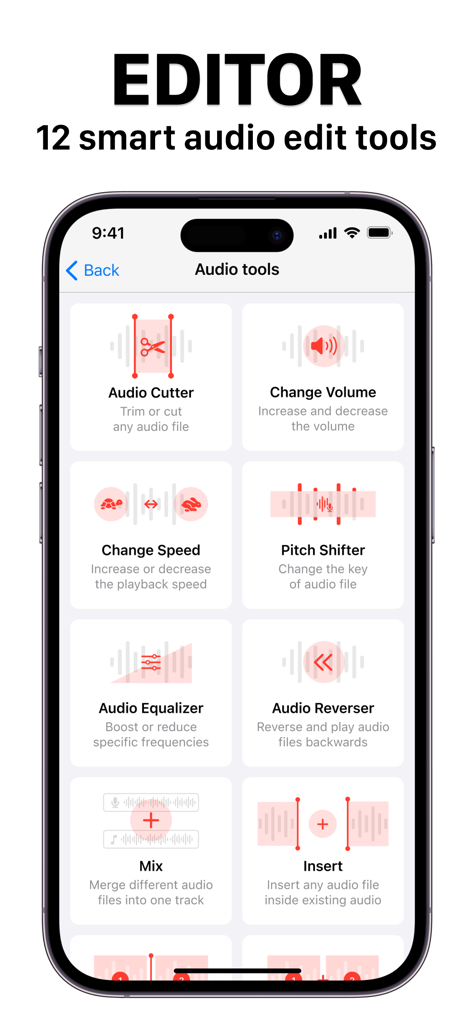
Voice Recorder & Memos - Voice Recorder 및 Memos 앱의 오디오 편집 도구를 보여주는 스마트폰 화면(이퀄라이저, 피치 시프터, 오디오 커터 포함).
Voice Recorder 및 Memos 앱의 오디오 편집 도구를 보여주는 스마트폰 화면(이퀄라이저, 피치 시프터, 오디오 커터 포함).

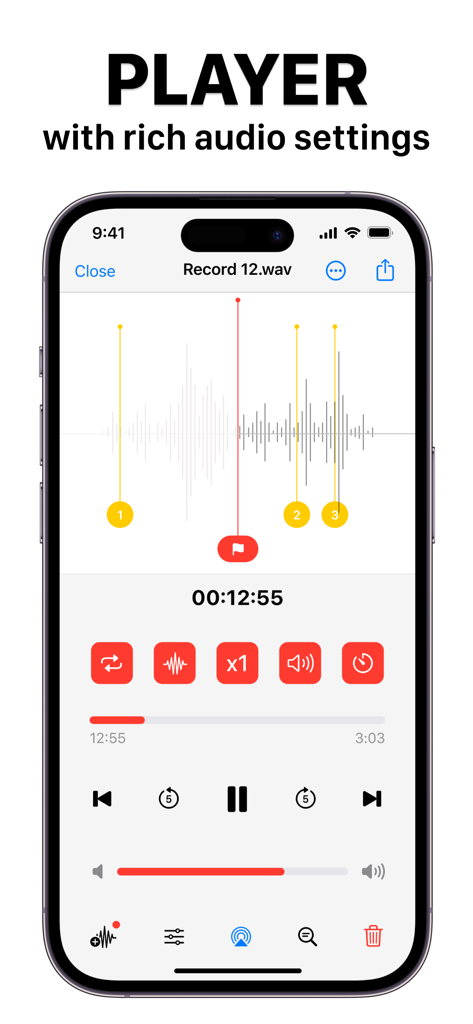
Voice Recorder & Memos - iPhone 화면에서 파형 및 재생 설정이 있는 Voice Recorder 앱의 고급 오디오 플레이어 인터페이스
iPhone 화면에서 파형 및 재생 설정이 있는 Voice Recorder 앱의 고급 오디오 플레이어 인터페이스

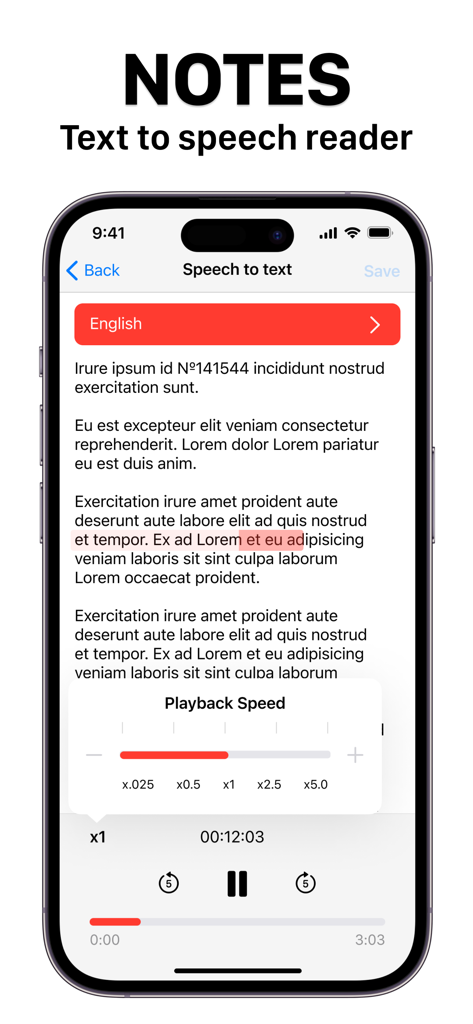
Voice Recorder & Memos - 텍스트 음성 변환기 및 재생 속도 컨트롤이 있는 노트를 보여주는 Voice Recorder and Memos 앱 인터페이스

텍스트 음성 변환기 및 재생 속도 컨트롤이 있는 노트를 보여주는 Voice Recorder and Memos 앱 인터페이스

설명

Introducing our powerful Voice Recorder app with Audio Editor Tools! This app is perfect for anyone who needs to capture audio notes, record interviews, or create audio projects. With our app, you can trim or cut any audio file, increase or decrease the volume, change the playback speed, and even change the key of the audio file. Our app also offers powerful audio editing tools, including the ability to boost or reduce specific frequencies, reverse and play audio files backwards, merge different audio files into one track, and insert any audio file inside existing audio. You can split audio files into many parts and export them, combine audio files together into one, and automatically remove blank sections of audio or noise from your recordings. With our app, you can store all your audio files and text notes in one place. You can also convert audio notes to text and text to audio notes. Import from iCloud or Gallery, and create folders to store all your files in secure storage. Our app also offers speech-to-text transcription for the most common languages, and includes a built-in text editor to create text notes. The player module includes many features like audio effects, background audio effects, pitch settings, decibel level settings, playback timer, flags for audio record, voice-to-text transcriber, airplay feature, and a fully working audio equalizer for real-time editing. You can easily share and export your audio files in many common audio formats, including MP3, WAV, AIFF, FLAC, and more. Whether you're a journalist, musician, student, or just someone who needs to capture audio notes on the go, our Voice Recorder app with Audio Editor Tools is the perfect solution for all your audio recording and editing needs. Terms of service: https://www.team2swift.com/terms-voice-recorder/ Privacy policy: https://www.team2swift.com/privacy-voice-recorder/ For any questions or requests, please use our customer support form at: https://www.team2swift.com/

Download

다운로드: App Store

이 페이지는 앱이나 개발자의 공식 페이지가 아니며, 정보 제공 및 논평을 목적으로 작성된 독립 편집 간행물입니다. 명시적으로 달리 언급되지 않는 한, 해당 앱이나 개발자는 MWM, Apple, Google Play, 앱 퍼블리셔 또는 앱 개발자와 제휴, 보증, 후원, 승인 또는 공식적으로 연결되어 있지 않으며, 이 페이지의 어떤 내용도 해당 앱이 MWM의 서비스를 사용하여 개발되었음을 의미하지 않습니다. 모든 상표, 로고, 스크린샷 및 기타 콘텐츠는 해당 소유자의 자산입니다.