BlackBerry Work

BlackBerry Work

다운로드: App Store다운로드: Google Play
로고: BlackBerry Work

BlackBerry Work: 현대 전문가를 위한 안전하고 통합된 생산성

기업 데이터를 보호하면서 개인 정보 보호를 유지하도록 설계된 단일 암호화 환경 내에서 비즈니스 이메일, 캘린더 및 연락처를 간소화하세요.

개발사

BlackBerry Corporation

카테고리

Business

다운로드

2M+

사용자 평점

2.8/5

총 평가 수

0

지원 언어

12

모든 프레임의 효율성

이 인터페이스를 사용하는 2M+ 명의 사용자.

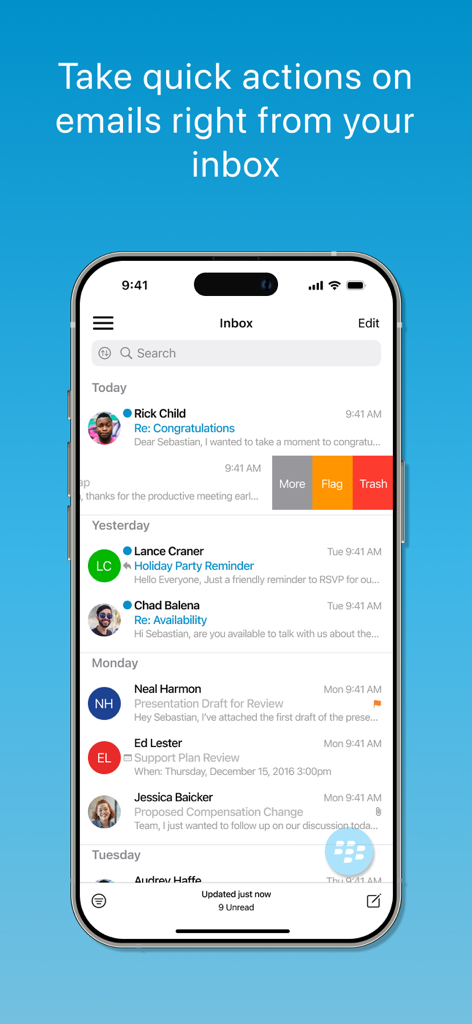
iPhone에서 BlackBerry Work 이메일 받은 편지함 스크린샷, 플래그 및 휴지통과 같은 빠른 작업 스 와이프 옵션 표시
iPhone에서 BlackBerry Work 이메일 받은 편지함 스크린샷, 플래그 및 휴지통과 같은 빠른 작업 스 와이프 옵션 표시

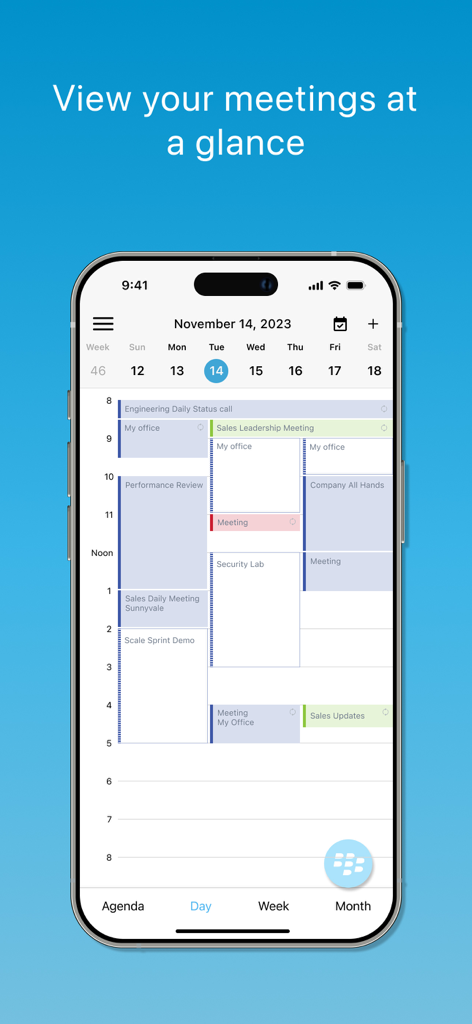
iPhone에서 일일 회의 일정을 보여주는 BlackBerry Work 앱 캘린더 인터페이스
iPhone에서 일일 회의 일정을 보여주는 BlackBerry Work 앱 캘린더 인터페이스

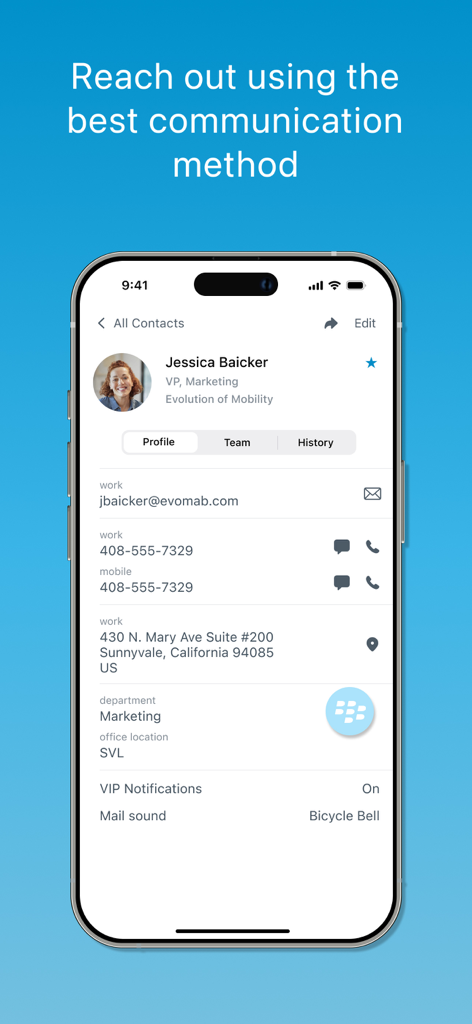
전문적인 커뮤니케이션 옵션 및 동료 정보를 보여주는 BlackBerry Work 앱 연락처 프로필 화면
전문적인 커뮤니케이션 옵션 및 동료 정보를 보여주는 BlackBerry Work 앱 연락처 프로필 화면

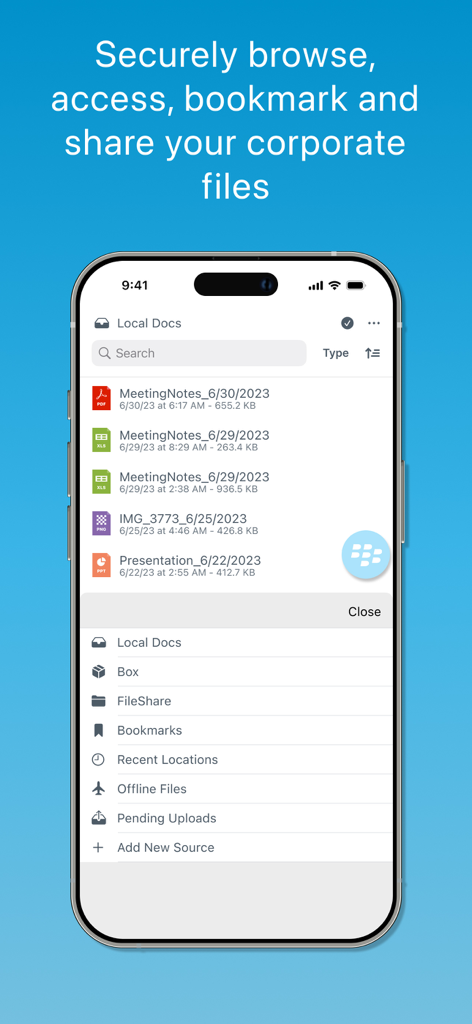
iPhone에서 안전한 기업 문서 관리 및 파일 공유 옵션을 보여주는 BlackBerry Work 앱 인터페이스
iPhone에서 안전한 기업 문서 관리 및 파일 공유 옵션을 보여주는 BlackBerry Work 앱 인터페이스

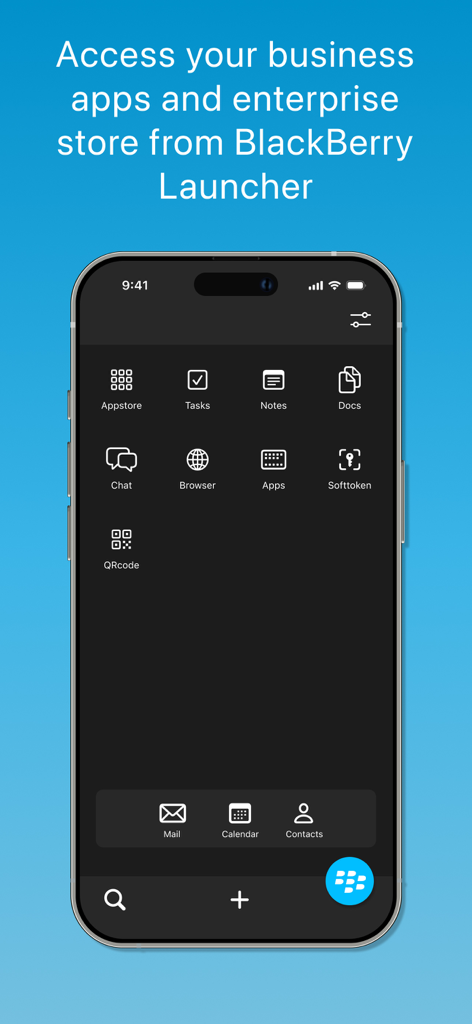
iPhone에서 기업 비즈니스 앱을 보여주는 BlackBerry Work 런처 인터페이스

iPhone에서 기업 비즈니스 앱을 보여주는 BlackBerry Work 런처 인터페이스

엔터프라이즈급 생산성, 단순화됨

이 앱을 돋보이게 하는 도구, 2M+ 명의 사용자가 선택.

🛡️

완벽한 일과 삶의 분리

개인 앱 및 위치가 엄격하게 비공개로 유지되도록 하면서 기업 데이터를 안전하게 컨테이너화합니다.

통합 비즈니스 제어

고속 멀티태스킹을 위해 구축된 직관적인 런처를 사용하여 이메일, 캘린더 및 연락처 간에 원활하게 전환하세요.

🔔

지능형 VIP 우선순위 지정

가장 중요한 연락처에 대한 사용자 지정 알림 및 실시간 상태 표시기를 사용하여 중요한 메시지를 놓치지 마세요.

앱 소개

에 대해 알아야 할 모든 것 BlackBerry Work.

설명

*** Contact your IT administrator for any help with setting up BlackBerry Work *** Take care of business simply, elegantly and securely with BlackBerry Work. Stay on top of your business email, schedule and join meetings, and manage your contacts with an easy to use, all-in-one app. BlackBerry Work delivers a personalized business experience. See your colleagues’ photos in your email. View online availability to chat everywhere you work - in email, a calendar event and on their contact card – a capability unique to BlackBerry. Quickly navigate among your business apps using Launcher. Switch easily between composing an email, adding a contact, or scheduling a calendar event with quick action buttons. And always know that your personal privacy is protected without intrusive geo-location capabilities. Simple app navigation: • Launcher: Simplify multi-tasking and app navigation with easy switching between your email, calendar, contacts, app settings and other BlackBerry apps. • Quick actions: Work smarter with quick action buttons to compose an email, schedule a meeting or add a contact. • Contextual file actions: Choose the right actions for your documents – edit, annotate, save, print, sign, etc. based on the other BlackBerry-secured apps installed on your device Improve productivity: • Email: Manage your inbox on the go! Check and respond to email, move messages to a folder, and take and attach photos. • Calendar: Stay in touch with your colleagues, customers and partners wherever you are. Join meetings or schedule new ones. Even send a quick reply message if you are running late. • Contacts: See all of your Outlook contacts, personal and work. Add additional information to the contact card or get the caller ID by sync’ing the contacts to the device. Personalize your experience: • Directory Photos: Your inbox, calendar and contacts now displays photos from your global address list so you can now enjoy more effective social interactions • People centric collaboration: Choose the best way to reach your colleagues based on their online availability status. Initiate a call, an email, an IM or an SMS from within the app them based on their availability. Quick notifications: • Badges: See how many unread email you have right on your device home screen without opening the app. . • VIP notifications: Never miss an important message. Set VIP status for key contacts to be notified via custom alerts when they send you an email.

최신 버전

3.19.2.1004

크기

99.9 MB

출시일

2014년 7월 13일

안전한 모바일 작업 공간을 제어하세요

이동 중에도 우아하고 암호화되며 효율적인 비즈니스 이동성을 위해 BlackBerry Work를 신뢰하는 2백만 명 이상의 전문가와 함께하세요.

다운로드: App Store다운로드: Google Play

App information, icons, screenshots, and descriptions displayed on this page are sourced from the Apple App Store and are the property of their respective developers. Download estimates and rankings are based on MWM's proprietary models and may not reflect actual figures. This page is provided for informational and analytical purposes only.

Believe this page infringes your intellectual property? File a dispute