Blood Test result management
다운로드: App Store

이 페이지는 앱이나 개발자의 공식 페이지가 아니며, 정보 제공 및 논평을 목적으로 작성된 독립 편집 간행물입니다. 명시적으로 달리 언급되지 않는 한, 해당 앱이나 개발자는 MWM, Apple, Google Play, 앱 퍼블리셔 또는 앱 개발자와 제휴, 보증, 후원, 승인 또는 공식적으로 연결되어 있지 않으며, 이 페이지의 어떤 내용도 해당 앱이 MWM의 서비스를 사용하여 개발되었음을 의미하지 않습니다. 모든 상표, 로고, 스크린샷 및 기타 콘텐츠는 해당 소유자의 자산입니다.


로고: Blood Test result management
다운로드: App Store

Blood Test result management

파편화된 검사 보고서를 단일 정보원으로 변환하세요. 직관적인 차트 작성 및 다음 의사 방문을 위한 전문적인 PDF 보고서로 가족의 혈액 검사 기록을 안전하게 추적하세요.

주요 수치

다운로드

1K+

사용자 평점

4.0/5

총 평가 수

0

개발사

YUTAKA IZUMIYAMA

카테고리

Health & Fitness

지원 언어

2

최신 버전

25.12.14

크기

4.4 MB

출시일

2024년 6월 10일
기능

건강 추세를 마스터하세요

파편화된 환자 포털을 뒤지는 것을 멈추세요. 실험실 결과를 하나의 안전한 대시보드에 통합하여 장기적인 건강 상태를 전체적으로 파악하세요.

시각적 추세 분석

정적 보고서를 대화형 차트로 변환하세요. 콜레스테롤 및 포도당과 같은 지표가 수년에 걸쳐 어떻게 추세를 보이는지 모니터링하여 라이프스타일 변화의 실제 영향을 확인하세요.

통합 가족 관리

보호자를 위한 최고의 도구입니다. 자신, 노부모 또는 자녀를 위한 별도의 건강 프로필을 관리하여 모든 기록을 하나의 비공개 장소에 정리하세요.

다음 스크린샷과 설명은 앱의 공식 스토어 목록에서 직접 가져온 것이며 앱 개발자의 자산입니다.

앱 스토어

스크린샷
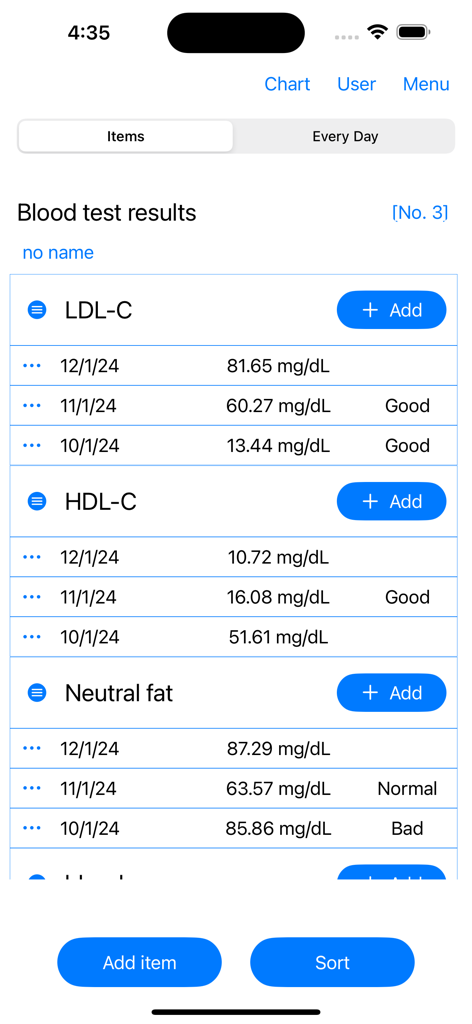
Blood Test result management - 날짜와 상태 레이블이 있는 LDL 및 HDL 콜레스테롤 혈액 검사 결과가 표시된 모바일 앱 화면.
날짜와 상태 레이블이 있는 LDL 및 HDL 콜레스테롤 혈액 검사 결과가 표시된 모바일 앱 화면.

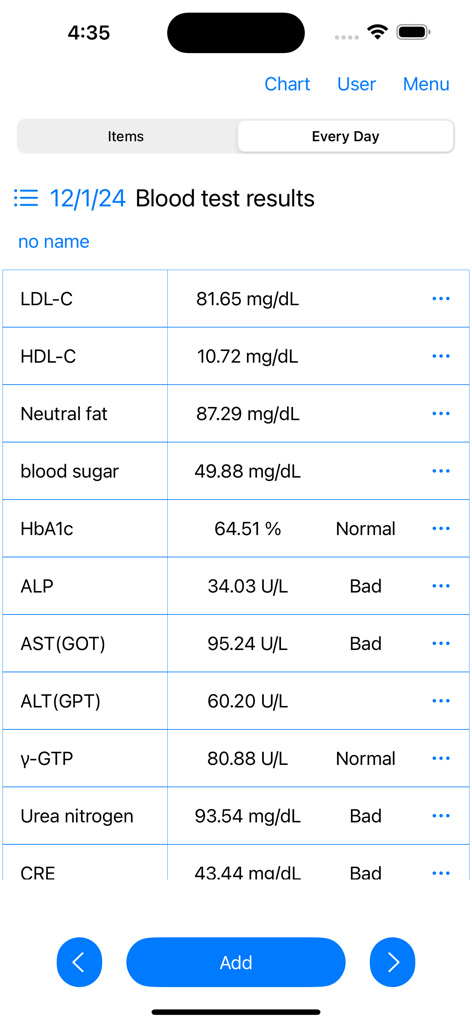
Blood Test result management - 혈액 검사 결과 및 건강 상태의 자세한 목록을 보여주는 모바일 애플리케이션 인터페이스
혈액 검사 결과 및 건강 상태의 자세한 목록을 보여주는 모바일 애플리케이션 인터페이스

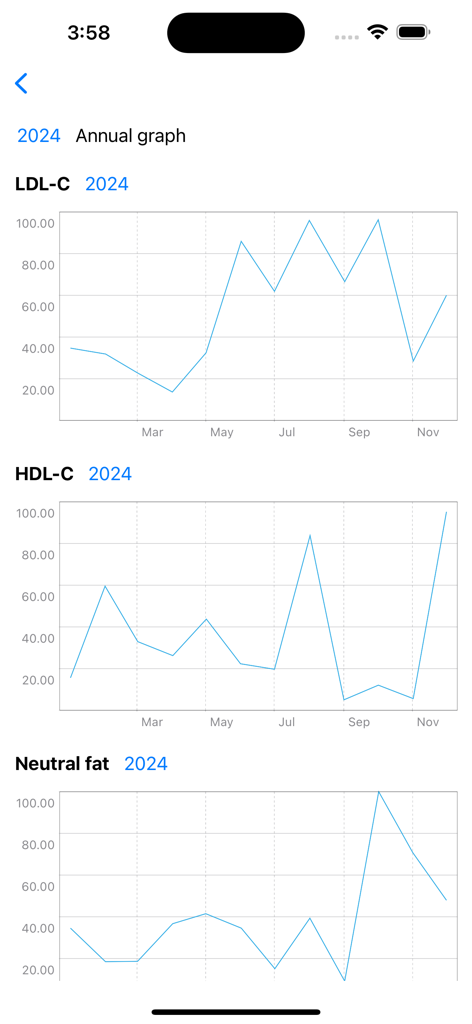
Blood Test result management - LDL-C, HDL-C 및 중성 지방 수치에 대한 연간 추세선 차트를 보여주는 앱 스크린샷.
LDL-C, HDL-C 및 중성 지방 수치에 대한 연간 추세선 차트를 보여주는 앱 스크린샷.

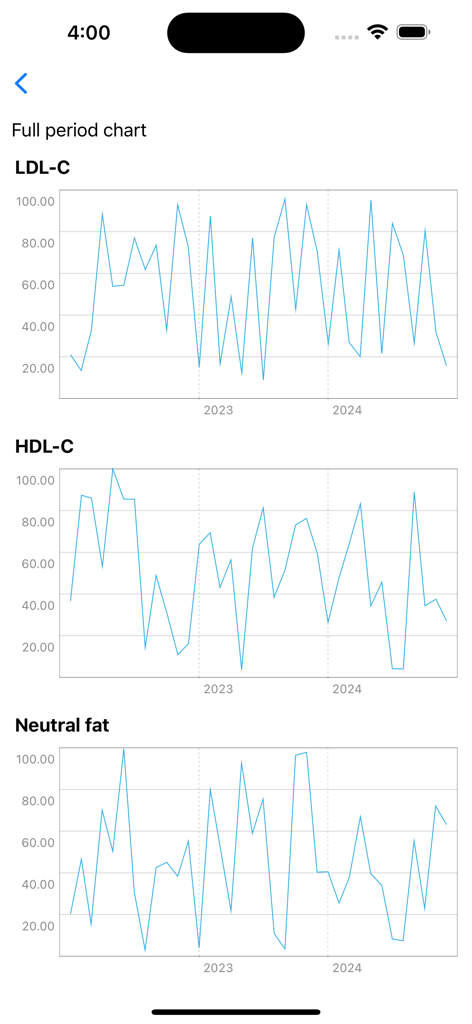
Blood Test result management - 수년에 걸친 LDL-C, HDL-C 및 중성 지방 수치를 추적하는 선 차트
수년에 걸친 LDL-C, HDL-C 및 중성 지방 수치를 추적하는 선 차트

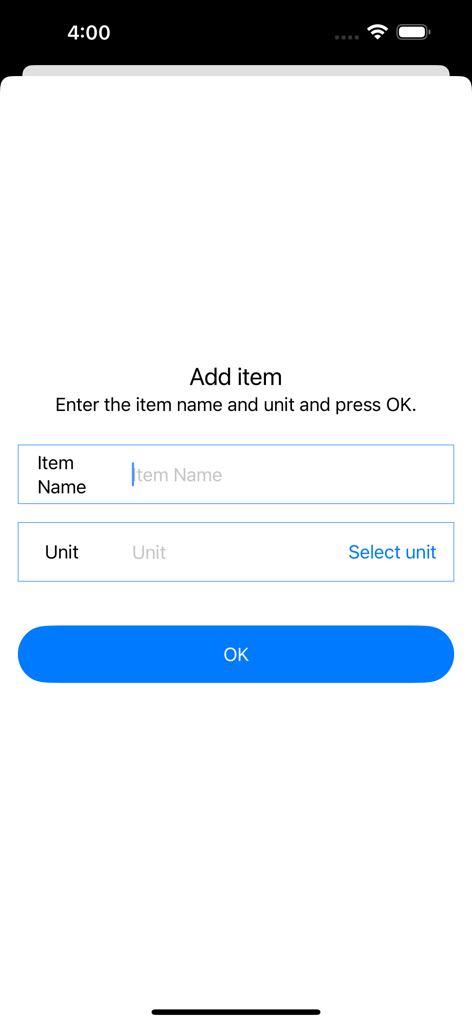
Blood Test result management - 새 혈액 검사 항목 이름 및 단위를 추가하기 위한 수동 입력 화면

새 혈액 검사 항목 이름 및 단위를 추가하기 위한 수동 입력 화면

설명

This is an app for recording blood test results and displaying charts. You can record blood test results by specifying the date. Record blood test results and display them in a chart. You can check the blood test results of each record on the chart. ▼Record blood test results 1. Press the Add button for the blood test result item. 2. Select the date of blood test and press next 3. Enter the blood test result value and press OK. 4. Enter the memo and press OK. ▼Blood test result chart 1. Press the chart at the top. 2. Press the full period chart/annual chart. 3. Displays a line chart of blood test results for each record. ▼Change/delete/set item name Press the item at the top. Tap the icon to the left of the item name to open the menu. The menu has the following items. ・Edit item name ・Edit units ・delete →Delete all item names and their records. ▼Add item Press Add Item on the item screen. Enter the item name and unit and press OK. ▼sort items Press Sort on the item screen. A screen with a list of items opens. To sort, press and hold the item name. ▼Delete one record 1. Press the three dots. 2. Press Delete. 3. Confirm the deletion details and press the delete button. ▼Add user Tap User at the top. If you add a name from Add User, you can record them separately. To edit, tap Edit/Delete User to open the editing screen. You can switch users by tapping the user name in user selection. ▼Create PDF file (top right menu) Create a PDF file. You can create a PDF file by specifying the year. If you want to print, please share the PDF file to an app that can print before printing. ▼Dark mode (top right menu) Select dark mode ON/OFF from the menu on the top right Press Dark Mode to switch to a screen display with a color scheme based on black. If you press Light mode, the screen will be displayed in the normal white color. ▼Delete all records (top right menu) From the menu on the top right, select Erase all data. You can delete all records. ・Model change data migration For users with the same Apple ID Because records are stored in iCloud View the same recording on a new iPhone/iPad

Download

다운로드: App Store

이 페이지는 앱이나 개발자의 공식 페이지가 아니며, 정보 제공 및 논평을 목적으로 작성된 독립 편집 간행물입니다. 명시적으로 달리 언급되지 않는 한, 해당 앱이나 개발자는 MWM, Apple, Google Play, 앱 퍼블리셔 또는 앱 개발자와 제휴, 보증, 후원, 승인 또는 공식적으로 연결되어 있지 않으며, 이 페이지의 어떤 내용도 해당 앱이 MWM의 서비스를 사용하여 개발되었음을 의미하지 않습니다. 모든 상표, 로고, 스크린샷 및 기타 콘텐츠는 해당 소유자의 자산입니다.