1C-RARUS TAS, MAS ULIYATI CHEKLANGAN JAMIYATI XORIJIY KORXONASI
이 페이지는 앱이나 개발자의 공식 페이지가 아니며, 정보 제공 및 논평을 목적으로 작성된 독립 편집 간행물입니다. 명시적으로 달리 언급되지 않는 한, 해당 앱이나 개발자는 MWM, Apple, Google Play, 앱 퍼블리셔 또는 앱 개발자와 제휴, 보증, 후원, 승인 또는 공식적으로 연결되어 있지 않으며, 이 페이지의 어떤 내용도 해당 앱이 MWM의 서비스를 사용하여 개발되었음을 의미하지 않습니다. 모든 상표, 로고, 스크린샷 및 기타 콘텐츠는 해당 소유자의 자산입니다.
BOSS Small Business Accounting
비싼 하드웨어와 복잡한 소프트웨어는 잊으세요. 기업가를 위한 가장 저렴한 올인원 도구로 스마트폰에서 직접 재고를 추적하고, 바코드를 스캔하며, 글로벌 매출을 관리하세요.
주요 수치
다운로드
646K+
사용자 평점
4.4/5
총 평가 수
2K+
개발사
1C-RARUS TAS, MAS ULIYATI CHEKLANGAN JAMIYATI XORIJIY KORXONASI
카테고리
Business
지원 언어
22
최신 버전
3.0.33
크기
157.3 MB
출시일
2015년 12월 3일
기능
비즈니스 성장에 필요한 모든 것
비싼 하드웨어와 복잡한 소프트웨어에 돈을 낭비하지 마세요. BOSS는 전문적인 재고, 회계 및 보고 도구를 당신의 주머니 속에 담았습니다.
모바일 바코드 스캐닝
스마트폰을 전문 스캐너로 변신시키세요. 추가 하드웨어를 구매하지 않고도 재고를 관리하고 가격표를 즉시 업데이트할 수 있습니다.
실시간 수익 통계
매출, 채무, 현금 흐름을 한눈에 확인하세요. 몇 초 만에 상세한 재무 보고서를 생성하여 더욱 스마트한 비즈니스 의사 결정을 내릴 수 있습니다.
다음 스크린샷과 설명은 앱의 공식 스토어 목록에서 직접 가져온 것이며 앱 개발자의 자산입니다.
앱 스토어
스크린샷
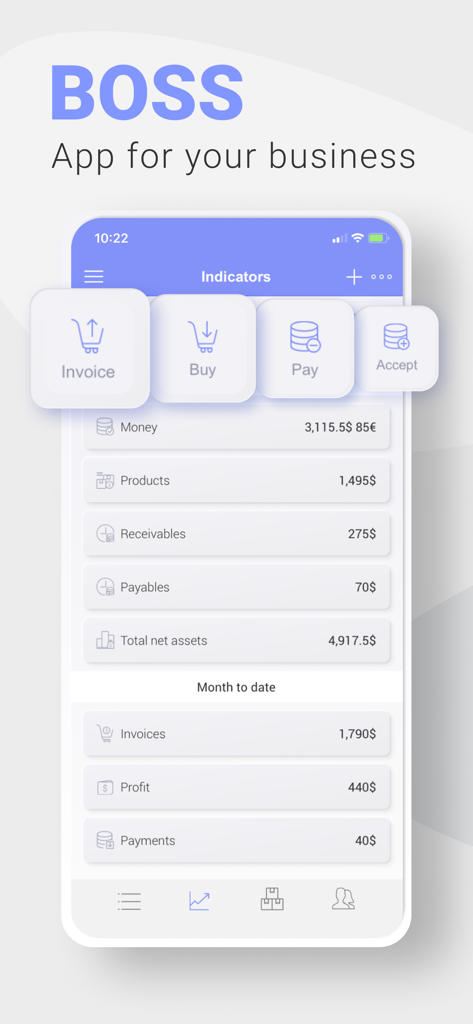
주요 재무 지표와 퀵 액션 버튼을 보여주는 BOSS 소규모 비즈니스 회계 모바일 대시보드
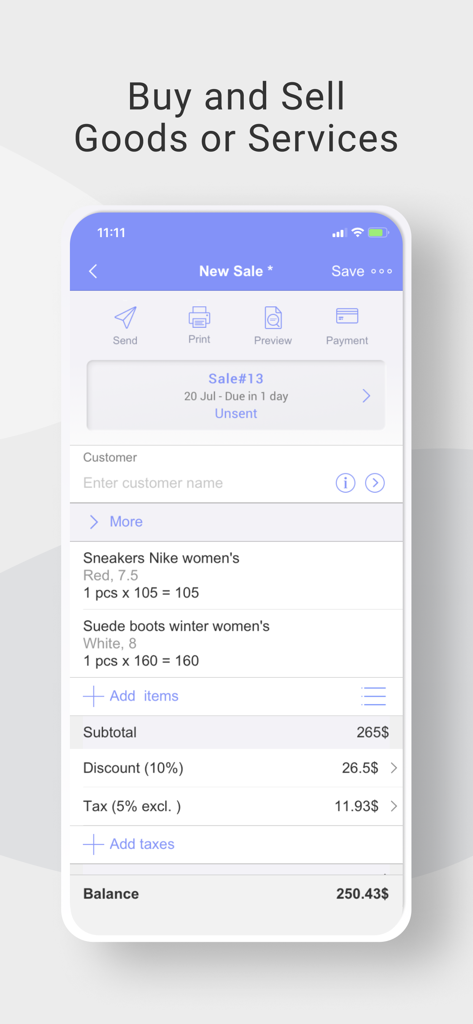
품목, 할인 및 총 잔액이 표시된 새 판매 화면을 보여주는 BOSS 소규모 비즈니스 회계 앱 인터페이스
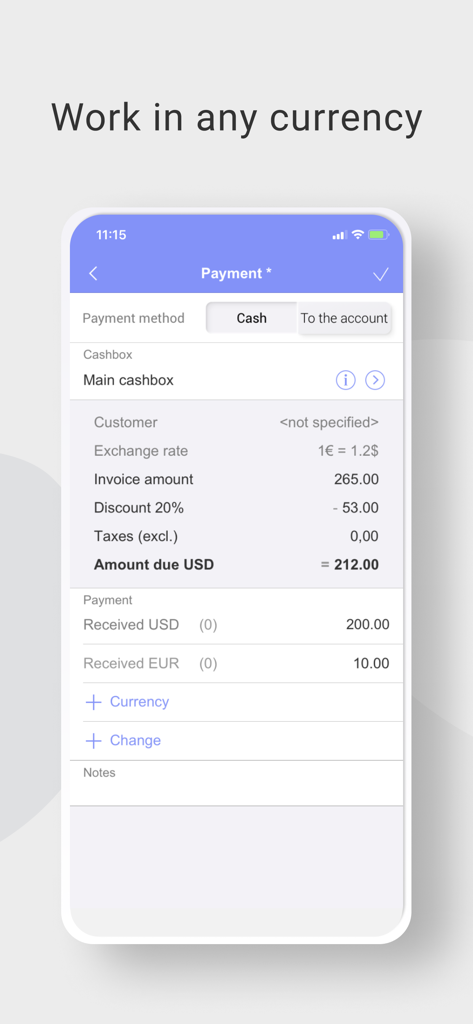
유로와 달러 간의 다중 통화 변환이 포함된 결제 영수증을 보여주는 BOSS 회계 앱의 스마트폰 화면
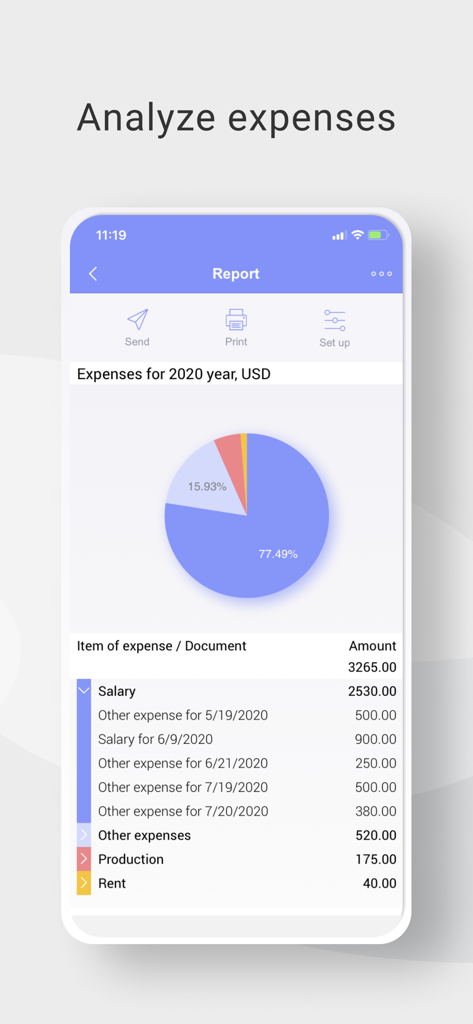
파이 차트와 비용 목록이 포함된 BOSS 회계 앱의 연간 지출 보고서
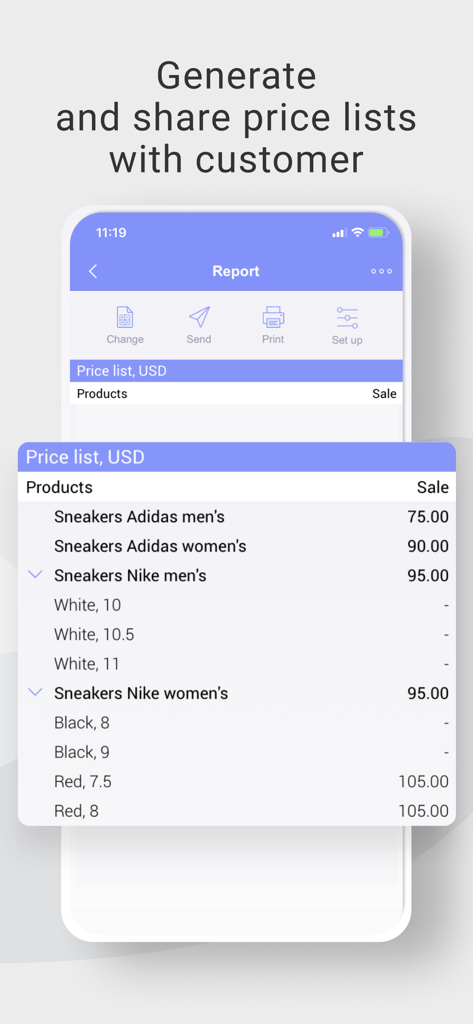
소매 제품의 상세 가격표를 표시하는 BOSS 소규모 비즈니스 회계 앱의 스마트폰 화면
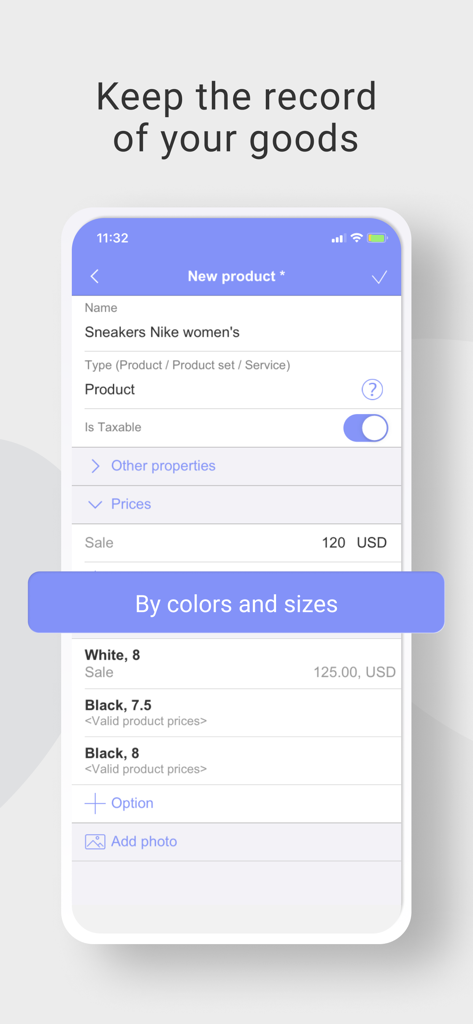
사이즈 및 색상 옵션이 포함된 제품 재고를 관리하기 위한 BOSS 소규모 비즈니스 회계 앱 화면
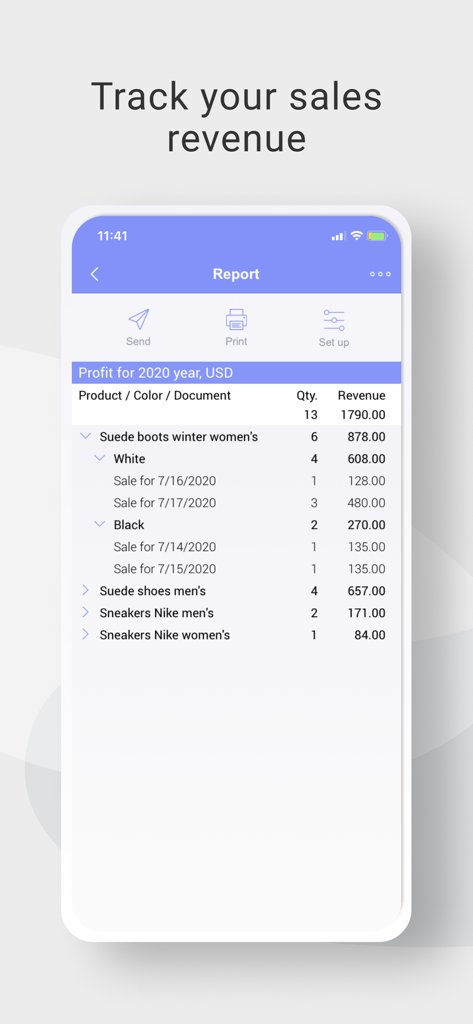
다양한 제품의 상세 수익 및 매출 보고서를 보여주는 BOSS 회계 앱의 모바일 화면
설명
Don’t waste your time on things that don’t bring you revenue. Boss was created to give you an opportunity to do business whenever and wherever you want. Our tutorial will help you harness the power of the app, even if you have never worked with accounting software before. With Boss, your business, big or small, can fit on your smartphone.
You will be able to use your mobile device to:
- Sell or buy goods and services (retail, wholesale, store credit, Debt, Cash).
- Maintain inventory records and generate price lists.
- Create and distribute pricing tables to your wholesale customers.
- Receive and spend money in any currency.
- Conduct mutual settlements with customers, suppliers, and other partners.
- Record inventory counts and revaluation of stock.
- Scan barcodes with your device’s camera.
- Keep accounts in multiple currencies at the same time.
- Estimate your expenses and profitability.
- Print documents directly from the app.
A penny saved is a penny earned, and with Boss, you will save a lot of money. No need to buy a barcode scanner, an extra PC, or business software. With Boss, all you need is your smartphone. Start saving money now!
Features included with Boss:
- Multi-currency option allows you to run transactions with your customers in multiple currencies at the same time.
- Add a barcode and a photo to any product. This feature makes inventory bookkeeping so much easier.
- Make out an invoice directly from the app, and send it by email or share with any other messaging app.
- Generate any kind of report in just a few seconds: sales report, debt report, balance report, cost-of-sales, profit and loss report, and so on.
- Ability to calculate and itemize your expenses.
- Inventory is maintained in real time.
- Choose the best possible ROS (Return on Sales) calculation for your business.
- Two user modes: The Cashier and The Owner. The Owner can choose the number of functions available for the Cashiers.
How it works in practice:
On the main screen, you can see key business indicators such sales, leftover stock, income, debt, accounts receivable, and costs. You can add any additional indicator you need.
Quick action buttons are located at the top of the main menu. They are “Sell,” “Pay,” “Receive Payment,” and “Rates of Exchange.”
The following actions are below:
- Sales: Goods Issues and Drop Off.
- Money: Inflow (cash receipt voucher), Outflow (cash payment voucher), Transfers, and Rates of Exchange.
- Purchases and Stock: Transfers, Capitalization, Deactivation, Inventory, and Input of Leftover Stock.
- Catalogs - Goods and Services (Assortment), Clients (Customers), Suppliers, Employees, Currencies, Cash Desks, and Stocks.
The above are followed by Reports. Reports are presented as adjustable tables and graphics. Different filters are available. Types of reports are:
- Sales Report: This report describes sales from customers, goods, stocks, and documents. It can take into account earning capacity and extra charges.
- Goods: This is a report of a leftover stock. Here you can find prime costs, quantity, and sum at any price.
- Money report: Four types are available: Leftover stock, Money turnover, Dynamics, and Cash Flow.
- Debt Report: May be analyzed. Includes Accounts Receivable, Dynamics, and Money Turnover.
- Incomes and costs are available taking into account articles that may be added.
- Price list: It is important to be able to change the prices just in the price list. Revaluation will be made by upgraded price lists.
- Financial Result.
Paid subscription options:
- Auto-renewable subscription - $6.99 per month or $66.99 per year.
- Payment will be charged to iTunes Account at confirmation of purchase
- You can Cancel subscription by going to the user's Account Settings after purchase (do it at least 24-hours before the end of period to avoid the next period charge)
Privacy Policy - https://boss-app.online/en/privacy-policy/
Terms of Service - https://boss-app.online/en/terms-of-use/
이 페이지는 앱이나 개발자의 공식 페이지가 아니며, 정보 제공 및 논평을 목적으로 작성된 독립 편집 간행물입니다. 명시적으로 달리 언급되지 않는 한, 해당 앱이나 개발자는 MWM, Apple, Google Play, 앱 퍼블리셔 또는 앱 개발자와 제휴, 보증, 후원, 승인 또는 공식적으로 연결되어 있지 않으며, 이 페이지의 어떤 내용도 해당 앱이 MWM의 서비스를 사용하여 개발되었음을 의미하지 않습니다. 모든 상표, 로고, 스크린샷 및 기타 콘텐츠는 해당 소유자의 자산입니다.