
이 페이지는 앱이나 개발자의 공식 페이지가 아니며, 정보 제공 및 논평을 목적으로 작성된 독립 편집 간행물입니다. 명시적으로 달리 언급되지 않는 한, 해당 앱이나 개발자는 MWM, Apple, Google Play, 앱 퍼블리셔 또는 앱 개발자와 제휴, 보증, 후원, 승인 또는 공식적으로 연결되어 있지 않으며, 이 페이지의 어떤 내용도 해당 앱이 MWM의 서비스를 사용하여 개발되었음을 의미하지 않습니다. 모든 상표, 로고, 스크린샷 및 기타 콘텐츠는 해당 소유자의 자산입니다.

Calculator - Pad Edition
아이패드는 단순한 콘텐츠 소비 기기가 아닙니다. 이 앱은 당신의 손에 숫자 세계를 완벽하게 지배할 권한을 부여합니다.
다운로드
12.5M+사용자 평점
총 평가 수
737.4K개발사
카테고리
Utilities지원 언어
34최신 버전
7.1크기
46.0 MB출시일
2013년 8월 14일'Calculator - Pad Edition' 앱 분석
주요 기능 및 대상 사용자 영향도 평가
기본 및 공학용 계산기
이 앱은 세로 모드에서 기본 계산을, 가로 모드에서 공학 계산을 포함한 광범위한 계산 기능을 제공하며, 메모리 버튼과 각도 단위 전환 등을 통해 사용자가 복잡한 수식을 처리할 수 있도록 지원합니다.
단위 및 환율 변환기
이 도구는 매일 업데이트되는 환율 정보를 포함한 국제 통화 변환과 면적, 데이터, 길이 등 다양한 범주의 단위 변환 기능을 제공하여 사용자가 여러 단위를 편리하게 상호 변환할 수 있도록 합니다.
프로그래머용 계산기
이 앱은 이진법, 8진법, 10진법, 16진법 간의 원활한 전환을 지원하고, 산술 및 논리 연산 수행, 내장된 비트 편집기를 통한 개별 비트 조작 기능을 제공하여 프로그래밍 및 공학 계산에 특화된 기능을 제공합니다.
분수 계산기
이 앱에는 분수 문제를 해결하기 위한 내장 분수 계산기가 포함되어 있으며, 결과를 가분수, 대분수 또는 소수 형식으로 표시하여 사용자가 분수 계산을 빠르고 쉽게 수행할 수 있도록 합니다.
팁 계산 및 N분의 1
이 도구는 식비에 대한 팁을 즉석에서 계산하고, 청구서를 분할하여 여러 사람과 공유하며, 총액, 팁 또는 1인당 금액을 쉽게 반올림할 수 있는 기능을 제공하여 사용자가 일상적인 재정 관리를 편리하게 할 수 있도록 돕습니다.
사용자 편의성 및 효율성
이 앱은 전체 계산식을 표시하고 이전 계산 기록을 확인하며, 숫자를 복사하고 붙여넣는 기능을 제공하여 사용자의 작업 흐름을 효율적으로 만듭니다. 또한, 분할 화면 멀티태스킹 및 외부 하드웨어 키보드 입력도 지원합니다.
맞춤형 인터페이스
이 앱은 다양한 테마를 제공하고, 크기 조정 및 드래그 가능한 인터페이스를 통해 한 손 사용을 용이하게 하며, 핀치 투 스케일(확대/축소) 기능으로 계산기 크기를 조절할 수 있어 사용자가 개인의 선호에 맞춰 인터페이스를 사용자화할 수 있도록 합니다.
iOS 디자인 및 위젯 연동
이 앱은 iOS의 현대적인 플랫 UI 디자인을 채택하여 순정 앱과 같은 일관된 시각적 경험을 제공합니다. 또한, 위젯을 통해 계산 결과를 빠르게 확인하고 기본적인 계산을 수행할 수 있도록 합니다.
자주 묻는 질문
에 대해 알아야 할 모든 것 Calculator - Pad Edition
Does Calculator - Pad Edition support scientific calculations?
Yes, Calculator - Pad Edition supports both basic and scientific calculations. Basic functions are available in portrait mode, while scientific functions like trigonometry and logarithms appear in landscape mode.
Does Calculator - Pad Edition include a unit converter?
Yes, Calculator - Pad Edition includes a comprehensive unit converter. It handles currency with daily updated exchange rates, along with various categories like area, data, length, mass, and temperature.
Can Calculator - Pad Edition handle fraction calculations?
Yes, Calculator - Pad Edition features a built-in Fraction Calculator. It solves fraction math problems and displays results as proper fractions, improper fractions, or decimal numbers.
Does Calculator - Pad Edition offer a programmer calculator?
Yes, Calculator - Pad Edition provides a Programmer Calculator. It supports multi-base calculations, allowing seamless switching between binary, octal, decimal, and hexadecimal bases for arithmetic and logical operations.
Does Calculator - Pad Edition have a tip calculator and bill splitter?
Yes, Calculator - Pad Edition features a Tip Calculator. It calculates tip percentages on the fly and includes a bill splitter to easily share costs among multiple people.
Can Calculator - Pad Edition be accessed via an iOS widget?
Yes, Calculator - Pad Edition supports access via a widget. Users can add the Calculator widget to view results and perform calculations directly from the iOS widget list.
Does Calculator - Pad Edition save calculation history?
Yes, Calculator - Pad Edition records previous calculations. Users can check their calculation history to review past equations and results within the app.
Does Calculator - Pad Edition support external keyboard input?
Yes, Calculator - Pad Edition supports external hardware keyboard input. This feature allows users to easily input numbers and operations, enhancing usability.
다음 스크린샷과 설명은 앱의 공식 스토어 목록에서 직접 가져온 것이며 앱 개발자의 자산입니다.
앱 스토어
스크린샷
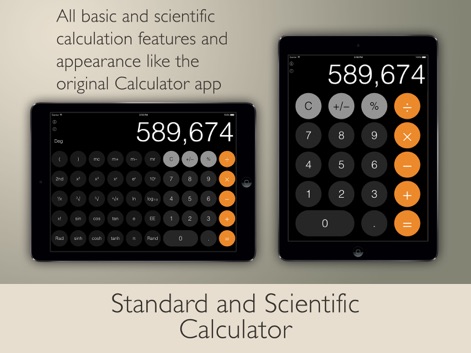
표준 및 공학 계산
이 앱은 세로 모드에서 기본 계산을, 가로 모드에서 다양한 공학 계산 기능을 제공하여 사용자의 모든 수학적 요구를 충족시킵니다.

분수 계산 마스터
분수 계산기를 통해 사용자는 복잡한 분수 수학 문제를 빠르고 쉽게 해결할 수 있으며, 분수 입력과 결과 표시를 명확하게 확인할 수 있습니다.
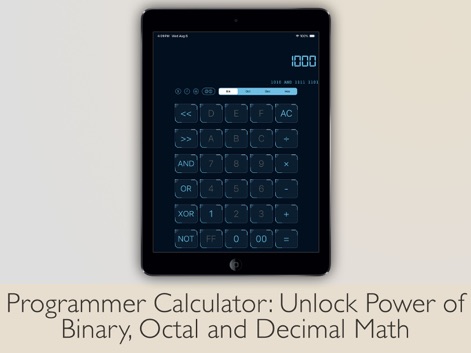
프로그래머 전용 계산
프로그래머 계산기는 이진, 팔진, 십진 및 십육진수 사이의 원활한 전환을 지원하며, 다양한 논리 연산을 수행할 수 있게 합니다.

통합 단위 변환
이 앱은 통화 환율과 같은 광범위한 단위를 지원하는 강력한 변환 기능을 내장하고 있으며, 사용자는 다양한 카테고리에서 단위를 자유롭게 변환할 수 있습니다.
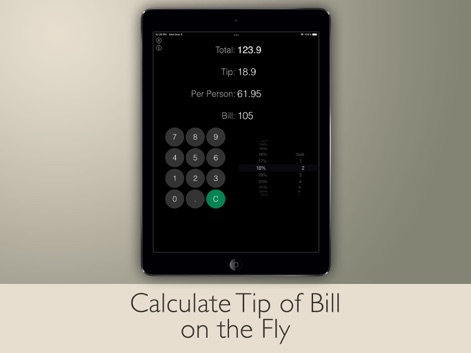
스마트 팁 계산
이 앱은 간편하게 팁 비율을 계산하고, 사용자 정의 가능한 팁 비율 선택을 통해 식사비를 인원별로 정확하게 나눌 수 있도록 돕습니다.

위젯으로 빠른 계산
사용자는 iOS 위젯을 통해 계산 결과를 빠르게 확인하고, 위젯 내에서 기본적인 계산을 즉시 수행할 수 있어 편리함을 더합니다.

계산 기록 관리
이 도구는 사용자가 이전 계산 기록을 쉽게 확인하고 재활용할 수 있도록 하며, 모든 계산 과정을 한눈에 보여주는 큰 디스플레이를 제공합니다.
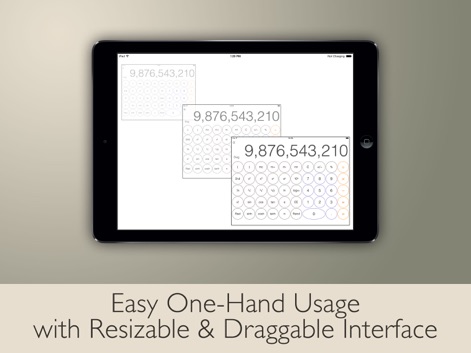
유연한 인터페이스
이 앱은 사용자가 계산기 크기를 조절하고 드래그하여 배치할 수 있는 기능을 제공하며, 이를 통해 한 손 사용이 용이한 유연한 인터페이스를 경험할 수 있습니다.
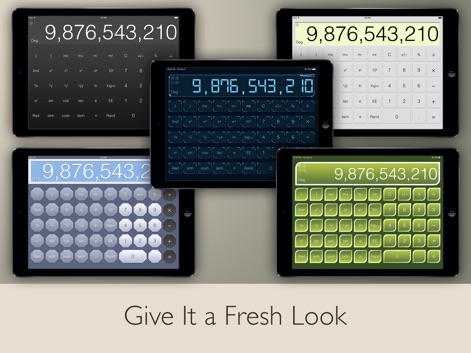
다채로운 테마 선택
사용자는 다양한 테마 옵션을 통해 앱의 디자인을 자신의 취향에 맞게 변경할 수 있으며, 여러 가지 색상과 스타일로 새로운 분위기를 연출할 수 있습니다.

외부 키보드 지원
이 앱은 외부 하드웨어 키보드 입력을 지원하여 사용자가 더 효율적으로 작업할 수 있으며, 계산 결과를 쉽게 복사하고 붙여넣을 수 있는 기능을 제공합니다.
설명
Download
비슷한 앱
유사한 기능과 사용자 경험을 가진 앱

Unit Converter - Best Unit App
Alan Mrvica
计算器i -简单好用算得快
Chongqing Frozen Technology Co., LTD
Metric Conversion tool
Wight Hat Ltd
Convert Any Unit
Cider Software LLC
Calculator with History +
Beijing Free Calculator Technology Co., Ltd.

ClevCalc - Calculator
Cleveni Inc.
Calculator for iPad!
7th Gear
Calculator!
7th Gear

Calzy
Raja V
이 페이지는 앱이나 개발자의 공식 페이지가 아니며, 정보 제공 및 논평을 목적으로 작성된 독립 편집 간행물입니다. 명시적으로 달리 언급되지 않는 한, 해당 앱이나 개발자는 MWM, Apple, Google Play, 앱 퍼블리셔 또는 앱 개발자와 제휴, 보증, 후원, 승인 또는 공식적으로 연결되어 있지 않으며, 이 페이지의 어떤 내용도 해당 앱이 MWM의 서비스를 사용하여 개발되었음을 의미하지 않습니다. 모든 상표, 로고, 스크린샷 및 기타 콘텐츠는 해당 소유자의 자산입니다.