
이 페이지는 앱이나 개발자의 공식 페이지가 아니며, 정보 제공 및 논평을 목적으로 작성된 독립 편집 간행물입니다. 명시적으로 달리 언급되지 않는 한, 해당 앱이나 개발자는 MWM, Apple, Google Play, 앱 퍼블리셔 또는 앱 개발자와 제휴, 보증, 후원, 승인 또는 공식적으로 연결되어 있지 않으며, 이 페이지의 어떤 내용도 해당 앱이 MWM의 서비스를 사용하여 개발되었음을 의미하지 않습니다. 모든 상표, 로고, 스크린샷 및 기타 콘텐츠는 해당 소유자의 자산입니다.


Calculator with History +
당신은 숫자를 정복합니다. 'Calculator with History +'는 모든 계산을 기억하고, 지저분한 화면을 지우고, 사용자가 원하는 대로 맞춤 설정할 수 있게 합니다.
다운로드
10M+사용자 평점
총 평가 수
339.3K개발사
카테고리
Finance지원 언어
31최신 버전
6.9.16크기
12.0 MB출시일
2019년 4월 23일종합적인 분석
Calculator with History + 주요 기능 심층 분석
고급 과학 계산 기능
이 앱은 삼각 함수, 로그, 지수 등 광범위한 과학 계산 기능을 갖추고 있어 학술 및 전문적인 요구사항을 충족합니다.
광고 없는 빠른 실행
이 앱은 광고 방해 없이 빠른 실행 속도를 제공하여 즉각적인 계산 환경을 보장합니다.
VoiceOver 접근성 지원
이 도구는 VoiceOver 기능을 갖추고 있어 시각 장애가 있는 사용자도 앱을 쉽게 이용할 수 있도록 접근성을 강화합니다.
계산 기록 기능
이 도구는 사용자가 이전 계산 기록을 확인하고 재활용할 수 있게 해주어 복잡한 작업 효율성을 높입니다.
백스페이스 키
이 도구는 백스페이스 키를 제공하여 입력 오류 발생 시 쉽게 수정할 수 있게 해줍니다.
한 손 사용 편의성
이 앱은 한 손으로 쉽게 조작할 수 있도록 설계되어 이동 중에도 편리하게 사용할 수 있습니다.
정밀한 숫자 표시 옵션
이 앱은 사용자가 소수점 이하 자릿수를 조정하고 천 단위 구분 기호를 설정할 수 있게 해주어 숫자의 가독성과 정확성을 높입니다.
시각적 입력 지원
이 앱은 시각적 입력 방식을 제공하여 사용자가 수식을 더 직관적으로 확인하고 오류를 쉽게 수정할 수 있도록 돕습니다.
과학 함수 표시/숨김
사용자는 과학 함수 패널을 필요에 따라 표시하거나 숨길 수 있어 인터페이스를 깔끔하게 유지하거나 고급 기능에 빠르게 접근할 수 있습니다.
맞춤형 키보드 옵션
사용자는 19가지 키보드 사운드, 24가지 색상, 진동 피드백을 통해 키보드를 개인화할 수 있어 사용자 경험을 향상시킵니다.
자주 묻는 질문
에 대해 알아야 할 모든 것 Calculator with History +
Is Calculator with History + a free app without ads?
Yes, Calculator with History + is a free calculator app for iPhone. It does not contain any advertisements.
Does Calculator with History + save calculation history?
Yes, Calculator with History + includes a calculation history feature. Users can review and access their past calculations within the application.
Can users change the keyboard colors in Calculator with History +?
Yes, Calculator with History + allows users to customize keyboard colors. It offers 24 different keyboard color options for personalization.
Does Calculator with History + include scientific functions?
Yes, Calculator with History + functions as a scientific calculator. It includes advanced functions like pi, exponents, logarithms, trigonometry, square root, and brackets.
Does Calculator with History + support accessibility features like VoiceOver?
Yes, Calculator with History + includes VoiceOver support. This accessibility feature assists users with visual impairments by providing spoken feedback.
Does Calculator with History + have keyboard sounds?
Yes, Calculator with History + features keyboard sounds. Users can choose from 19 different sound options for key presses.
Does Calculator with History + offer a BMI Calculator?
Yes, Calculator with History + provides a BMI Calculator. Users can measure body shape by accurately entering their height and weight.
Is there a fraction calculator in Calculator with History +?
Yes, Calculator with History + features a dedicated Fraction Calculator. This allows users to perform operations directly with fractions.
Does Calculator with History + have a currency converter?
Yes, Calculator with History + includes a Currency Converter. It also offers a Unit Converter for various measurements, providing comprehensive conversion tools.
Can users adjust decimal places and use a thousands separator in Calculator with History +?
Yes, Calculator with History + allows users to adjust the number of decimal places. It also includes a thousands separator for improved readability of large numbers.
다음 스크린샷과 설명은 앱의 공식 스토어 목록에서 직접 가져온 것이며 앱 개발자의 자산입니다.
앱 스토어
스크린샷
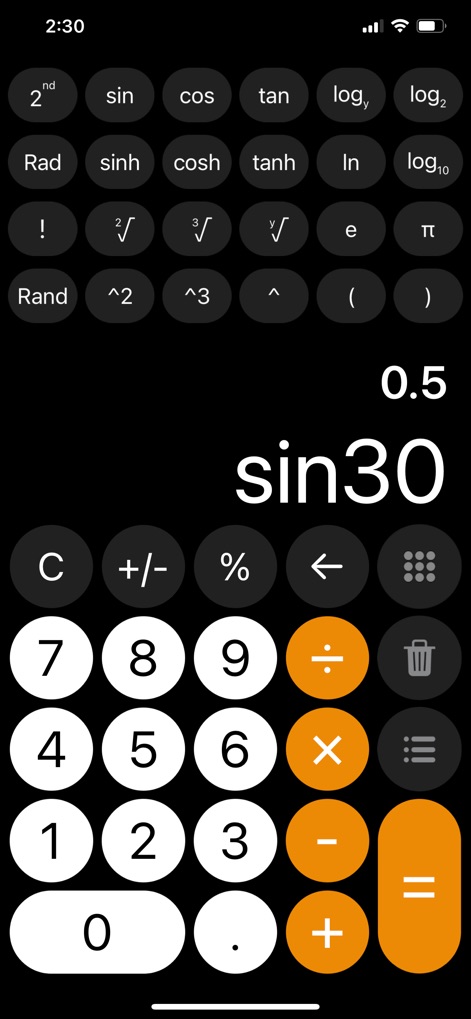
이 앱은 사인, 코사인, 탄젠트와 같은 다양한 삼각 함수를 제공하며, 사용자는 'sin30'과 같은 복잡한 계산 결과를 즉시 확인할 수 있습니다.
고급 과학 계산
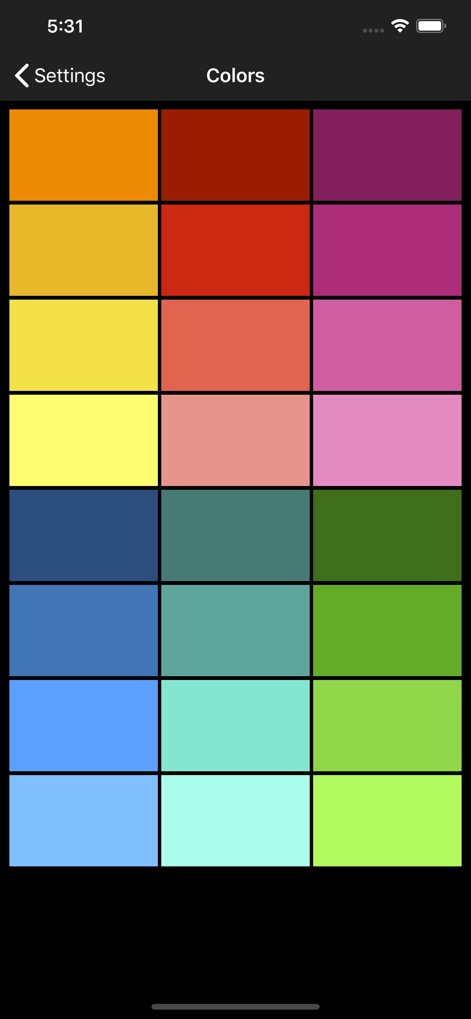
사용자는 24가지의 다채로운 키보드 색상 중에서 취향에 맞게 선택하여 계산기 디자인을 개인화할 수 있습니다. 설정 메뉴에서 색상 팔레트가 명확하게 표시됩니다.
다양한 키보드 색상

이 앱은 이전 계산 내역을 명확하게 표시하여 사용자가 과거 작업을 쉽게 추적하고 다시 확인할 수 있도록 돕습니다. '6x(12+8)'과 같은 복잡한 수식도 함께 기록됩니다.
계산 기록 관리

이 계산기는 방해 없이 깨끗하고 집중적인 사용 환경을 제공하며, 화면 상단에 'No ads' 표시를 통해 광고 없음이 확인됩니다.
광고 없는 경험

이 도구는 사인, 로그, 파이와 같은 고급 과학 함수를 지원하여 공학 및 학술 계산에 적합합니다. 'sin30 = 0.5'와 같은 예시가 명확하게 보입니다.
강력한 과학 기능

이 앱은 음성 안내 기능을 통해 계산 과정을 들려주어 사용자가 입력 오류를 줄이고 결과를 쉽게 확인할 수 있습니다. 화면 상단에 커다란 스피커 아이콘이 음성 기능을 나타냅니다.
음성 안내 계산

사용자는 메모 앱과 같은 다른 애플리케이션 내에서도 계산기 키보드를 직접 활용하여 '36x88'과 같은 계산을 손쉽게 수행할 수 있습니다. 숫자 패드와 함께 연산자 버튼이 통합되어 있습니다.
내장 계산기 키보드
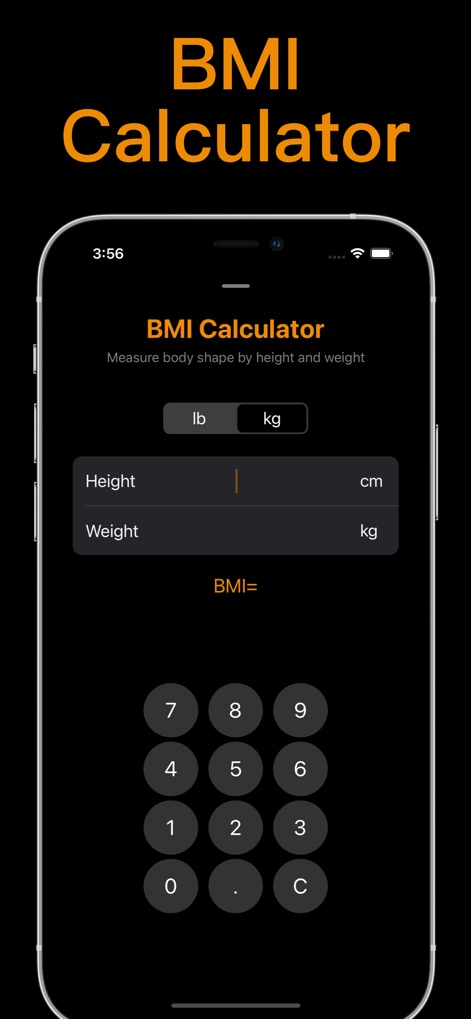
이 앱은 신장과 체중을 입력하여 BMI(체질량지수)를 정확하게 계산할 수 있도록 돕습니다. 사용자는 측정 단위를 'lb' 또는 'kg'으로 선택하여 입력할 수 있습니다.
정확한 BMI 계산

사용자는 이 분수 계산기를 통해 일반적인 분수와 혼합 분수를 손쉽게 입력하고 계산할 수 있습니다. '3과 6/8'과 같은 복잡한 분수 입력 방식이 명확하게 보입니다.
분수 계산의 편리함

이 앱은 다양한 통화(예: 미국 달러, 유로, 일본 엔) 간의 실시간 환율 변환 기능을 제공합니다. 사용자는 여러 국가의 통화 목록과 변환 값을 한눈에 확인할 수 있습니다.
환율 및 단위 변환
설명
Download
비슷한 앱
유사한 기능과 사용자 경험을 가진 앱

Unit Converter - Best Unit App
Alan Mrvica
计算器i -简单好用算得快
Chongqing Frozen Technology Co., LTD
Metric Conversion tool
Wight Hat Ltd
Convert Any Unit
Cider Software LLC
Calculator - Pad Edition
Ratha Sou

ClevCalc - Calculator
Cleveni Inc.
Calculator for iPad!
7th Gear
Calculator!
7th Gear

Calzy
Raja V
이 페이지는 앱이나 개발자의 공식 페이지가 아니며, 정보 제공 및 논평을 목적으로 작성된 독립 편집 간행물입니다. 명시적으로 달리 언급되지 않는 한, 해당 앱이나 개발자는 MWM, Apple, Google Play, 앱 퍼블리셔 또는 앱 개발자와 제휴, 보증, 후원, 승인 또는 공식적으로 연결되어 있지 않으며, 이 페이지의 어떤 내용도 해당 앱이 MWM의 서비스를 사용하여 개발되었음을 의미하지 않습니다. 모든 상표, 로고, 스크린샷 및 기타 콘텐츠는 해당 소유자의 자산입니다.