
이 페이지는 앱이나 개발자의 공식 페이지가 아니며, 정보 제공 및 논평을 목적으로 작성된 독립 편집 간행물입니다. 명시적으로 달리 언급되지 않는 한, 해당 앱이나 개발자는 MWM, Apple, Google Play, 앱 퍼블리셔 또는 앱 개발자와 제휴, 보증, 후원, 승인 또는 공식적으로 연결되어 있지 않으며, 이 페이지의 어떤 내용도 해당 앱이 MWM의 서비스를 사용하여 개발되었음을 의미하지 않습니다. 모든 상표, 로고, 스크린샷 및 기타 콘텐츠는 해당 소유자의 자산입니다.


Calculator #
이 앱은 당신의 계산기를 박물관 유물로 만듭니다. 'Calculator #'는 비용 절감이라는 명분으로 수학적 지배력을 선사합니다.
다운로드
5M+사용자 평점
총 평가 수
116.1K개발사
카테고리
Utilities지원 언어
15최신 버전
7.1크기
56.5 MB출시일
2011년 8월 31일고급 계산, 그래프 및 문제 해결을 위한 이 앱의 핵심 역량 평가
Calculator # 앱 심층 분석: STEM 학생 및 전문가를 위한 필수 기능
AI 기반 수학 문제 해결사
이 앱은 복잡한 수학 문제를 인공지능 기반으로 단계별 풀이를 제공하여 사용자가 학습하고 이해하는 데 도움을 줍니다.
고급 2D 그래프 기능
이 도구는 F(X,Y)=0 형식의 방정식까지 지원하는 부드러운 줌 및 변환이 가능한 2D 그래프 기능을 제공하여 사용자가 함수와 데이터를 시각적으로 분석할 수 있게 해줍니다.
수학 사진 솔버
이 기능은 인쇄된 수학 문제의 사진을 찍어 즉시 풀이를 제공함으로써 사용자가 빠르고 효율적으로 문제를 해결하도록 돕습니다.
고급 수학 함수
이 앱은 사인, 코사인, 로그, 팩토리얼 등 광범위한 고급 수학 함수를 지원하여 과학 및 공학 분야의 복잡한 계산을 가능하게 합니다.
다양한 방정식 솔버
이 도구는 이차 방정식과 2개의 미지수를 가진 연립 선형 방정식을 포함한 다양한 방정식을 해결하여 사용자가 수학 문제를 효율적으로 처리할 수 있게 해줍니다.
수학적 표기 디스플레이
이 기능은 수식을 자연어처럼 직관적으로 표시하여 사용자가 복잡한 식을 쉽게 입력하고 결과를 명확하게 이해할 수 있도록 돕습니다.
수기 인식 기능
이 앱은 사용자가 터치스크린에 직접 수식을 작성하여 입력할 수 있는 수기 인식 기능을 제공하여 편리성을 높입니다.
다항식 확장 및 인수분해
이 도구는 다항식을 확장하고 인수분해하는 기능을 제공하여 사용자가 대수학 문제를 더 쉽게 분석하고 해결할 수 있도록 돕습니다.
수치 적분 계산
이 앱은 수치 적분 계산 기능을 통해 특정 범위 내 함수의 적분 값을 제공하여 사용자가 미적분학 관련 문제를 해결하는 데 유용합니다.
큰 정수 및 유리수 처리
이 기능은 최대 30!까지의 큰 정수와 유리수를 정밀하게 처리하여 사용자가 높은 정확도가 요구되는 계산을 수행할 수 있도록 지원합니다.
다음 스크린샷과 설명은 앱의 공식 스토어 목록에서 직접 가져온 것이며 앱 개발자의 자산입니다.
앱 스토어
스크린샷

이 앱은 복잡한 수식과 Σ(합계) 계산을 정확히 처리하며, 직관적인 키패드와 함께 고급 수학 기능을 제공합니다.
강력한 계산 기능
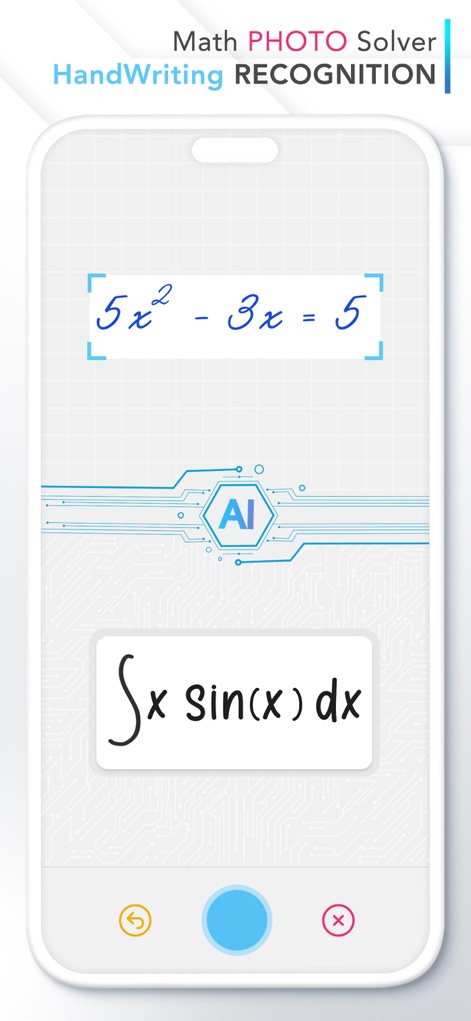
사용자는 손글씨 인식 기능으로 작성된 수학 문제나 사진 해결사를 통해 카메라로 찍은 수식을 간편하게 입력할 수 있습니다.
AI 수학 문제 해결

이 도구는 적분과 이차방정식 풀이 과정을 단계별로 상세히 보여주어, 문제 해결에 대한 이해를 돕고 학습을 지원합니다.
단계별 해법 제시

사용자는 복잡한 함수를 2D 그래프로 시각화하여, 극좌표 방정식과 변수 T에 따른 나비 모양 그래프를 명확하게 관찰할 수 있습니다.
정교한 2D 그래프

이 앱은 행렬식을 이용한 연립방정식 및 이차방정식 해법을 모두 제공하여, 다양한 유형의 수학 문제를 해결합니다.
방정식 솔버

사용자는 이 도구로 행렬 곱셈과 전치 행렬 계산을 포함한 다양한 행렬 및 벡터 연산을 효율적으로 수행할 수 있습니다.
행렬 및 벡터 연산

이 앱은 합계, 평균, 표준 편차와 같은 상세한 통계 결과를 제공하며, 회귀 분석을 위한 데이터를 효과적으로 처리합니다.
심층 통계 분석

이 도구는 제곱근, 편각 및 절댓값을 포함한 복소수 계산을 지원하며, 복소수 i를 활용한 연산이 가능합니다.
복소수 계산
설명
Download
비슷한 앱
유사한 기능과 사용자 경험을 가진 앱

Calculate84
Century Light LLC

Calculator ∞
An Truong

数字ּּ统量
振龙 张

Scientific Calculator fx-991
Dinh Phuc

Desmos Graphing Calculator
Desmos, Inc.
NCalc Scientific Calculator +
Tran Duy

HiPER Scientific Calculator
Jindrich Houska
Panecal Scientific Calculator
Noriyasu Kutsuzawa

PCalc
TLA Systems Ltd.
이 페이지는 앱이나 개발자의 공식 페이지가 아니며, 정보 제공 및 논평을 목적으로 작성된 독립 편집 간행물입니다. 명시적으로 달리 언급되지 않는 한, 해당 앱이나 개발자는 MWM, Apple, Google Play, 앱 퍼블리셔 또는 앱 개발자와 제휴, 보증, 후원, 승인 또는 공식적으로 연결되어 있지 않으며, 이 페이지의 어떤 내용도 해당 앱이 MWM의 서비스를 사용하여 개발되었음을 의미하지 않습니다. 모든 상표, 로고, 스크린샷 및 기타 콘텐츠는 해당 소유자의 자산입니다.