Chapters

Chapters

다운로드: App Store
로고: Chapters

Chapters: 어디서든 전문 전자책을 쓰고 편집하세요

작가 및 독립 크리에이터를 위한 간단하고 강력한 ePub 편집기. 원고를 작성하고, 메타데이터를 관리하며, iPhone, iPad, Mac 전반에 걸쳐 원활하게 동기화하세요.

다운로드: App Store

개발사

Two-Byte Software Inc.

카테고리

Productivity

다운로드

200

사용자 평점

1.0/5

총 평가 수

0

지원 언어

1

내부 모습 엿보기

이 인터페이스를 사용하는 200 명의 사용자.

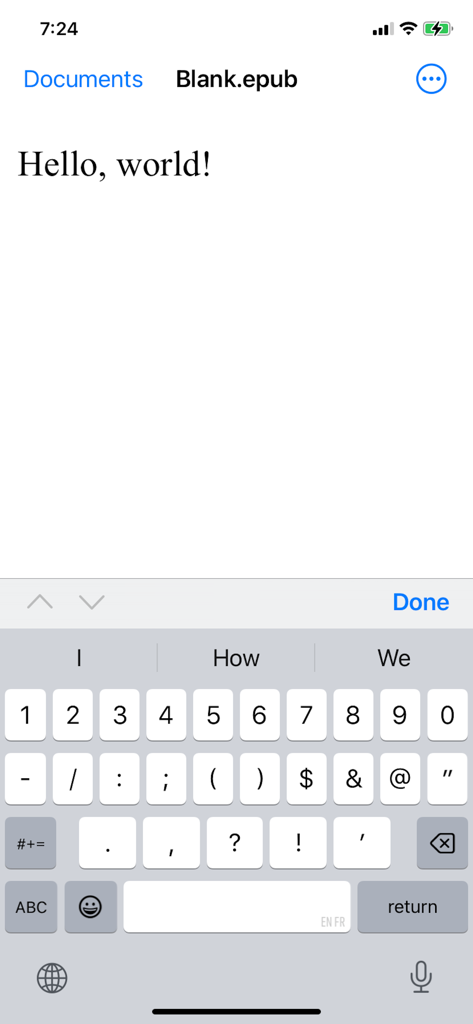
Chapters 앱 인터페이스가 iPhone에서 ePub 파일 텍스트 편집기를 표시합니다.

Chapters 앱 인터페이스가 iPhone에서 ePub 파일 텍스트 편집기를 표시합니다.

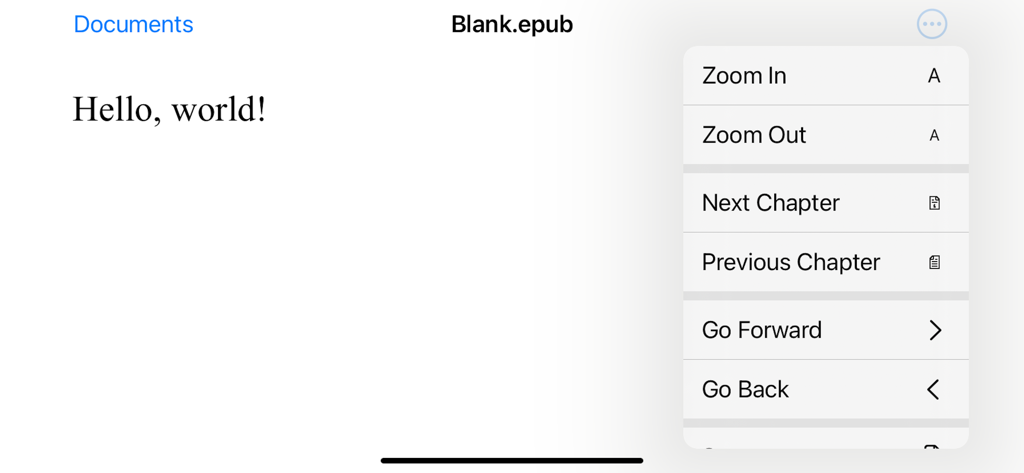
Chapters 앱의 스크린샷으로, 탐색 메뉴가 열려 있고 확대/축소 및 챕터 컨트롤이 있는 Blank epub라는 제목의 문서가 표시됩니다.

Chapters 앱의 스크린샷으로, 탐색 메뉴가 열려 있고 확대/축소 및 챕터 컨트롤이 있는 Blank epub라는 제목의 문서가 표시됩니다.

원고를 전문 전자책으로 바꾸세요

이 앱을 돋보이게 하는 도구, 200 명의 사용자가 선택.

☁️

창의적인 흐름을 동기화하세요

통근 중에 iPhone에서 편집하고 집에서 Mac으로 계속 작업하세요. iCloud 통합은 모든 기기에서 진행 상황이 자동으로 저장되도록 합니다.

✍️

직관적인 시각적 편집

복잡한 코드나 HTML은 잊으세요. 집중적인 글쓰기를 위해 설계된 깔끔한 인터페이스로 텍스트를 포맷하고, 목차를 관리하고, 레이아웃을 조정하세요.

📖

출판 준비 완료 표준

어떤 화면에서도 완벽하게 보이는 고품질의 가변 ePub을 제작하세요. 작품에 전문적인 감각을 더하기 위해 사용자 지정 표지 아트와 메타데이터를 쉽게 추가하세요.

앱 소개

에 대해 알아야 할 모든 것 Chapters.

설명

Chapters can create new ePub documents and open existing ePub files for editing. ePub is the most widely adopted file format for ebooks. ePub files reflow their content for comfortable reading on screen of any size from smartphones to desktops. Each document's content zipped into a single file for maximum portability. It is an open and vendor-independent file format based on popular web standards, such as HTML and CSS. With Chapters, you can ▪ Open existing files and create new ePub documents ▪ View an entire document in vertical scroll view ▪ Pinch to zoom and smart zoom with double-tap ▪ Edit and format document’s text ▪ Save your changes back to the file ▪ Use Table of Contents to jump ahead (on Mac only at the moment) ▪ Print and export to PDF (on Mac only at the moment) ▪ Add cover image and modify metadata (on Mac only at the moment) Chapters also supports ▪ iCloud Drive for keeping documents in sync on all your devices ▪ Autosaving automatically saves changes in background while you are editing ▪ Unlimited undo and redo as you edit ▪ Browsing previous changes and restoring them ▪ Resume your work right where you left off once app launches ▪ Side by side multitasking with another app in full screen split view on Mac and iPad ▪ Sharing documents with others via Messages, Mail and AirDrop If you encounter a bug or app crashing, please contact app’s support at chapters@shaw.ca Thank you!

최신 버전

1.2

크기

1.1 MB

출시일

2014년 12월 11일

걸작을 출판할 준비가 되셨나요?

오늘날 수천 명의 독립 크리에이터와 함께하세요. Chapters를 다운로드하고 iPhone, iPad, Mac에서 전문 ePub 파일을 원활하게 제작하세요.

다운로드: App Store

App information, icons, screenshots, and descriptions displayed on this page are sourced from the Apple App Store and are the property of their respective developers. Download estimates and rankings are based on MWM's proprietary models and may not reflect actual figures. This page is provided for informational and analytical purposes only.

Believe this page infringes your intellectual property? File a dispute