
이 페이지는 앱이나 개발자의 공식 페이지가 아니며, 정보 제공 및 논평을 목적으로 작성된 독립 편집 간행물입니다. 명시적으로 달리 언급되지 않는 한, 해당 앱이나 개발자는 MWM, Apple, Google Play, 앱 퍼블리셔 또는 앱 개발자와 제휴, 보증, 후원, 승인 또는 공식적으로 연결되어 있지 않으며, 이 페이지의 어떤 내용도 해당 앱이 MWM의 서비스를 사용하여 개발되었음을 의미하지 않습니다. 모든 상표, 로고, 스크린샷 및 기타 콘텐츠는 해당 소유자의 자산입니다.

다운로드
100M+사용자 평점
총 평가 수
1.8M개발사
카테고리
Productivity지원 언어
42최신 버전
6.8.43크기
155.0 MB출시일
2015년 5월 30일Microsoft Authenticator 앱 분석: 주요 보안 및 편의 기능
온라인 계정 보안 및 로그인 효율성을 극대화하는 핵심 도구
다단계 인증(MFA) 푸시 알림 승인
이 앱은 로그인 시 장치로 전송된 푸시 알림을 통해 다단계 인증 요청을 편리하게 승인할 수 있게 해줍니다. 이를 통해 사용자 계정의 보안이 강화됩니다.
직장/학교 계정 통합 및 장치 등록
이 도구는 기업 및 교육 기관의 보안 정책에 따라 장치를 등록하고, 인증서 기반 인증을 통해 해당 기관의 리소스에 안전하고 원활하게 접근할 수 있도록 지원합니다.
시간 기반 일회용 비밀번호(TOTP) 생성
이 앱은 네트워크 연결 없이도 30초마다 새로운 일회용 비밀번호를 생성하여 다양한 온라인 계정에 대한 보안 접근을 제공합니다.
암호 없는 로그인
이 기능은 사용자가 비밀번호를 입력하는 대신 지문, 얼굴 인식 또는 PIN을 사용하여 Microsoft 계정에 안전하게 로그인할 수 있도록 해줍니다.
비밀번호 자동 완성 및 동기화
이 앱은 저장된 비밀번호를 앱과 웹사이트에서 자동으로 완성해 주며, Microsoft Edge와 동기화하고 다른 비밀번호 관리자에서 가져올 수 있습니다. 다단계 인증으로 보호되어 보안도 유지됩니다.
비 Microsoft 계정 다단계 인증 지원
이 도구는 Facebook, Amazon, Dropbox, Google, LinkedIn, GitHub 등 Microsoft 계정 외의 다양한 서비스에 대한 다단계 인증 기능을 통합 관리할 수 있도록 해줍니다.
자주 묻는 질문
에 대해 알아야 할 모든 것 Microsoft Authenticator
What is Microsoft Authenticator used for?
Microsoft Authenticator provides easy, secure sign-ins for online accounts using multi-factor authentication, passwordless options, or password autofill. It also offers account management for Microsoft personal, work, or school accounts.
Does Microsoft Authenticator support multi-factor authentication?
Yes, Microsoft Authenticator provides multi-factor authentication (MFA). It offers a second layer of security by requiring approval of a notification or entry of a one-time password (OTP) generated by the app after entering your password.
How does multi-factor authentication work with Microsoft Authenticator?
Multi-factor authentication in Microsoft Authenticator works by sending a notification for approval or generating a time-based one-time password (OTP). Users either approve the notification or enter the OTP, which has a 30-second timer.
Can I use Microsoft Authenticator for non-Microsoft accounts?
Yes, Microsoft Authenticator supports adding multiple accounts, including non-Microsoft accounts. Examples include Facebook, Amazon, Dropbox, Google, LinkedIn, and GitHub.
Does Microsoft Authenticator offer passwordless sign-in?
Yes, Microsoft Authenticator enables passwordless sign-in for Microsoft accounts. Users enter their username, then approve a notification on their phone using fingerprint, Face ID, or PIN for verification.
How does passwordless sign-in work with Microsoft Authenticator?
Passwordless sign-in with Microsoft Authenticator requires entering a username for a Microsoft account. The app sends a notification to the phone, which the user approves using fingerprint, Face ID, or PIN for a second layer of security.
Can Microsoft Authenticator autofill passwords?
Yes, Microsoft Authenticator can autofill passwords. Users sign in to the Passwords tab with their personal Microsoft account to sync passwords, including those from Microsoft Edge, and can set it as the default autofill provider.
Is password autofill in Microsoft Authenticator secure?
Yes, password autofill in Microsoft Authenticator is secure. Passwords are protected with multi-factor authentication, requiring fingerprint, Face ID, or PIN verification to access and autofill them on mobile devices.
Can I import passwords into Microsoft Authenticator?
Yes, Microsoft Authenticator allows users to import passwords. It supports importing passwords from Google Chrome and other password managers.
How does Microsoft Authenticator support work or school accounts?
Microsoft Authenticator supports work or school accounts by allowing device registration for organizational resources. It provides cert-based authentication, ensuring seamless and secure access to Microsoft apps and services without needing separate logins.
Does the Microsoft Authenticator app drain battery or require a network connection for OTPs?
No, the Microsoft Authenticator app does not drain battery or require a network connection for its one-time password (OTP) feature. The OTP codes are time-based and function offline.
다음 스크린샷과 설명은 앱의 공식 스토어 목록에서 직접 가져온 것이며 앱 개발자의 자산입니다.
앱 스토어
스크린샷
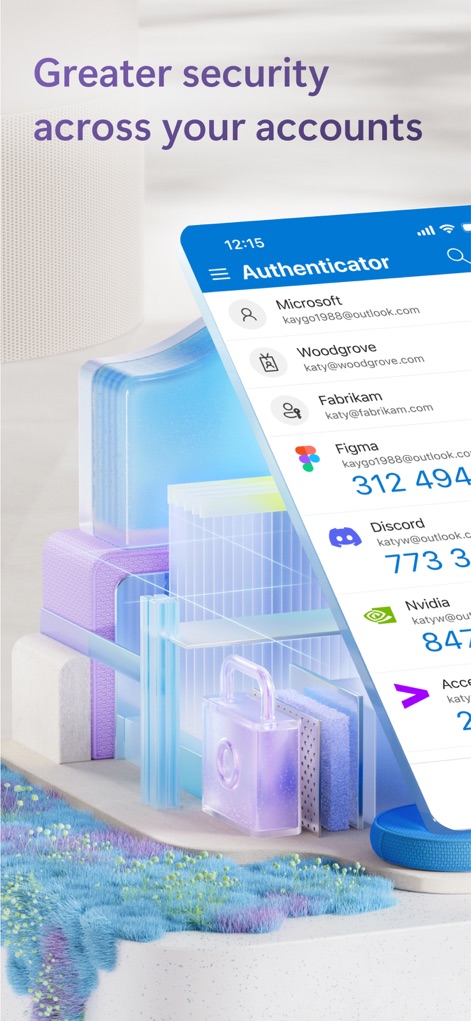
다중 계정 보안
이 앱은 다양한 온라인 계정(Microsoft, Figma)을 한곳에서 관리하며, 각 계정의 실시간 OTP 코드를 명확하게 보여줍니다.

장치 간 연결
사용자는 앱의 하단 탐색 메뉴(Authenticator, Verified IDs)를 통해 주요 기능을 쉽게 전환할 수 있으며, 여러 장치 유형(스마트폰, 태블릿, 데스크톱)에서 일관된 보안을 경험합니다.

간편한 로그인 승인
잠금 화면에서 직접 로그인 승인 알림을 제공하여(TIME SENSITIVE 알림), 사용자가 신속하게 본인임을 인증하고 귀여운 강아지 배경 이미지와 함께 확인 과정을 거칠 수 있습니다.

비밀번호 없는 인증
사용자는 비밀번호 없이 로그인할 때, 앱이 제공하는 숫자 매칭 프롬프트(54, 48, 21)를 통해 간편하고 안전하게 본인 인증을 완료할 수 있습니다.

통합 계정 관리
이 앱은 직장 또는 학교 계정(Microsoft, Woodgrove)을 통합 관리하여, 사용자가 여러 서비스(Microsoft Office, OneDrive)에 걸쳐 단일 로그온으로 손쉽게 접근하도록 돕습니다.

신뢰할 수 있는 신원
이 앱은 "확인된 ID" 기능을 통해 사용자의 직장 신분(Verified Employee 카드)을 디지털 방식으로 저장하고, 이름과 이메일 같은 주요 정보와 함께 신뢰할 수 있는 기관(Woodgrove)의 발급을 명확히 보여줍니다.

패스키로 안전한 로그인
이 앱은 패스키 기반 인증을 지원하여, 사용자가 "Microsoft Authenticator를 사용하여 로그인하시겠습니까?"라는 명확한 메시지와 함께 "계속" 버튼을 눌러 간편하고 안전하게 로그인할 수 있도록 안내합니다.
설명
Download
비슷한 앱
유사한 기능과 사용자 경험을 가진 앱

Google Authenticator
Google LLC

Duo Mobile
Duo Security LLC

Authenticator App - 2FA &. MFA
APPLY DIJITAL HIZMETLER TICARET LIMITED SIRKETI

authenticator . app
Mustafa Uz

SafeNet MobilePASS+
Thales DIS (Singapore) Pte Ltd

Čítačka
Tatra banka, a.s.

Authenticator App - SafeAuth
Brilliant App Limited

Authenticator App - 2FA Auth
UNIVERSE DIJITAL HIZMETLER LIMITED SIRKETI

Authenticator App : Scan & 2FA
XSOFT GLOBAL LIMITED
이 페이지는 앱이나 개발자의 공식 페이지가 아니며, 정보 제공 및 논평을 목적으로 작성된 독립 편집 간행물입니다. 명시적으로 달리 언급되지 않는 한, 해당 앱이나 개발자는 MWM, Apple, Google Play, 앱 퍼블리셔 또는 앱 개발자와 제휴, 보증, 후원, 승인 또는 공식적으로 연결되어 있지 않으며, 이 페이지의 어떤 내용도 해당 앱이 MWM의 서비스를 사용하여 개발되었음을 의미하지 않습니다. 모든 상표, 로고, 스크린샷 및 기타 콘텐츠는 해당 소유자의 자산입니다.