
이 페이지는 앱이나 개발자의 공식 페이지가 아니며, 정보 제공 및 논평을 목적으로 작성된 독립 편집 간행물입니다. 명시적으로 달리 언급되지 않는 한, 해당 앱이나 개발자는 MWM, Apple, Google Play, 앱 퍼블리셔 또는 앱 개발자와 제휴, 보증, 후원, 승인 또는 공식적으로 연결되어 있지 않으며, 이 페이지의 어떤 내용도 해당 앱이 MWM의 서비스를 사용하여 개발되었음을 의미하지 않습니다. 모든 상표, 로고, 스크린샷 및 기타 콘텐츠는 해당 소유자의 자산입니다.

다운로드
100M+사용자 평점
총 평가 수
6.6M개발사
카테고리
Productivity지원 언어
67최신 버전
1.2026.13102크기
335.0 MB출시일
2014년 4월 30일Google Sheets 심층 분석
테크 분석가가 평가한 주요 기능 및 사용자 영향력
실시간 협업 및 공유
이 앱은 여러 사용자가 동일한 스프레드시트에서 동시에 작업하고 변경 사항을 실시간으로 확인하며, 편집 알림을 받고 동료와 채팅할 수 있도록 지원합니다.
Microsoft Excel 파일 완벽 호환
이 도구는 사용자가 기존 Excel 파일을 열고, 편집하고, 저장할 수 있도록 해주며, Sheets와 Excel 간의 원활한 전환을 가능하게 합니다.
오프라인 접근 및 자동 저장
이 앱은 인터넷 연결 없이도 언제 어디서든 작업할 수 있는 오프라인 기능을 제공하며, 모든 작업 내용이 자동으로 저장되어 데이터 손실을 방지합니다.
AI 기반 데이터 분석 및 통찰력
이 앱은 Google AI를 활용하여 데이터에서 신속하게 통찰력을 얻고, 복잡한 분석 작업을 효율적으로 수행할 수 있도록 돕습니다.
비즈니스 도구 데이터 통합 및 사용자 지정
이 플랫폼은 다른 비즈니스 핵심 도구의 데이터를 분석하고, 사용자가 특정 요구 사항에 맞춰 맞춤형 솔루션을 구축할 수 있는 기능을 제공합니다.
다양한 핵심 스프레드시트 기능
이 스프레드시트 도구는 셀 서식 지정, 데이터 입력 및 정렬, 차트 보기, 수식 삽입, 찾기/바꾸기 등 필수적인 스프레드시트 기능을 모두 포함합니다.
자주 묻는 질문
에 대해 알아야 할 모든 것 Google Sheets
Can I collaborate with others in Google Sheets?
Yes, Google Sheets allows users to share spreadsheets and collaborate in real-time. Multiple users can edit simultaneously, see changes as they occur, and chat within the same spreadsheet.
Does Google Sheets work offline?
Yes, Google Sheets allows users to work anywhere, anytime, even offline. All changes are automatically saved as you type and when you regain connection.
Is Google Sheets compatible with Excel files?
Yes, Google Sheets enables users to open, edit, and save Microsoft Excel files directly within the application. This ensures seamless interoperability between the two spreadsheet formats.
Is Google Sheets secure for my data?
Yes, Google Sheets ensures secure handling of spreadsheets. Google Workspace subscribers benefit from enterprise-grade security features, safeguarding sensitive data.
Does Google Sheets auto-save my work?
Yes, Google Sheets automatically saves all your work as you type. Users never worry about losing their work, as every change is preserved instantly.
Does Google Sheets have a dark mode option?
Yes, Google Sheets supports a dark mode interface. This feature helps users stay productive and can reduce eye strain, especially in low-light environments.
다음 스크린샷과 설명은 앱의 공식 스토어 목록에서 직접 가져온 것이며 앱 개발자의 자산입니다.
앱 스토어
스크린샷

실시간 협업 경험
이 앱은 실시간 채팅 기능을 통해 팀원들이 동시에 문서에 접근하고 소통할 수 있게 하며, 특정 셀이 강조 표시되어 중요한 데이터를 쉽게 공유하고 논의할 수 있습니다.

안전한 데이터 관리
이 도구는 중앙에 있는 스프레드시트 아이콘과 자물쇠로 데이터 보안을 강조하며, 다양한 사용자 아이콘과 함께 접근 권한(빨간색 'X' 또는 녹색 체크 표시)을 시각적으로 보여줍니다.
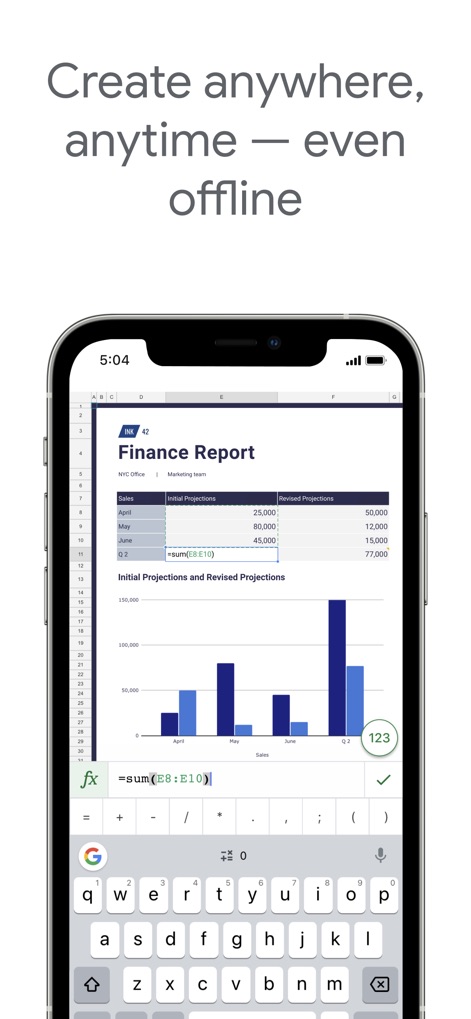
언제 어디서나 작업
사용자는 모바일 기기에서 직접 수식 입력창을 통해 함수를 입력하여 데이터를 계산할 수 있으며, 데이터는 시각적으로 명확한 막대형 차트로 즉시 표시됩니다.
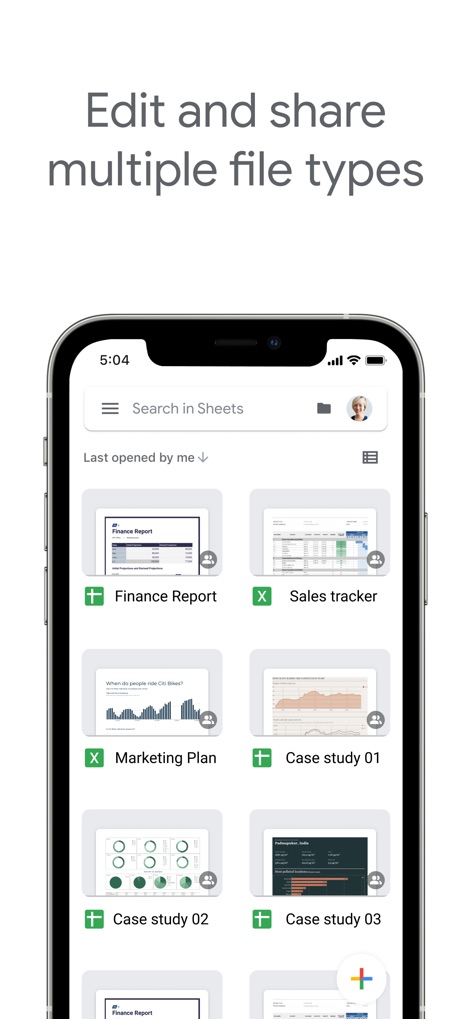
다양한 파일 호환
이 앱은 Google Sheets 파일(녹색 '+' 아이콘)과 Excel 파일(녹색 'X' 아이콘)을 모두 지원하여 다양한 문서 유형을 관리할 수 있으며, 각 파일에는 공유 상태를 나타내는 작은 사용자 아이콘이 표시됩니다.

다크 모드 생산성
사용자는 다크 모드 환경에서 검은색 배경과 밝은 글씨를 통해 눈의 피로를 줄이며 작업할 수 있으며, 재무 데이터가 시각화된 막대형 차트가 명확하게 표시됩니다.
설명
Download
비슷한 앱
유사한 기능과 사용자 경험을 가진 앱

Table Notes Spreadsheet Excel
Vivek Agarwal

Microsoft Excel
Microsoft Corporation

Spreadsheets
SMM service, s.r.o.

Spreadsheet-xlsx&csv editor
BEST MUSIC VIDEO & IMAGE MAKER LIMITED

XLSX Sheets: Edit Spreadsheet
Rhophi Analytics LLP

Sheets - Spreadsheet
CODE HARMONY LIMITED

Simple Spreadsheet:view & edit
WEN WU LI

Zoho Sheet: Spreadsheet App
Zoho Corporation

Numbers: Make Spreadsheets
Apple Inc.
이 페이지는 앱이나 개발자의 공식 페이지가 아니며, 정보 제공 및 논평을 목적으로 작성된 독립 편집 간행물입니다. 명시적으로 달리 언급되지 않는 한, 해당 앱이나 개발자는 MWM, Apple, Google Play, 앱 퍼블리셔 또는 앱 개발자와 제휴, 보증, 후원, 승인 또는 공식적으로 연결되어 있지 않으며, 이 페이지의 어떤 내용도 해당 앱이 MWM의 서비스를 사용하여 개발되었음을 의미하지 않습니다. 모든 상표, 로고, 스크린샷 및 기타 콘텐츠는 해당 소유자의 자산입니다.