Cinema P3 Pro Camera
다운로드: App Store

이 페이지는 앱이나 개발자의 공식 페이지가 아니며, 정보 제공 및 논평을 목적으로 작성된 독립 편집 간행물입니다. 명시적으로 달리 언급되지 않는 한, 해당 앱이나 개발자는 MWM, Apple, Google Play, 앱 퍼블리셔 또는 앱 개발자와 제휴, 보증, 후원, 승인 또는 공식적으로 연결되어 있지 않으며, 이 페이지의 어떤 내용도 해당 앱이 MWM의 서비스를 사용하여 개발되었음을 의미하지 않습니다. 모든 상표, 로고, 스크린샷 및 기타 콘텐츠는 해당 소유자의 자산입니다.

로고: Cinema P3 Pro Camera
다운로드: App Store

Cinema P3 Pro Camera

10비트 Apple Log, ProRes 및 고급 실시간 스코프를 사용하여 창의적인 비전을 완전히 제어하세요. '자동'에 만족하지 않는 영화 제작자를 위한 전문가 도구입니다.

주요 수치

다운로드

126K+

사용자 평점

4.7/5

총 평가 수

900

개발사

Thomas Blackburn

카테고리

Photo & Video

지원 언어

4

최신 버전

2.1.7

크기

72.5 MB

출시일

2020년 8월 27일
기능

현대 영화 제작자를 위한 전문가 수준의 도구

고급 수동 제어, 전문 모니터링 스코프 및 업계 표준 10비트 Log 녹화를 사용하여 iPhone 센서를 완전히 제어하세요.

시네마틱 Log 및 10비트 녹화

10비트 Apple Log 및 ProRes를 사용하여 최대 다이나믹 레인지를 캡처하여 DaVinci Resolve에서 전문적인 색 보정을 위한 유연성을 제공합니다.

완전한 수동 제어

제한적인 자동 노출에서 벗어나세요. 셔터 각도, ISO 및 화이트 밸런스를 정밀하게 조정하여 일관되고 영화 같은 결과를 얻으세요.

다음 스크린샷과 설명은 앱의 공식 스토어 목록에서 직접 가져온 것이며 앱 개발자의 자산입니다.

앱 스토어

스크린샷
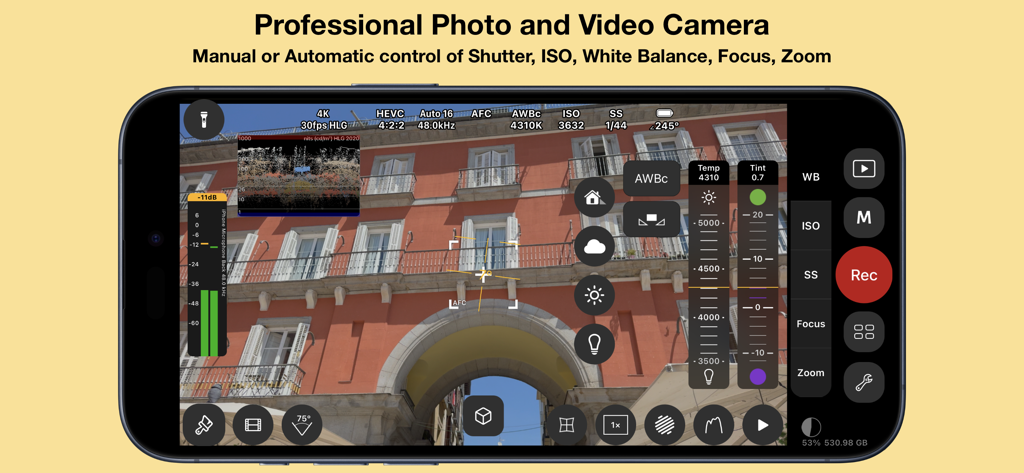
Cinema P3 Pro Camera - ISO 셔터 속도 및 화이트 밸런스에 대한 수동 설정이 있는 Cinema P3 Pro Camera 앱 인터페이스를 표시하는 스마트폰 화면
ISO 셔터 속도 및 화이트 밸런스에 대한 수동 설정이 있는 Cinema P3 Pro Camera 앱 인터페이스를 표시하는 스마트폰 화면

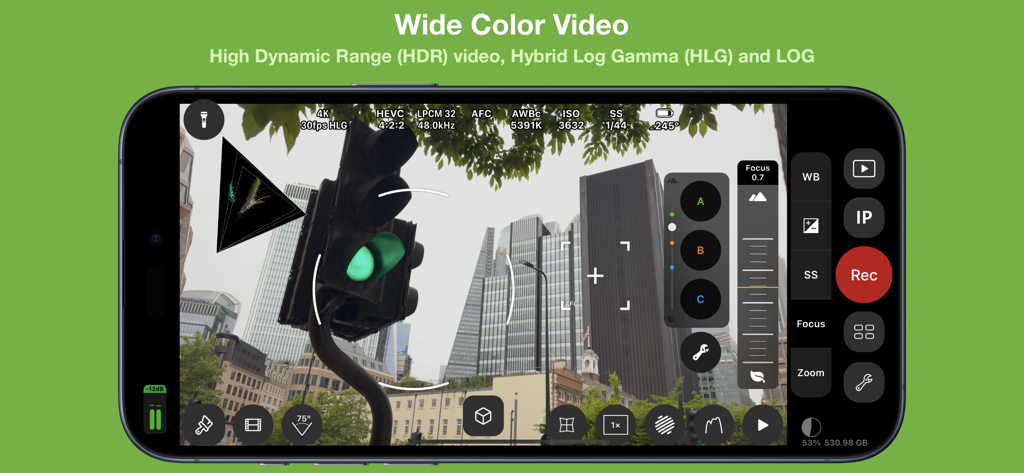
Cinema P3 Pro Camera - HDR 및 LOG 설정을 갖춘 Cinema P3 Pro Camera 전문가 동영상 녹화 인터페이스
HDR 및 LOG 설정을 갖춘 Cinema P3 Pro Camera 전문가 동영상 녹화 인터페이스

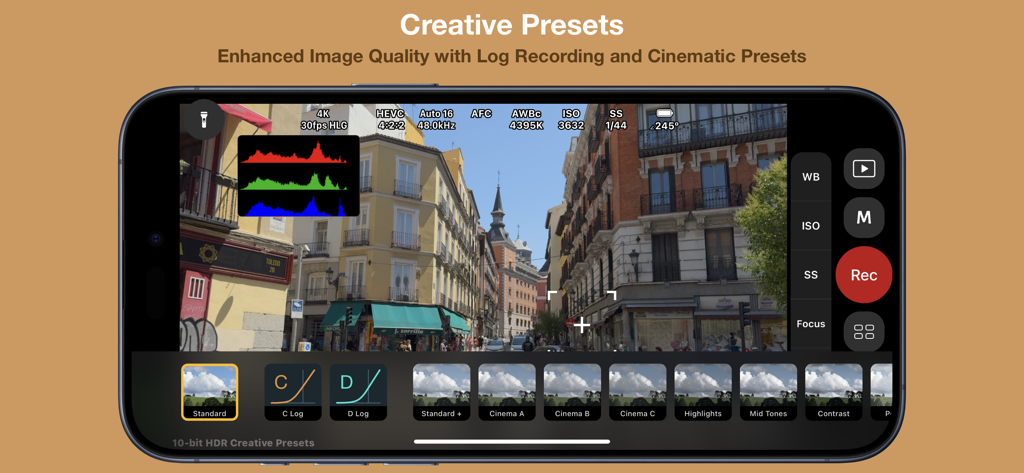
Cinema P3 Pro Camera - 시네마틱 사전 설정 및 로그 옵션을 보여주는 Cinema P3 Pro Camera의 전문가 동영상 녹화 인터페이스.
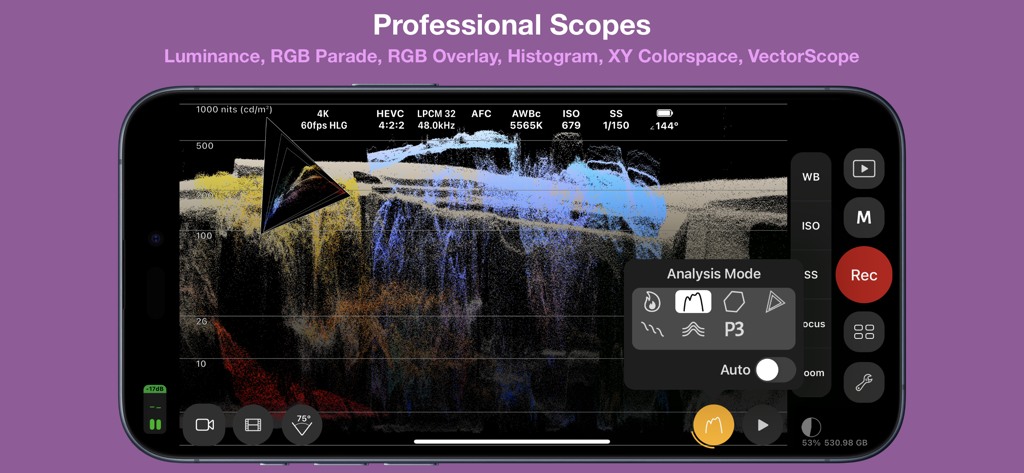
시네마틱 사전 설정 및 로그 옵션을 보여주는 Cinema P3 Pro Camera의 전문가 동영상 녹화 인터페이스.

Cinema P3 Pro Camera - iPhone에서 전문 동영상 분석 스코프를 보여주는 Cinema P3 Pro Camera 앱 인터페이스
iPhone에서 전문 동영상 분석 스코프를 보여주는 Cinema P3 Pro Camera 앱 인터페이스

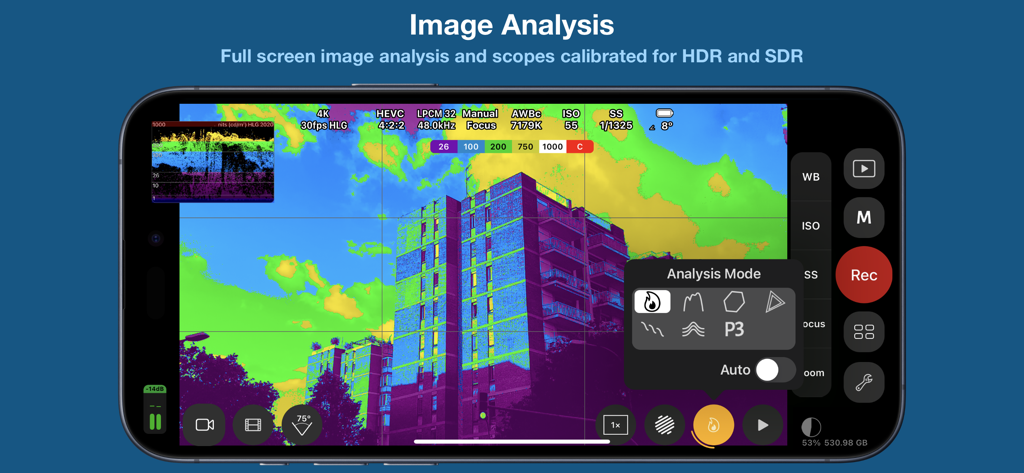
Cinema P3 Pro Camera - iPhone 화면에 잘못된 색상 이미지 분석 및 기술 스코프를 표시하는 Cinema P3 Pro Camera 앱
iPhone 화면에 잘못된 색상 이미지 분석 및 기술 스코프를 표시하는 Cinema P3 Pro Camera 앱

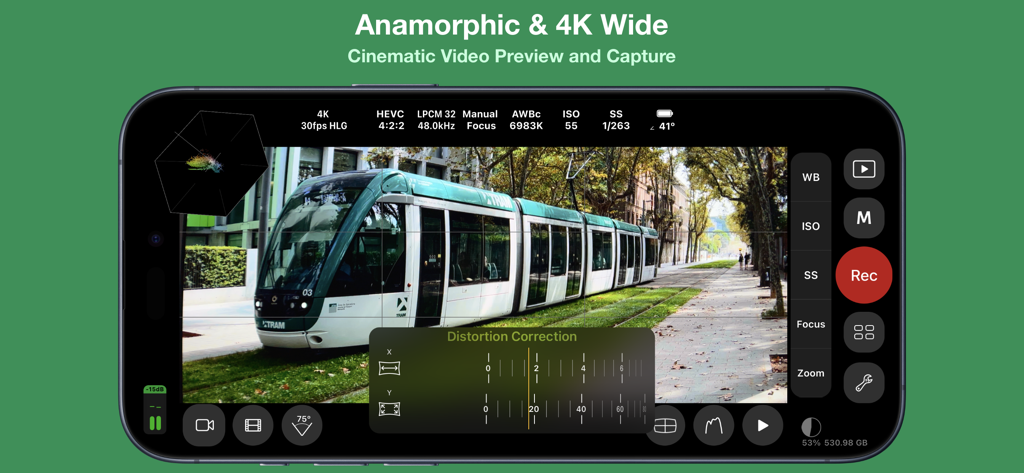
Cinema P3 Pro Camera - 아나모픽 4K 와이드 동영상 미리 보기 및 왜곡 보정 설정을 보여주는 Cinema P3 Pro Camera 앱 인터페이스.
아나모픽 4K 와이드 동영상 미리 보기 및 왜곡 보정 설정을 보여주는 Cinema P3 Pro Camera 앱 인터페이스.

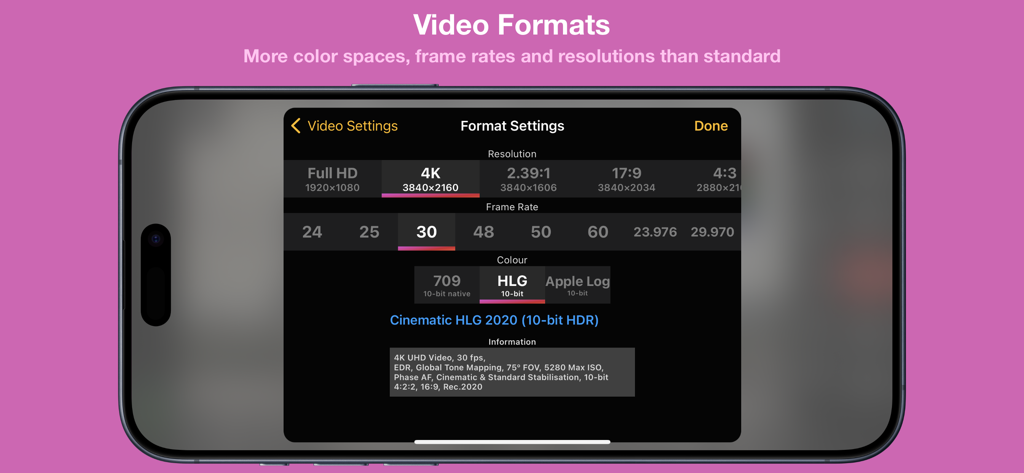
Cinema P3 Pro Camera - iPhone에서 4K 해상도 및 10비트 HDR 동영상 형식 설정을 보여주는 Cinema P3 Pro Camera의 인터페이스.
iPhone에서 4K 해상도 및 10비트 HDR 동영상 형식 설정을 보여주는 Cinema P3 Pro Camera의 인터페이스.

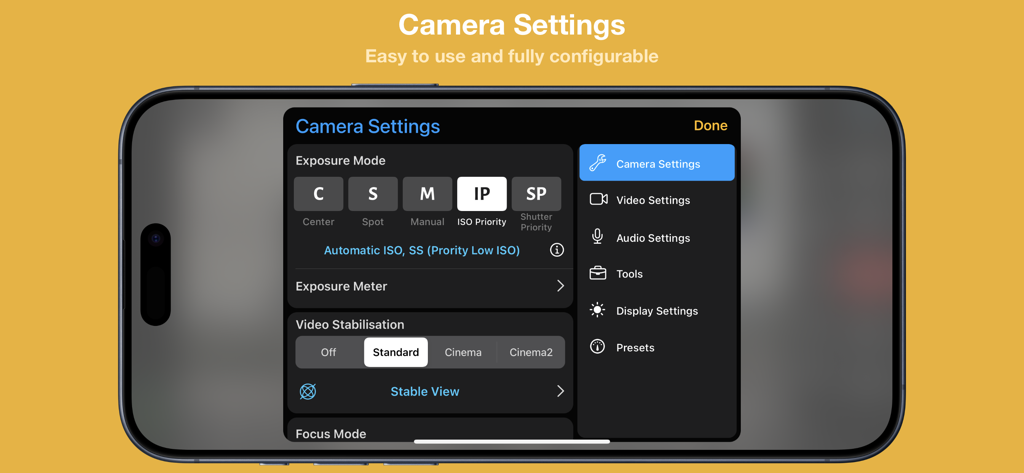
Cinema P3 Pro Camera - iPhone에서 수동 노출 및 동영상 안정화 설정을 보여주는 Cinema P3 Pro Camera 앱의 인터페이스
iPhone에서 수동 노출 및 동영상 안정화 설정을 보여주는 Cinema P3 Pro Camera 앱의 인터페이스

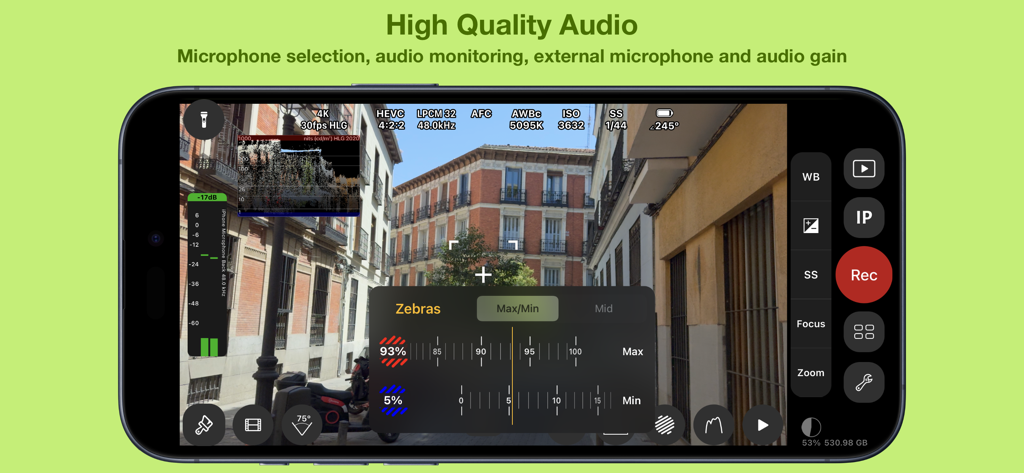
Cinema P3 Pro Camera - 오디오 모니터링 레벨 및 제브라 노출 도구를 특징으로 하는 Cinema P3 Pro Camera 인터페이스
오디오 모니터링 레벨 및 제브라 노출 도구를 특징으로 하는 Cinema P3 Pro Camera 인터페이스

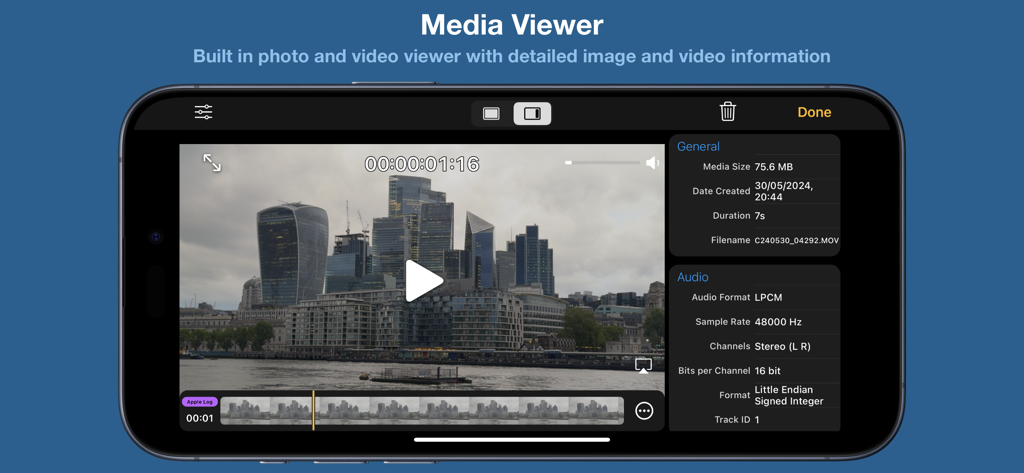
Cinema P3 Pro Camera - iPhone에서 기술 동영상 및 오디오 메타데이터를 표시하는 Cinema P3 Pro Camera 앱 미디어 뷰어.

iPhone에서 기술 동영상 및 오디오 메타데이터를 표시하는 Cinema P3 Pro Camera 앱 미디어 뷰어.

설명

Cinema P3 Pro Camera unlocks the full capability of your device’s cameras. — Intuitive easy to use controls make taking photos and video a pleasure. — Advanced professional tools allow you to capture the highest quality image every time. FULL CONTROL — Automatic and Manual controls White balance, temperature and tint, exposure, ISO, shutter speed, shutter angle and focus — ISO Priority and Shutter Priority with Spot, Matrix and Center Weight Metering — Manual and Automatic White Balance (AWBc) with Temperature and Tint controls Automatic White Balance calibration using a grey card — Manual Zoom control with adjustable zoom speed for smooth transitions Zoom with a two finger pinch gesture — High Dynamic Range (HDR) Video Capture — Capture 10-bit video with Apple Log*. — Capture 10-bit BT.2020 color (Dolby Vision)*. — Capture HDR video with Hybrid Log Gamma (HLG). — Capture HDR video with C-Log and D-Log. — Capture and playback video with P3 wide color. — Presets to store custom camera settings such as Exposure Mode, White Balance, Video Format and Anamorphic Lens Distortion, Restore a preset with a single tap. ADVANCED TOOLS ● Multiple video recording formats: — 10-bit Apple Log* — 10-bit HLG (Dolby Vision)* — 10-bit 709* — 8-bit P3 HLG — 8-bit P3 — 8-bit 709 ● Full control over video format settings: — Use all Frame Rate, Resolution and Color Spaces supported by your device. — H.265 HEVC, H.264, H.265 4:2:2, ProRes* — Bit Rate, Pixel Aspect Ratio and Key Frame Interval — Time Code Track — 4K Wide Recording Mode ● Powerful full screen and mini scopes, with advanced image processing tools provide real time image analysis. — Luma/Luminance Scope — RGB Parade — RGB Overlay — Histogram. — XY Colorspace — VectorScope — Luma Histogram — (False) Color Analysis ● Tools — Anamorphic Desqueeze with Distortion Correction — Aspect Ratio Guides and Grids assist scene composition. — P3 Button highlights parts of an image that use P3 color. — Anamorphic De-squeeze for 1.3x, 1.55x and custom lenses. — Preserve Camera Settings when changing camera modes — Lock White Balance on Record — Camera Quick Select — Torch — Tilt Sensor — Rotation Lock — Zebras ● Creative Video Mode to optimise and enhance the image in camera: — A-Log & B-Log (SDR) — C-Log & D-Log (HDR) — 33 and 65 point LUT export to convert Log footage to 709, 2020 PQ & 2020 HLG color spaces. — Creative presets with saturation adjustment — .cube LUT support with “LUT Tools Upgrade” In-App Purchase. ● Focus Controls — Continuous Automatic Focus, Manual and Automatic Focus — Face and Animal Detection focus modes. — Focus Target for automatic focus and Focus Lock function — Focus Assist Tool for precise manual focus — Manual focus control with Focus Loupe — Focus peaking ● Audio — Audio level meter — Audio monitoring with headphones — Stereo audio recording on compatible devices — Audio Format selection AAC/LPCM — Manual or automatic microphone selection — Microphone gain control for compatible microphones ● Media Player/Viewer — Photo Viewer with image info display (EXIF, TIFF) — Video Player with track info display (audio, video, timecode) PHOTOGRAPHY ● Full Manual Control for Photos — White Balance, Color Temperature and Tint, Exposure, Shutter Speed, Stabilisation, Flash, Focus, HDR and Red Eye Reduction ● Multiple image formats — Capture photos in HEIC or JPG formats, with optional Live Photo — Custom Aspect Ratio for JPG photos 4:3, 3:2, 5:4, 7:5, 1:1, 16:9, 2.39:1 — RAW, ProRAW* capture — RAW with Bracket capture ● User customisable EXIF Data ● Photo Timer NOTE: *Not all functionality is available on all iOS devices In-App purchase is required to enable some functionality Feature availability is dependent upon model of iPhone/iPad used

Download

다운로드: App Store

이 페이지는 앱이나 개발자의 공식 페이지가 아니며, 정보 제공 및 논평을 목적으로 작성된 독립 편집 간행물입니다. 명시적으로 달리 언급되지 않는 한, 해당 앱이나 개발자는 MWM, Apple, Google Play, 앱 퍼블리셔 또는 앱 개발자와 제휴, 보증, 후원, 승인 또는 공식적으로 연결되어 있지 않으며, 이 페이지의 어떤 내용도 해당 앱이 MWM의 서비스를 사용하여 개발되었음을 의미하지 않습니다. 모든 상표, 로고, 스크린샷 및 기타 콘텐츠는 해당 소유자의 자산입니다.








