
이 페이지는 앱이나 개발자의 공식 페이지가 아니며, 정보 제공 및 논평을 목적으로 작성된 독립 편집 간행물입니다. 명시적으로 달리 언급되지 않는 한, 해당 앱이나 개발자는 MWM, Apple, Google Play, 앱 퍼블리셔 또는 앱 개발자와 제휴, 보증, 후원, 승인 또는 공식적으로 연결되어 있지 않으며, 이 페이지의 어떤 내용도 해당 앱이 MWM의 서비스를 사용하여 개발되었음을 의미하지 않습니다. 모든 상표, 로고, 스크린샷 및 기타 콘텐츠는 해당 소유자의 자산입니다.


Cinemagraph Pro
움직임을 멈춰 세우는 것, 그것이 이 앱이 당신에게 주는 힘이다. 평범한 사진과 동영상 사이에서 시선 강탈의 영역을 개척한다.
다운로드
2.5M+사용자 평점
총 평가 수
18.5K개발사
카테고리
Photo & Video지원 언어
9최신 버전
2026.13크기
170.4 MB출시일
2013년 6월 24일시네마그래프 제작의 선두 주자, 'Cinemagraph Pro'가 제공하는 핵심 기능들을 전문적인 관점에서 분석합니다.
Cinemagraph Pro 주요 기능 분석
특허받은 라이브 마스킹 기술
이 앱은 움직이는 부분을 정지 이미지 위로 칠하여 마법처럼 드러내는 특허받은 라이브 마스킹 방식을 제공합니다.
소셜 미디어 및 광고 맞춤형 내보내기
사용자는 소셜 미디어 게시물이나 광고에 최적화된 맞춤형 자르기 및 내보내기 설정을 활용할 수 있으며, Facebook 광고 관리자로 원탭 업로드를 지원합니다.
고품질 4K 시네마그래프 지원
이 도구는 지원되는 기기에서 최대 4K 해상도의 고품질 시네마그래프를 촬영하고 편집할 수 있도록 지원합니다.
오버레이 레이어 및 텍스트 추가
이 앱은 시네마그래프 위에 이미지와 텍스트를 추가할 수 있는 오버레이 레이어 기능을 제공하여 시각적 스토리를 풍부하게 만듭니다.
색상, 조명 및 톤 커브 사용자 정의
이 도구는 사전 설정 필터와 함께 색상, 조명 및 톤 커브를 정밀하게 조정하여 사용자가 원하는 시각적 미학을 구현할 수 있게 합니다.
정밀한 루프 설정 및 트리밍
사용자는 완벽한 루프를 위해 비디오를 쉽게 트리밍하고, 크로스페이드와 함께 반복 또는 바운스 루프를 설정할 수 있습니다.
iCloud Drive를 통한 크로스-디바이스 워크플로우
이 앱은 iCloud Drive를 지원하여 사용자가 iPhone, iPad 또는 Mac에서 프로젝트를 원활하게 편집할 수 있도록 합니다.
다양한 내보내기 형식 지원
이 도구는 H.264, HEVC, Live Photo 또는 GIF와 같은 다양한 형식으로 시네마그래프를 내보낼 수 있는 기능을 갖추고 있습니다.
자주 묻는 질문
에 대해 알아야 할 모든 것 Cinemagraph Pro
What is Cinemagraph Pro?
Cinemagraph Pro is an Apple Design Award-winning app for iOS that defines visual storytelling. It enables users to create professional cinemagraphs, which are hybrids of natural motion and still imagery, directly on iPhone and iPad.
Can I create professional cinemagraphs easily with Cinemagraph Pro?
Yes, Cinemagraph Pro simplifies professional cinemagraph creation. It allows users to produce high-quality, noticeable hybrid motion imagery in seconds, even without extensive photo or video editing expertise.
How does Cinemagraph Pro create motion effects?
Cinemagraph Pro uses a patented Magical Live Masking method. Users paint over a still image to reveal and isolate motion from a video. This process seamlessly blends still and moving elements into a single compelling cinemagraph.
What video sources are supported by Cinemagraph Pro?
Cinemagraph Pro supports importing any video shot on a tripod, including up to 4K resolution on supported devices. Users can also directly capture videos using the in-app camera for cinemagraph creation.
Does Cinemagraph Pro allow adding text and images?
Yes, Cinemagraph Pro features an advanced editing overlay layer. This functionality enables users to add both text and images on top of their cinemagraphs, enhancing creative expression and visual impact.
What are the export options in Cinemagraph Pro?
Cinemagraph Pro offers diverse export options: H.264, HEVC, Live Photo, and GIF. It also provides custom crop and export settings optimized for seamless sharing on various social media platforms and advertising campaigns.
Where can I find tutorials for Cinemagraph Pro?
Cinemagraph Pro provides comprehensive learning resources within the app. These include video tutorials ranging from beginner to advanced levels, along with downloadable tutorial documents for hands-on practice.
Can I browse other cinemagraphs for inspiration in Cinemagraph Pro?
Yes, Cinemagraph Pro features a 'Discover' section. Users can explore creative work on Flixel, browse curated collections, and upload their own cinemagraphs to potentially be featured for community inspiration.
How does Cinemagraph Pro manage subscriptions?
Cinemagraph Pro subscriptions, known as Flixel Plans, are charged to your iTunes Account. They automatically renew monthly or yearly unless auto-renewal is manually disabled at least 24 hours before the current period ends.
Is Cinemagraph Pro compatible with iCloud Drive for file management?
Yes, Cinemagraph Pro supports iCloud Drive. This feature allows users to access and edit their cinemagraph documents seamlessly across different Apple devices, including iPhone, iPad, and Mac, maintaining workflow continuity.
다음 스크린샷과 설명은 앱의 공식 스토어 목록에서 직접 가져온 것이며 앱 개발자의 자산입니다.
앱 스토어
스크린샷
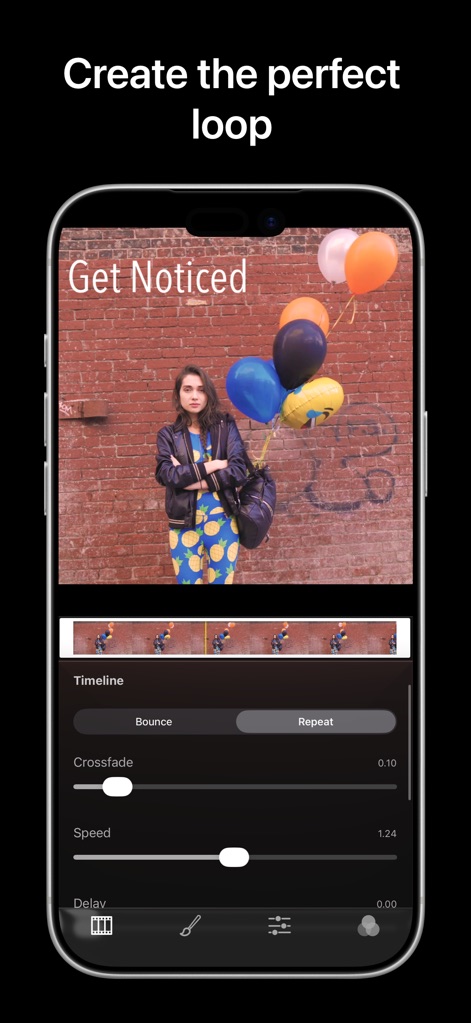
이 앱은 타임라인을 사용하여 자연스러운 동작의 완벽한 루프를 생성하도록 돕고, 크로스페이드 및 속도 조절 기능을 통해 매끄러운 전환을 제공합니다.
완벽한 루프 생성
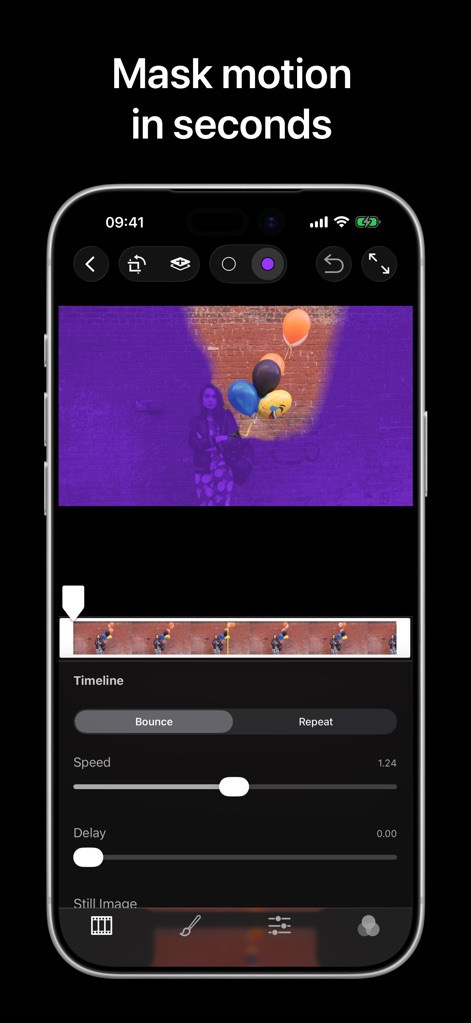
사용자는 특허받은 라이브 마스킹 도구로 움직임을 쉽게 드러낼 수 있으며, 시네마그래프의 특정 영역에서만 동작을 적용하여 정적인 배경과 대비되는 역동적인 효과를 만듭니다.
움직임을 순간 마스킹

이 도구는 온도와 채도를 포함한 정교한 색상 조정 기능을 제공하여 사용자가 이미지의 분위기를 완벽하게 설정하고 노출을 미세하게 조절할 수 있게 합니다.
세밀한 색상 조정

사용자는 'Get Noticed'와 같은 텍스트 오버레이를 시네마그래프에 쉽게 추가하여 메시지를 전달할 수 있으며, 다양한 글꼴과 크기 조절 옵션으로 시각적 효과를 극대화할 수 있습니다.
텍스트 오버레이 추가

이 앱은 시네마그래프에 적용할 수 있는 다양한 프리셋 필터 갤러리를 제공하여 분위기를 전환하고, 썸네일 이미지 미리보기를 통해 최적의 시각적 효과를 쉽게 선택할 수 있도록 돕습니다.
다양한 필터 적용

사용자는 다양한 소셜 미디어 플랫폼에 맞춰 '1:1' 또는 '16:9'와 같은 프리셋 화면비율을 선택하여 이미지 크롭 영역을 조절하고, 최적화된 시네마그래프를 손쉽게 생성할 수 있습니다.
유연한 화면비율 설정

이 도구는 직관적인 이미지 자르기 도구를 제공하여 사용자가 시네마그래프의 구도를 정밀하게 설정할 수 있으며, 회전 및 똑바로 정렬 기능을 통해 완벽한 프레임을 만듭니다.
정확한 이미지 프레임

이 앱은 틱톡, 인스타그램 등 인기 소셜 미디어 플랫폼에 최적화된 내보내기 프리셋을 제공하며, 사용자는 H.264 형식 및 맞춤형 해상도 설정을 통해 고품질 결과물을 얻을 수 있습니다.
최적화된 내보내기

사용자는 생성된 시네마그래프를 Flixel 플랫폼에 손쉽게 업로드하여 공유할 수 있으며, '공개', '보호', '비공개'와 같은 프라이버시 설정 옵션을 통해 콘텐츠의 가시성을 관리할 수 있습니다.
간편한 공유 및 업로드
설명
Download
비슷한 앱
같은 카테고리의 상위 앱

CapCut: Photo & Video Editor
BYTEDANCE PTE. LTD.

Instagram, Inc.

YouTube
Google LLC

Canva: AI Photo & Video Editor
Canva Pty Ltd

Snapchat
Snap, Inc.

快手
Beijing Kwai Technology Co., Ltd.

Edits: Video Editor
Instagram, Inc.

Meitu- AI Photo & Video Editor
Xiamen Meitu Technology Co., Ltd.

Google Photos: Backup & Edit
Google LLC
이 페이지는 앱이나 개발자의 공식 페이지가 아니며, 정보 제공 및 논평을 목적으로 작성된 독립 편집 간행물입니다. 명시적으로 달리 언급되지 않는 한, 해당 앱이나 개발자는 MWM, Apple, Google Play, 앱 퍼블리셔 또는 앱 개발자와 제휴, 보증, 후원, 승인 또는 공식적으로 연결되어 있지 않으며, 이 페이지의 어떤 내용도 해당 앱이 MWM의 서비스를 사용하여 개발되었음을 의미하지 않습니다. 모든 상표, 로고, 스크린샷 및 기타 콘텐츠는 해당 소유자의 자산입니다.