Cirrus SR22
Cirrus SR22
다운로드: App Store

이 페이지는 앱이나 개발자의 공식 페이지가 아니며, 정보 제공 및 논평을 목적으로 작성된 독립 편집 간행물입니다. 명시적으로 달리 언급되지 않는 한, 해당 앱이나 개발자는 MWM, Apple, Google Play, 앱 퍼블리셔 또는 앱 개발자와 제휴, 보증, 후원, 승인 또는 공식적으로 연결되어 있지 않으며, 이 페이지의 어떤 내용도 해당 앱이 MWM의 서비스를 사용하여 개발되었음을 의미하지 않습니다. 모든 상표, 로고, 스크린샷 및 기타 콘텐츠는 해당 소유자의 자산입니다.

로고: Cirrus SR22
다운로드: App Store

Cirrus SR22

최고의 iPad EFB로 추측을 제거하십시오. 실제 POH 데이터에 맞춰 SR22 G1, G2 또는 G3에 특화된 질량 및 균형, 이륙 성능 및 '시뮬레이션' 시나리오를 몇 초 안에 계산합니다.

주요 수치

다운로드

500

사용자 평점

1.0/5

총 평가 수

0

개발사

Gyronimo, LLC

카테고리

Education

지원 언어

1

최신 버전

2.1

크기

16.9 MB

출시일

2015년 4월 27일
기능

Cirrus 조종사를 위한 정밀 비행 계획

SR22 성능 및 질량 및 균형을 위한 최고의 EFB 도구. 실제 POH 데이터를 기반으로 한 고해상도 대화형 계산으로 수동 차트를 대체하십시오.

대화형 질량 및 균형

직관적인 슬라이더를 사용하여 몇 초 안에 승객 및 수하물 무게를 설정합니다. 고해상도 그래픽 디스플레이로 CG 범위를 즉시 확인합니다.

즉석 성능 계산

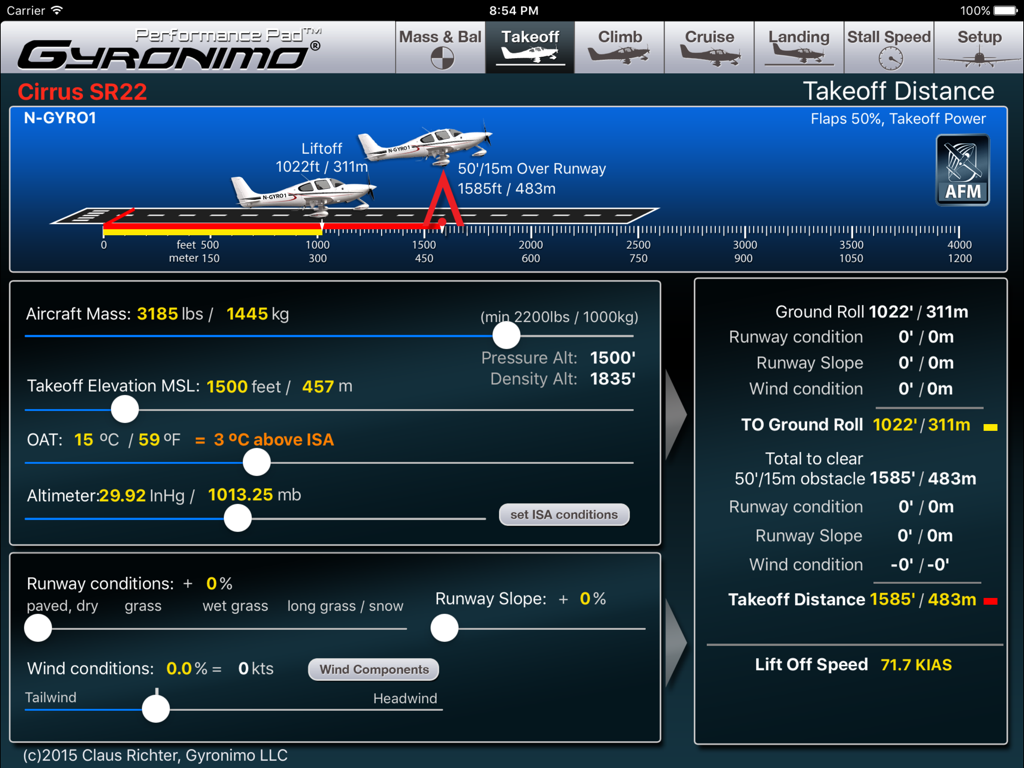
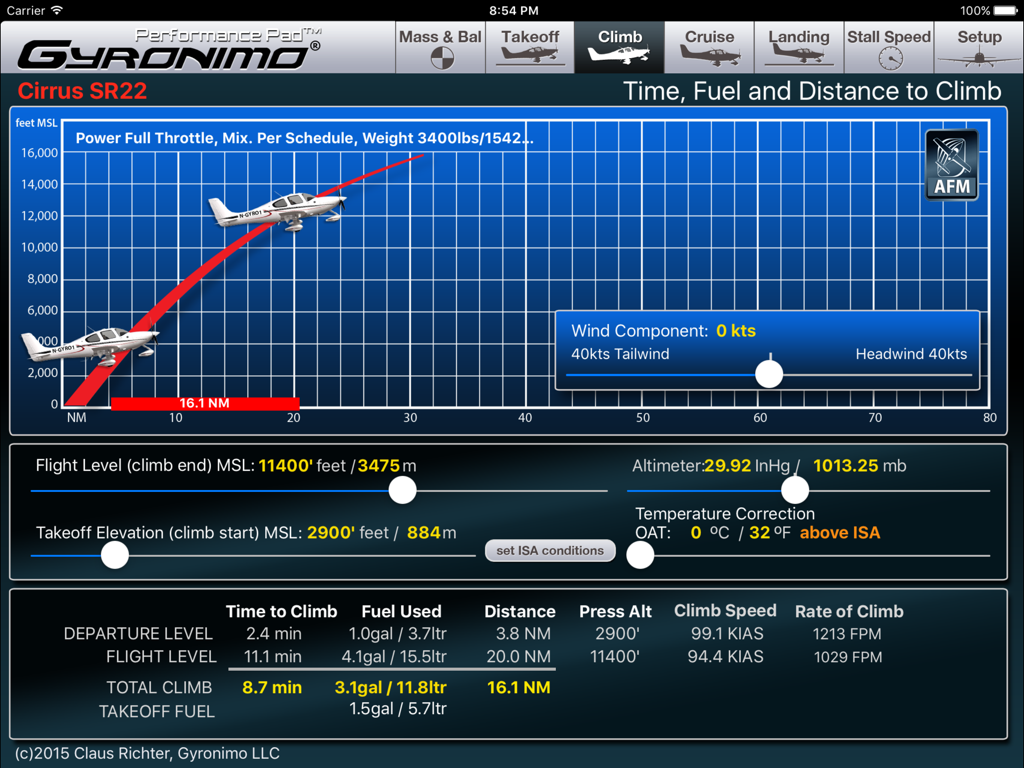
몇 초 안에 정확한 이륙, 상승 및 착륙 데이터를 얻습니다. 실시간 환경 변수를 사용하여 지상 활주 거리 및 밀도 고도를 계산합니다.

다음 스크린샷과 설명은 앱의 공식 스토어 목록에서 직접 가져온 것이며 앱 개발자의 자산입니다.

앱 스토어

스크린샷
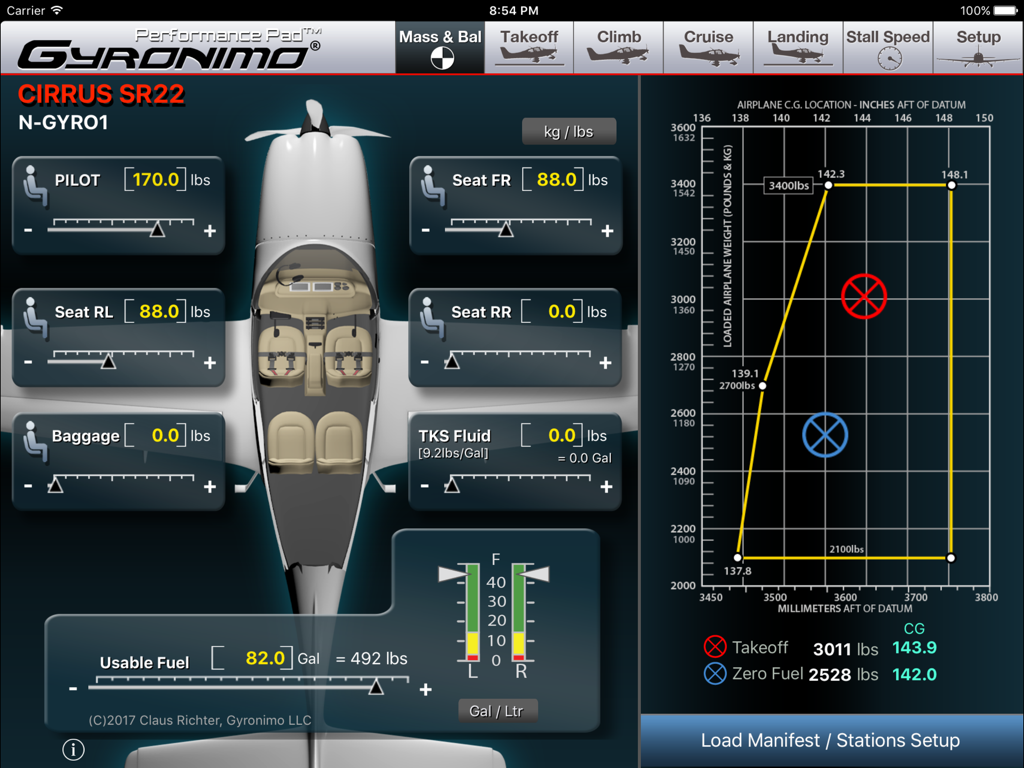
Cirrus SR22 - 조절 가능한 슬라이더와 중심 중량 그래프가 있는 중량 및 균형 계산을 보여주는 Cirrus SR22 성능 패드 앱의 스크린샷.
조절 가능한 슬라이더와 중심 중량 그래프가 있는 중량 및 균형 계산을 보여주는 Cirrus SR22 성능 패드 앱의 스크린샷.

Cirrus SR22 - 질량 및 환경 조건에 대한 조절 가능한 슬라이더가 있는 Cirrus SR22 항공기의 이륙 거리 및 지상 활주 거리 계산 화면.
질량 및 환경 조건에 대한 조절 가능한 슬라이더가 있는 Cirrus SR22 항공기의 이륙 거리 및 지상 활주 거리 계산 화면.

Cirrus SR22 - 시간, 연료 및 상승 거리를 포함한 Cirrus SR22의 상승 성능 계산을 보여주는 iPad 인터페이스
시간, 연료 및 상승 거리를 포함한 Cirrus SR22의 상승 성능 계산을 보여주는 iPad 인터페이스

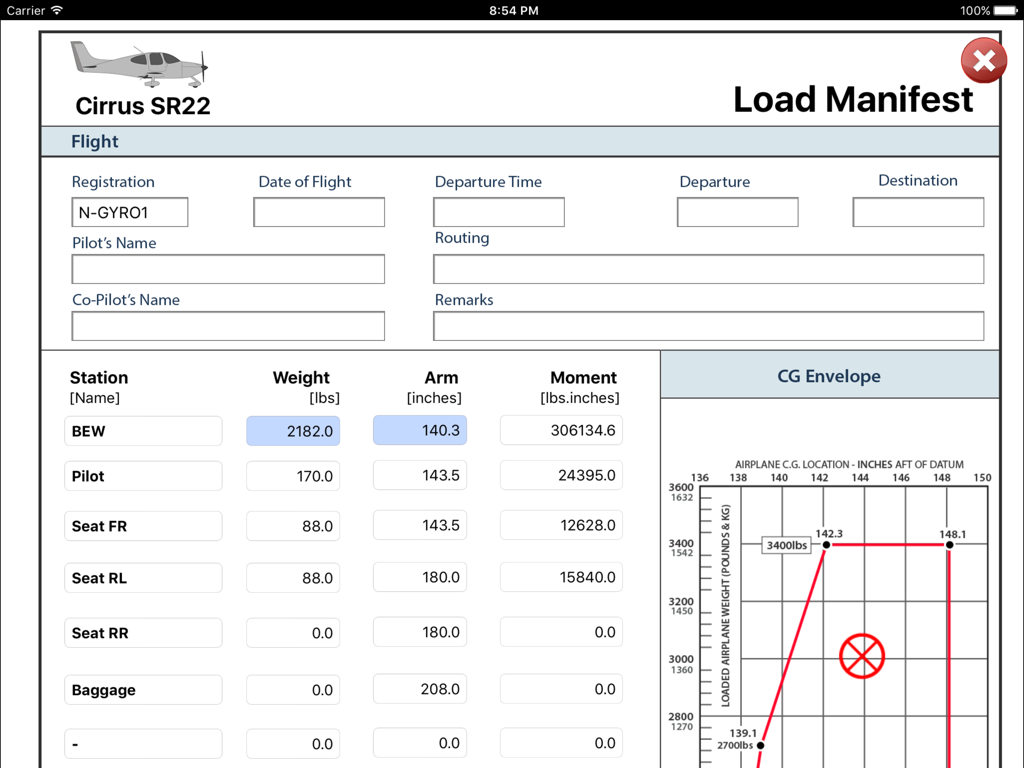
Cirrus SR22 - 중량 계산과 중심 중량 그래프를 보여주는 Cirrus SR22 적재량 명세서 화면의 iPad 스크린샷
중량 계산과 중심 중량 그래프를 보여주는 Cirrus SR22 적재량 명세서 화면의 iPad 스크린샷

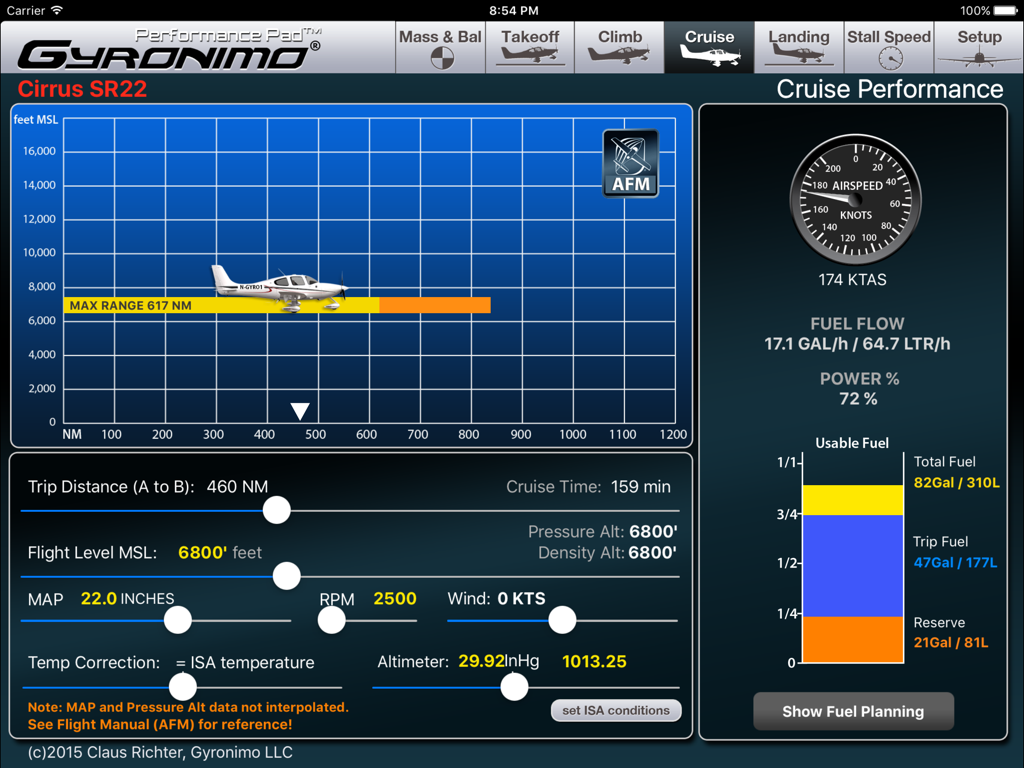
Cirrus SR22 - 연료 계획 및 비행 데이터가 포함된 Cirrus SR22 순항 성능 페이지

연료 계획 및 비행 데이터가 포함된 Cirrus SR22 순항 성능 페이지

설명

Gyronimo Performance Pad -Cirrus SR22- The ultimate EFB computer for Mass & Balance and Performance. *** now with 81/92 US Gal Fuel Tank Option to accommodate SR22 G1, G2 and G3 models. *** For SR22 model with MTOW 3400 lbs with Cirrus Perspective Avionics System (based on flight manual revision Sept. 2011) The W&B and performance computations can be used for all SR22 serial numbers (0002-3026 and subsequent). ++ TKS Anti Icing Fluid option. **** NOW WITH PROFESSIONAL LOAD MANIFEST ***** Sign the manifest on the iPad and send it via email. Calculate and interpolate performance data using the actual values from the Pilot's Operating Handbook (POH). Finish your complete fight planning in just a few seconds. Performance planning has never been easier and quicker. Results are updated immediately and displayed in high resolution graphics, enhanced for the iPad 2/3 and iPad Mini. Change all important values using sliders. Experiment with the results and create "what if" scenarios in no time. Find your optimal cruise altitude, takeoff ground roll, landing distance, climb data and stall speeds. The Performance Pad has seven main pages: 1. The Mass & Balance (or Weight & Balance) Page Calculates Center of Gravity, Moments, Takeoff and Zero Fuel Mass. Set person and baggage weights in seconds using the convenient sliders. Check if the CG is within limits using three graphical displays - Moment Envelope - CG envelope - Aircraft axis 2. The Takeoff Page Using the actual data from the Operating Handbook the Performance Pad calculates and displays Ground Roll and Landing Distance based on: - Aircraft Mass - Takeoff Elevation in MSL (Pressure Altitude and Density Altitude will be computed) - Outside Air Temperature (OAT) - Altimeter Setting - Runway Conditions (i.e. paved dry to long grass or snow) - Runway Slope - Wind Conditions Wind Components Computer - Use the Wind Components page to determine your headwind or tailwind component. Rotate the wind dial to set wind direction, set windspeed and the results will be transferred to your takeoff computations automatically! 3. The Climb page Calculates time, fuel and distance based on - Difference between Takeoff Elevation and intended Flight Level - Altimeter Setting - Outside Air Temperature (OAT) - Altimeter Setting - Headwind or Tailwind Component Also the Rate of Climb and Climb Speed will be displayed. 4. The Cruise Page Using the actual data from the Pilot's Operating Handbook you can determine the optimal cruise altitude based on - Trip Distance - Flight Level - MAP / RPM - Temperature - Wind and Altimeter Setting 5. Landing Page Calculates Ground Roll and Landing Distance based on wind, elevation, altimeter setting etc. Like on the Takeoff Page you can use the Wind Components Computer to quickly determine head- or tailwind components 6. Stall Speed Page. Calculates The Stall Speed based on Bank Angle and Flap Settings. Stall Speed will be computed as KIAS and KCAS using the actual values from the POH. 7. Setup - Load and Save up to five Aircraft Settings and Scenarios. - Send a Mass & Balance Summary to your email address. - Visit our video channel and watch tutorials and video manuals. Mode Switch: The Performance Pad can be used in two Modes: "Individual Mode" All calculations can be done independently from each other. "Plan Mode" Calculated values will be forwarded to the next page and an additional "Flight Summary Page" is available. Gyronimo LLC is not affiliated with Cirrus Aircraft. All Gyronimo Performance Pads for Cirrus aircrafts are not sponsored or endorsed by Cirrus Aircraft. The author disclaims any liability for any direct, indirect, incidental, or consequential losses or damages in connection with your access to or use of this software. The information contained in this software is for general information purposes only.

Download

다운로드: App Store

이 페이지는 앱이나 개발자의 공식 페이지가 아니며, 정보 제공 및 논평을 목적으로 작성된 독립 편집 간행물입니다. 명시적으로 달리 언급되지 않는 한, 해당 앱이나 개발자는 MWM, Apple, Google Play, 앱 퍼블리셔 또는 앱 개발자와 제휴, 보증, 후원, 승인 또는 공식적으로 연결되어 있지 않으며, 이 페이지의 어떤 내용도 해당 앱이 MWM의 서비스를 사용하여 개발되었음을 의미하지 않습니다. 모든 상표, 로고, 스크린샷 및 기타 콘텐츠는 해당 소유자의 자산입니다.