Clicker Communicator: AAC
다운로드: App Store

이 페이지는 앱이나 개발자의 공식 페이지가 아니며, 정보 제공 및 논평을 목적으로 작성된 독립 편집 간행물입니다. 명시적으로 달리 언급되지 않는 한, 해당 앱이나 개발자는 MWM, Apple, Google Play, 앱 퍼블리셔 또는 앱 개발자와 제휴, 보증, 후원, 승인 또는 공식적으로 연결되어 있지 않으며, 이 페이지의 어떤 내용도 해당 앱이 MWM의 서비스를 사용하여 개발되었음을 의미하지 않습니다. 모든 상표, 로고, 스크린샷 및 기타 콘텐츠는 해당 소유자의 자산입니다.

로고: Clicker Communicator: AAC
다운로드: App Store

Clicker Communicator: AAC

교실 참여 및 언어 발달을 위해 특별히 설계된 연구 기반 사용자 친화적인 의사소통 도구로 말하기 어려움을 겪는 학습자에게 힘을 실어주세요.

주요 수치

다운로드

300

사용자 평점

1.0/5

총 평가 수

0

개발사

Crick Software Ltd

카테고리

Education

지원 언어

1

최신 버전

1.2.4

크기

857.6 MB

출시일

2015년 5월 21일
기능

모든 아이의 목소리에 힘을 실어주세요

Clicker Communicator는 의사소통과 학습 사이의 격차를 해소하도록 설계된 연구 기반 AAC 도구로, 교육자가 맞춤 설정하기 쉽고 아이들이 사용하기에 직관적입니다.

모든 능력에 접근 가능

미세 운동 능력이 제한적이거나 복잡한 접근 요구 사항이 있는 어린이를 위해 특별히 설계된 SuperKeys 기술과 스와이프 없는 인터페이스로 물리적 장벽을 제거하세요.

교실 성공을 위해 제작됨

무료 커리큘럼 기반 어휘 세트와 의사소통을 문해력 및 학업 성장과 직접 연결하는 도구를 사용하여 수업에 적극적으로 참여할 수 있도록 하세요.

다음 스크린샷과 설명은 앱의 공식 스토어 목록에서 직접 가져온 것이며 앱 개발자의 자산입니다.

앱 스토어

스크린샷
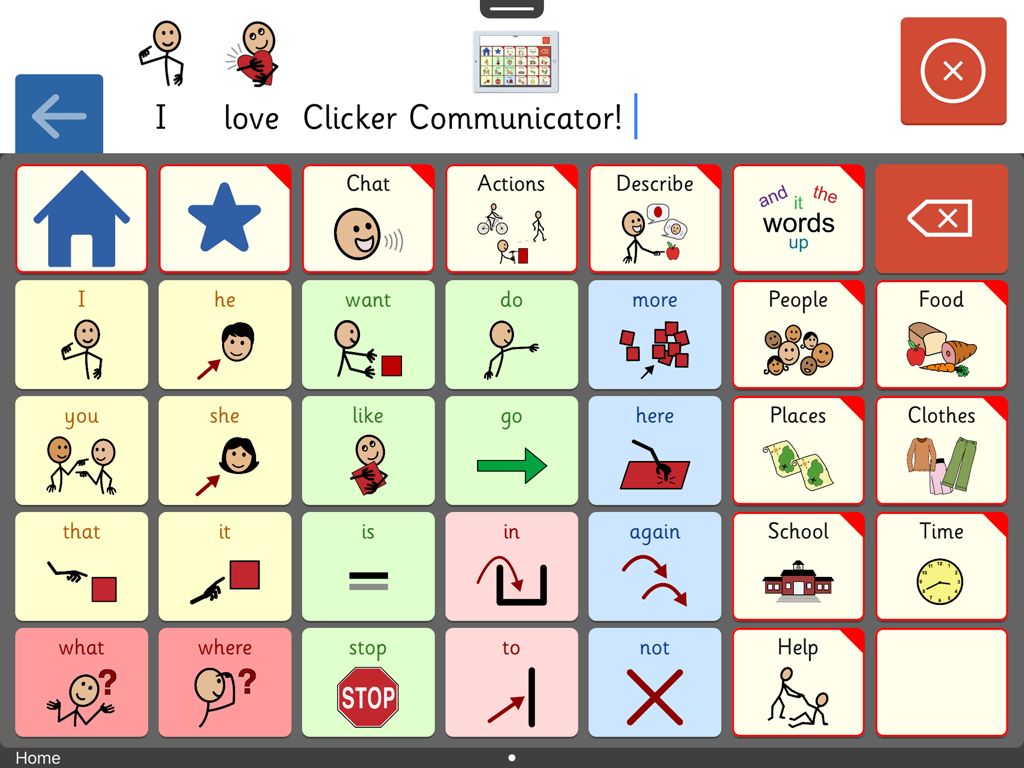
Clicker Communicator: AAC - 아동을 위한 색상 코드 기호 및 범주가 있는 의사소통 보드를 보여주는 Clicker Communicator AAC 앱 화면
아동을 위한 색상 코드 기호 및 범주가 있는 의사소통 보드를 보여주는 Clicker Communicator AAC 앱 화면

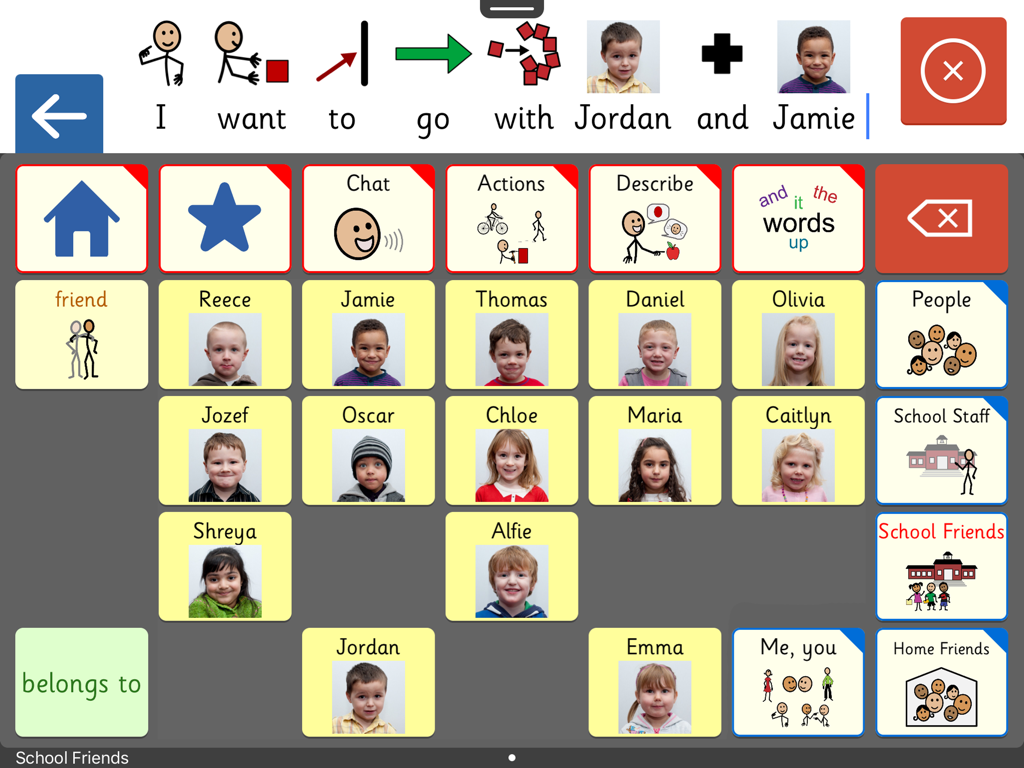
Clicker Communicator: AAC - 쉬운 의사소통을 위해 이름과 사진이 있는 학교 친구들의 맞춤 그리드를 보여주는 Clicker Communicator AAC 앱의 인터페이스
쉬운 의사소통을 위해 이름과 사진이 있는 학교 친구들의 맞춤 그리드를 보여주는 Clicker Communicator AAC 앱의 인터페이스

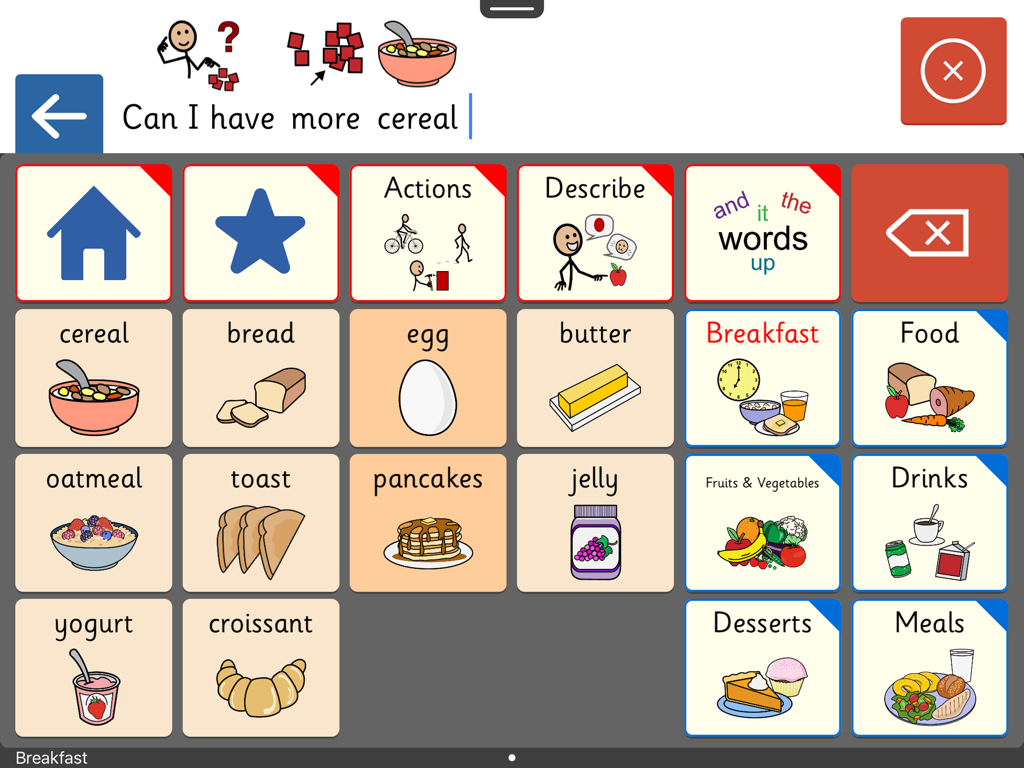
Clicker Communicator: AAC - 아침 식사 음식 기호와 문장 표시줄이 있는 의사소통 그리드를 보여주는 Clicker Communicator AAC 앱 인터페이스
아침 식사 음식 기호와 문장 표시줄이 있는 의사소통 그리드를 보여주는 Clicker Communicator AAC 앱 인터페이스

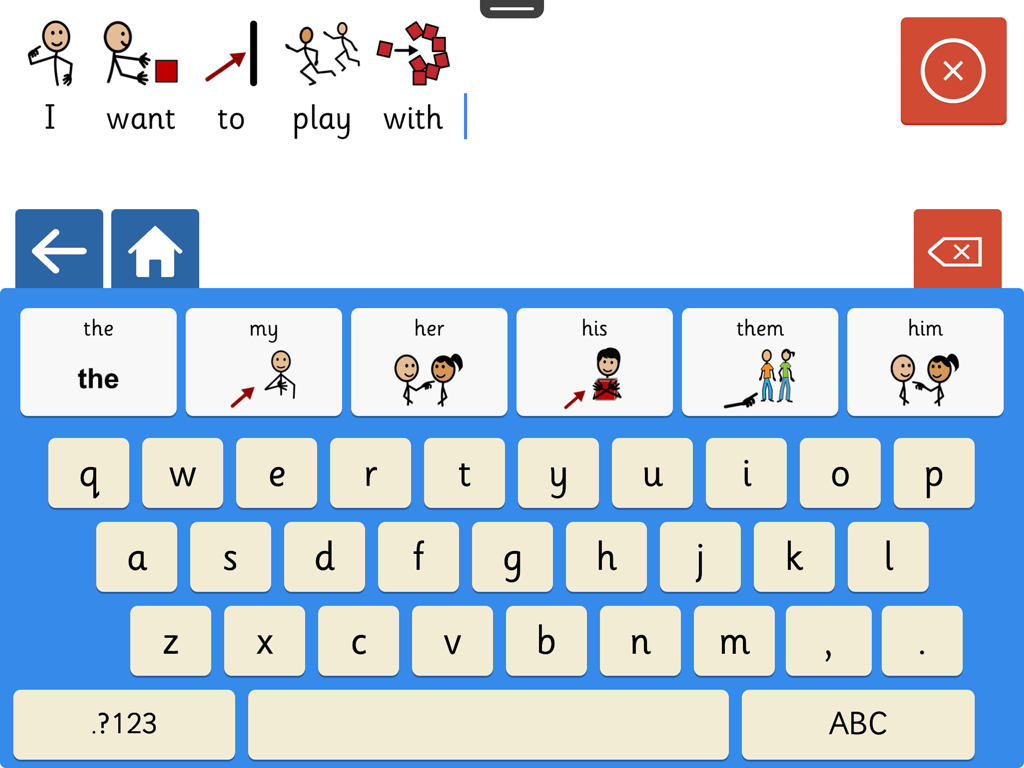
Clicker Communicator: AAC - 기호 지원 키보드와 문장 빌더를 보여주는 Clicker Communicator AAC 앱의 스크린샷
기호 지원 키보드와 문장 빌더를 보여주는 Clicker Communicator AAC 앱의 스크린샷

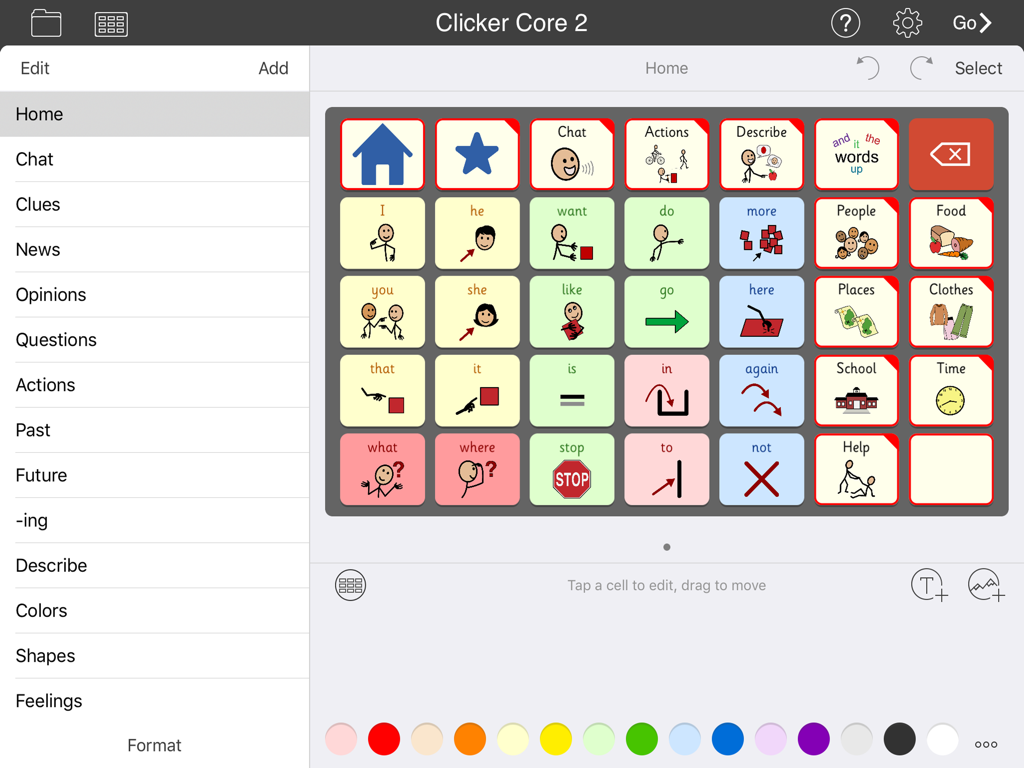
Clicker Communicator: AAC - 의사소통 기호 및 범주 그리드를 보여주는 Clicker Communicator AAC 앱의 인터페이스

의사소통 기호 및 범주 그리드를 보여주는 Clicker Communicator AAC 앱의 인터페이스

설명

A VOICE FOR EVERYONE Clicker Communicator is the definitive AAC app that gives a voice to children and young people with speech and language challenges. This is the latest addition to Crick Software’s Clicker family, developed over 20 years and used worldwide. "The app is so user friendly and easy to customize. Personally, I think it is the BEST AAC app I have seen" - Rose Duszynski, AT Specialist “I love the crisp, easy-to-use interface! The thoughtfulness of features that no other AAC apps have speaks to Crick's continued dedication to students with special needs.” - Laura Giovanetti, CAGS, CCC-SLP, ATP GET STARTED QUICKLY The ready-made Vocabulary Sets are carefully constructed using color-coded, research-based core words - a proven approach for providing a rich communication experience and developing language skills. The three levels, Clicker Core 1, 2, and 3, cover a wide ability range and use consistent layouts to optimize motor-mapping and enable children to progress from one level to the next. CREATE AND EDIT IN MINUTES Clicker Communicator works in the same intuitive way as all the Clicker Apps, enabling you to meet the particular needs of your learners by editing the ready-made Vocabulary Sets or creating your own. Personalize every last detail by adding photos, colors, and topics, and repositioning cells. And you won’t find a faster way of searching and selecting symbols anywhere! DESIGNED FOR CHILDREN We’ve used our 20+ years of experience in developing special needs software to create an app that includes: • Easy to read Sassoon font • Realistic children’s voices • Child-friendly keyboard with symbol-supported predictor • Research-based Vocabulary Sets at three levels • Free curriculum-based Vocabulary Sets on LearningGrids SYMBOLSTIX SYMBOLS INCLUDED This app comes with the complete SymbolStix library. The Widgit and PCS libraries are also available as in-app purchases (please note that this is the only version of the app that enables you to purchase additional libraries). If you wish to ONLY use Widgit or PCS symbols, these versions of Clicker Communicator are available as separate apps in the App Store. Additional pictures are provided by the CrickPix library: 3,500 curriculum pictures to support a wide range of classroom topics. TALK IN CLASS Get your learners with speech challenges taking an active vocal part in the classroom. Our free LearningGrids resources provide the opportunity to respond to teaching points, participate in discussions, and ask and answer topic-based questions. These sets provide access to the vocabulary your learners will meet in their curriculum topics, and provide a natural link to literacy development. UNIQUELY ACCESSIBLE Clicker Communicator has a wide range of accessibility options: • SuperKeys – our unique access method for those who need big target areas. Just tap the cluster containing the symbol you want, and then tap the symbol in the enlarged cluster. • No scrolling or swiping – so every tap is accepted. • Switch access for one and two switches. • Toolbars only visible when editing – all navigation is done from the grid. • Favorite/Recent messages and Vocabulary Sets accessible with just two taps. SHARE AND BACKUP There’s a Backup Safe provided within the app, and Vocabulary Sets can be shared or backed up via email, AirDrop, Dropbox, Google Drive, OneDrive, or WebDAV. PART OF CRICK SOFTWARE’S CLICKER FAMILY Based in the UK and US, Crick Software has a worldwide reputation for quality educational software for learners of all abilities, and we provide free support by email, phone and the Clicker Communicator Users Group on Facebook. Clicker Communicator is part of the Clicker Apps family – find more in the App Store by searching for Crick Software.

Download

다운로드: App Store

이 페이지는 앱이나 개발자의 공식 페이지가 아니며, 정보 제공 및 논평을 목적으로 작성된 독립 편집 간행물입니다. 명시적으로 달리 언급되지 않는 한, 해당 앱이나 개발자는 MWM, Apple, Google Play, 앱 퍼블리셔 또는 앱 개발자와 제휴, 보증, 후원, 승인 또는 공식적으로 연결되어 있지 않으며, 이 페이지의 어떤 내용도 해당 앱이 MWM의 서비스를 사용하여 개발되었음을 의미하지 않습니다. 모든 상표, 로고, 스크린샷 및 기타 콘텐츠는 해당 소유자의 자산입니다.








