ClickMeeting Webinars Meetings

ClickMeeting Webinars Meetings

다운로드: App Store
로고: ClickMeeting Webinars Meetings

ClickMeeting: 어디서나 주최하고, 가르치고, 판매하세요

전문 웨비나 및 온라인 회의를 위한 최고의 모바일 플랫폼입니다. 라이브 이벤트를 스트리밍하고, 원격 팀을 관리하며, 백그라운드 지원 성능과 강력한 리드 전환 도구로 청중의 참여를 유도하세요.

개발사

ClickMeeting Sp. z o.o.

카테고리

Business

다운로드

1M+

사용자 평점

4.1/5

총 평가 수

300

지원 언어

1

당신의 가상 무대가 기다리고 있습니다

이 인터페이스를 사용하는 1M+ 명의 사용자.

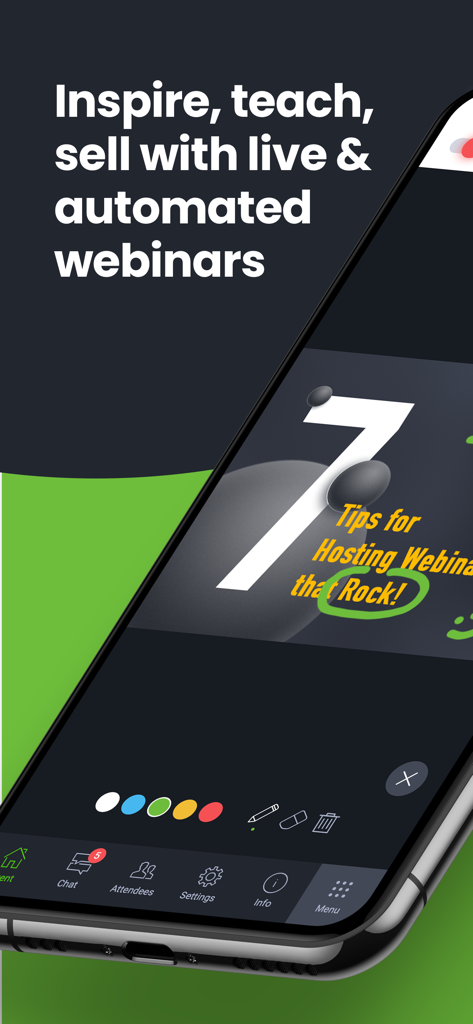
웨비나 프레젠테이션과 대화형 그리기 도구가 있는 ClickMeeting 앱 인터페이스를 보여주는 스마트폰 화면
웨비나 프레젠테이션과 대화형 그리기 도구가 있는 ClickMeeting 앱 인터페이스를 보여주는 스마트폰 화면

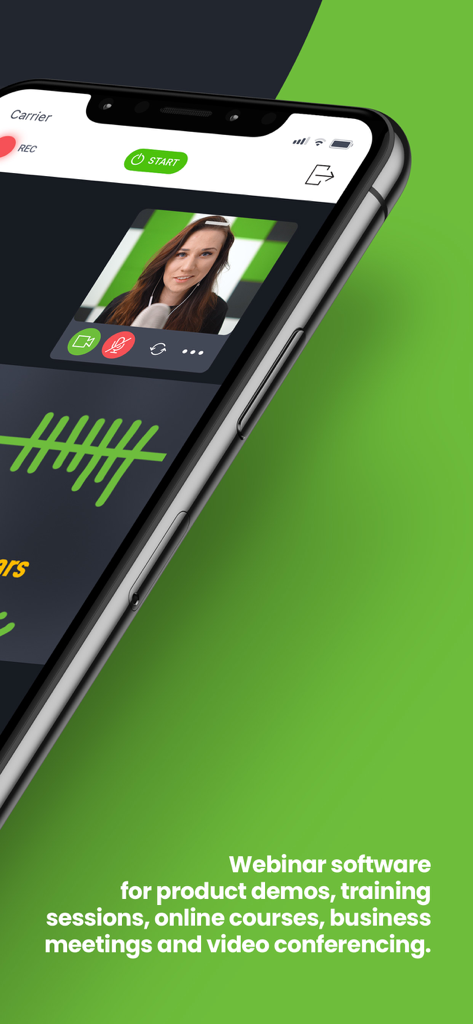
발표자와 전문적인 회의 기능이 포함된 라이브 비디오 웨비나를 보여주는 ClickMeeting 모바일 앱 인터페이스
발표자와 전문적인 회의 기능이 포함된 라이브 비디오 웨비나를 보여주는 ClickMeeting 모바일 앱 인터페이스

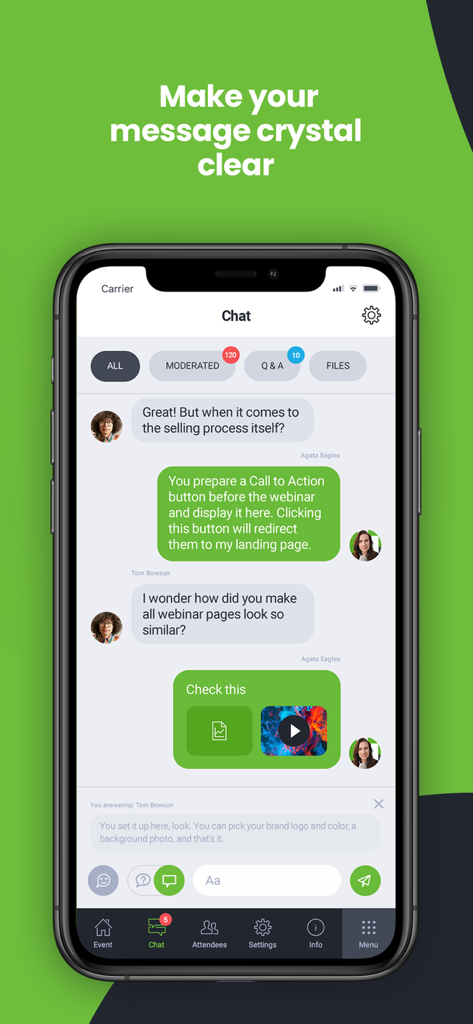
중재 및 Q&A 탭이 있는 대화형 채팅 인터페이스를 보여주는 ClickMeeting 모바일 앱 스크린샷
중재 및 Q&A 탭이 있는 대화형 채팅 인터페이스를 보여주는 ClickMeeting 모바일 앱 스크린샷

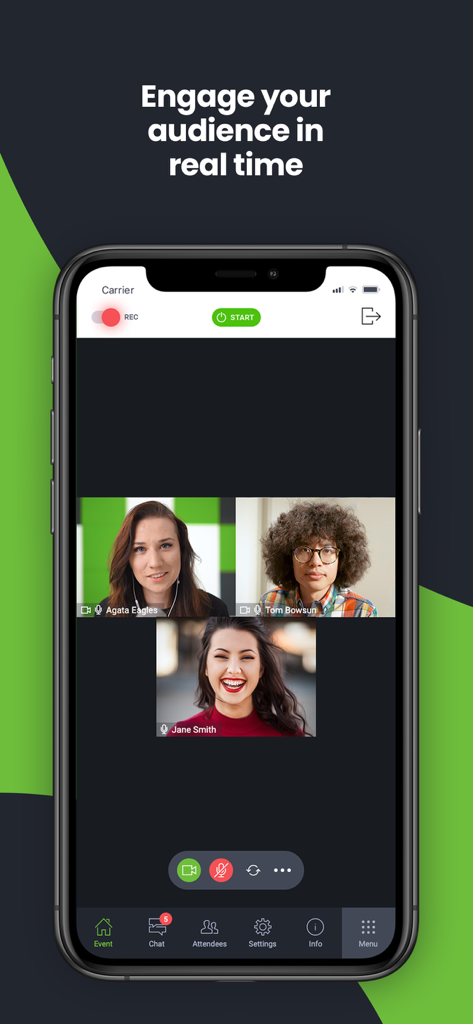
세 명의 참가자와 참여 도구가 있는 실시간 화상 회의를 보여주는 ClickMeeting 모바일 앱 인터페이스
세 명의 참가자와 참여 도구가 있는 실시간 화상 회의를 보여주는 ClickMeeting 모바일 앱 인터페이스

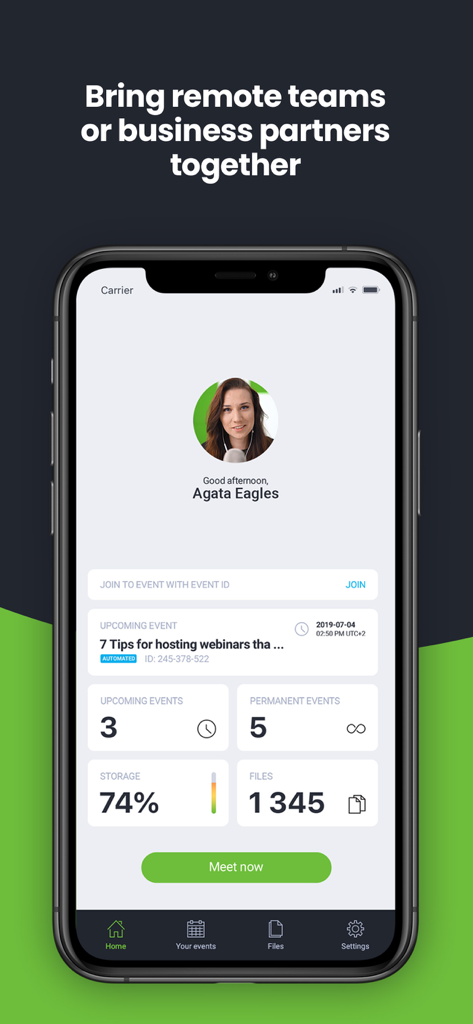
모바일 기기에서 예정된 웨비나와 이벤트 관리 통계를 보여주는 ClickMeeting 앱 홈 화면.

모바일 기기에서 예정된 웨비나와 이벤트 관리 통계를 보여주는 ClickMeeting 앱 홈 화면.

어디서나 전문적인 존재감을 강화하세요

이 앱을 돋보이게 하는 도구, 1M+ 명의 사용자가 선택.

📱

중단 없는 멀티태스킹

이메일이나 메모를 확인하는 동안 백그라운드에서 연결 상태를 유지하여 앱을 전환해도 이벤트가 끊기지 않도록 합니다.

직관적인 올인원 뷰

화면을 넘길 필요가 없습니다. 발표자, 슬라이드, 채팅을 한 화면에서 확인하여 진정으로 몰입감 있는 경험을 즐기세요.

🚀

즉각적인 전환 유도

비즈니스 성장을 이끄는 통합 클릭 유도 문구(CTA) 버튼과 실시간 Q&A 세션을 통해 참석자를 리드로 전환하세요.

리뷰 분석

사용자 리뷰 인사이트.

감정 점수

26%
부정적

요약

This mobile app receives largely negative feedback, primarily due to persistent stability and connectivity issues, with many users experiencing frequent crashes and dropped connections during meetings. Reviewers also criticize the app for missing crucial features, such as screen sharing (especially on iPad), horizontal mode, and functions available in the web version, alongside a generally clunky and unintuitive user interface. While some users appreciate its ease of use and certain features like whiteboard functionality, widespread problems with audio device management, excessive battery drain, and difficulties with installation and updates significantly detract from the overall experience. Several users specifically reported issues with sound and video not working after an iOS 14.4.1 update and frequent crashes upon screen rotation.

주요 테마

App Stability(10)
Connectivity Problems(7)
Missing Key Features(7)
User Interface Issues(7)
Audio Device Management(6)
Ease of Use(3)
Battery Drain(2)

앱 소개

에 대해 알아야 할 모든 것 ClickMeeting Webinars Meetings.

설명

Attend or host online events of all shapes and sizes (online business meetings, virtual classrooms, mid-scale webinars, and huge virtual events) with the latest ClickMeeting app. Take valuable webinar content and important business meetings with you wherever you go. With fresh, intuitive UX design and stunning audio-video quality, the ClickMeeting online events app is a top choice for sharing knowledge and collaboration on the go. From now on, the app can work in the background, so your event is not going to turn off if: • You use other apps in the meantime, for instance, to send a message to a friend; • You don’t take any actions on your screen for a longer time. Attendees: What can you expect from using the app? • No screen-swiping to view a presentation, a presenter, and a chat. You can see it all on one screen. • An incredibly easy way to join online events. • The audio-video streaming quality will knock your socks off! J Organizers: With the ClickMeeting webinar app, you can: • Use a customized Call-To-Action button to redirect your events’ attendees to a landing page of your choice; • Stream your events live on Facebook or YouTube; • Interact with your audience in real-time through the Q&A mode; • Make the most of your files stored in your cloud (Dropbox, OneDrive, Google Drive). ClickMeeting – inspire, teach, sell, and collaborate ClickMeeting is a browser-based web conferencing platform loved by thousands of business customers all over the globe. Flexibility and scalability make their online events platform a top choice for solopreneurs, startups, small and medium companies, and large enterprises that discovered video conferencing as a perfect way to achieve their goals. Who makes the most of ClickMeeting digital get-togethers? • Marketers; • Sales teams; • Remote teams; • Online teachers and trainers; • C-level executives; • Business and professional associations; • HR specialists. What types of online events can you host on the ClickMeeting web conferencing platform? 1. Live webinars. A classic and most popular version of webinars. You schedule your online event to happen at a specific time and, then, you meet your audience live. Live webinars are an ideal match for onboarding and training purposes as well as with sales events and product demos. 2. On-demand webinars. With this option, you pre-record your webinar to release it to your contacts, leads, or students so they can watch it anytime and anywhere they want. If your goal is generating leads and running online courses, on-demand webinars will be a way to go! 3. Automated webinars. Unlike on-demand events, you schedule automated webinars to take place on a specific day and hour. However, just like above, you need to have a recorded material first and then enrich them with tools like Call-To-Action, a video clip, or a survey. 4. Online meetings. Planned in advance or organized spontaneously. Online meetings are smaller web gatherings where up to 25 participants can see, hear, and talk to each other in one virtual conference room. It’s a way to go if you’re on the lookout for a real-time collaboration tool and organize virtual meetups with your team, customers, or business partners. 5. Huge virtual events. Powered up with webcasting technology, huge virtual events give you a chance to stream your content for up to 10k viewers!

최신 버전

6.0.1

크기

89.6 MB

출시일

2016년 10월 13일

어디서나 전문 이벤트를 확장할 준비가 되셨나요?

이동 중에도 영감을 주고, 가르치고, 판매하기 위해 ClickMeeting을 신뢰하는 수천 명의 마케터, 교육자 및 리더와 함께하세요. 지금 다운로드하여 청중과 소통할 기회를 절대 놓치지 마세요.

다운로드: App Store
FAQ

자주 묻는 질문

에 대해 알아야 할 모든 것 ClickMeeting Webinars Meetings

ClickMeeting 앱은 어떤 종류의 온라인 이벤트를 지원하나요?

ClickMeeting 앱은 라이브, 온디맨드, 자동 웨비나, 최대 25명 참가자를 위한 온라인 회의, 웹캐스팅 기술을 이용한 최대 10,000명의 시청자를 위한 대규모 가상 이벤트를 포함한 다양한 온라인 이벤트를 지원합니다.

ClickMeeting 이벤트를 소셜 미디어 플랫폼에서 실시간으로 스트리밍할 수 있나요?

네, ClickMeeting 웨비나 앱을 사용하면 주최자는 Facebook 또는 YouTube에서 이벤트를 실시간으로 스트리밍할 수 있습니다. 이 기능을 통해 더 많은 잠재 고객에게 도달하고 참여를 유도할 수 있습니다.

ClickMeeting은 주최자를 위한 Call-To-Action 버튼을 제공하나요?

네, ClickMeeting은 주최자가 사용자 지정 Call-To-Action 버튼을 사용할 수 있도록 허용합니다. 이 버튼은 이벤트 참가자를 주최자가 선택한 랜딩 페이지로 리디렉션하여 마케팅 노력을 지원합니다.

ClickMeeting 참가자는 프레젠테이션, 발표자, 채팅을 한 화면에서 볼 수 있나요?

네, ClickMeeting 앱을 사용하는 참가자는 프레젠테이션, 발표자, 채팅을 모두 한 화면에서 볼 수 있습니다. 이 디자인은 화면을 스와이프할 필요를 없애므로 간소화된 경험을 제공합니다.

ClickMeeting 이벤트 중에 다른 앱으로 전환하거나 화면이 비활성화되면 어떻게 되나요?

ClickMeeting 앱은 백그라운드에서 작동합니다. 다른 앱을 사용하거나 화면이 장시간 비활성화되어 있어도 이벤트가 종료되지 않으므로 지속적인 참여가 보장됩니다.

ClickMeeting은 파일 저장을 위해 클라우드 스토리지 서비스와 통합할 수 있나요?

네, ClickMeeting은 주최자가 클라우드 서비스에 저장된 파일을 활용할 수 있도록 허용합니다. Dropbox, OneDrive, Google Drive와 같은 인기 있는 플랫폼과 통합되어 자료에 쉽게 액세스할 수 있습니다.

ClickMeeting은 대규모 가상 이벤트에 적합한가요?

네, ClickMeeting은 웹캐스팅 기술로 구동되는 대규모 가상 이벤트를 지원합니다. 최대 10,000명의 시청자에게 콘텐츠를 스트리밍할 수 있어 대규모 청중에게 적합합니다.

ClickMeeting 디지털 모임의 주요 수혜자는 누구인가요?

ClickMeeting은 마케터, 영업 팀, 원격 팀, 온라인 교사, C-레벨 임원, 비즈니스 협회, HR 전문가를 포함한 다양한 전문가에게 혜택을 제공하여 많은 비즈니스 요구에 맞게 활용할 수 있습니다.

App information, icons, screenshots, and descriptions displayed on this page are sourced from the Apple App Store and are the property of their respective developers. Download estimates and rankings are based on MWM's proprietary models and may not reflect actual figures. This page is provided for informational and analytical purposes only.

Believe this page infringes your intellectual property? File a dispute