Clone Camera Pro
Clone Camera Pro
다운로드: App Store

이 페이지는 앱이나 개발자의 공식 페이지가 아니며, 정보 제공 및 논평을 목적으로 작성된 독립 편집 간행물입니다. 명시적으로 달리 언급되지 않는 한, 해당 앱이나 개발자는 MWM, Apple, Google Play, 앱 퍼블리셔 또는 앱 개발자와 제휴, 보증, 후원, 승인 또는 공식적으로 연결되어 있지 않으며, 이 페이지의 어떤 내용도 해당 앱이 MWM의 서비스를 사용하여 개발되었음을 의미하지 않습니다. 모든 상표, 로고, 스크린샷 및 기타 콘텐츠는 해당 소유자의 자산입니다.


로고: Clone Camera Pro
다운로드: App Store

Clone Camera Pro

일반적인 필터는 잊고 스크롤을 멈추게 하세요. 정밀 마스킹과 유령 이미지로 클로닝 기술을 마스터하여 창의적인 비전을 초현실적인 걸작으로 바꿔보세요.

주요 수치

다운로드

297K+

사용자 평점

4.2/5

총 평가 수

3K+

개발사

Peta Vision

카테고리

Photo & Video

지원 언어

3

최신 버전

2.3.5

크기

46.4 MB

출시일

2012년 10월 5일
기능

특별한 것을 만드세요

소셜 피드를 돋보이게 디자인된 전문가 수준의 도구로 단순한 스냅샷을 놀라운 디지털 아트로 변환하세요.

6배의 마법

최대 6개의 이미지를 하나의 완벽한 걸작으로 결합하세요. 사전 설정된 프레임이 없으므로 당신의 상상력이 스토리텔링의 유일한 한계입니다.

완벽한 유령 정렬

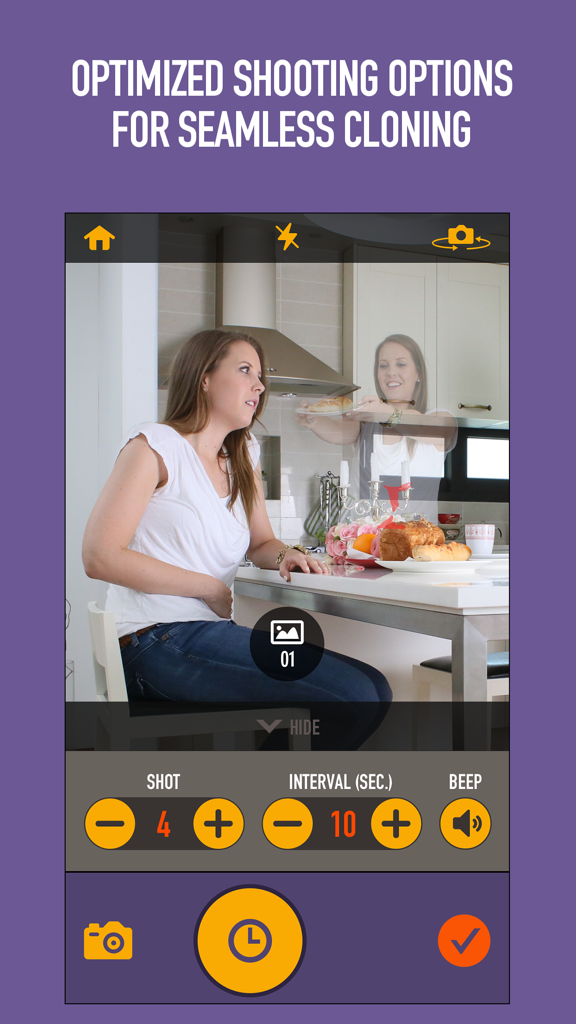
저희 유령 이미지 기술은 다음 사진을 찍는 동안 이전 사진을 볼 수 있게 하여 모든 클론이 완벽하게 배치되고 사실적으로 보이도록 합니다.

다음 스크린샷과 설명은 앱의 공식 스토어 목록에서 직접 가져온 것이며 앱 개발자의 자산입니다.

앱 스토어

스크린샷
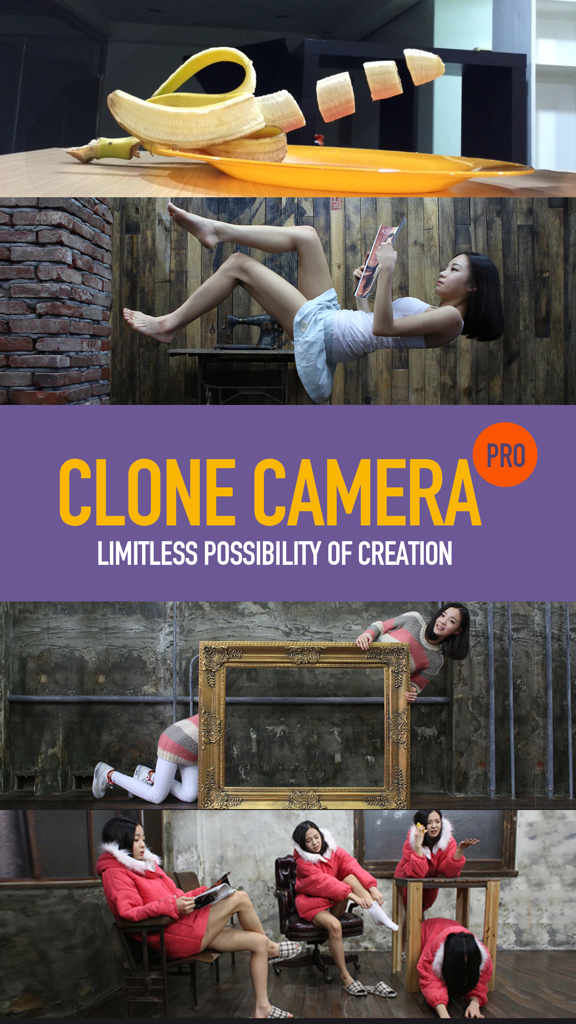
Clone Camera Pro - 클론 카메라 프로로 만든 클로닝 및 공중 부양 효과를 보여주는 초현실주의 사진 모음

클론 카메라 프로로 만든 클로닝 및 공중 부양 효과를 보여주는 초현실주의 사진 모음

Clone Camera Pro - 클로닝 및 공중 부양 효과를 보여주는 초현실적이고 창의적인 사진 그리드
클로닝 및 공중 부양 효과를 보여주는 초현실적이고 창의적인 사진 그리드

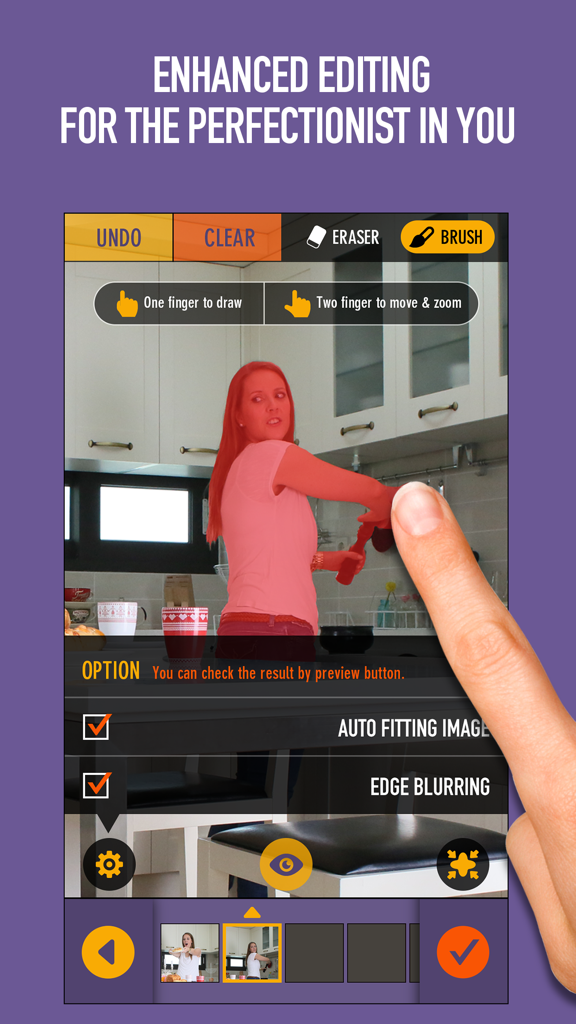
Clone Camera Pro - 빨간색 하이라이트로 수동 피사체 마스킹을 보여주는 클론 카메라 프로 편집 인터페이스
빨간색 하이라이트로 수동 피사체 마스킹을 보여주는 클론 카메라 프로 편집 인터페이스

Clone Camera Pro - 유령 이미지 미리 보기와 셀프 타이머 컨트롤이 있는 촬영 설정을 보여주는 클론 카메라 프로 앱 인터페이스
유령 이미지 미리 보기와 셀프 타이머 컨트롤이 있는 촬영 설정을 보여주는 클론 카메라 프로 앱 인터페이스

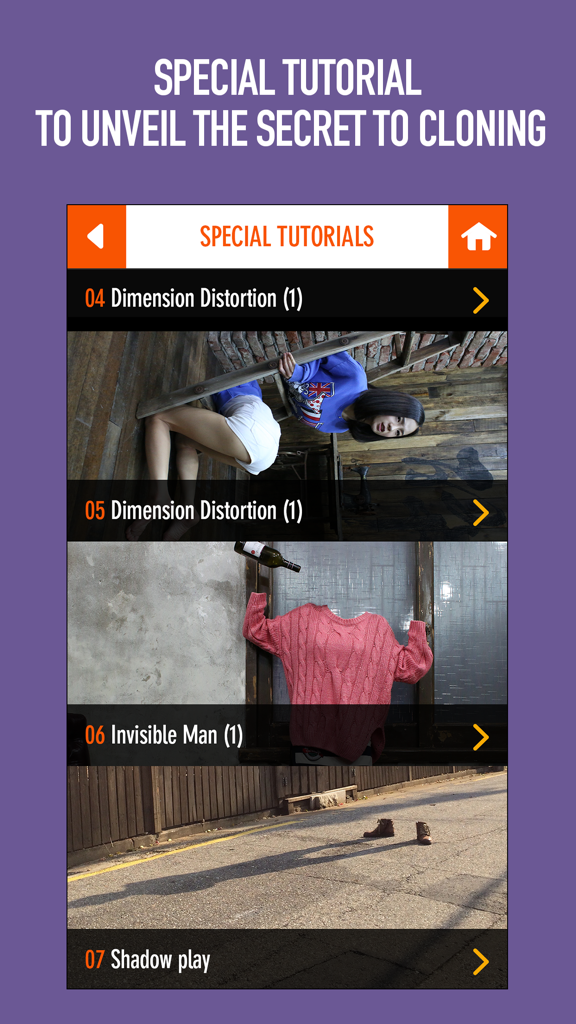
Clone Camera Pro - 창의적인 사진 조작 예시를 보여주는 클론 카메라 프로의 특별 튜토리얼 메뉴

창의적인 사진 조작 예시를 보여주는 클론 카메라 프로의 특별 튜토리얼 메뉴

설명

The world's first original cloning app with MILLIONS of paid users! Introduced by the official App Store on Facebook and Twitter. Want to really impress your Instagram followers? Use CloneCamera to make clones of your subjects in a single photo. Want to create photos that stand out? Wish you could clone yourself? CloneCamera helps you create flawless clone photos! There's no preset frames, so let your imagination run free! Features: 1. Mind-blowing photos 2. Combine up to 6 images 3. Provides ghost imaging technique while taking photos 4. Load and edit photos from your camera roll 5. An enhanced self-timer 6. Numerous filters to choose from 7. Share with your friends instantly 8. A new preview option 9. A start-up guide to help you on your first try 10. Supports full-resolution images 11. Save and load previous drafts 12. Special tutorial to unveil the secret to cloning Instructions: 1. Take as many photos as you want 2. Select up to 6 photos to combine 3. Outline the subject you want to clone 4. Press 'Preview' to check the final result 5. Choose a filter, adjust, and crop 6. Share! --------------------------------------------------- Take Clone Camera from your phone to your wall with Pixuru. Pixuru offers high-quality printing on canvas, wood, metal, framed prints and more! After taking photos with Clone Camera, tap 'Print with Pixuru' to order. Simple, easy, and who doesn't love the feeling of holding your photos? We're also giving you 25% off your first order! Choose the print option within the app & enter code CLONEPIX25 during checkout to receive 25% off an order. One time use. Valid on all products. Free shipping on orders to the Contiguous US only. Cannot be combined with other discounts. Code is only valid on the product listed above; cannot be traded for cash or other products. Offer expires 10/3/14 at 11:59 pm PST. If you have any questions, please contact support at helpme@pixuru.com --------------------------------------------------- Participate to win a spot in our showcase! All you have to do is: 1. Follow us on Facebook, Instagram, or Twitter Facebook: facebook.com/petavision Instagram: @Petavision Twitter: @Petavision 2. Tag #CloneCameraChoice to your favorite photos ------------------------------------------------- Watch our video here: http://vimeo.com/petavision/clonecamerapro See others' pictures on Instagram by searching #clonecamera ------------------------------------------------- Contact us: www.peta-vision.com info@peta-vision.com

Download

다운로드: App Store

이 페이지는 앱이나 개발자의 공식 페이지가 아니며, 정보 제공 및 논평을 목적으로 작성된 독립 편집 간행물입니다. 명시적으로 달리 언급되지 않는 한, 해당 앱이나 개발자는 MWM, Apple, Google Play, 앱 퍼블리셔 또는 앱 개발자와 제휴, 보증, 후원, 승인 또는 공식적으로 연결되어 있지 않으며, 이 페이지의 어떤 내용도 해당 앱이 MWM의 서비스를 사용하여 개발되었음을 의미하지 않습니다. 모든 상표, 로고, 스크린샷 및 기타 콘텐츠는 해당 소유자의 자산입니다.








