
이 페이지는 앱이나 개발자의 공식 페이지가 아니며, 정보 제공 및 논평을 목적으로 작성된 독립 편집 간행물입니다. 명시적으로 달리 언급되지 않는 한, 해당 앱이나 개발자는 MWM, Apple, Google Play, 앱 퍼블리셔 또는 앱 개발자와 제휴, 보증, 후원, 승인 또는 공식적으로 연결되어 있지 않으며, 이 페이지의 어떤 내용도 해당 앱이 MWM의 서비스를 사용하여 개발되었음을 의미하지 않습니다. 모든 상표, 로고, 스크린샷 및 기타 콘텐츠는 해당 소유자의 자산입니다.


Collage Maker - Photos Editor
이 앱은 당신의 콘텐츠를 잊을 수 없는 시각적 서사로 바꿉니다. 더 이상 평범함은 없습니다.
다운로드
100k+사용자 평점
총 평가 수
158개발사
카테고리
Photo & Video지원 언어
17최신 버전
2.1.8크기
397.3 MB출시일
2024년 11월 1일소셜 미디어 콘텐츠 제작자를 위한 핵심 기능 평가
"Collage Maker - Photos Editor" 앱 분석
소셜 미디어 즉시 공유
이 앱은 완성된 콜라주를 인스타그램과 틱톡에 직접 게시할 수 있는 기능을 제공하여, 사용자가 원활한 워크플로우로 콘텐츠를 쉽게 공유하고 더 많은 사람들에게 도달할 수 있게 해줍니다.
풍부한 콜라주 템플릿
이 앱은 수백 개의 전문적으로 디자인된 콜라주 템플릿을 제공하여 사용자가 다양한 스타일과 목적에 맞는 시각적으로 매력적인 콘텐츠를 쉽게 만들 수 있게 해줍니다.
인스타그램 스토리 템플릿
이 앱은 인스타그램 스토리 및 릴을 위한 템플릿을 제공하여, 사용자가 인상적인 게시물을 쉽게 만들고 팔로워들과 즉시 공유할 수 있게 해줍니다.
다양한 그리드 레이아웃
이 앱은 1:1, 16:9 등 다양한 종횡비의 사전 제작된 그리드 레이아웃을 제공하여, 사용자가 여러 장의 사진으로 일관성 있고 아름다운 인스타그램 피드를 구성할 수 있도록 지원합니다.
강력한 사진 편집 도구
이 앱은 자르기, 회전, 크기 조정, 흐림 효과, 미화 등 다양한 사진 편집 기능을 포함하고 있어, 사용자가 콜라주에 삽입하기 전에 사진의 품질을 향상시키고 개성을 더할 수 있게 해줍니다.
전문적인 사진 필터
이 도구는 전문적인 수준의 필터를 제공하여, 사용자가 사진의 분위기를 손쉽게 변화시키고 시각적으로 매력적인 효과를 연출할 수 있도록 합니다.
다양한 텍스트 및 글꼴 옵션
이 앱은 100가지 이상의 엄선된 글꼴을 제공하여, 사용자가 자신의 콜라주에 메시지를 추가하고 다양한 스타일로 텍스트를 커스터마이징할 수 있도록 지원합니다.
자유로운 디자인 캔버스
이 도구는 사용자가 자유형 캔버스를 통해 제한 없이 콜라주를 제작하고, 확대/축소 기능을 활용하여 세밀한 부분까지 조정하며 독창적인 레이아웃을 구현할 수 있도록 합니다.
자주 묻는 질문
에 대해 알아야 할 모든 것 Collage Maker - Photos Editor
What features does Collage Maker - Photos Editor offer for creating collages?
Collage Maker - Photos Editor allows users to combine scenic shots, create food collages, design product comparisons, make holiday greetings, and craft personal digital scrapbooks. It offers various templates, grids, and freestyle options.
Can users edit photos within the Collage Maker - Photos Editor app?
Yes, Collage Maker - Photos Editor includes a powerful photo editor. Users can crop, rotate, resize, blur, beautify, add stickers, text, backgrounds, and adjust brightness, contrast, saturation, and layout.
Does Collage Maker - Photos Editor provide pre-made templates and grid layouts?
Yes, Collage Maker - Photos Editor provides hundreds of hand-picked templates, from minimalist to extravagant styles. It also features premade grid layouts for collages in popular aspect ratios like 1:1, 3:4, and 16:9.
Can I share collages directly to social media from Collage Maker - Photos Editor?
Yes, Collage Maker - Photos Editor supports instant posting directly to Instagram and TikTok. Users can also create Instagram stories or reels using provided templates and share them seamlessly.
How can I change photo backgrounds in Collage Maker - Photos Editor?
Collage Maker - Photos Editor allows users to change photo backgrounds. Options include modifying colors, adjusting opacity, applying gradients and patterns, or using the dedicated background eraser tool.
Does Collage Maker - Photos Editor offer a free trial?
Yes, Collage Maker - Photos Editor offers a free trial for 3 days. This trial includes unlimited gallery cleaning for a limited period.
What are the subscription options for Collage Maker - Photos Editor?
Collage Maker - Photos Editor offers weekly, monthly, and yearly subscription types. These subscriptions automatically renew unless auto-renewal is turned off at least 24 hours before the current period ends.
How do users manage auto-renewal for Collage Maker - Photos Editor subscriptions?
Users manage auto-renewal for Collage Maker - Photos Editor subscriptions through their Account Settings after purchase. Auto-renewal must be turned off at least 24 hours before the current period expires.
Where can I find the privacy policy for Collage Maker - Photos Editor?
The privacy policy for Collage Maker - Photos Editor is available at https://pzmobile.com/app/en/policy. This document outlines how user data is collected and processed.
Can I add stickers and doodles to my collages in Collage Maker - Photos Editor?
Yes, Collage Maker - Photos Editor provides hundreds of free stickers and overlays. Users can also create their own drawings and doodles to add personalized artistic touches to their collages.
다음 스크린샷과 설명은 앱의 공식 스토어 목록에서 직접 가져온 것이며 앱 개발자의 자산입니다.
앱 스토어
스크린샷
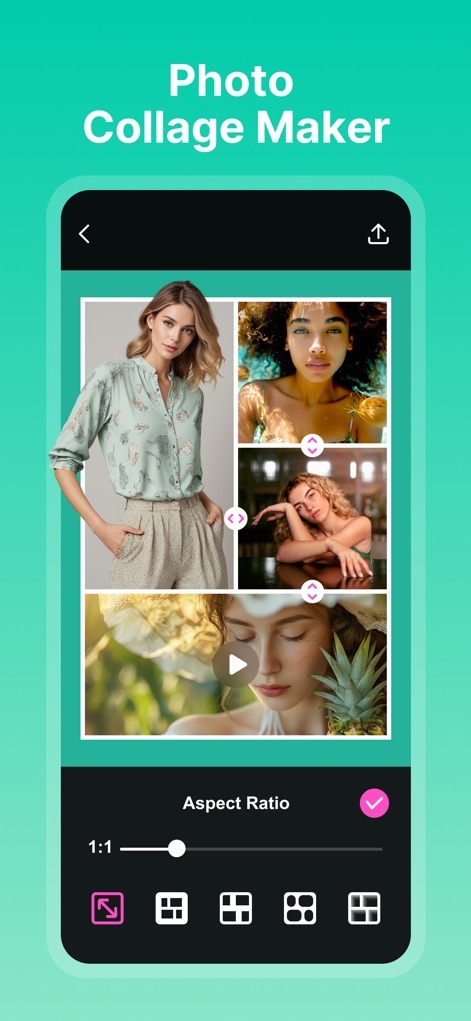
사용자는 다양한 레이아웃 옵션을 통해 여러 사진과 비디오를 결합할 수 있으며, 1:1과 같은 다양한 화면 비율을 손쉽게 조절할 수 있습니다.
콜라주 레이아웃
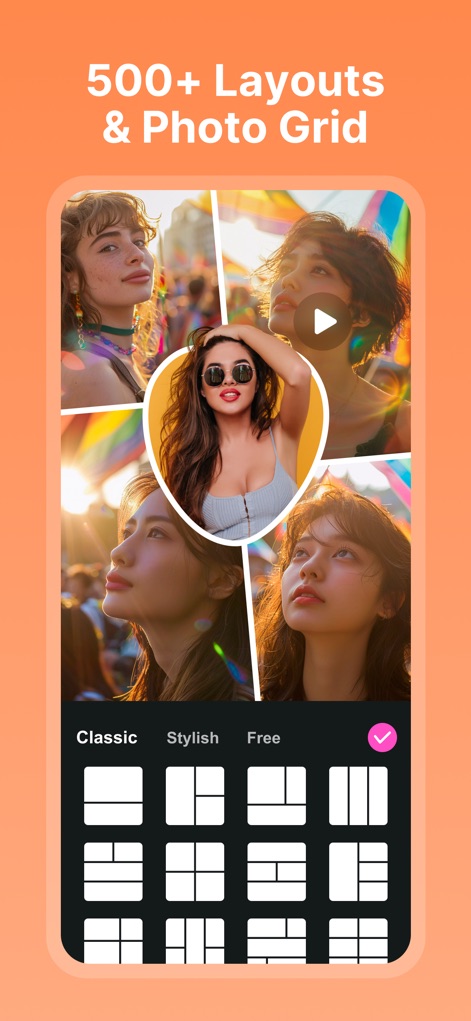
이 앱은 500개 이상의 레이아웃과 포토 그리드를 제공하여, 'Classic', 'Stylish' 등 다채로운 카테고리에서 원하는 디자인을 선택할 수 있습니다.
다채로운 포토 그리드
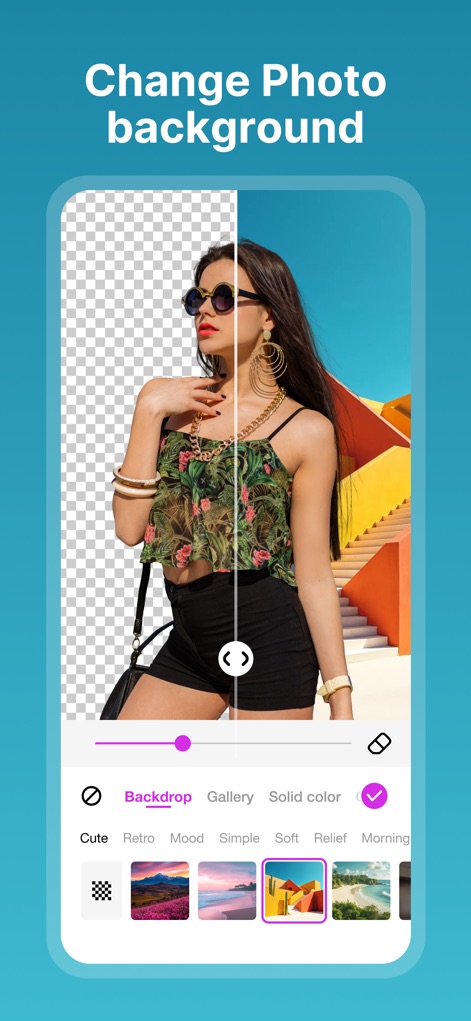
사용자는 이미지의 배경을 손쉽게 변경할 수 있으며, 기존 배경을 제거하거나 'Backdrop' 및 'Gallery' 옵션을 통해 새로운 배경을 적용할 수 있습니다.
스마트 배경 교체

이 도구는 'Erase' 기능으로 이미지의 불필요한 배경을 깔끔하게 지울 수 있으며, 'Restore' 옵션을 사용하여 실수한 부분을 되돌릴 수 있습니다.
정교한 배경 제거

사용자는 다양한 스타일의 포스터 템플릿을 활용하여 독창적인 콘텐츠를 제작할 수 있으며, 여러 이미지와 텍스트를 조합한 디자인으로 시선을 사로잡습니다.
세련된 포스터 템플릿
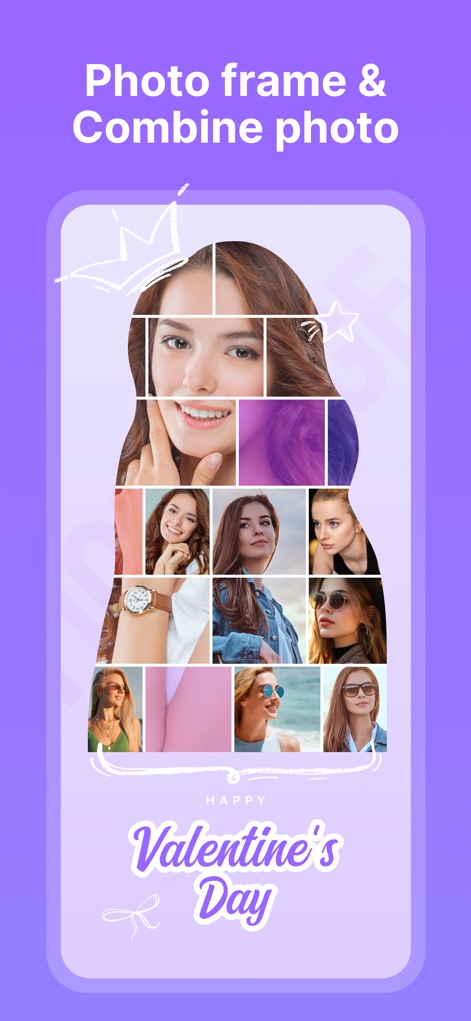
이 앱은 여러 사진을 하나의 큰 이미지 프레임 안에 통합하는 기능을 제공하며, 특별한 메시지나 테마가 있는 'Happy Valentine's Day'와 같은 문구를 추가할 수 있습니다.
포토 프레임 조합

사용자는 'Texture' 옵션에서 다양한 패턴과 질감의 배경을 선택하여 콜라주에 개성을 더할 수 있으며, 여러 장의 사진을 독특한 형태로 배치할 수 있습니다.
다채로운 질감 배경
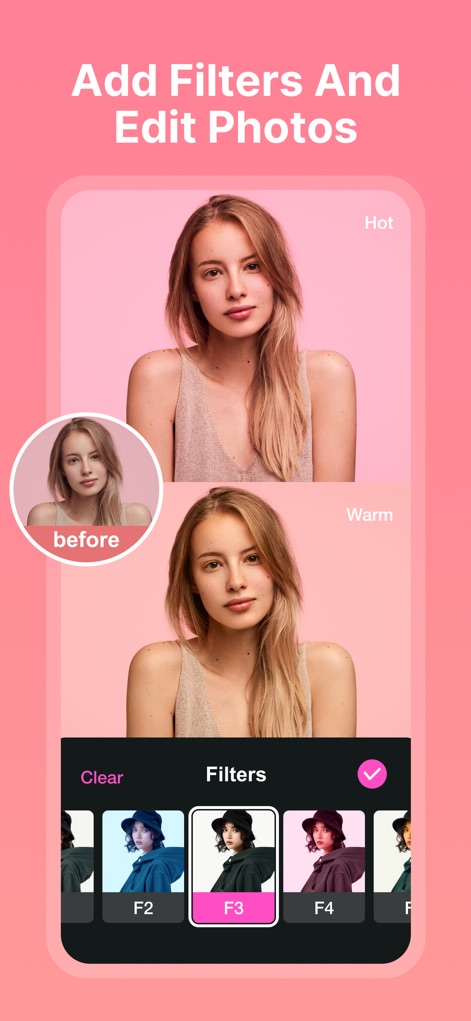
사용자는 다양한 'Filters'를 적용하여 사진의 분위기를 극적으로 변화시킬 수 있으며, 원본과 필터 적용 후의 모습을 쉽게 비교할 수 있습니다.
전문가급 필터 효과
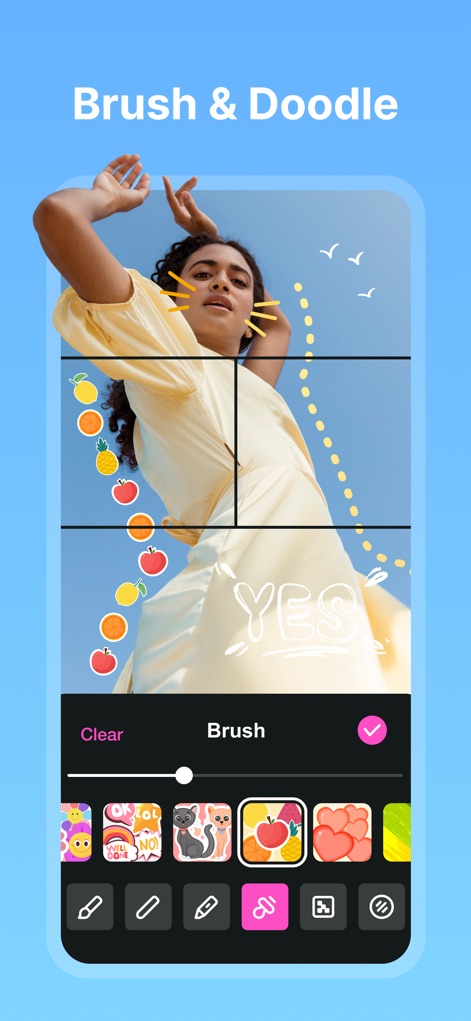
이 기능은 이미지에 자유로운 'Brush'와 'Doodle'을 추가하여 개인적인 감각을 더할 수 있으며, 다양한 모양과 색상의 스티커로 콜라주를 꾸밀 수 있습니다.
창의적인 그림 도구
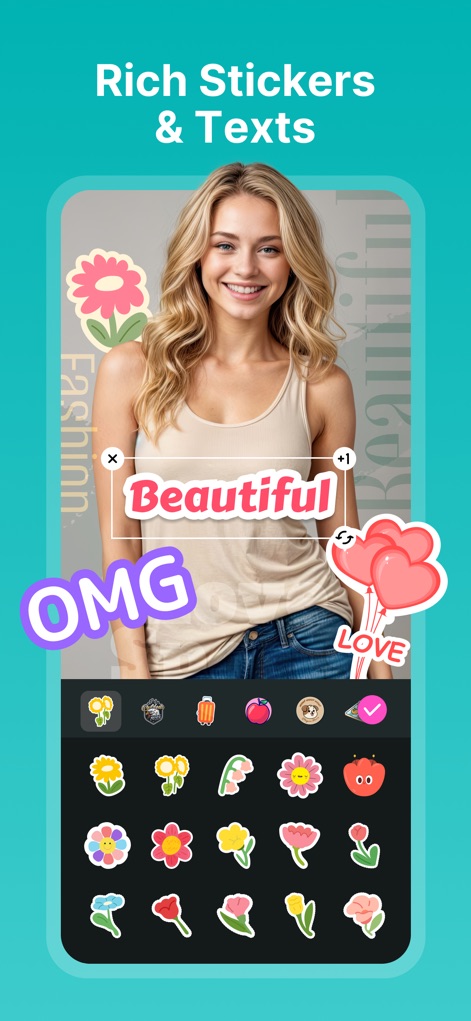
사용자는 수많은 'Stickers'와 'Texts' 옵션을 활용하여 사진에 개성을 불어넣을 수 있으며, 다양한 디자인과 글꼴로 자신만의 메시지를 표현할 수 있습니다.
풍부한 스티커와 텍스트
설명
Download
비슷한 앱
유사한 기능과 사용자 경험을 가진 앱

SCRL: Photo Collage Maker
Appostrophe AB

PhotoGrid: Video Collage Maker
JUPITER PALACE PTE. LTD.

Layout for Instagram: Collage
Shamble, Inc.

Photo Collage Maker: InCollage
SHANTANU PTE. LTD.

TicPic
Zhuhai Kuxiong Network Technology Co., Ltd.

Collage Maker: CollagePlus
Shamble, Inc.

Photo Collage Montage Maker
Honk Honk Punch Pty Ltd

Photo Collage Maker & Creator
Honk Honk Punch Pty Ltd

Photo Collage Montage & Layout
Honk Honk Punch Pty Ltd
이 페이지는 앱이나 개발자의 공식 페이지가 아니며, 정보 제공 및 논평을 목적으로 작성된 독립 편집 간행물입니다. 명시적으로 달리 언급되지 않는 한, 해당 앱이나 개발자는 MWM, Apple, Google Play, 앱 퍼블리셔 또는 앱 개발자와 제휴, 보증, 후원, 승인 또는 공식적으로 연결되어 있지 않으며, 이 페이지의 어떤 내용도 해당 앱이 MWM의 서비스를 사용하여 개발되었음을 의미하지 않습니다. 모든 상표, 로고, 스크린샷 및 기타 콘텐츠는 해당 소유자의 자산입니다.