
이 페이지는 앱이나 개발자의 공식 페이지가 아니며, 정보 제공 및 논평을 목적으로 작성된 독립 편집 간행물입니다. 명시적으로 달리 언급되지 않는 한, 해당 앱이나 개발자는 MWM, Apple, Google Play, 앱 퍼블리셔 또는 앱 개발자와 제휴, 보증, 후원, 승인 또는 공식적으로 연결되어 있지 않으며, 이 페이지의 어떤 내용도 해당 앱이 MWM의 서비스를 사용하여 개발되었음을 의미하지 않습니다. 모든 상표, 로고, 스크린샷 및 기타 콘텐츠는 해당 소유자의 자산입니다.


CommBank
이 앱은 사용자가 호주 은행의 모든 것을 손바닥 안에 넣을 수 있는 권한을 부여합니다. 돈을 움직이고, 추적하고, 보상받는 모든 행동이 즉각적으로 통제됩니다.
다운로드
7.5M+사용자 평점
총 평가 수
342.2K개발사
카테고리
Finance지원 언어
1최신 버전
5.49.0.165578크기
519.2 MB출시일
2009년 4월 16일호주 금융 활동 개인 및 소규모 사업자 대상 디지털 플랫폼 평가
CommBank 앱 핵심 기능 분석
실시간 모바일 뱅킹 및 빠른 결제
사용자는 휴대폰으로 송금, 청구서 결제, 잔액 확인을 실시간으로 수행하고, PayID, 계좌번호 또는 BPAY를 통해 빠르게 결제할 수 있습니다.
고급 보안 기능
CallerCheck를 통한 통화 발신자 확인, 기기 분실 시 디지털 지갑 카드 삭제, NameCheck를 통한 결제 사기 및 오결제 방지 등 최신 보안 기능을 제공하여 사용자의 금융 자산을 보호합니다.
사업 및 개인 계정 분리
이 앱은 사용자가 사업 프로필을 설정하고 재정 상태를 명확하게 파악할 수 있도록 지원하여, 소규모 사업자가 개인 및 사업 자금을 효과적으로 관리할 수 있게 해줍니다.
지능형 재무 관리 도구
이 앱은 지출 추적, 청구서 관리, 저축 목표 설정을 통해 사용자의 스마트한 은행 업무를 돕는 Money plan 기능을 제공합니다.
24시간 연중무휴 고객 지원
이 도구는 가상 비서 Ceba를 통해 즉각적인 도움을 제공하거나, 필요한 경우 전문가와 연결하여 24시간 내내 지원을 받을 수 있게 해줍니다.
카드 관리 및 제어
사용자는 카드 설정 및 PIN을 관리하고, 분실, 도난 또는 손상된 카드를 신고하며, 카드를 임시로 잠글 수 있어 금융 제어권을 유지할 수 있습니다.
CommBank Yello 고객 혜택
이 프로그램은 CommBank Yello를 통해 앱 내에서 다양한 혜택, 캐시백, 할인을 제공하여 고객의 충성도를 보상합니다.
항공 및 호텔 예약 혜택
CommBank Yello Homeowner 및 Everyday Plus 고객에게는 Hopper가 제공하는 여행 예약 서비스를 통해 항공편 및 호텔 예약 시 10% 캐시백 혜택을 제공합니다.
자주 묻는 질문
에 대해 알아야 할 모든 것 CommBank
What can I do with the CommBank app?
The CommBank app allows you to transfer money, pay bills, check balances, and make fast payments. It also offers features for tracking spending, setting savings goals, and accessing security tools like CallerCheck.
How does CommBank Yello work in the CommBank app?
CommBank Yello is the CommBank app's customer recognition program. It provides eligible users with access to exclusive benefits, cashbacks, and discounts directly within the app.
Does the CommBank app offer security features like CallerCheck?
Yes, the CommBank app integrates security features such as CallerCheck to verify calls from CommBank. It also enables users to delete cards from digital wallets and utilize NameCheck to prevent payment issues.
How do I get customer support in the CommBank app?
The CommBank app offers 24/7 support. You can get instant help from the virtual assistant Ceba or connect with a specialist who will message you back directly through the app.
Can I book travel, flights, and hotels using the CommBank app?
Yes, the CommBank app provides Travel Booking, powered by Hopper. Eligible CommBank Yello Homeowner and Everyday Plus customers receive 10% back in travel credits on flight and hotel bookings.
How do I manage my CommBank cards in the app?
The CommBank app allows comprehensive card management. Users can adjust card settings, manage their PIN, report lost, stolen, or damaged cards, and temporarily lock their cards.
Is it possible to manage business and personal accounts separately in the CommBank app?
Yes, the CommBank app allows users to set up a dedicated business profile. This feature provides a clear, separate view of your business and personal financial positions.
What is the Money plan feature in the CommBank app?
Money plan in the CommBank app is a tool for smarter banking. It enables users to track spending, effectively manage bills, and set specific savings goals to help achieve financial objectives.
Is there a cost to download the CommBank app?
No, the CommBank app is free to download. However, charges from your mobile network provider for accessing data on your phone apply independently.
What are the system requirements for the CommBank app?
For optimal performance, the CommBank app requires your phone's language setting to be English. Additionally, the device's region setting must be configured to Australia.
Can I invest in shares and ETFs with the CommBank app?
Yes, the CommBank app includes an "Investing hub" feature. This allows users to manage their portfolio, explore investment options, and invest in shares and ETFs.
How do I view all my accounts and their balances in the CommBank app?
The CommBank app provides a centralized "Accounts" section. Here, you can view all your accounts, such as Smart Access and Travel Fund, with their respective available balances and total financial positions.
다음 스크린샷과 설명은 앱의 공식 스토어 목록에서 직접 가져온 것이며 앱 개발자의 자산입니다.
앱 스토어
스크린샷
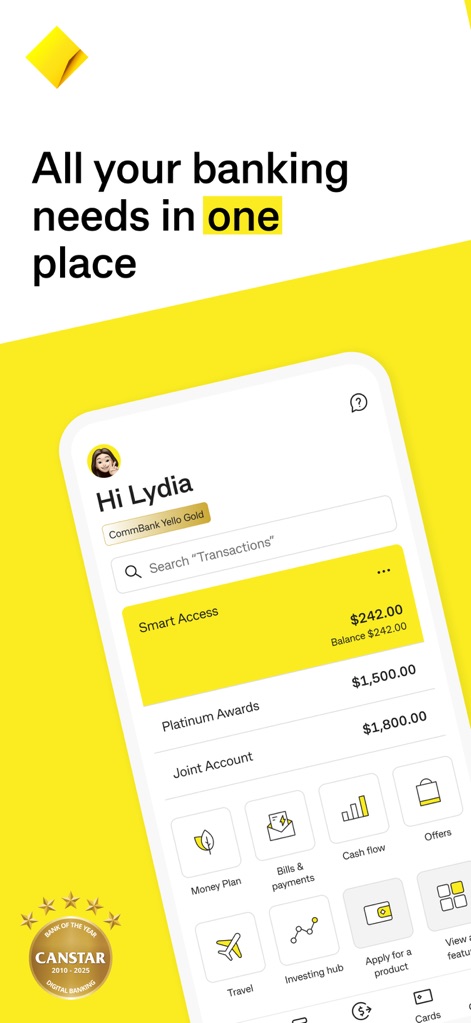
이 앱은 사용자의 모든 뱅킹 니즈를 한곳에 통합합니다. 사용자는 'Smart Access' 계좌 잔액과 'Money Plan' 기능을 통해 재정을 쉽게 관리할 수 있습니다.
모든 뱅킹 니즈
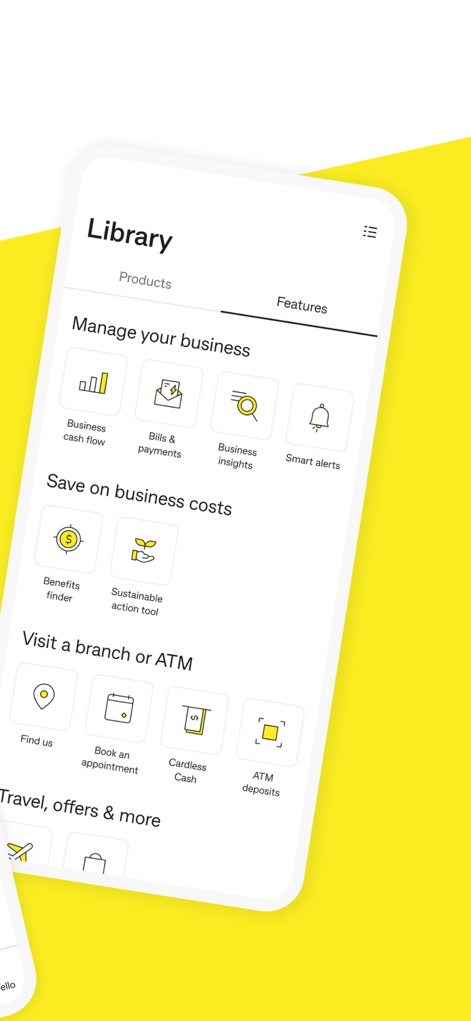
이 도구는 비즈니스 관리를 위한 광범위한 기능을 제공합니다. 'Business cash flow'와 'Business insights'를 통해 운영을 효율적으로 모니터링할 수 있습니다.
비즈니스 및 기능
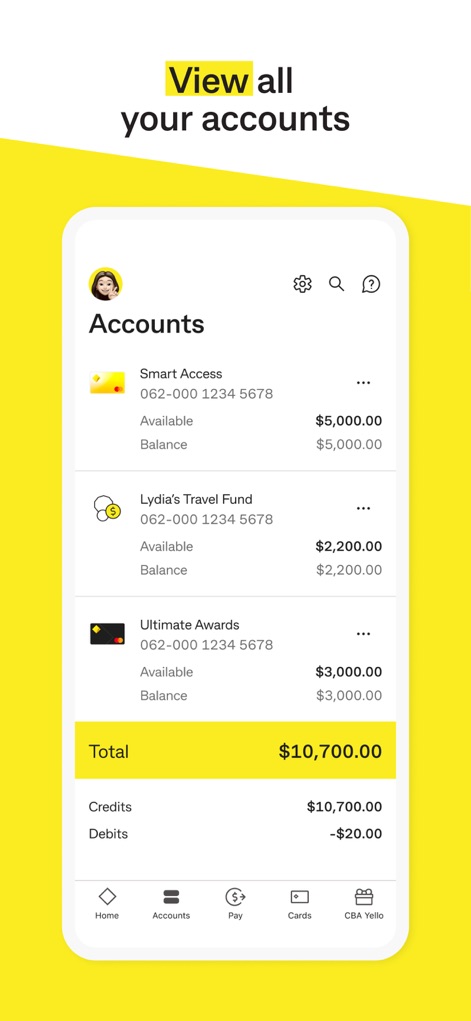
사용자는 자신의 모든 금융 계좌를 한눈에 볼 수 있습니다. 'Smart Access' 계좌와 'Lydia's Travel Fund'를 포함한 모든 계좌의 잔액을 명확하게 확인할 수 있습니다.
모든 계좌 보기
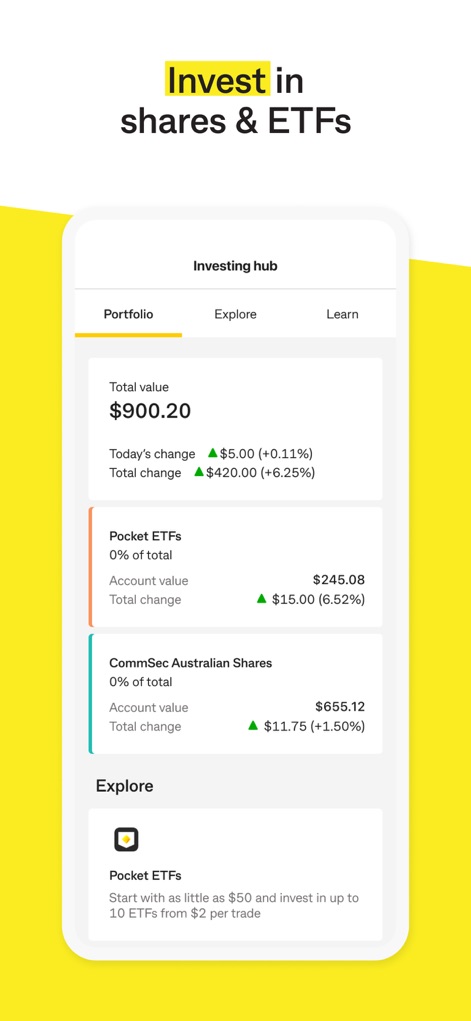
이 앱은 사용자가 주식 및 ETF에 투자할 수 있도록 지원합니다. 'Total value'와 'Pocket ETFs' 섹션에서 투자 포트폴리오의 실적을 확인할 수 있습니다.
주식 및 ETF 투자

CommBank Yello 프로그램은 사용자에게 맞춤형 혜택을 제공합니다. '5% back in Travel Credits'와 'Gold' 티어 혜택을 통해 더 많은 가치를 경험할 수 있습니다.
CommBank Yello 혜택
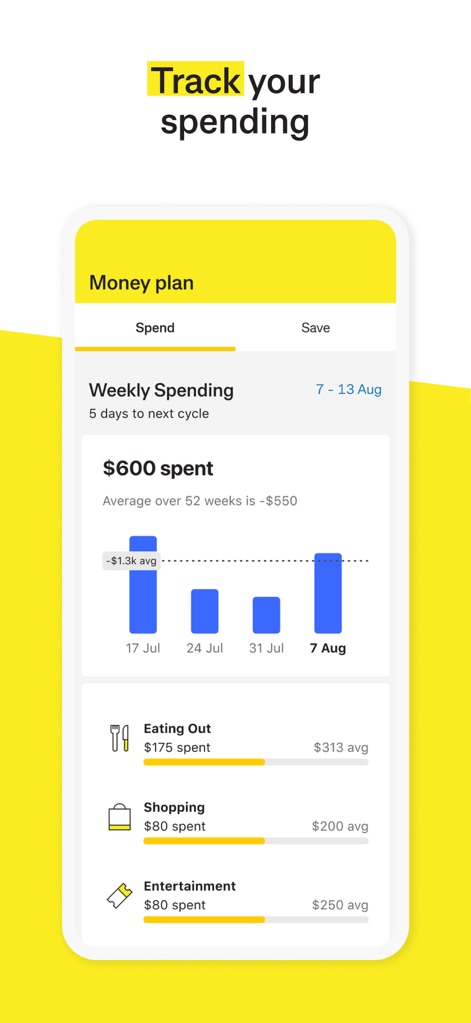
이 도구는 사용자의 지출 패턴을 효과적으로 추적하고 분석합니다. 'Weekly Spending' 그래프와 'Eating Out' 카테고리별 지출 내역을 통해 소비 습관을 파악할 수 있습니다.
지출 추적 및 분석
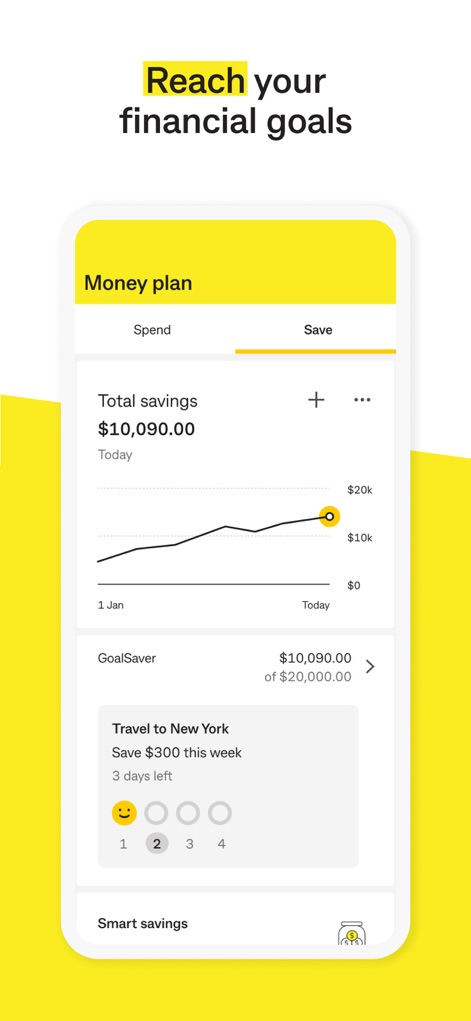
이 앱은 사용자의 재정 목표 달성을 돕습니다. 'Total savings' 현황을 그래프로 확인하고, 'Travel to New York'과 같은 특정 목표에 대한 진행 상황을 추적할 수 있습니다.
재정 목표 달성
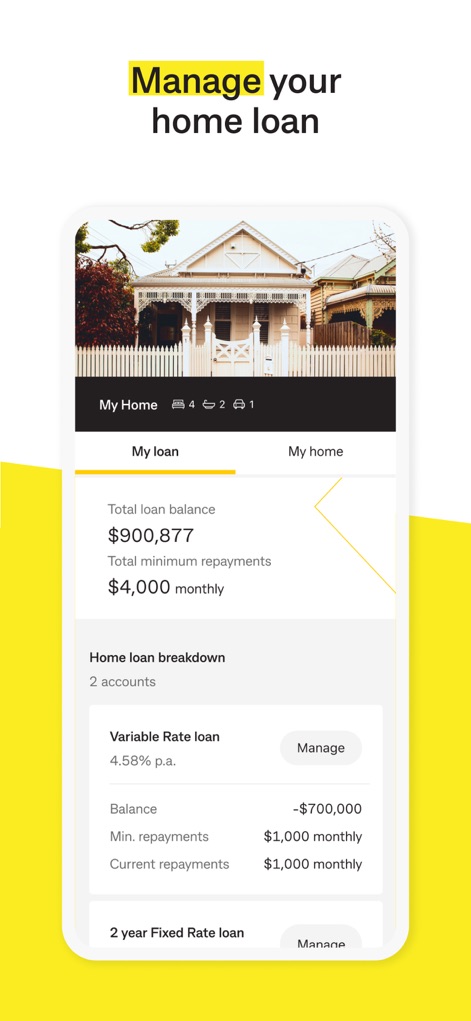
사용자는 주택 대출을 편리하게 관리할 수 있습니다. 'Total loan balance'를 확인하고 'Variable Rate loan'과 '2 year Fixed Rate loan'의 상세 정보를 한눈에 볼 수 있습니다.
주택 대출 관리
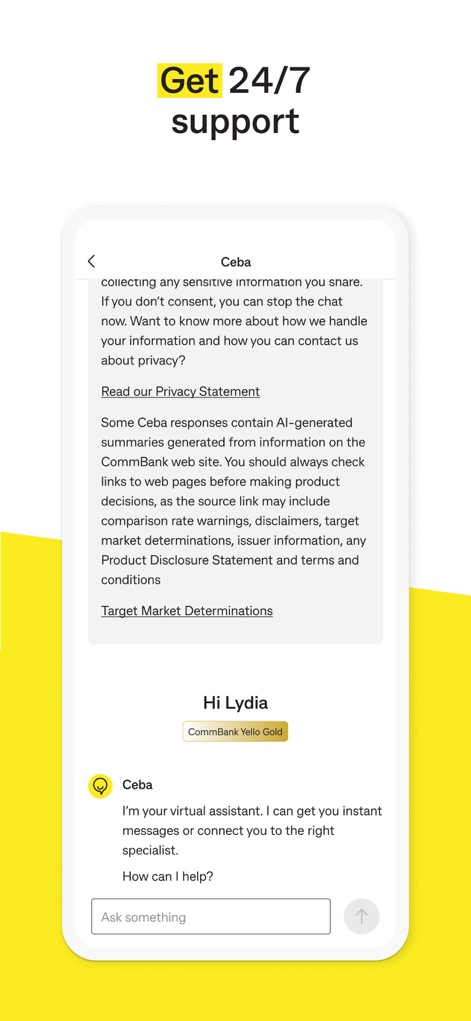
이 앱은 연중무휴 24시간 지원을 제공합니다. 가상 비서 'Ceba'와의 채팅을 통해 질문하고, 'Hi Lydia'와 같은 개인화된 응답을 받을 수 있습니다.
24/7 지원
설명
Download
비슷한 앱
유사한 기능과 사용자 경험을 가진 앱

PayPal - Pay, Send, Save
PayPal, Inc.

中国农业银行
AGRICULTURAL BANK OF CHINA LIMITED

Mercado Pago: cuenta digital
MercadoLibre S.A.

中国工商银行
Industrial and Commercial Bank of China

Revolut: Send, spend and save
Revolut Ltd

HDFC Bank App (Early Access)
HDFC Bank Ltd

Zalopay - Quét Mọi QR
ZION JOINT STOCK COMPANY

Cash App
Block, Inc.

招商银行
CHINA MERCHANTS BANK CO.,LTD.
이 페이지는 앱이나 개발자의 공식 페이지가 아니며, 정보 제공 및 논평을 목적으로 작성된 독립 편집 간행물입니다. 명시적으로 달리 언급되지 않는 한, 해당 앱이나 개발자는 MWM, Apple, Google Play, 앱 퍼블리셔 또는 앱 개발자와 제휴, 보증, 후원, 승인 또는 공식적으로 연결되어 있지 않으며, 이 페이지의 어떤 내용도 해당 앱이 MWM의 서비스를 사용하여 개발되었음을 의미하지 않습니다. 모든 상표, 로고, 스크린샷 및 기타 콘텐츠는 해당 소유자의 자산입니다.