Converter Files & PDF Editor

Converter Files & PDF Editor

다운로드: App Store
로고: Converter Files & PDF Editor

변환기 파일 및 PDF 편집기: 올인원 데스크톱 수준 모바일 오피스

이동 중인 전문가 및 학생을 위한 궁극의 생산성 도구. 랩톱 없이도 데스크톱 수준의 정확도로 가장 큰 파일도 쉽게 스캔, 편집 및 변환할 수 있습니다.

개발사

Shenzhen Miguo Qudong Technology Co., Ltd

카테고리

Productivity

다운로드

100K+

사용자 평점

4.9/5

총 평가 수

900

지원 언어

5

생산성, 시각화

이 인터페이스를 사용하는 100K+ 명의 사용자.

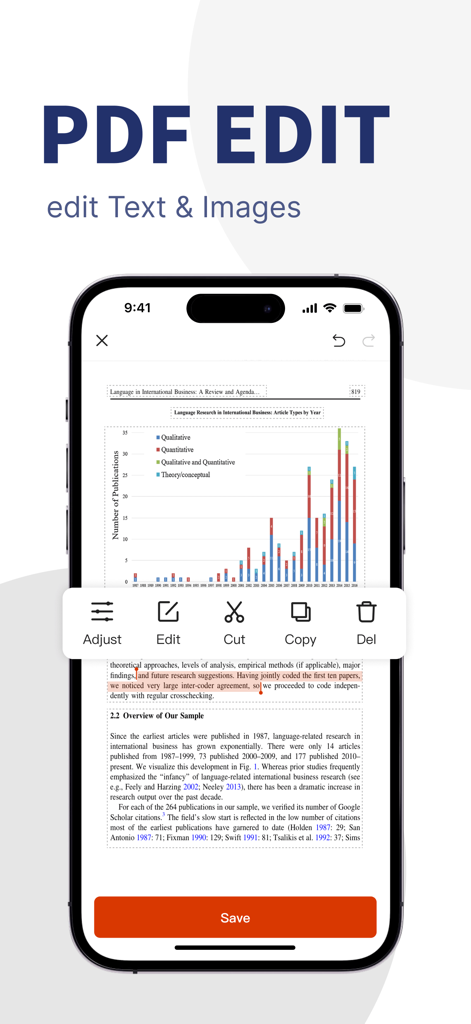
모바일 애플리케이션 인터페이스로 PDF 텍스트 및 이미지 편집 도구를 보여줍니다.
모바일 애플리케이션 인터페이스로 PDF 텍스트 및 이미지 편집 도구를 보여줍니다.

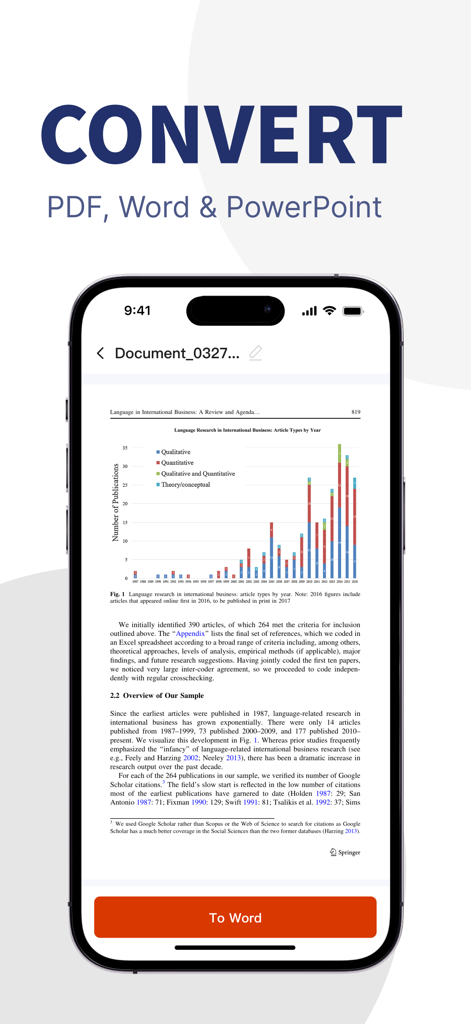
모바일 생산성을 위한 PDF-Word 변환 인터페이스를 보여주는 스마트폰 화면
모바일 생산성을 위한 PDF-Word 변환 인터페이스를 보여주는 스마트폰 화면

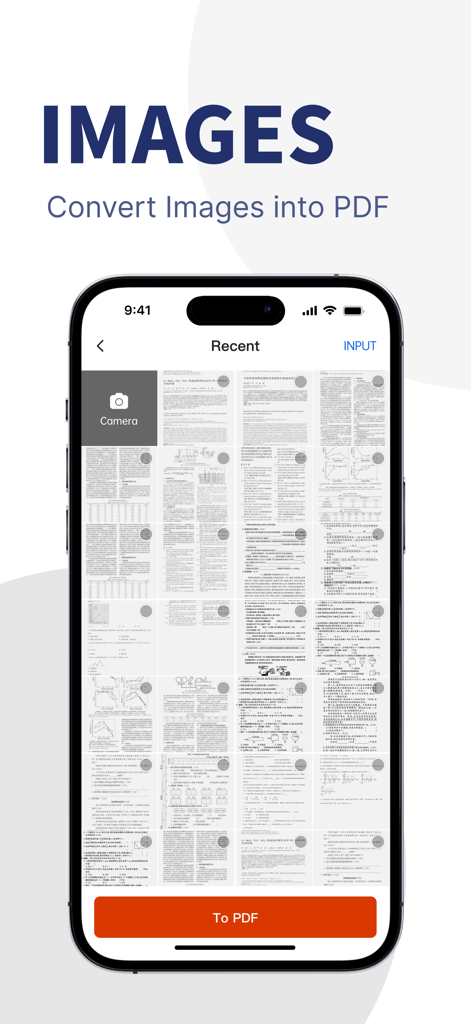
단일 PDF 파일로 변환할 스캔된 문서 및 이미지 갤러리를 보여주는 모바일 앱 화면.
단일 PDF 파일로 변환할 스캔된 문서 및 이미지 갤러리를 보여주는 모바일 앱 화면.

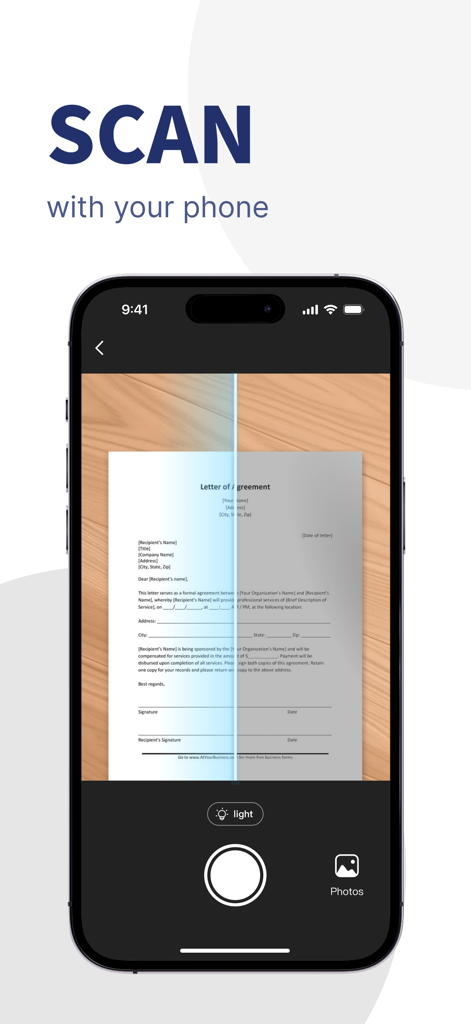
디지털 PDF 문서를 만들기 위해 계약서의 종이 편지를 스캔하는 스마트폰 인터페이스
디지털 PDF 문서를 만들기 위해 계약서의 종이 편지를 스캔하는 스마트폰 인터페이스

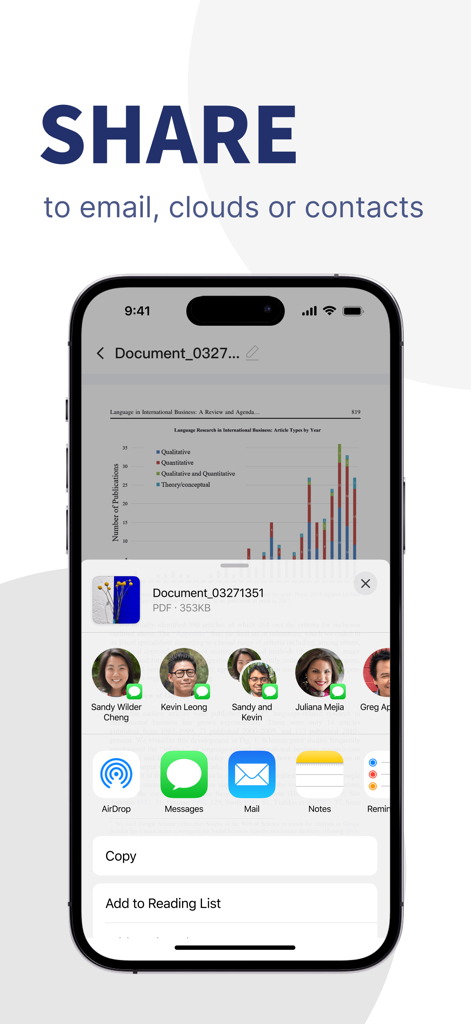
이메일, 클라우드 또는 연락처를 통해 PDF 문서 공유 옵션을 보여주는 iOS 인터페이스

이메일, 클라우드 또는 연락처를 통해 PDF 문서 공유 옵션을 보여주는 iOS 인터페이스

어디서든 전문가 수준의 PDF 파워

이 앱을 돋보이게 하는 도구, 100K+ 명의 사용자가 선택.

🔄

흠잡을 데 없는 다중 형식 변환

레이아웃을 100% 그대로 유지하면서 Word, Excel, PPT 및 PDF 간에 전환하세요. 텍스트가 깨지지 않고 100MB 이상의 복잡한 파일을 처리합니다.

✍️

고급 PDF 편집 및 보안

이동 중에 텍스트를 수정하고, 계약서에 서명하고, 문서를 병합하세요. 전문적인 삭제, 워터마크 및 보안 주석으로 개인 정보를 보호하세요.

📸

고해상도 포켓 스캐너

카메라를 사용하여 송장, 메모 및 계약서를 즉시 디지털화하세요. 선명한 PDF를 생성하고 스마트 폴더로 구성하여 종이 없는 워크플로우를 만드세요.

앱 소개

에 대해 알아야 할 모든 것 Converter Files & PDF Editor.

설명

----- Key Features ----- [PDF Editor] With the PDF Editor, you can perform various operations on PDF documents, such as format conversion, editing text within PDF, editing images, inserting text and images into PDF, extracting images, merging, splitting, deleting pages, and reordering. By using the “PDF scissors” feature, you can easily handle large files, as well as apply redactions, annotations, and add watermarks, enhancing your workflow and making document processing more efficient and professional. 【PDF Converter】 PDF Converter is a powerful tool that supports efficient multi-format conversion. It allows you to convert PDF documents into Word, Excel, PPT, images, TXT, and more with just one click—while perfectly preserving the original layout and formatting. It also supports fast conversion from various file formats to PDF, making it ideal for office, study, and contract scenarios. Whether you're exporting editable content, extracting tables, or batch processing files, PDF Converter delivers a smooth and accurate conversion experience, improving your work efficiency. 【Powerful Format Conversion】 No more worries about handling large files! We support conversions of files over 100MB, ensuring stable formatting and no garbled text, helping you manage complex document processing tasks with ease. 【Mobile Scanner】 Simply use your phone’s camera to convert paper documents into high-resolution digital files. Whether it’s contracts, invoices, or other paper documents, the Mobile Scanner can generate PDFs or image files, helping you easily digitize your documents. 【Image to PDF】 With just a few steps, you can quickly merge multiple images into a single PDF. Whether photos, scans, or screenshots, the Image to PDF feature ensures clear and readable files, perfect for saving and sharing work materials. 【Personal Document Manager】 Easily manage and categorize all your files, whether PDFs, images, or other formats, with labels and multiple folders. The personal document manager makes it easy to organize and locate work, study, and daily life resources. Use Cases: 1. Daily Office Scenarios - Contract Processing: Quickly edit, modify, or sign PDF contracts. Handle lengthy contracts with ease using the large file conversion feature, and batch-convert to Word or other formats for easy editing and archiving. - Invoice Organization: Scan paper invoices to generate digital copies with batch processing, making it easy to archive and quickly share with the finance department to enhance efficiency. - Document Archiving and Sharing: Companies can scan, batch-manage, and convert documents to PDFs, organizing for easy access and collaborative use within the organization. 2. Education and Learning Scenarios - Textbook and Lecture Note Management: Teachers and students can scan textbooks and lecture notes into PDFs, use OCR to extract text, add notes and annotations, and efficiently organize study materials. - Study Material Organization: Merge multiple study images into a single PDF for unified management; convert PDF study materials to Word documents for easy editing and note-taking, boosting learning efficiency. - With PDF Document Manager, whether handling complex work tasks or managing study materials, you can complete various document operations easily and efficiently, enhancing productivity in both work and study! ==== Related Agreements ==== - User Service Agreement: https://mgfun.cloudtofun.com/download/agreement/MgPDF-servicepolicy.html - Privacy Policy: https://mgfun.cloudtofun.com/download/agreement/MgPDF-privacypolicy.html

최신 버전

1.2.0

크기

62.7 MB

출시일

2024년 11월 4일

필요한 유일한 PDF 파워 도구

책상을 벗어나 휴대폰에서 직접 대용량 파일, 복잡한 변환 및 전문적인 편집을 처리하세요. 오늘 100,000명 이상의 모바일 우선 전문가들과 함께하세요.

다운로드: App Store
FAQ

자주 묻는 질문

에 대해 알아야 할 모든 것 Converter Files & PDF Editor

Converter Files & PDF Editor 앱을 사용하여 PDF의 텍스트와 이미지를 편집할 수 있나요?

네, "Converter Files & PDF Editor" 앱을 사용하면 PDF 문서 내의 텍스트를 편집하고, 이미지를 수정하고, 새로운 텍스트와 이미지를 삽입하고, 페이지 병합, 분할, 재정렬과 같은 다양한 작업을 수행할 수 있습니다.

Converter Files & PDF Editor는 어떤 파일 형식을 변환할 수 있나요?

"Converter Files & PDF Editor" 앱은 PDF 문서를 Word, Excel, PPT, 이미지, TXT와 같은 형식으로 변환합니다. 또한 원본 레이아웃을 유지하면서 다양한 다른 파일 형식을 PDF로 변환하는 것도 지원합니다.

Converter Files & PDF Editor는 대용량 파일을 변환할 수 있나요?

네, "Converter Files & PDF Editor"는 100MB 이상의 파일을 변환할 수 있습니다. 안정적인 서식을 보장하고 텍스트 깨짐을 방지하여 복잡하고 대용량 문서 처리 작업을 효율적으로 관리하는 데 적합합니다.

Converter Files & PDF Editor의 모바일 스캐너 기능은 어떻게 작동하나요?

"Converter Files & PDF Editor"의 모바일 스캐너 기능은 휴대폰 카메라를 사용하여 종이 문서를 고해상도 디지털 파일로 변환합니다. 계약서나 송장과 같은 항목에서 PDF 또는 이미지 파일을 생성합니다.

Converter Files & PDF Editor는 여러 이미지를 하나의 PDF로 결합할 수 있나요?

네, "Converter Files & PDF Editor"를 사용하면 사진, 스캔, 스크린샷 등 여러 이미지를 단일 PDF 파일로 빠르게 병합할 수 있습니다. 이 기능을 통해 공유하기 쉬운 명확하고 읽기 쉬운 파일을 만들 수 있습니다.

Converter Files & PDF Editor는 문서 관리에 어떻게 도움이 되나요?

"Converter Files & PDF Editor" 앱에는 개인 문서 관리자가 포함되어 있습니다. 이 기능을 사용하면 레이블과 여러 폴더를 사용하여 PDF 및 이미지를 포함한 모든 파일을 쉽게 관리하고 분류할 수 있습니다.

Converter Files & PDF Editor 앱을 사용하여 문서를 어떻게 공유할 수 있나요?

처리된 파일을 이메일, 다양한 클라우드 서비스 또는 연락처로 직접 "Converter Files & PDF Editor"에서 공유할 수 있습니다. 이 기능은 처리된 파일의 배포 및 공동 사용을 단순화합니다.

Converter Files & PDF Editor의 개인정보 처리방침은 어디에서 찾을 수 있나요?

"Converter Files & PDF Editor"의 개인정보 처리방침은 앱 설명의 링크를 통해 확인할 수 있습니다: https://mgfun.cloudtofun.com/download/agreement/MgPDF-privacypolicy.html.

App information, icons, screenshots, and descriptions displayed on this page are sourced from the Apple App Store and are the property of their respective developers. Download estimates and rankings are based on MWM's proprietary models and may not reflect actual figures. This page is provided for informational and analytical purposes only.

Believe this page infringes your intellectual property? File a dispute