
이 페이지는 앱이나 개발자의 공식 페이지가 아니며, 정보 제공 및 논평을 목적으로 작성된 독립 편집 간행물입니다. 명시적으로 달리 언급되지 않는 한, 해당 앱이나 개발자는 MWM, Apple, Google Play, 앱 퍼블리셔 또는 앱 개발자와 제휴, 보증, 후원, 승인 또는 공식적으로 연결되어 있지 않으며, 이 페이지의 어떤 내용도 해당 앱이 MWM의 서비스를 사용하여 개발되었음을 의미하지 않습니다. 모든 상표, 로고, 스크린샷 및 기타 콘텐츠는 해당 소유자의 자산입니다.


Cubasis LE 3
모바일 기기를 스튜디오로 탈바꿈시키는 이 앱의 핵심 기능은 영감의 흐름을 방해하지 않는다는 점입니다. 아이폰이나 아이패드에서 몇 번의 탭만으로 전문적인 음악 제작이 가능해집니다.
다운로드
1M+사용자 평점
총 평가 수
1.4K개발사
카테고리
Music지원 언어
1최신 버전
3.8.3크기
1.2 GB출시일
2020년 3월 29일모바일 음악 제작을 위한 강력하고 휴대성 높은 DAW 평가
Cubasis LE 3 주요 기능 분석
유니버설 앱 지원
이 앱은 아이폰과 아이패드 모두에서 원활하게 작동하여, 사용자가 어떤 기기를 사용하든 일관된 음악 제작 경험을 제공합니다.
직관적인 모바일 DAW 워크플로우
이 도구는 녹음, 편집, 믹싱 작업을 간편하게 만들어, 사용자가 언제 어디서든 빠르고 효율적으로 음악을 제작할 수 있게 해줍니다.
가상 악기 및 키보드
이 앱은 뛰어난 사운드의 MicroSonic 악기와 가상 키보드를 제공하여, 사용자가 처음부터 완벽한 트랙, 비트, 멜로디를 만들 수 있도록 지원합니다.
외부 장비 연동
이 앱은 외부 마이크, 악기 및 MIDI 컨트롤러(Bluetooth LE 포함)와의 연결을 지원하여, 사용자가 전문적인 품질로 녹음하고 작업할 수 있게 합니다.
전문가급 믹서 및 효과
이 앱은 전체 화면으로 확장 가능한 믹서와 즉시 사용할 수 있는 사전 설정이 포함된 전문가급 효과를 통해, 사용자가 완벽한 사운드의 믹스를 만들 수 있도록 돕습니다.
고급 오디오 및 MIDI 편집기
이 도구는 직관적인 오디오 및 MIDI 편집기를 갖추고 있어, 사용자가 정밀한 조작으로 음악 트랙을 세밀하게 조정하고 마스터링할 수 있습니다.
인앱 구매를 통한 확장성
이 앱은 다양한 인앱 구매를 통해 기능을 확장할 수 있어, 사용자가 필요에 따라 Cubasis 3의 모든 기능이나 Waves 플러그인 등을 추가할 수 있습니다.
최적화된 사용자 인터페이스 및 워크플로우 도구
이 앱은 UI 스케일 프리셋, 개선된 MediaBay, 실행 취소 내역 목록 등의 기능을 제공하여, 사용자의 작업 효율성과 편의성을 향상시킵니다.
자주 묻는 질문
에 대해 알아야 할 모든 것 Cubasis LE 3
Does Cubasis LE 3 require a hardware device to unlock its features?
Yes, Cubasis LE 3 requires a supported hardware device to unlock its full feature set. Without it, the app operates in demo mode.
What are the core functions of Cubasis LE 3?
Cubasis LE 3 is a compact mobile multitouch sequencer. It is designed for recording, editing, and mixing music on iPhone and iPad with quick and easy operation.
Is Cubasis LE 3 compatible with both iPhone and iPad?
Yes, Cubasis LE 3 offers universal app support, allowing it to run on both iPhone and iPad. This is a new feature in Cubasis LE 3.
What virtual instruments are available in Cubasis LE 3?
Cubasis LE 3 includes a virtual keyboard and MicroSonic instruments. These feature 25 sounds based on acclaimed HALion Sonic and Allen Morgan drum kits.
Can Cubasis LE 3 connect to external musical equipment?
Yes, Cubasis LE 3 allows connecting external devices like guitars, vocals, and keyboard hardware via MIDI, including Bluetooth LE support.
What is the maximum number of audio and MIDI tracks supported by Cubasis LE 3?
Cubasis LE 3 supports up to 4 audio tracks and 4 MIDI tracks, allowing users to build their musical projects efficiently.
How can I unlock all features of the full Cubasis version within Cubasis LE 3?
You can unlock all features of the full Cubasis version by purchasing an in-app purchase directly within Cubasis LE 3.
Is it possible to transfer in-app purchases from Cubasis LE 2 to Cubasis LE 3?
Yes, Cubasis LE 3 allows users to freely transfer previous plug-in in-app purchases made in Cubasis LE 2.
Does Cubasis LE 3 feature a full-screen mixer and professional effects?
Yes, Cubasis LE 3 includes a full-blown mixer that extends to full-screen. It also offers pro-grade effects with ready-to-use presets.
What audio editing tools are available in Cubasis LE 3?
Cubasis LE 3 provides an Audio Editor with tools such as trim, reverse, normalize, fade in, and fade out for effective file editing.
What is the MIDI resolution offered by Cubasis LE 3?
Cubasis LE 3 offers a 960 PPQN MIDI resolution, ensuring precise audio and MIDI event editing at the highest level.
Does Cubasis LE 3 include a reverb effect?
Yes, Cubasis LE 3 includes the super-versatile RoomWorks SE reverb effect. It features an intuitive graphical display for adjustments and comes with presets.
What audio engine and resolution does Cubasis LE 3 use?
Cubasis LE 3 uses a 32-bit floating point audio engine. It supports an audio I/O resolution of 16-bit/44.1 + 48 kHz.
Does Cubasis LE 3 have an undo history?
Yes, Cubasis LE 3 includes an undo with history list feature. This allows users to quickly revert to earlier versions of their song.
다음 스크린샷과 설명은 앱의 공식 스토어 목록에서 직접 가져온 것이며 앱 개발자의 자산입니다.
앱 스토어
스크린샷
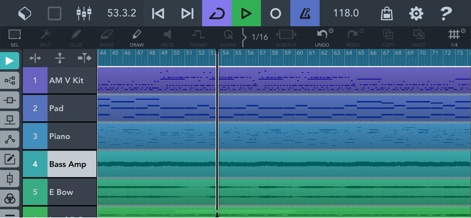
이 화면은 앱의 메인 프로젝트 타임라인으로, 사용자는 다양한 오디오 및 MIDI 클립을 구성하여 음악을 만들 수 있습니다. 여러 개의 "트랙"과 "편집 도구"를 활용하여 아이디어를 현실로 구현할 수 있습니다.
다중 트랙 시퀀서
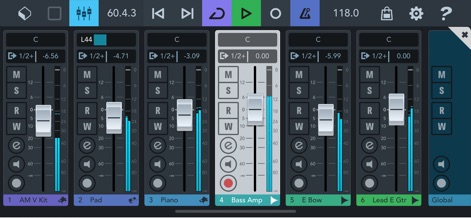
이 스크린샷은 앱의 전체 화면 믹서를 보여주며, 사용자는 각 트랙의 볼륨과 패닝을 정밀하게 조절할 수 있습니다. "레벨 페이더"와 "솔로/뮤트 버튼" 같은 시각적 요소를 통해 전문적인 믹싱 환경을 제공합니다.
전문 믹서 컨트롤
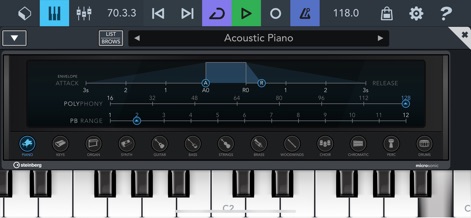
이 화면은 내장된 마이크로소닉 가상 악기를 통해 음악 아이디어를 구현하는 과정을 보여줍니다. 사용자는 "어쿠스틱 피아노" 음색을 선택하거나 다양한 "악기 카테고리"를 탐색하여 창의적인 사운드를 만들 수 있습니다.
가상 악기 연주
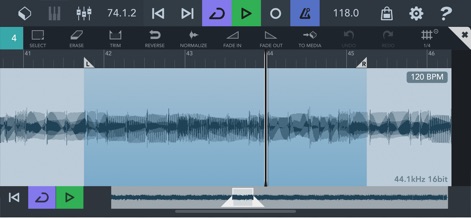
앱의 오디오 에디터를 통해 사용자는 파형을 시각적으로 확인하며 정밀하게 오디오를 편집할 수 있습니다. "페이드 인" 및 "트림"과 같은 고급 도구를 활용하여 사운드 클립을 완벽하게 다듬을 수 있습니다.
정교한 오디오 편집
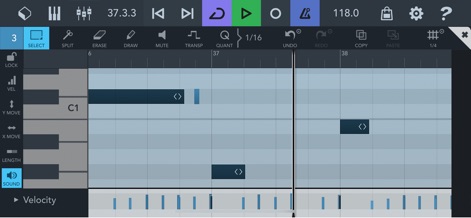
이 스크린샷은 MIDI 에디터의 직관적인 인터페이스를 보여주며, 사용자는 피아노 롤에서 "MIDI 노트"를 직접 편집할 수 있습니다. 하단에 위치한 "벨로시티(Velocity)" 컨트롤을 통해 음의 강도를 섬세하게 조절하여 더욱 풍부한 표현을 더할 수 있습니다.
MIDI 노트 편집
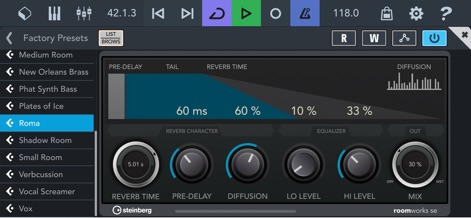
앱에 내장된 'RoomWorks SE' 리버브 효과는 사운드에 깊이와 공간감을 부여합니다. 사용자는 "프리셋 목록"에서 다양한 공간을 선택하거나, "REVERB TIME"과 "DIFFUSION" 같은 파라미터를 직접 조절하여 원하는 사운드를 만들 수 있습니다.
전문 리버브 효과
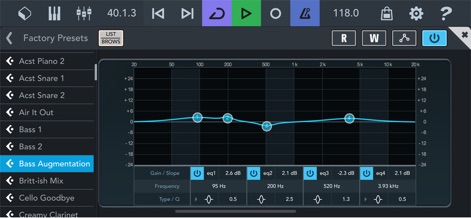
이 스크린샷은 앱의 파라메트릭 이퀄라이저를 보여주며, 사용자는 주파수 스펙트럼을 정밀하게 조절하여 사운드를 미세하게 다듬을 수 있습니다. "주파수 응답 곡선"을 통해 시각적으로 변화를 확인하고, "게인/슬로프" 및 "Q" 값을 조절하여 완벽한 톤을 찾을 수 있습니다.
정교한 EQ 조절
설명
Download
비슷한 앱
유사한 기능과 사용자 경험을 가진 앱

Loopy Pro: Looper DAW Sampler
A Tasty Pixel

AUM - Audio Mixer
Kymatica AB

Drambo
Jaroslaw Jacek

Groove Rider 2
Dmitrij Pavlov

BandLab – Music Maker & Beats
BandLab Singapore Pte Ltd

Medly
Medly Labs Inc.

Cubasis 3 - DAW & Music Studio
Steinberg Media Technologies GmbH

KORG Gadget 3
KORG INC.

iMPC Pro 2 for iPhone
Akai Professional
이 페이지는 앱이나 개발자의 공식 페이지가 아니며, 정보 제공 및 논평을 목적으로 작성된 독립 편집 간행물입니다. 명시적으로 달리 언급되지 않는 한, 해당 앱이나 개발자는 MWM, Apple, Google Play, 앱 퍼블리셔 또는 앱 개발자와 제휴, 보증, 후원, 승인 또는 공식적으로 연결되어 있지 않으며, 이 페이지의 어떤 내용도 해당 앱이 MWM의 서비스를 사용하여 개발되었음을 의미하지 않습니다. 모든 상표, 로고, 스크린샷 및 기타 콘텐츠는 해당 소유자의 자산입니다.