
이 페이지는 앱이나 개발자의 공식 페이지가 아니며, 정보 제공 및 논평을 목적으로 작성된 독립 편집 간행물입니다. 명시적으로 달리 언급되지 않는 한, 해당 앱이나 개발자는 MWM, Apple, Google Play, 앱 퍼블리셔 또는 앱 개발자와 제휴, 보증, 후원, 승인 또는 공식적으로 연결되어 있지 않으며, 이 페이지의 어떤 내용도 해당 앱이 MWM의 서비스를 사용하여 개발되었음을 의미하지 않습니다. 모든 상표, 로고, 스크린샷 및 기타 콘텐츠는 해당 소유자의 자산입니다.


다운로드
12.5M+사용자 평점
총 평가 수
165.0K개발사
카테고리
Photo & Video지원 언어
12최신 버전
2.8크기
109.2 MB출시일
2013년 1월 9일Cute CUT 앱 주요 기능 분석
이 앱은 창의적인 영상 편집을 위한 다양한 도구를 제공하며, 사용자가 독특하고 인상적인 콘텐츠를 제작할 수 있도록 지원합니다.
다중 미디어 레이어 지원
이 앱은 영상 프로젝트에 최대 6가지 유형의 미디어(비디오, 사진, 직접 그리기, 텍스트, 음악, 음성)를 동시에 추가할 수 있게 하여 풍부한 콘텐츠 제작을 돕습니다.
간편한 영상 공유
이 앱은 완성된 영상을 카메라 롤로 내보내거나 YouTube, Facebook, 이메일 등 다양한 플랫폼으로 직접 공유할 수 있는 기능을 제공하여 사용자가 제작물을 쉽게 배포할 수 있도록 지원합니다.
영상에 직접 그리기 및 고급 브러시
이 도구는 사용자가 30가지 이상의 그리기 도구와 텍스처, 선형 그라디언트, 방사형 그라디언트 등 3가지 고급 브러시를 사용하여 영상에 직접 그림을 그리거나 전문적인 효과를 추가할 수 있게 합니다.
다양한 해상도 및 화면 비율 지원 & PIP 효과
이 앱은 HD, SD, 정사각형(1:1), 세로 모드 등 다양한 해상도와 화면 비율을 지원하며, PIP(Picture-In-Picture) 기능을 통해 여러 비디오 세그먼트를 독립적으로 크기 조정하여 쉽게 중첩할 수 있게 합니다.
맞춤형 전환 효과 및 사전 정의된 전환
이 앱은 20가지 이상의 사전 정의된 전환 효과와 함께 고도로 맞춤 설정 가능한 전환 기능을 제공하여 사용자가 영상 간의 흐름을 부드럽고 독창적으로 연출할 수 있도록 돕습니다.
세부적인 사용자 정의 옵션
이 도구는 투명도, 테두리, 모서리, 그림자, 변형, 사운드 볼륨 등 다양한 요소를 세부적으로 맞춤 설정할 수 있는 기능을 제공하여 사용자가 영상의 각 요소를 정밀하게 제어할 수 있게 합니다.
직관적인 사용자 인터페이스
이 앱은 드래그 앤 드롭 방식을 통해 미디어 세그먼트를 쉽게 정렬하고 관리할 수 있는 사용자 친화적인 인터페이스를 제공하며, 세련된 UI는 인물 및 풍경 모드를 모두 지원합니다.
풍부한 학습 자료 제공
이 도구는 사용자가 앱의 기능을 쉽게 익힐 수 있도록 다수의 튜토리얼과 전체 비디오 워크스루를 제공합니다.
자주 묻는 질문
에 대해 알아야 할 모든 것 Cute CUT
What is Cute CUT?
Cute CUT is a powerful video editor that allows users to create high-quality movies by combining video, photos, self-draw elements, text, music, and voice. It offers advanced, Hollywood-style editing functionalities.
Does Cute CUT support multi-layer video editing?
Yes, Cute CUT supports multi-layer video editing. Users can add up to six different media types simultaneously and create Picture-In-Picture (PIP) effects with independent resizing of video segments.
Can I draw directly on my movies in Cute CUT?
Yes, Cute CUT allows users to draw directly on their movies. It provides over 30 drawing tools and three advanced brushes with editable gradients for professional effects like Texture, Linear, and Radial Gradient.
What media types can I add to my projects in Cute CUT?
Cute CUT supports adding up to six different media types simultaneously: Video, Photo (from album or camera), SELF-DRAW, Text, Music, and Voice into movie projects.
What are the benefits of upgrading to Cute CUT Pro?
Upgrading to Cute CUT Pro provides watermark-free movies, unlimited movie length, no ads, 4K Ultra HD movie exporting, and access to more music tracks and stickers.
Does Cute CUT have a green screen feature?
Yes, Cute CUT includes a Chroma Key feature, also known as green screen. This functionality allows users to remove or replace specific colors from their video footage.
How do I manage my movie projects in Cute CUT?
Cute CUT offers movie management features. Users can organize and rearrange their movie projects using folders for efficient workflow.
What aspect ratios does Cute CUT support for videos?
Cute CUT supports various resolutions and aspect ratios, including HD (16:9, 19.5:9, 21:9), SD (4:3, 5:4), SQUARE (1:1), and Portrait Mode for video projects.
Can I export my Cute CUT movies to social media?
Yes, users can share their Cute CUT movies. Export options include saving to the Camera Roll, sending to YouTube/Facebook, or sharing via e-mail directly from the app.
다음 스크린샷과 설명은 앱의 공식 스토어 목록에서 직접 가져온 것이며 앱 개발자의 자산입니다.
앱 스토어
스크린샷
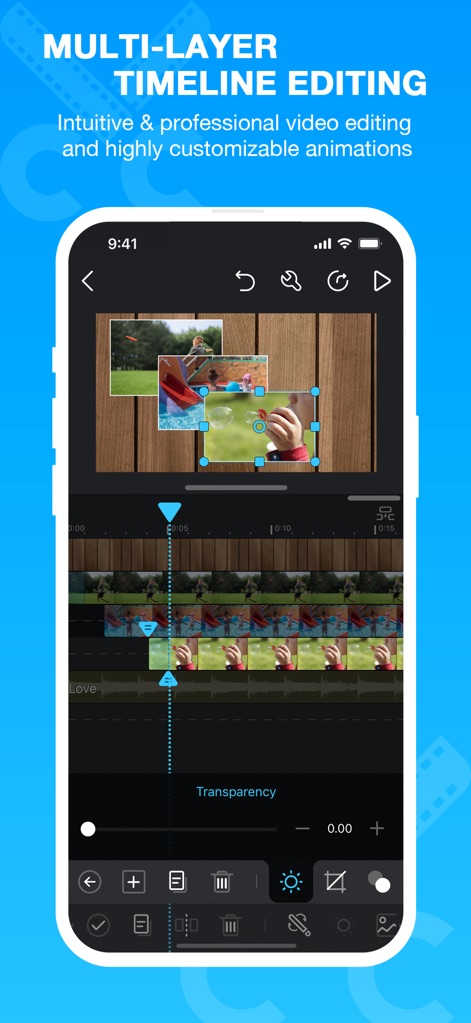
다중 트랙 편집
이 앱은 직관적인 다중 트랙 타임라인과 각 비디오 세그먼트의 독립적인 크기 조절 기능을 제공하여, 사용자가 여러 요소를 동시에 편집하고 배치할 수 있습니다.
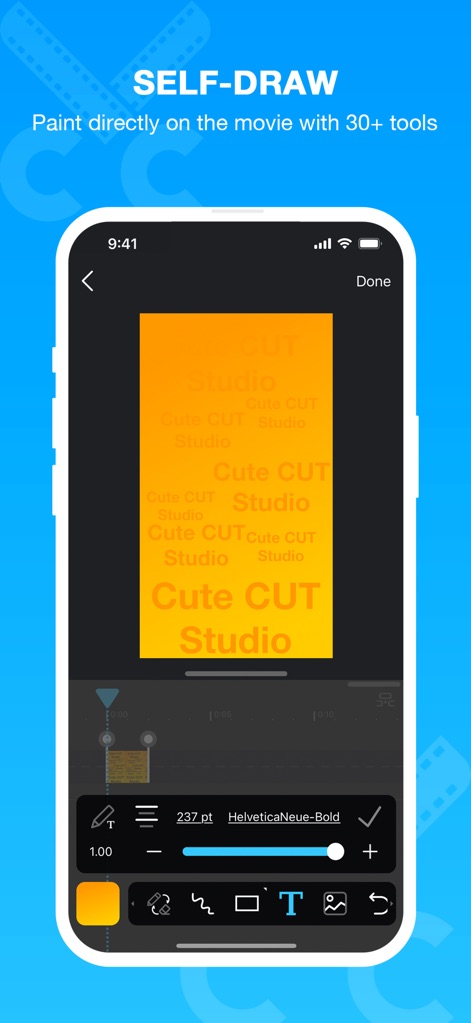
자유로운 드로잉 및 텍스트
사용자는 30가지 이상의 드로잉 도구를 사용하여 동영상에 직접 그림을 그리거나, 다양한 폰트와 크기로 텍스트 오버레이를 추가하여 시각적인 메시지를 효과적으로 전달할 수 있습니다.
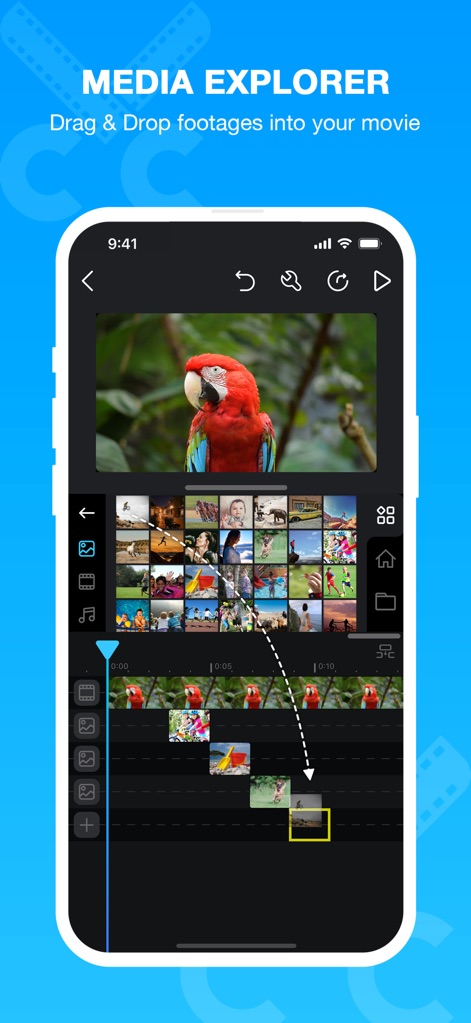
미디어 간편 추가
이 도구는 미디어 탐색기를 통해 앨범의 비디오 및 사진을 손쉽게 드래그 앤 드롭 방식으로 프로젝트 타임라인에 추가할 수 있도록 지원합니다.
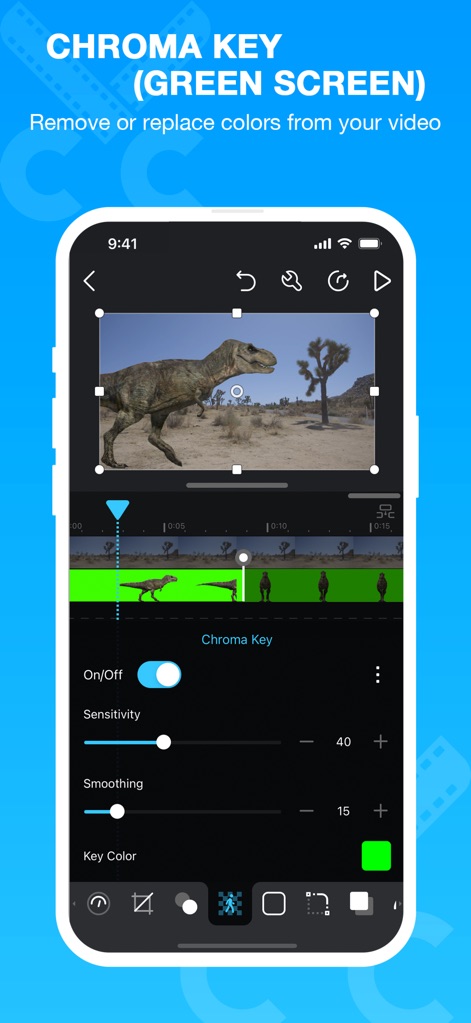
크로마 키 기능
전문적인 크로마 키 기능을 활용하여 사용자는 동영상 배경에서 특정 색상을 제거하거나 교체할 수 있으며, 민감도 및 스무딩 설정을 조절하여 정교한 결과물을 얻을 수 있습니다.

프로젝트 체계적 관리
이 앱은 폴더를 활용하여 비디오 프로젝트를 체계적으로 정리하고 재배치할 수 있는 효율적인 관리 시스템을 제공하며, 각 프로젝트의 썸네일 미리보기를 통해 내용을 쉽게 식별할 수 있습니다.
설명
Download
비슷한 앱
유사한 기능과 사용자 경험을 가진 앱

VEED Shorts: AI videos
VEED Ltd

AI Video Maker - Renderforest
Renderforest LLC

Slideshow Creator -MovieStudio
立瑗 胡

Filmigo Video Maker & Editor
VIDEOSHOW PTE. LTD.

Slideshow Maker Video & Photo
Honk Honk Punch Pty Ltd

Quick Slideshow Maker + Music
Zipo Apps Ltd.

Salad Video -Video Editor
ChengDu PinGuo Technology Co., Ltd.

Story Swag - Quick Reels
Slider LLC

StoryWave - Video Maker
UNSTATIC LTD
이 페이지는 앱이나 개발자의 공식 페이지가 아니며, 정보 제공 및 논평을 목적으로 작성된 독립 편집 간행물입니다. 명시적으로 달리 언급되지 않는 한, 해당 앱이나 개발자는 MWM, Apple, Google Play, 앱 퍼블리셔 또는 앱 개발자와 제휴, 보증, 후원, 승인 또는 공식적으로 연결되어 있지 않으며, 이 페이지의 어떤 내용도 해당 앱이 MWM의 서비스를 사용하여 개발되었음을 의미하지 않습니다. 모든 상표, 로고, 스크린샷 및 기타 콘텐츠는 해당 소유자의 자산입니다.