Doc : Image to Excel Converter

Doc : Image to Excel Converter

다운로드: App Store
로고: Doc : Image to Excel Converter

Doc: 이미지-엑셀 변환기: 모든 문서를 즉시 편집 가능한 스프레드시트로 변환

수동 데이터 입력에 몇 시간씩 낭비하지 마세요. 영수증, 송장, 메모에서 테이블, 텍스트, 필기를 높은 정확도의 OCR로 전문적인 엑셀, CSV 또는 PDF 파일로 쉽게 추출하세요.

다운로드: App Store

개발사

Muhammad Shahid

카테고리

Productivity

다운로드

24K+

사용자 평점

3.4/5

총 평가 수

0

지원 언어

14

효율성의 시각화

이 인터페이스를 사용하는 24K+ 명의 사용자.

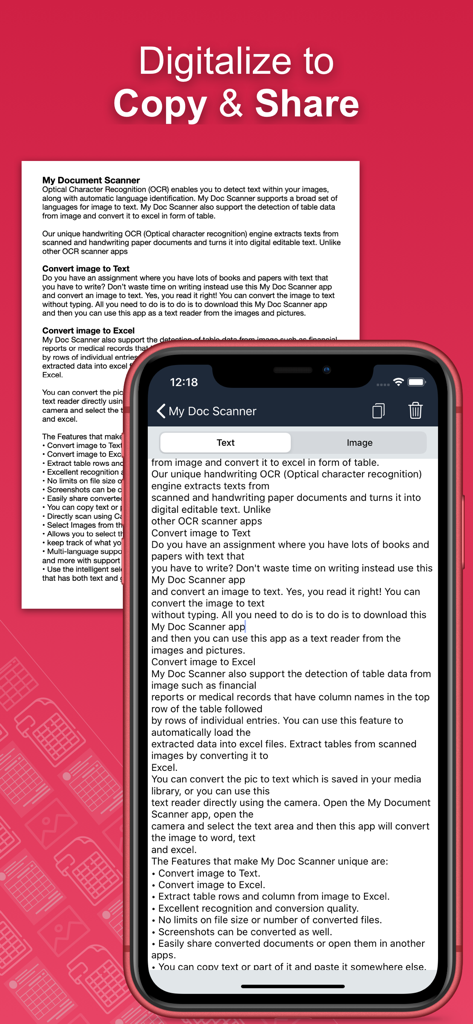
모바일 앱 화면에 스캔된 문서에서 텍스트가 추출되어 쉽게 복사하고 공유할 수 있는 상태로 표시됨.

모바일 앱 화면에 스캔된 문서에서 텍스트가 추출되어 쉽게 복사하고 공유할 수 있는 상태로 표시됨.

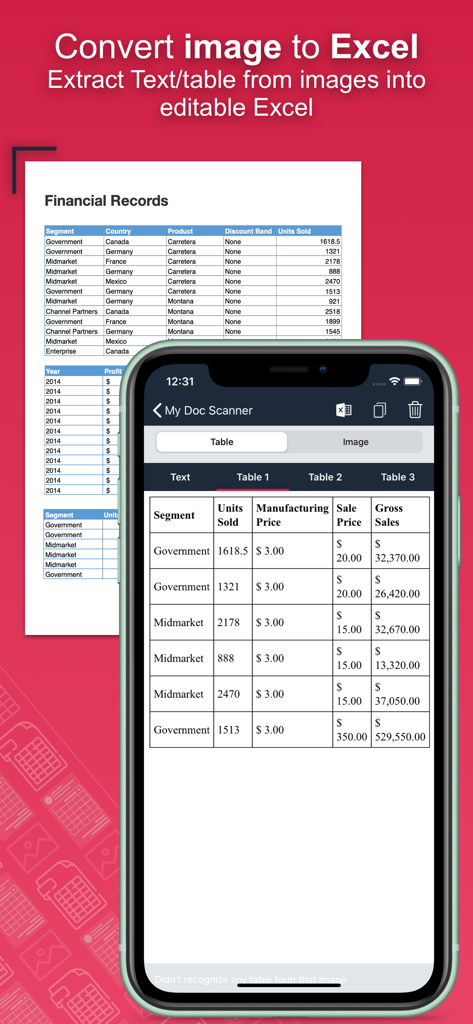
스마트폰 앱 화면이 물리적 금융 문서를 편집 가능한 디지털 테이블로 변환하고 있음

스마트폰 앱 화면이 물리적 금융 문서를 편집 가능한 디지털 테이블로 변환하고 있음

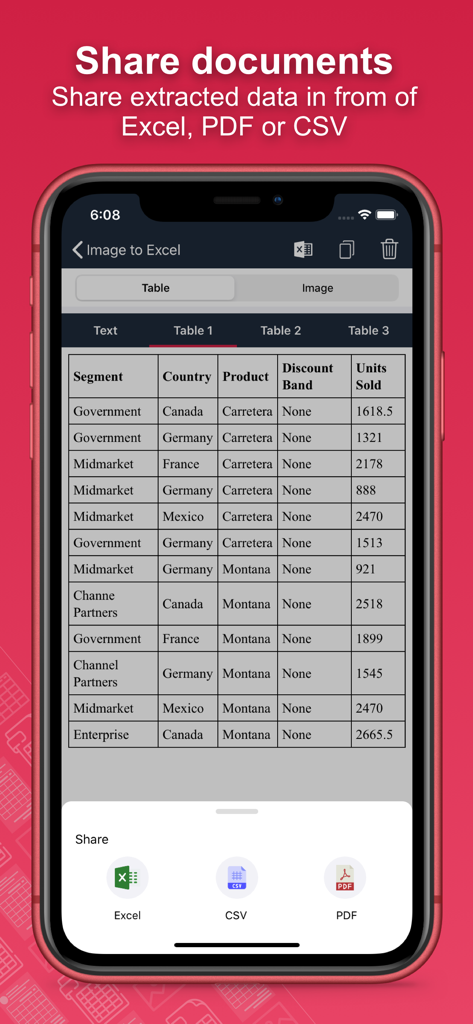
모바일 앱 인터페이스에 추출된 문서 데이터를 엑셀, CSV 또는 PDF 파일로 공유 및 내보내기 옵션이 표시됨

모바일 앱 인터페이스에 추출된 문서 데이터를 엑셀, CSV 또는 PDF 파일로 공유 및 내보내기 옵션이 표시됨

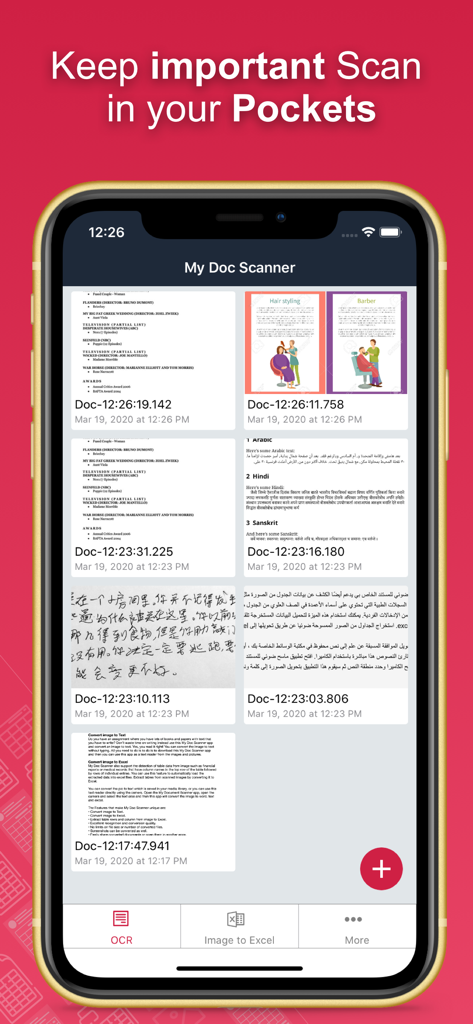
Doc 이미지-엑셀 변환기 앱의 인터페이스에 스캔된 문서 및 스프레드시트 목록이 표시됨

Doc 이미지-엑셀 변환기 앱의 인터페이스에 스캔된 문서 및 스프레드시트 목록이 표시됨

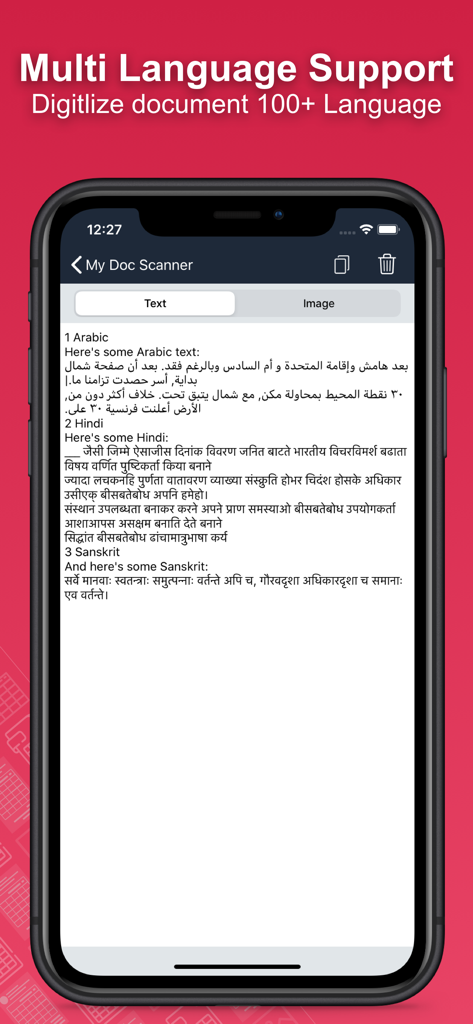
모바일 앱 화면에 여러 언어로 된 문서 디지털화가 표시됨

모바일 앱 화면에 여러 언어로 된 문서 디지털화가 표시됨

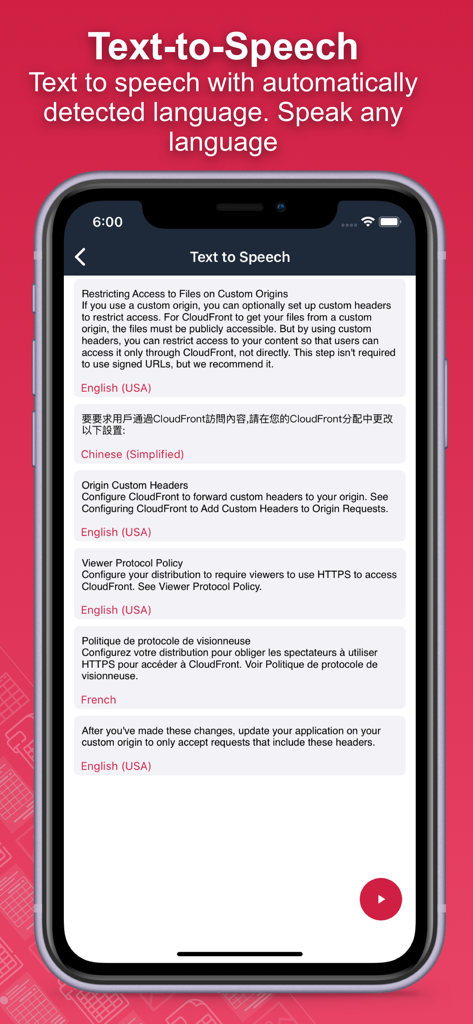
텍스트 음성 변환 기능과 함께 영어, 중국어, 프랑스어 샘플을 보여주는 자동 다국어 감지 기능

텍스트 음성 변환 기능과 함께 영어, 중국어, 프랑스어 샘플을 보여주는 자동 다국어 감지 기능

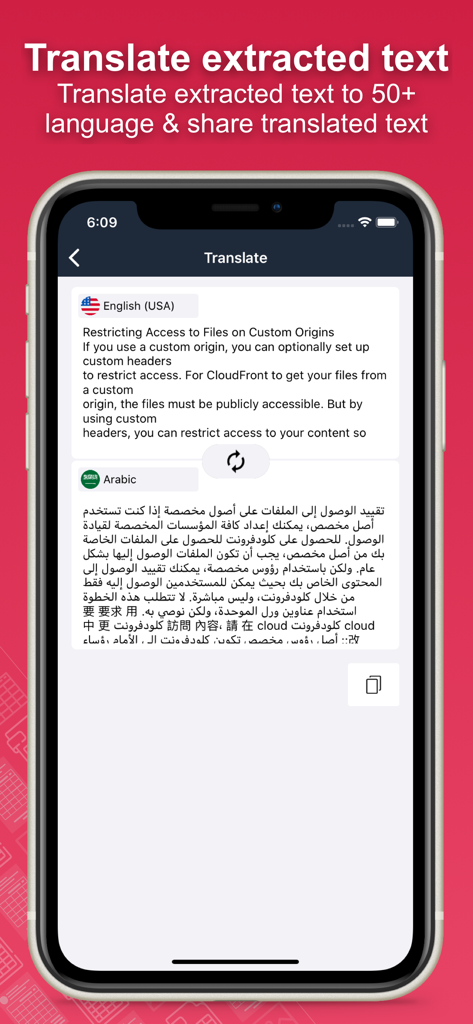
모바일 화면에 영어 텍스트가 아랍어로 변환되는 앱의 번역 기능이 표시됨

모바일 화면에 영어 텍스트가 아랍어로 변환되는 앱의 번역 기능이 표시됨

타이핑은 그만, 자동화를 시작하세요

이 앱을 돋보이게 하는 도구, 24K+ 명의 사용자가 선택.

📊

즉각적인 테이블 추출

수동 데이터 입력은 잊으세요. 은행 명세서, 영수증 또는 송장을 캡처하여 분석 준비가 된 완벽하게 구조화된 엑셀 또는 CSV 파일로 변환하세요.

✍️

필기 인식

워크플로우를 디지털화하세요. 고급 OCR 기술로 필기한 회의록 및 강의 메모를 정확하게 편집 가능한 디지털 텍스트로 변환합니다.

🔒

안전한 일괄 처리

한 번에 수십 페이지를 스캔하여 생산성을 극대화하고, 내장된 생체 인식 및 비밀번호 보호 기능으로 민감한 금융 데이터를 안전하게 보호하세요.

앱 소개

에 대해 알아야 할 모든 것 Doc : Image to Excel Converter.

설명

Document Scanner - OCR Image to Text and Spreadsheet Converter Optical Character Recognition (OCR) enables accurate detection and extraction of text from images, with built-in support for automatic language identification. The Doc: Image to Excel Converter app goes beyond traditional OCR by offering advanced features like handwriting recognition and intelligent table extraction from scanned documents, forms, and images. Effortlessly convert images into editable text, spreadsheets (CSV or Excel), or PDFs. Perfect for digitizing books, notes, financial statements, receipts, and more. Key Features: • Convert Image to Text Tired of manually typing notes from books or printed pages? Just snap a photo or choose an image, and the app will accurately convert it to text without typing. • Convert Image to Excel, Spreadsheet, and PDF Extract both text and structured table data from documents. Ideal for financial reports, medical forms, invoices, and more. Convert scanned images into .xlsx, .csv, or .pdf formats instantly. • Batch Scan Support Scan and convert multiple images at once for handling large volumes of documents efficiently. • Tabular Data Extraction Extract rows and columns from images and load them directly into Excel. Supports intelligent table detection for accurate conversion. • Multi-language OCR (60+ languages) Supports text recognition in English, Spanish, French, German, Italian, and many more. • Translate Extracted Data Translate extracted tables or text into 50+ languages for seamless international use. • Secure Your Documents Protect your scans using a passcode or biometric authentication. • Smart Area Selection Focus only on the part of the image containing text, even if it includes graphics. • Scan History and Clipboard Actions Keep track of all scanned documents. Easily copy text, open URLs, make calls, send emails, or paste content anywhere. • Handwriting Recognition Convert handwritten notes and scanned paper documents into digital, editable text. • Capture or Import Images Use your camera to scan in real-time or import from your gallery. Supports text extraction from screenshots as well. Why Choose Document Scanner OCR++? • Highly accurate text and table recognition • No limits on file size or number of conversions • Instant conversion of bank e-statements, receipts, and more • Output files ready to use in Word, Excel, or PDF • Clean and user-friendly interface • Fast, lightweight, and powerful Stop wasting time typing manually. Download the Doc: Image to Excel Converter app today and instantly convert your images into editable, shareable, and searchable content.

최신 버전

1.60

크기

30.3 MB

출시일

2020년 3월 20일

오늘부터 수동 데이터 입력은 그만

매주 몇 시간씩 절약하는 수천 명의 전문가 및 학생들과 함께하세요. Doc: 이미지-엑셀 변환기를 다운로드하고 종이 더미를 즉시 실행 가능한 스프레드시트로 변환하세요.

다운로드: App Store

App information, icons, screenshots, and descriptions displayed on this page are sourced from the Apple App Store and are the property of their respective developers. Download estimates and rankings are based on MWM's proprietary models and may not reflect actual figures. This page is provided for informational and analytical purposes only.

Believe this page infringes your intellectual property? File a dispute