Docker Server Admin

Docker Server Admin

다운로드: App Store
로고: Docker Server Admin

Docker 서버 관리자: 포켓 속 전문 DevOps 관리

실시간 컨테이너 통계를 모니터링하고, SSH 스니펫을 실행하며, 안전하고 고성능인 터미널로 언제 어디서든 Linux 호스트를 관리하세요.

다운로드: App Store

개발사

婉媚 邵

카테고리

Developer Tools

다운로드

73K+

사용자 평점

4.6/5

총 평가 수

300

지원 언어

1

인프라를 한눈에

이 인터페이스를 사용하는 73K+ 명의 사용자.

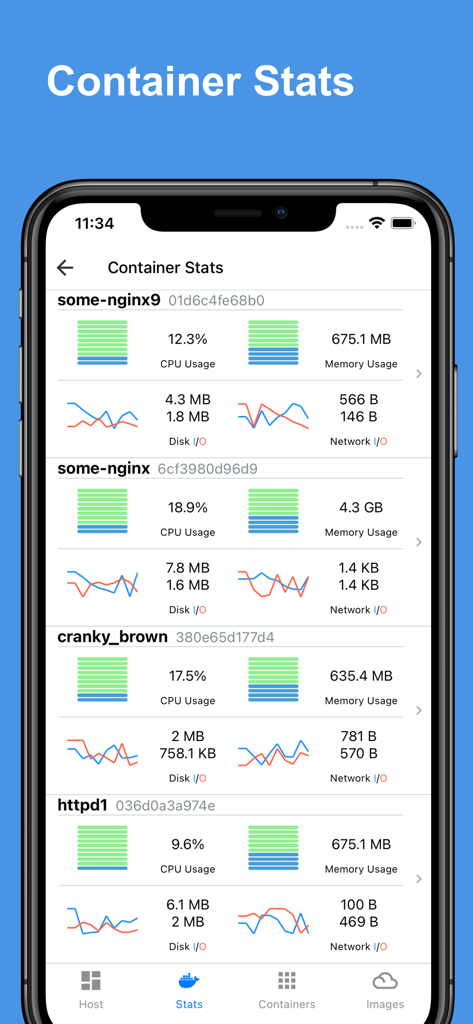
다중 Docker 컨테이너에 대한 실시간 CPU, 메모리 및 네트워크 사용량 차트를 표시하는 모바일 대시보드.
다중 Docker 컨테이너에 대한 실시간 CPU, 메모리 및 네트워크 사용량 차트를 표시하는 모바일 대시보드.

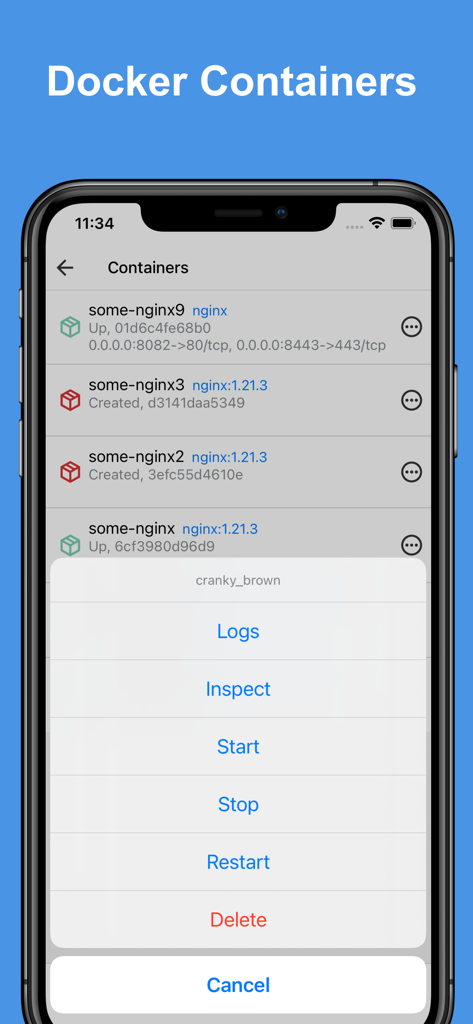
컨테이너 목록과 iPhone의 관리 작업 메뉴를 보여주는 Docker 서버 관리자 앱 인터페이스.
컨테이너 목록과 iPhone의 관리 작업 메뉴를 보여주는 Docker 서버 관리자 앱 인터페이스.

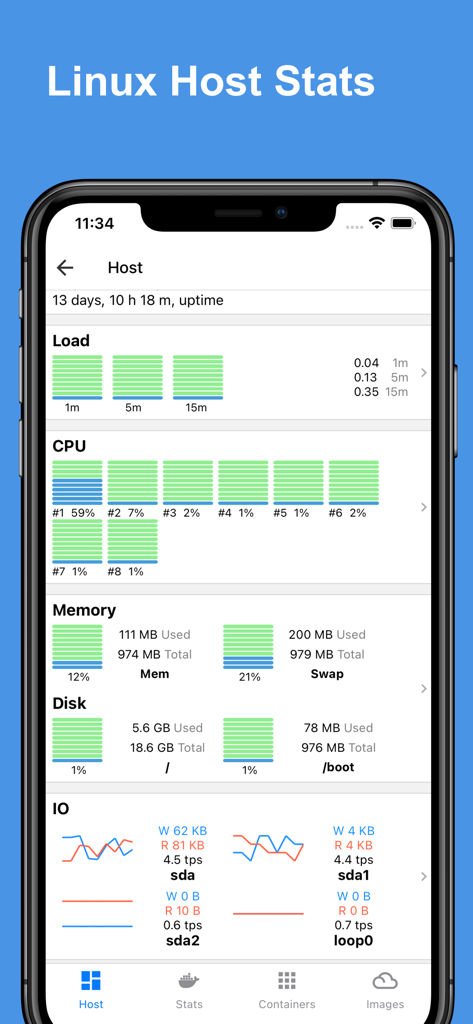
CPU 메모리 및 디스크 사용량 차트를 포함한 실시간 Linux 호스트 통계를 보여주는 대시보드가 있는 Docker 서버 관리자 앱 인터페이스.
CPU 메모리 및 디스크 사용량 차트를 포함한 실시간 Linux 호스트 통계를 보여주는 대시보드가 있는 Docker 서버 관리자 앱 인터페이스.

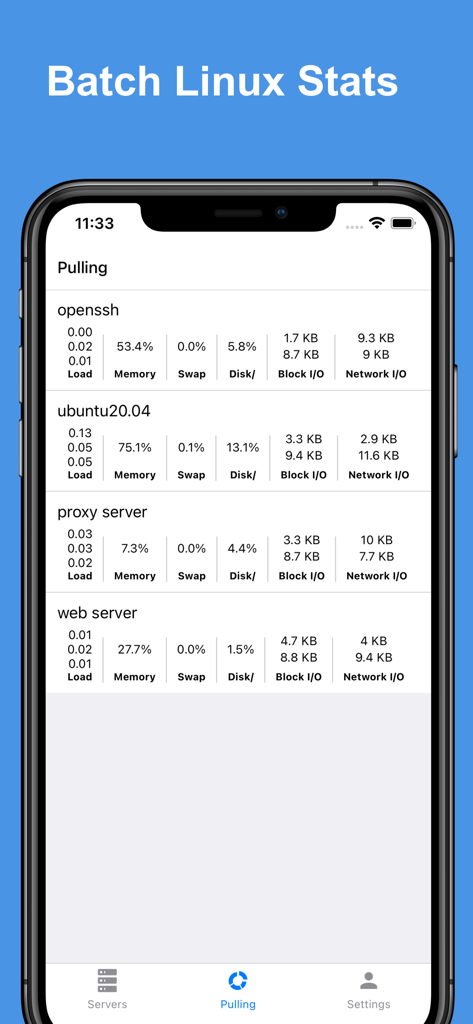
다중 서버에 대한 배치 Linux 통계를 보여주는 Docker 서버 관리자 앱 인터페이스.
다중 서버에 대한 배치 Linux 통계를 보여주는 Docker 서버 관리자 앱 인터페이스.

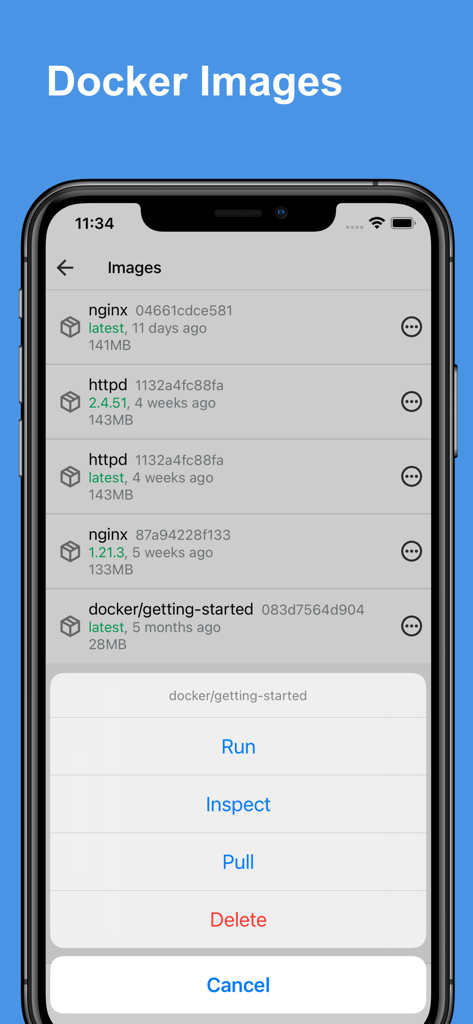
Docker 이미지를 실행, 검사, 풀 및 삭제 옵션이 있는 메뉴와 함께 나열하는 Docker 서버 관리자 앱의 인터페이스.
Docker 이미지를 실행, 검사, 풀 및 삭제 옵션이 있는 메뉴와 함께 나열하는 Docker 서버 관리자 앱의 인터페이스.

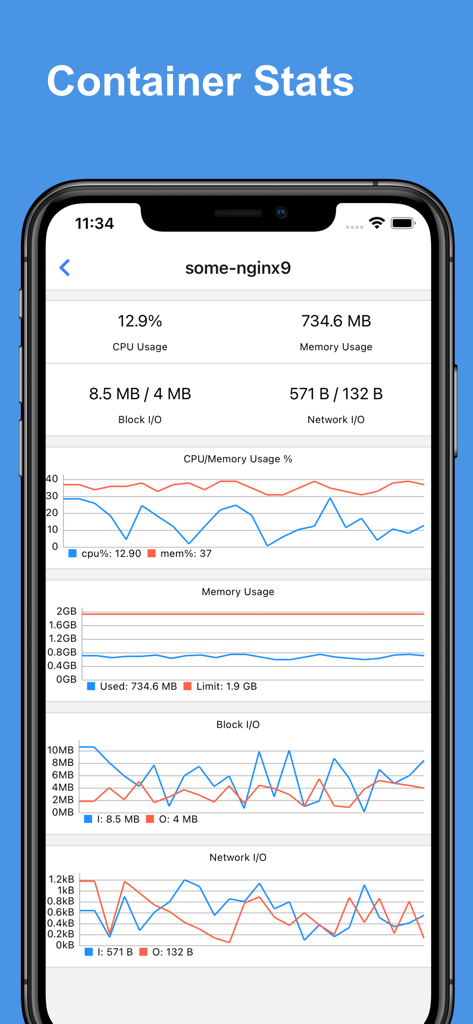
Docker 컨테이너에 대한 실시간 CPU, 메모리 및 네트워크 사용량 차트를 보여주는 대시보드.
Docker 컨테이너에 대한 실시간 CPU, 메모리 및 네트워크 사용량 차트를 보여주는 대시보드.

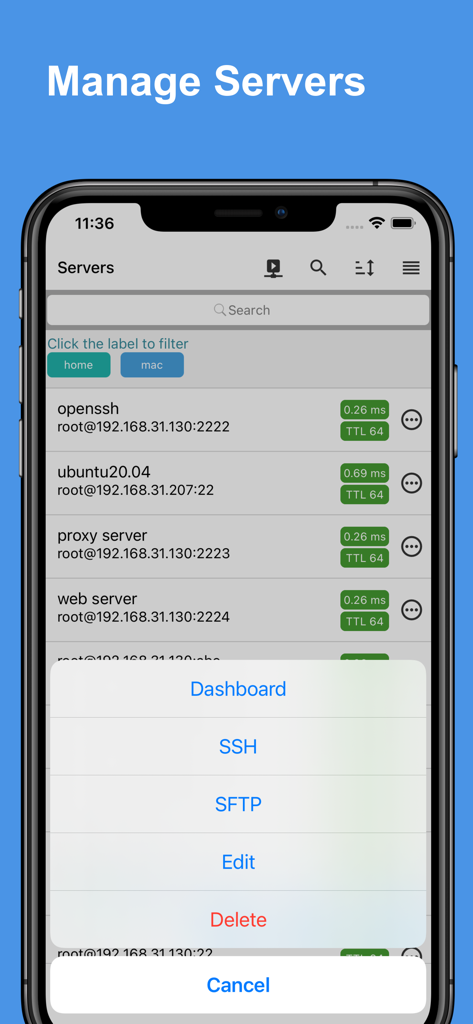
SSH 및 SFTP 옵션이 있는 관리 메뉴와 서버 목록을 보여주는 Docker 서버 관리자 앱의 모바일 인터페이스.
SSH 및 SFTP 옵션이 있는 관리 메뉴와 서버 목록을 보여주는 Docker 서버 관리자 앱의 모바일 인터페이스.

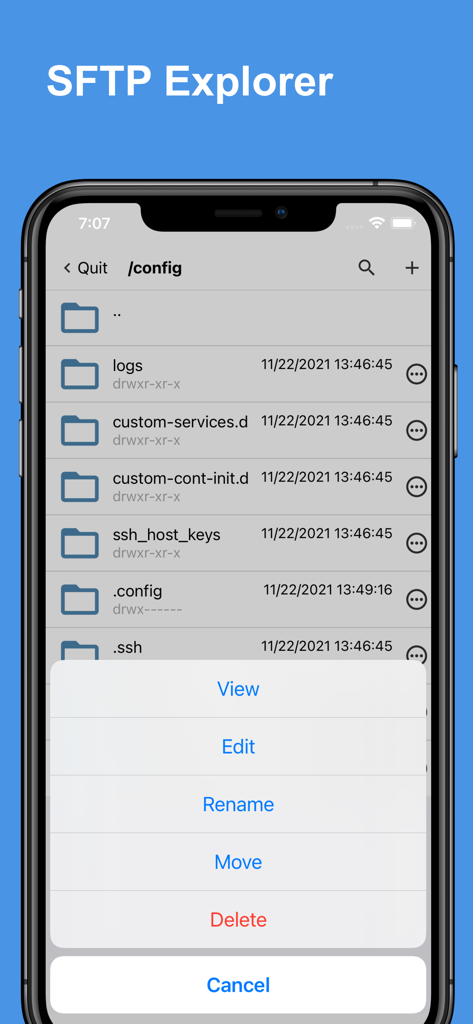
파일 관리 옵션을 보여주는 Docker 서버 관리자 앱의 SFTP 탐색기 인터페이스.
파일 관리 옵션을 보여주는 Docker 서버 관리자 앱의 SFTP 탐색기 인터페이스.

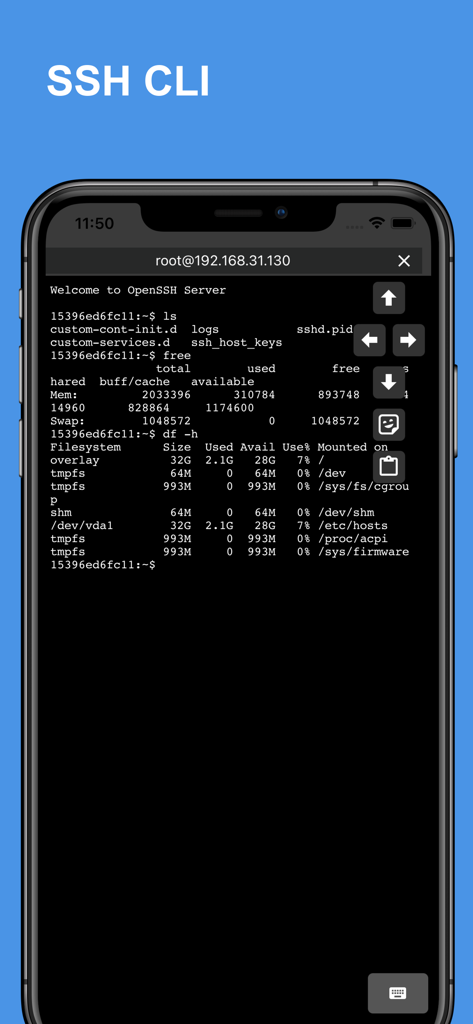
원격 서버 관리를 위한 Linux 명령 출력을 표시하는 휴대폰의 SSH CLI 터미널 인터페이스.
원격 서버 관리를 위한 Linux 명령 출력을 표시하는 휴대폰의 SSH CLI 터미널 인터페이스.

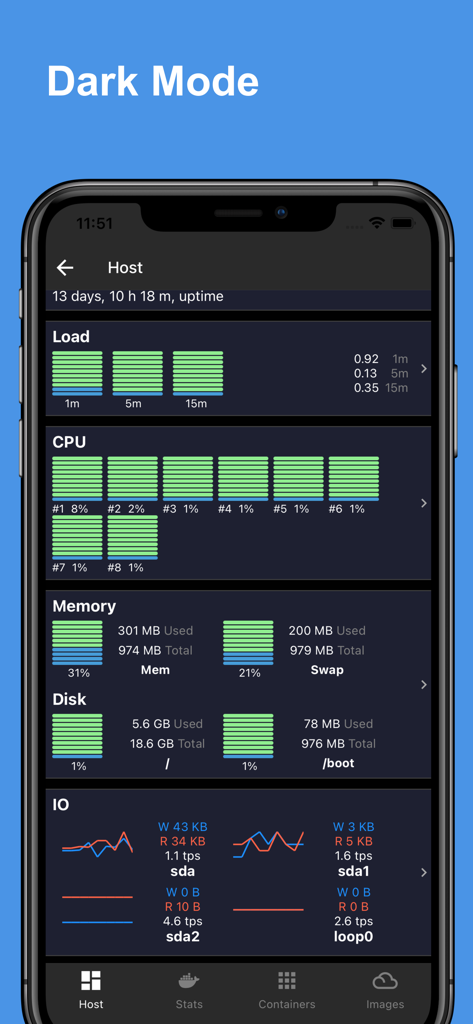
CPU 메모리 및 디스크 사용량 차트가 있는 Linux 호스트 통계 대시보드를 보여주는 다크 모드의 Docker 서버 관리자 앱 인터페이스.

CPU 메모리 및 디스크 사용량 차트가 있는 Linux 호스트 통계 대시보드를 보여주는 다크 모드의 Docker 서버 관리자 앱 인터페이스.

어디서든 서버 마스터하기

이 앱을 돋보이게 하는 도구, 73K+ 명의 사용자가 선택.

📊

통찰력 있는 상태 대시보드

전문적인 차트로 CPU, 메모리, 네트워크 사용량을 실시간으로 모니터링하여 문제 해결을 즉각적이고 시각적으로 만듭니다.

🚀

손쉬운 컨테이너 관리

복잡한 CLI 구문을 능률적인 모바일 인터페이스로 대체하여 탭 한 번으로 Docker 컨테이너를 시작, 중지, 검사하거나 이미지를 관리하세요.

🛡️

안전한 SSH 및 자동화

점프 호스트를 통해 연결하고 저장된 명령 스니펫을 사용하여 복잡한 유지보수 작업을 즉시 실행하여 모바일 입력의 불편함을 피하세요.

앱 소개

에 대해 알아야 할 모든 것 Docker Server Admin.

설명

Docker Server Admin – Comprehensive Docker and Linux Host Management. Monitoring and management of Docker containers, images, and Linux hosts through a secure SSH connection. Docker Container Stats. Gain valuable insights into your Docker containers with detailed statistics: * CPU Usage: Visualize real-time CPU data with comprehensive charts. * Memory Usage: Track memory consumption with intuitive graphical representations. * Disk I/O: Monitor disk read/write operations through detailed charts. * Network I/O: Analyze network traffic with line charts showing data transfer rates. Linux Host Stats Dashboard. Keep your Linux hosts in check with a robust stats dashboard: * Load Averages: View load averages over 1 minute, 5 minutes, and 15 minutes. * CPU Load: Access charts displaying overall and per-core CPU load. * Memory, Swap & Disk Usage: Monitor memory, swap, and disk utilization in real-time. * Disk I/O: Get insights into disk transactions per second and read/write rates. * Network I/O: Track transmission (TX) and reception (RX) rates for comprehensive network monitoring. Docker Container Management. Easily manage your Docker containers with a user-friendly interface: * Container Overview: View a list of containers with names, IDs, statuses, and port mappings. * Container Control: Start, stop, restart, or remove containers as needed. * Inspect & Logs: Inspect container details and access logs for troubleshooting. Docker Image Management. Manage your Docker images with powerful tools: * Image Overview: Access a list of images, including names, IDs, and versions. * Image Control: Run containers from images, inspect image details, pull new images, or delete unwanted ones. SSH Terminal: The built-in SSH client offers full access to your host system's command line, empowering you to perform administrative tasks remotely: * Jump Host & Proxy Support: Connect securely via SSH jump hosts or SOCKS5 proxies, enabling you to manage servers in layered network environments. * Interactive Terminal: Experience a fully interactive terminal that supports real-time command execution, run complex scripts and commands with ease. * Command Management: Benefit from features such as command snippets, making it easy to reuse previous commands. * Copy and Paste Functionality: Quickly copy and paste text between your device and the terminal, simplifying the workflow when working with scripts or configuration files. * Startup & Batch Snippets: Automate your routine tasks with predefined startup snippets or execute batch commands across multiple sessions, saving time and increasing productivity. * Session Persistence: Keep your sessions active for long-running tasks, allowing you to disconnect and reconnect without losing your place. SFTP Explorer: Efficiently manage files on your server: * File & Directory Management: Upload, download, edit, move, rename, and delete files easily. * Streamlined Workflow: Perform operations on files and folders effortlessly, ensuring efficient handling of file transfers or system updates. * User-Friendly Navigation: Browse directories smoothly while managing file permissions directly from the app. The app is a docker third-party client, the app is not affiliated with Docker Corporation. Payment will be charged to iTunes Account at confirmation of purchase. Subscription automatically renews unless auto-renew is turned off at least 24-hours before the end of the current period. Account will be charged for renewal within 24-hours prior to the end of the current period, and identify the cost of the renewal. Subscriptions may be managed by the user and auto-renewal may be turned off by going to the user's Account Settings after purchase. Any unused portion of a free trial period, if offered, will be forfeited when the user purchases a subscription to that publication, where applicable. Terms of use: https://septudio.com/terms-of-use Privacy policy: https://septudio.com/privacy-policy

최신 버전

1.12

크기

94.5 MB

출시일

2021년 11월 26일

당신의 인프라, 당신의 손안에.

수천 명의 DevOps 전문가들과 함께 Docker 컨테이너와 Linux 호스트를 완벽하게 관리하세요. 언제 어디서든 서버의 가동 시간을 유지하고 서버를 마스터하세요.

다운로드: App Store

App information, icons, screenshots, and descriptions displayed on this page are sourced from the Apple App Store and are the property of their respective developers. Download estimates and rankings are based on MWM's proprietary models and may not reflect actual figures. This page is provided for informational and analytical purposes only.

Believe this page infringes your intellectual property? File a dispute