Dote Timer - Time Management

Dote Timer - Time Management

다운로드: App Store
로고: Dote Timer - Time Management

Dote Timer: 집중을 위한 뒤집기, 정확한 계획, 그리고 나눔

독특한 플립 타이머로 방해 요소를 극복하고, 10분 단위 점 플래너로 진행 상황을 시각화하며, 깊이 있는 작업 시간을 도움이 필요한 학생들을 위한 실제 기부로 전환하세요.

개발사

Smartdong School

카테고리

Productivity

다운로드

56K+

사용자 평점

4.6/5

총 평가 수

1K+

지원 언어

18

몰입 시간을 관리하세요

이 인터페이스를 사용하는 56K+ 명의 사용자.

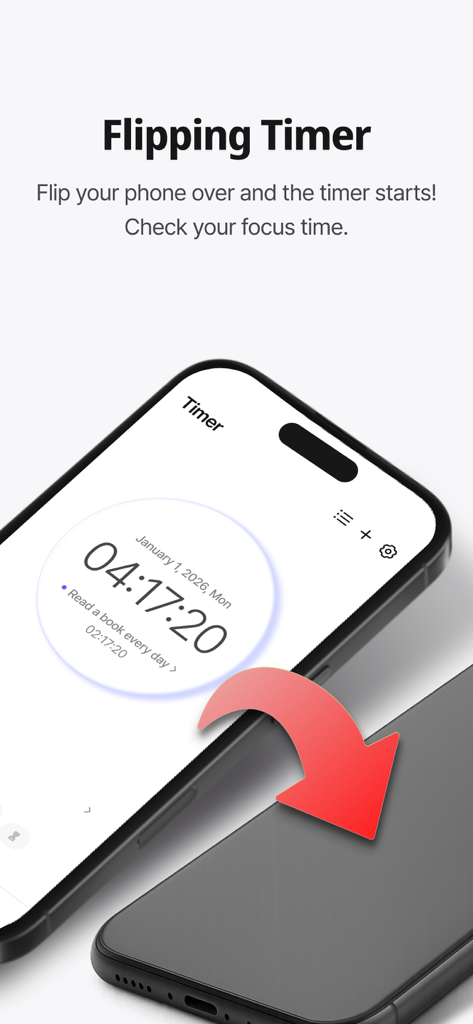
Dote Timer 앱에서 집중 타이머 기능을 활성화하기 위해 스마트폰을 뒤집는 모습.

Dote Timer 앱에서 집중 타이머 기능을 활성화하기 위해 스마트폰을 뒤집는 모습.

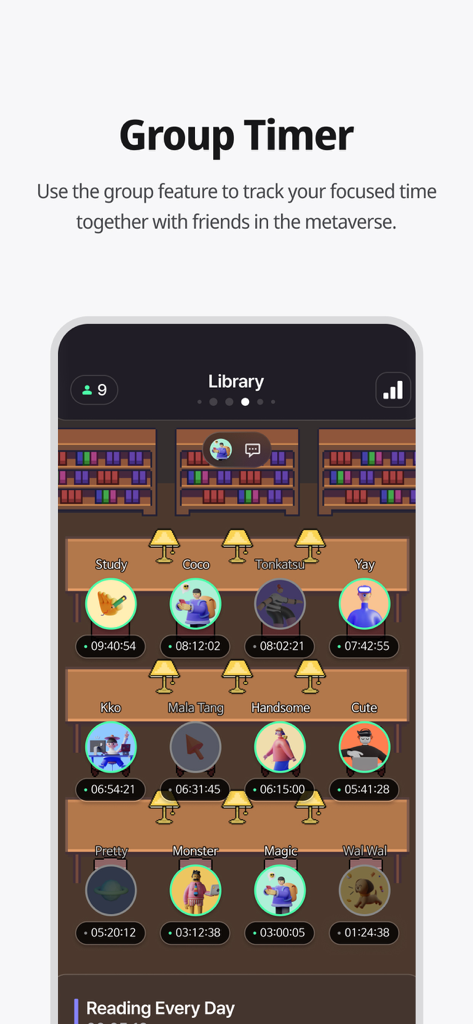
사용자들이 함께 공부하는 가상 도서관 환경에서 그룹 타이머 기능을 보여주는 Dote Timer 앱 스크린샷.

사용자들이 함께 공부하는 가상 도서관 환경에서 그룹 타이머 기능을 보여주는 Dote Timer 앱 스크린샷.

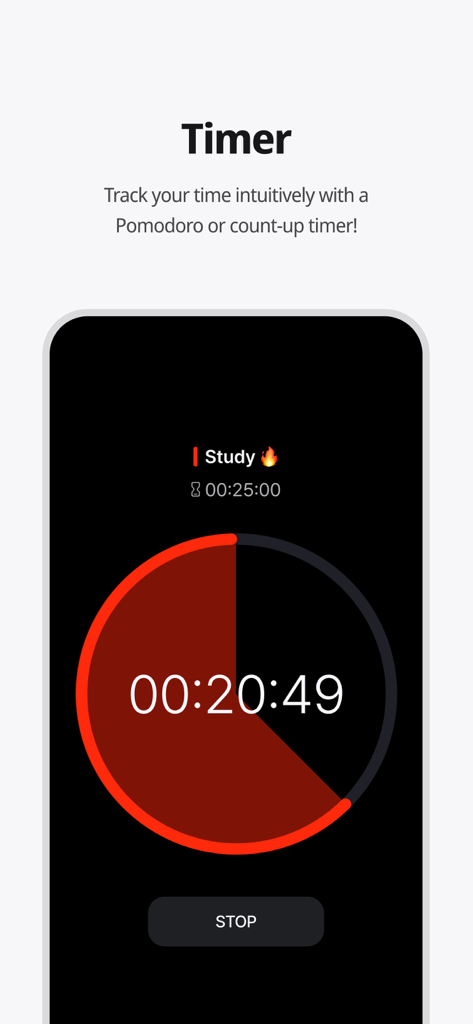
Dote Timer 앱 인터페이스에 표시되는 원형 뽀모도로 스터디 타이머 카운트다운

Dote Timer 앱 인터페이스에 표시되는 원형 뽀모도로 스터디 타이머 카운트다운

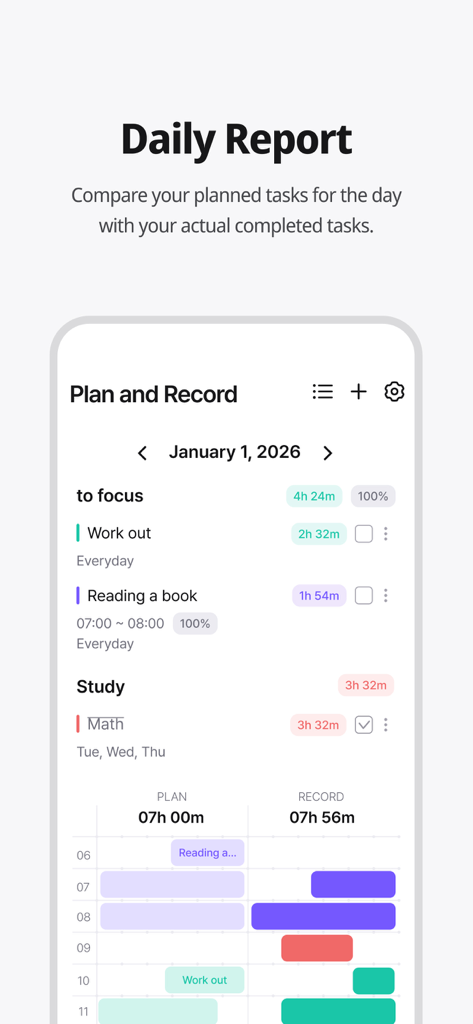
Dote Timer 일일 보고서 화면에 계획된 작업과 실제 기록된 시간이 비교되어 표시됨

Dote Timer 일일 보고서 화면에 계획된 작업과 실제 기록된 시간이 비교되어 표시됨

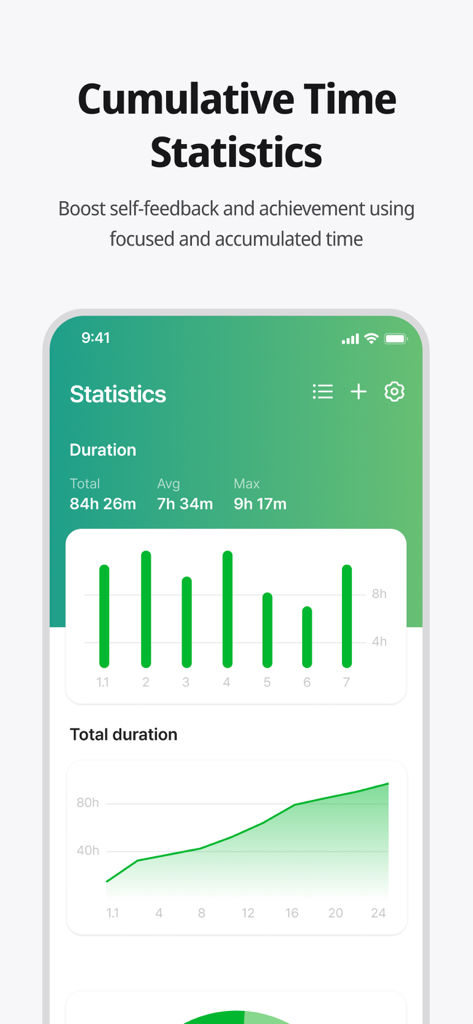
Dote Timer 앱 화면에 누적 집중 시간 통계 및 차트가 표시됨

Dote Timer 앱 화면에 누적 집중 시간 통계 및 차트가 표시됨

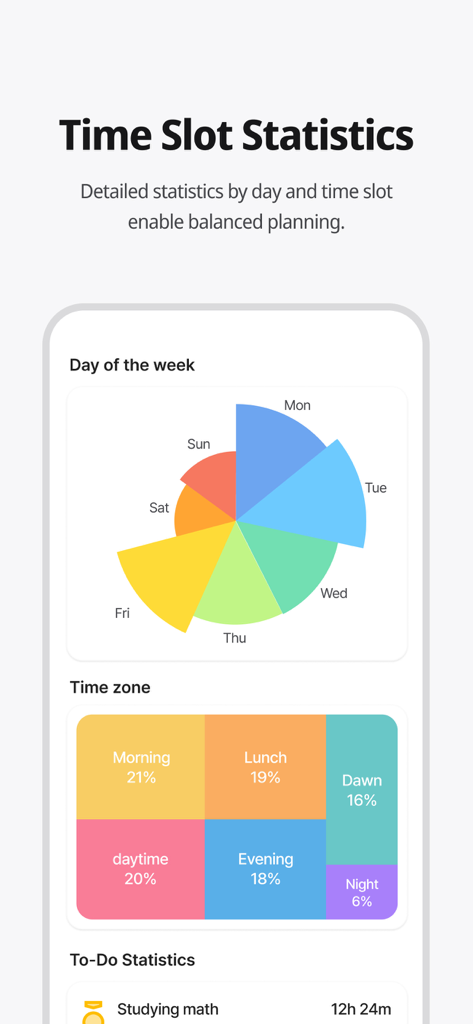
요일별 및 시간대별 시간 관리 통계를 보여주는 다채로운 분석 대시보드

요일별 및 시간대별 시간 관리 통계를 보여주는 다채로운 분석 대시보드

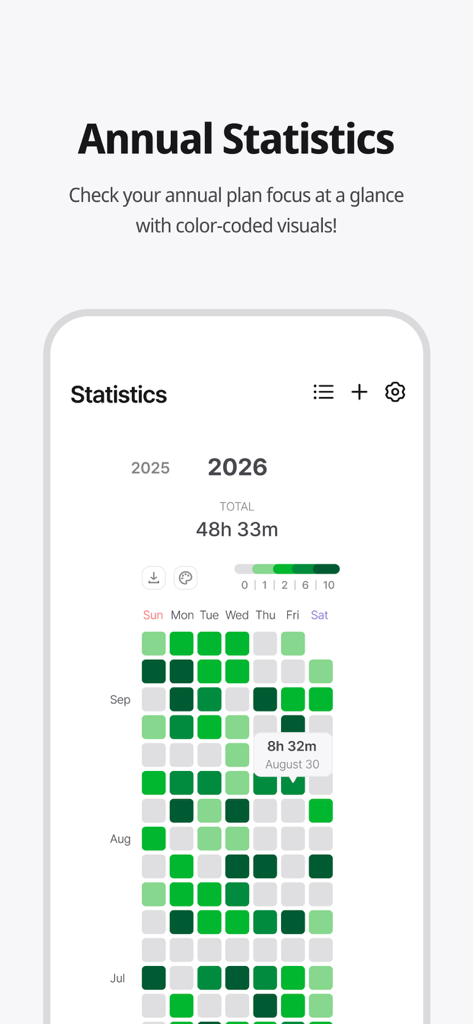
Dote Timer 앱의 색상 코드로 구분된 연간 집중 시간 통계 히트맵

Dote Timer 앱의 색상 코드로 구분된 연간 집중 시간 통계 히트맵

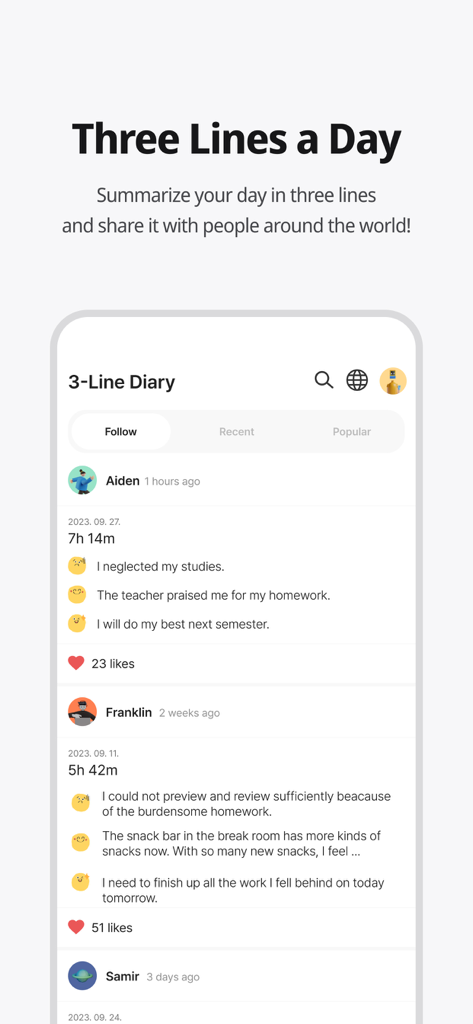
사용자 요약 및 집중 시간을 보여주는 Dote Timer 앱의 '하루 세 줄 일기' 커뮤니티 기능

사용자 요약 및 집중 시간을 보여주는 Dote Timer 앱의 '하루 세 줄 일기' 커뮤니티 기능

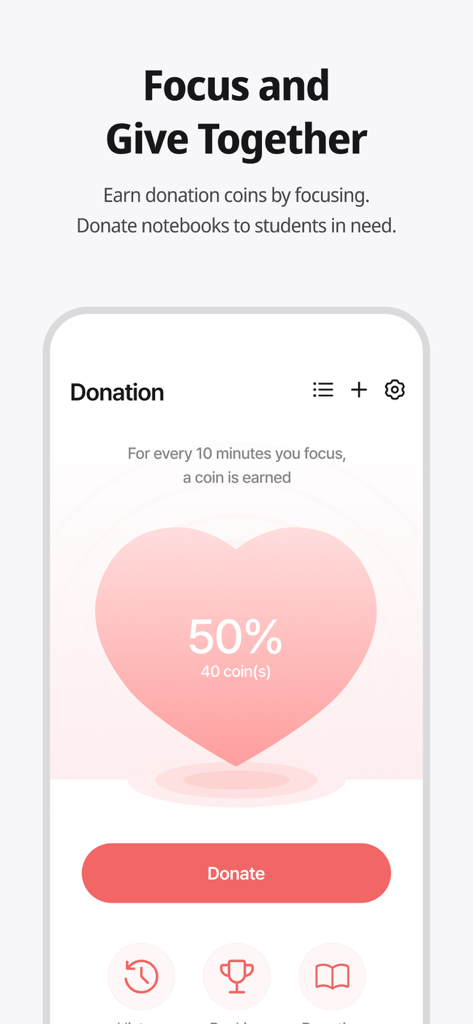
사용자가 집중하여 코인을 얻고 도움이 필요한 학생들에게 기부할 수 있는 Dote Timer 앱의 기부 기능 화면.

사용자가 집중하여 코인을 얻고 도움이 필요한 학생들에게 기부할 수 있는 Dote Timer 앱의 기부 기능 화면.

목적을 가지고 생산성을 높이세요

이 앱을 돋보이게 하는 도구, 56K+ 명의 사용자가 선택.

📱

깊은 집중을 위한 뒤집기

휴대폰을 뒤집어 놓았을 때만 작동하는 타이머로 스마트폰 중독을 없애세요. 즉시 주의력을 되찾고 몰입 상태에 들어가세요.

📈

계획 vs. 현실 분석

10분 단위의 정밀도로 목표와 실제 집중 시간을 비교하세요. 시각적인 히트맵을 사용하여 가장 생산적인 시간을 파악하세요.

🌍

영향력을 가진 생산성

집중력을 선한 영향력으로 전환하세요. 작업하면서 코인을 획득하여 전 세계의 어려운 학생들을 위한 교육 자료를 지원하세요.

앱 소개

에 대해 알아야 할 모든 것 Dote Timer - Time Management.

설명

#Time Management Secret of Successful People# Try Dot Timer now, the king of time management! Are you having trouble managing your time? Need to concentrate, but your smartphone is distracting you? Organizing your work or even recording your study time, everything can be done with Dot Timer! ##Flip Timer UP your concentration with a timer that runs when your flip your smartphone! Let's get away from smartphone addiction! Get donation coins every 10 minutes of concentration ##Time Table Unique time table that allows you to compare your plans with the actual records at a glance! Maximize time utilization with a 10-minute dot-separated planner ##Various statistical charts It's not end with record! Analyze your concentration time in detail with various graphs and charts! Identify your improvement with daily statistics, annual statistics, cumulative statistics, weekly statistics, hourly statistics and plan leaderboards at a glance ##Donation Program You can donate the collected coins to gift notes for underprivileged students! Donation rangking are changing in real time basis ##Three Lines a Day How are you today? Share your diary in three lines. Motivate each other with friends around the world ‍##Study Group 'Study With' Try taking notes with your friends in real time! There are various themes such as classrooms, libraries, offices, fitness places and others. Group member statistics. ##Premium Features Try premium features that are constantly being updated. More efficient time management developed by time management experts How to Use Dote Timer Apple Watch 1. Add a to-do in the Dote timer app. 2. Open the Dote Timer Apple Watch app and select a task by pressing the ‘Select Task’ button. 3. Press the START button to start recording. 4. When the recording is finished, press the STOP button to save the recording and end it. Caution : 1. The Apple Watch must be connected to the iPhone. 2. The Dote timer must be installed on the iPhone. * Notice * First, You need to click To Do List and create category to use this app. reporting translation errors -> skyktc75@gmail.com Your review can help a lot for your developer. Thank you. When we try to concentrate on something, there are so many distractions. One of the biggest distractions is the smartphone. You need to focus on the book. But I find myself looking at the phone. The plan was to study for 5 hours But you actually spent only 1 hour on the book? Dote Timer is the answer! Let’s start with the special proprietary features of Dote Timer. First, Dote Timer starts only when you flip the device (screen facing down). It will automatically stop when you use or move the phone after activating the timer. Thus, you can concentrate on study or work. Second, you can compare the plan with your actual concentration record. Set up the D-Day of your task. And categorize it into A, B, or C depending on the importance to set up a precise plan. The actual length of concentration is recorded and can be compared with your original plan. Third, the thickness of color denotes how much you concentrated. Thus, you can easily find out the days when you concentrated on your tasks. Especially the app shows in different colors the days of concentration and the days you failed to concentrate throughout the year. So you can compare how you fared yesterday and today to make your day more productive. In addition, collect coins by using the timer and donate them for underserved people. My accumulated time of concentration is converted into coins. When they reach a certain threshold, Dote Planner and Dote Book will be donated to underserved students. There are also the standings of donation, Which motivates the users to compete in the donation of coins. Dote Timer can be set up as desired. Just focus on what you have to do to contribute to society. The most efficient time management app for the perfect time allocation. Download Dote Timer now!

최신 버전

2.6.6

크기

103.5 MB

출시일

2021년 7월 6일

화면 사용 시간을 사회적 영향력으로 전환하세요

미루는 습관을 정복할 준비가 되셨나요? 수천 명의 학생 및 전문가들과 함께 폰을 뒤집어 집중력을 찾아보세요. 지금 Dote Timer를 다운로드하고 깊이 있는 작업을 실제 기부로 전환하기 시작하세요.

다운로드: App Store

App information, icons, screenshots, and descriptions displayed on this page are sourced from the Apple App Store and are the property of their respective developers. Download estimates and rankings are based on MWM's proprietary models and may not reflect actual figures. This page is provided for informational and analytical purposes only.

Believe this page infringes your intellectual property? File a dispute