Export Audio
Export Audio
다운로드: App Store

이 페이지는 앱이나 개발자의 공식 페이지가 아니며, 정보 제공 및 논평을 목적으로 작성된 독립 편집 간행물입니다. 명시적으로 달리 언급되지 않는 한, 해당 앱이나 개발자는 MWM, Apple, Google Play, 앱 퍼블리셔 또는 앱 개발자와 제휴, 보증, 후원, 승인 또는 공식적으로 연결되어 있지 않으며, 이 페이지의 어떤 내용도 해당 앱이 MWM의 서비스를 사용하여 개발되었음을 의미하지 않습니다. 모든 상표, 로고, 스크린샷 및 기타 콘텐츠는 해당 소유자의 자산입니다.


로고: Export Audio
다운로드: App Store

Export Audio

비디오를 몇 초 만에 전문적인 오디오 파일로 전환하세요. 클립 자르기, 사용자 정의 메타데이터 추가, MP3, WAV 또는 FLAC으로 내보내기 – 이 모든 것을 iPhone 또는 iPad에서 직접 할 수 있습니다.

주요 수치

다운로드

1M+

사용자 평점

4.7/5

총 평가 수

7K+

개발사

Nobutaka Yuasa

카테고리

Music

지원 언어

2

최신 버전

2.4.1

크기

17.6 MB

출시일

2017년 7월 24일
기능

비디오를 전문가 수준의 오디오로 전환하세요

크리에이터가 이동 중에도 고음질 사운드를 추출하고, 클립을 자르고, 미디어 라이브러리를 정리하는 가장 빠르고 안정적인 방법입니다.

정밀 추출

내보내기 전에 필요한 오디오 세그먼트만 정확하게 잘라내어 공간과 시간을 절약하세요.

무손실 내보내기 옵션

FLAC, WAV, M4A를 포함한 8가지 이상의 형식 중에서 선택하여 어떤 플랫폼에서도 오디오가 전문적으로 들리도록 보장합니다.

다음 스크린샷과 설명은 앱의 공식 스토어 목록에서 직접 가져온 것이며 앱 개발자의 자산입니다.

앱 스토어

스크린샷
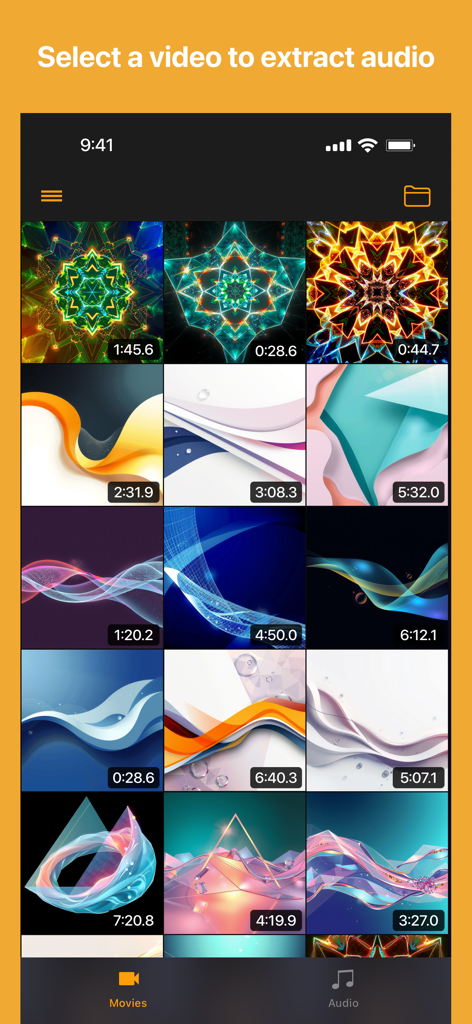
Export Audio - Export Audio 앱의 비디오 선택 갤러리에서 오디오 추출을 위한 다양한 비디오 썸네일과 그 길이를 보여줍니다.
Export Audio 앱의 비디오 선택 갤러리에서 오디오 추출을 위한 다양한 비디오 썸네일과 그 길이를 보여줍니다.

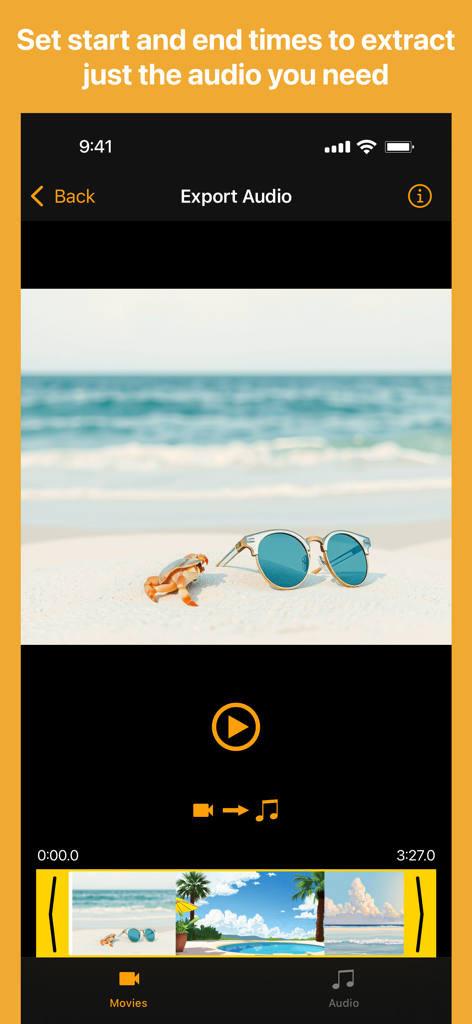
Export Audio - Export Audio 앱에서 특정 오디오 세그먼트를 추출하기 위해 비디오 클립을 자르는 인터페이스
Export Audio 앱에서 특정 오디오 세그먼트를 추출하기 위해 비디오 클립을 자르는 인터페이스

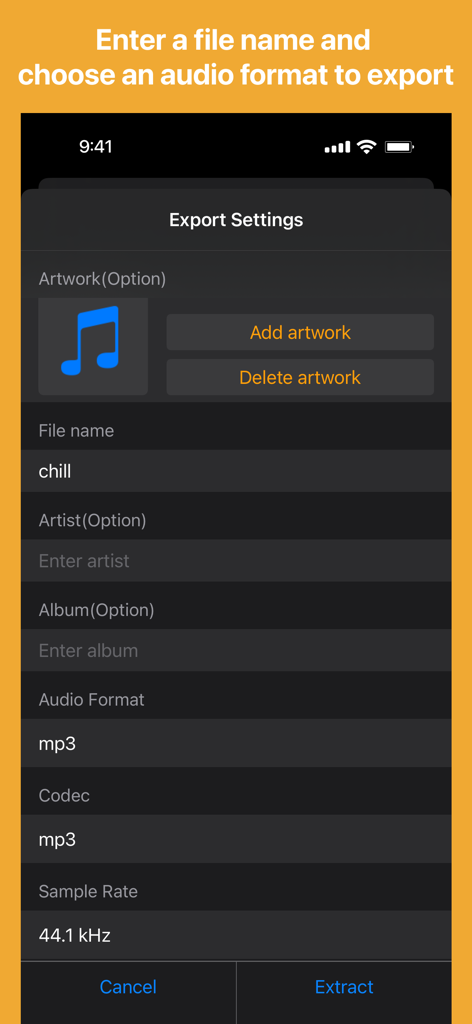
Export Audio - 아트워크, 파일 이름, 아티스트 추가 및 MP3와 같은 오디오 형식 선택 옵션을 보여주는 내보내기 설정 화면.
아트워크, 파일 이름, 아티스트 추가 및 MP3와 같은 오디오 형식 선택 옵션을 보여주는 내보내기 설정 화면.

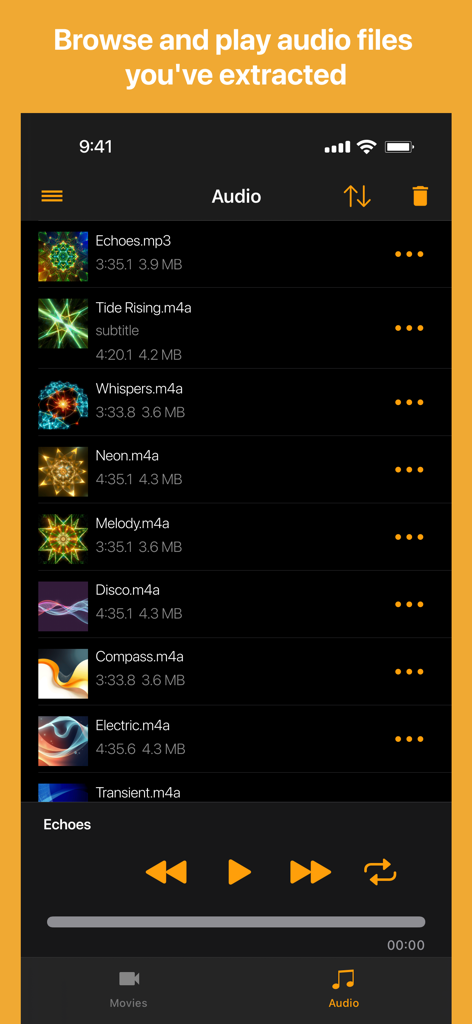
Export Audio - Export Audio 앱 라이브러리 화면에서 추출된 오디오 파일 목록과 재생 컨트롤을 보여줍니다.

Export Audio 앱 라이브러리 화면에서 추출된 오디오 파일 목록과 재생 컨트롤을 보여줍니다.

설명

Extract audio from QuickTime (.mov) and MP4 videos with this easy-to-use audio extractor app. Select a QuickTime or MP4 video from the Photos app or Files app. Set the start and end time for extraction, enter a custom audio file name, and choose your preferred output audio format. Extract and save the audio clip in the format you selected. You can also add custom artwork and artist metadata to your extracted audio files when using formats like AIFC, AIFF, FLAC, M4A, MP3, MP4, or WAV. Easily open or share your extracted audio files with other apps. All extracted audio files are saved and accessible from the Files app: On My iPhone/iPad → MovieToAudio → Audio 【Supported Audio Formats】 - AIFC - AIFF - CAF - FLAC - M4A (recommended) - MP3 - MP4 - WAV 【Additional Notes & Troubleshooting】 Need more features or have suggestions? Just leave a review; I will do my best to improve. **Troubleshooting Tips:** If your extracted files don't appear in the Files app, try restarting your device. If you encounter extraction errors: • Restart your device • Move the video from the Photos app to the Files app, then open it from there • If the issue persists, send the video file or a downloadable link to the support email so I can investigate and improve the app If you enjoy using this app, please leave a review or rating—thank you for your support! 【About IN APP PURCHASE】 Removing ADs is available via an auto-renewable yearly subscription. Payment will be charged to iTunes Account at confirmation of purchase. Subscription automatically renews unless auto-renew is turned off at least 24-hours before the end of the current period. Manage your subscriptions in Account Settings after purchase. No cancellation of the current subscription is allowed during active subscription period. Privacy Policy: https://nobu-y-dev.web.app/export-audio/privacy-policy.html Terms and Conditions: https://nobu-y-dev.web.app/export-audio/terms-and-conditions.html

Download

다운로드: App Store

이 페이지는 앱이나 개발자의 공식 페이지가 아니며, 정보 제공 및 논평을 목적으로 작성된 독립 편집 간행물입니다. 명시적으로 달리 언급되지 않는 한, 해당 앱이나 개발자는 MWM, Apple, Google Play, 앱 퍼블리셔 또는 앱 개발자와 제휴, 보증, 후원, 승인 또는 공식적으로 연결되어 있지 않으며, 이 페이지의 어떤 내용도 해당 앱이 MWM의 서비스를 사용하여 개발되었음을 의미하지 않습니다. 모든 상표, 로고, 스크린샷 및 기타 콘텐츠는 해당 소유자의 자산입니다.








