이 페이지는 앱이나 개발자의 공식 페이지가 아니며, 정보 제공 및 논평을 목적으로 작성된 독립 편집 간행물입니다. 명시적으로 달리 언급되지 않는 한, 해당 앱이나 개발자는 MWM, Apple, Google Play, 앱 퍼블리셔 또는 앱 개발자와 제휴, 보증, 후원, 승인 또는 공식적으로 연결되어 있지 않으며, 이 페이지의 어떤 내용도 해당 앱이 MWM의 서비스를 사용하여 개발되었음을 의미하지 않습니다. 모든 상표, 로고, 스크린샷 및 기타 콘텐츠는 해당 소유자의 자산입니다.
File Viewer for All
Office 문서부터 WebP 애니메이션까지 모든 형식을 보고 PC와 iPhone 간에 파일을 원활하게 전송하세요. 기술 전문가를 위한 궁극의 안전한 클라우드 없는 작업 공간입니다.
주요 수치
다운로드
300
사용자 평점
4.8/5
총 평가 수
0
개발사
刚刚 孔
카테고리
Utilities
지원 언어
2
최신 버전
5.9
크기
38.9 MB
출시일
2022년 6월 8일
기능
디지털 워크플로 마스터하기
클라우드 없이 Windows, Mac, iOS 전반에 걸쳐 모든 파일 형식을 보고, 관리하고, 전송하는 파워 유저를 위한 올인원 솔루션입니다.
고속 무선 전송
Windows와 iPhone 간의 격차를 해소하세요. 장치를 모바일 하드 드라이브로 변환하고 케이블 없이 HTTP 또는 WebDAV를 통해 즉시 파일을 이동하세요.
범용 형식 뷰어
앱 전환을 중지하세요. PDF 및 Office 문서부터 GIF 및 WebP까지 모든 것을 효율성을 위해 설계된 놀랍고 유동적인 폭포 레이아웃으로 열어보세요.
다음 스크린샷과 설명은 앱의 공식 스토어 목록에서 직접 가져온 것이며 앱 개발자의 자산입니다.
앱 스토어
스크린샷
File Viewer for All 앱의 자연 사진 폭포 갤러리 보기
File Viewer for All 앱 인터페이스에 표시되는 전체 화면 가로 사진
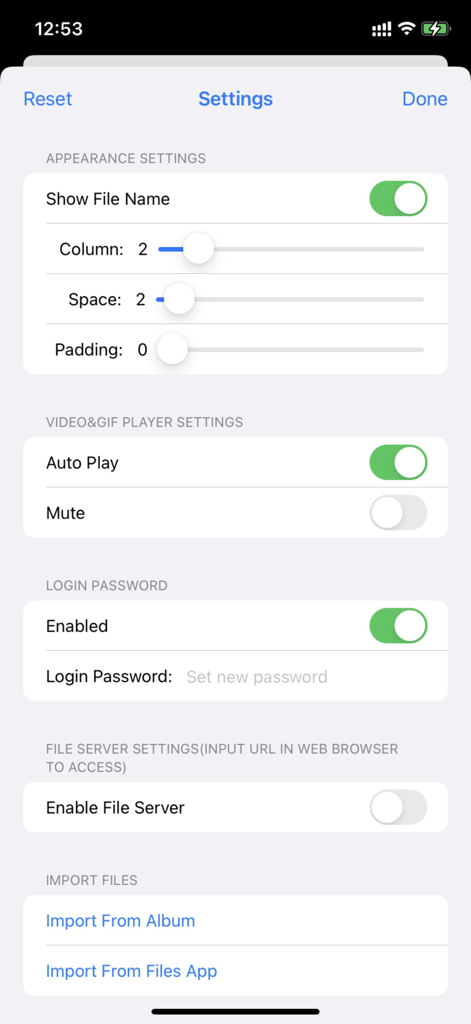
레이아웃, 보안 비밀번호, 파일 서버 활성화에 대한 사용자 정의 옵션을 보여주는 File Viewer for All 앱 설정 화면
비밀번호 보호 및 로그인 버튼이 있는 File Viewer for All 앱의 환영 화면
설명
Meet 2 major requirements:
* View almost all types of files with waterfall layout just in a SINGLE app, including image, video, gif/WebP/Apng, pdf, Microsoft word/excel/ppt, iWorks pages/numbers and etc
* Transfer files between phones/pads/PCs/Apps freely and easily by embedded http&WebDav server, iTunes, airdrop, Files App, Album and third-party apps.
[How to use]
Step1: Enable file server in app from setting page, the file server's address will appear beside(such as http://192.168.3.5:5156)
Step2: Enter or copy&paste server URL in any web browser, drag files or folders to the displayed webpage to upload files
Step3: After upload complete, close the setting page, tap the folder list in toolbar of the app, all the folder will be list, you can choose any one to browse.
[Key Features]
1. It supports browsing pictures and videos in a waterfall layout, which is very smooth and fluent, and the visual effect is stunning.
2. It supports viewing almost all file formats, including pictures, videos, texts, PDFs, gif / webp / apng animations, office word / excel / ppt, iWorks pages / number, etc.
3. With built - in HTTP and WebDav servers, files and folders can be uploaded, downloaded and managed remotely through a browser. It is also possible to mount an iPhone remotely on a computer and operate it just like a local hard disk, making it very suitable for using an iPhone as a mobile hard disk.
4. It supports the built - in "Files" app in iOS to manage files and folders with its powerful functions.
5. It supports uploading, downloading and managing files and folders through iTunes.
6. There are abundant file - sharing functions, and files can be conveniently shared via email and various third - party apps.
7. It supports login protection, facial recognition, fingerprint authentication and password - based login.
8. It supports file management functions such as file sorting and file deletion.
[Contact]
Email: DummyApps@163.com
[FAQ]
1. Why new files and folder won't list?
A: you should tap "Refresh" button on navigation bar to list newly uploaded files and folders
3. How to transfer files between phone/pad/PC?
A:
1) Enable file server from setting page, the file server's url will list beside, (such as http://192.168.1.12:13653), you can use web browser to access file server by url (such as http://192.168.1.12:13653), you can upload files, create subfolders, download files from it
2) upload&download by iTunes
3) Import&export files by Files app
4) Import&export files by album
5) Import &export files from third-party app
5. what's the default password?
A: M12345678
6. How to show context menu?
A: long press any of file, the context menu will display
8. What gesture are support in full view?
A:
1) tap gesture. when zoomed out, tap gesture can resize images&videos to its original size. when videos are in original size, tap gesture can play/pause video
2) drag gesture. horizontal drag gesture can adjust the progress of video play
3) pinch gesture. to zoom in/out images and videos
9. How to hide toolbar?
A:
1) In file list view, user can long press any file, from the context menu, user can show/hide toolbar, if file list is empty, user can always tap the blank space to show toolbar
2) In full view, user can tap or zoom to hide/show toolbar when view image and videos
11. where modified images, video snapshot and video cuts are saved?
A:
1) All modified images ,video snapshot, video cuts are saved to the folder named "Filename + _Edit" in root folder
2) All images import from system album are saved to "Import from Album" folder in root folder
3) All files import from file app are saved to "Import from Files App" in root folder
이 페이지는 앱이나 개발자의 공식 페이지가 아니며, 정보 제공 및 논평을 목적으로 작성된 독립 편집 간행물입니다. 명시적으로 달리 언급되지 않는 한, 해당 앱이나 개발자는 MWM, Apple, Google Play, 앱 퍼블리셔 또는 앱 개발자와 제휴, 보증, 후원, 승인 또는 공식적으로 연결되어 있지 않으며, 이 페이지의 어떤 내용도 해당 앱이 MWM의 서비스를 사용하여 개발되었음을 의미하지 않습니다. 모든 상표, 로고, 스크린샷 및 기타 콘텐츠는 해당 소유자의 자산입니다.