Focus Interval Timer ChronoCat

Focus Interval Timer ChronoCat


다운로드: App Store
로고: Focus Interval Timer ChronoCat

ChronoCat: 당신의 삶에 맞춰 조정되는 스마트 시간 차단기

까다로운 달력과 싸우는 것을 멈추세요. 자연어로 즉시 하루를 계획하고, 시간이 초과될 때 자동으로 일정을 조정하여 집중력을 유지하고 죄책감을 덜어주는 유연한 일정을 즐기세요.

다운로드: App Store

개발사

HABITEDGE PTY LTD

카테고리

Productivity

다운로드

100

사용자 평점

4.9/5

총 평가 수

0

지원 언어

1

당신의 하루, 시각화

이 인터페이스를 사용하는 100 명의 사용자.

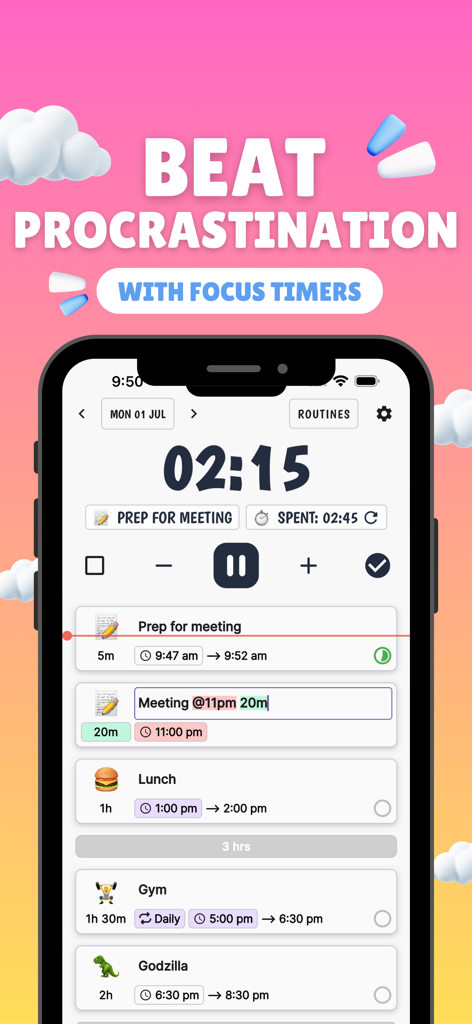
ChronoCat의 모바일 앱 인터페이스, 카운트다운 집중 타이머와 이모티콘이 있는 일일 작업의 연대기 목록을 보여줌

ChronoCat의 모바일 앱 인터페이스, 카운트다운 집중 타이머와 이모티콘이 있는 일일 작업의 연대기 목록을 보여줌

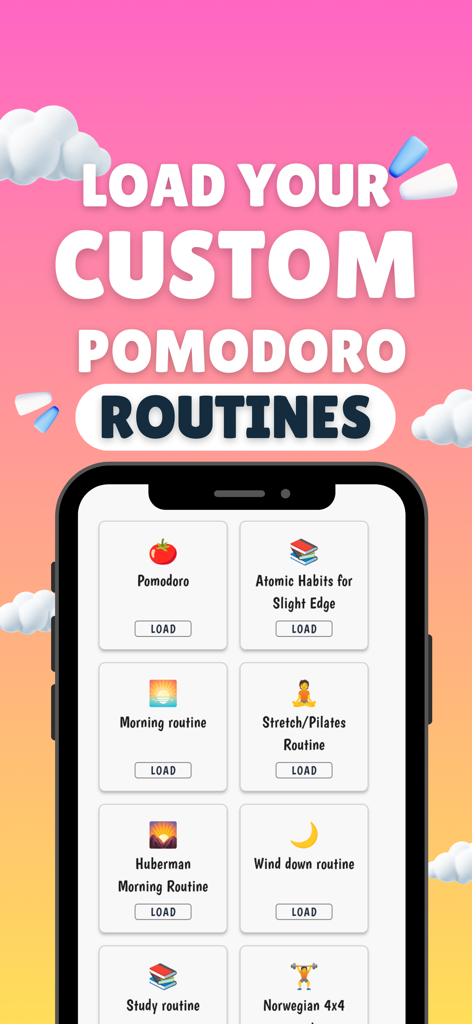
Huberman Morning 및 Atomic Habits와 같은 사용자 정의 가능한 뽀모도로 루틴을 보여주는 ChronoCat 앱 화면

Huberman Morning 및 Atomic Habits와 같은 사용자 정의 가능한 뽀모도로 루틴을 보여주는 ChronoCat 앱 화면

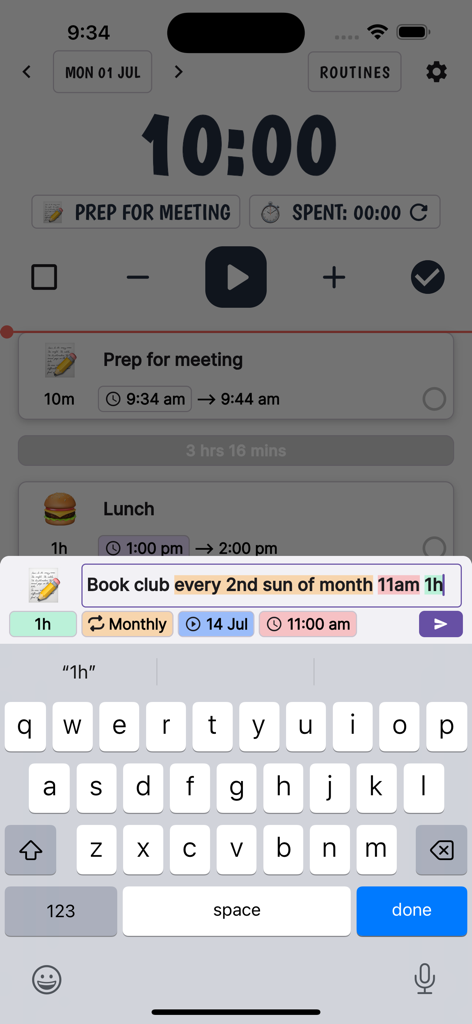
반복되는 북 클럽 작업을 예약하기 위해 자연어 구문을 사용하는 ChronoCat 앱의 스크린샷

반복되는 북 클럽 작업을 예약하기 위해 자연어 구문을 사용하는 ChronoCat 앱의 스크린샷

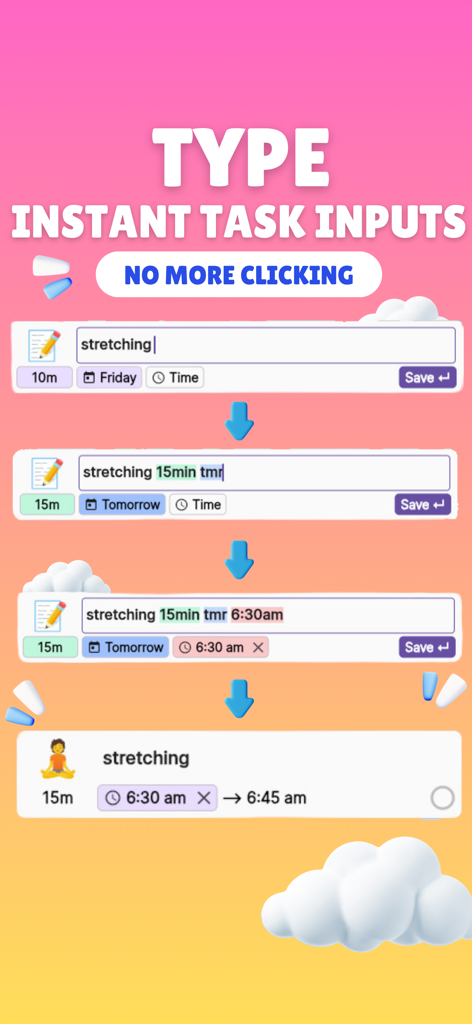
자동 이모티콘 생성을 통해 스트레칭 작업을 빠르게 입력하고 예약하기 위해 자연어 구문을 사용하는 ChronoCat 앱 인터페이스

자동 이모티콘 생성을 통해 스트레칭 작업을 빠르게 입력하고 예약하기 위해 자연어 구문을 사용하는 ChronoCat 앱 인터페이스

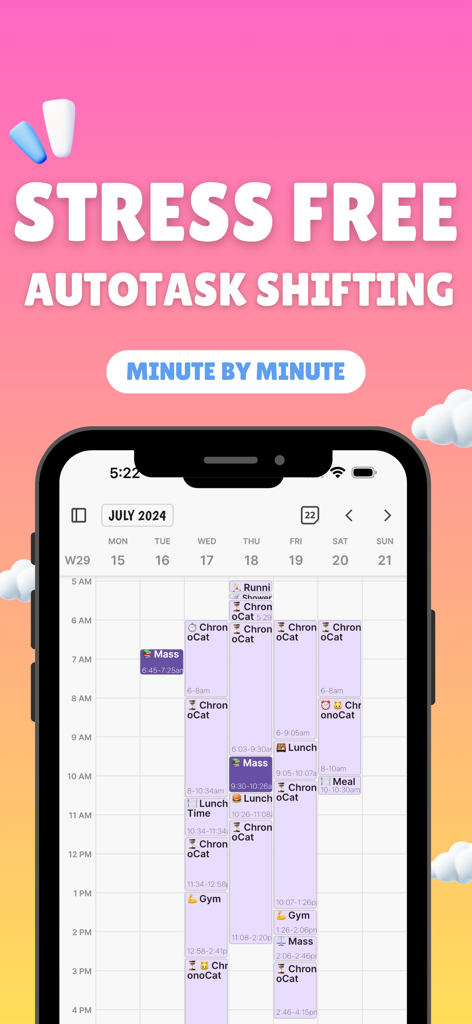
ChronoCat 앱 주간 캘린더 보기를 분 단위로 시간 관리 오류를 줄이는 데 도움이 되는 스트레스 없는 자동 작업 전환 텍스트와 함께 보여주는 스마트폰 화면

ChronoCat 앱 주간 캘린더 보기를 분 단위로 시간 관리 오류를 줄이는 데 도움이 되는 스트레스 없는 자동 작업 전환 텍스트와 함께 보여주는 스마트폰 화면

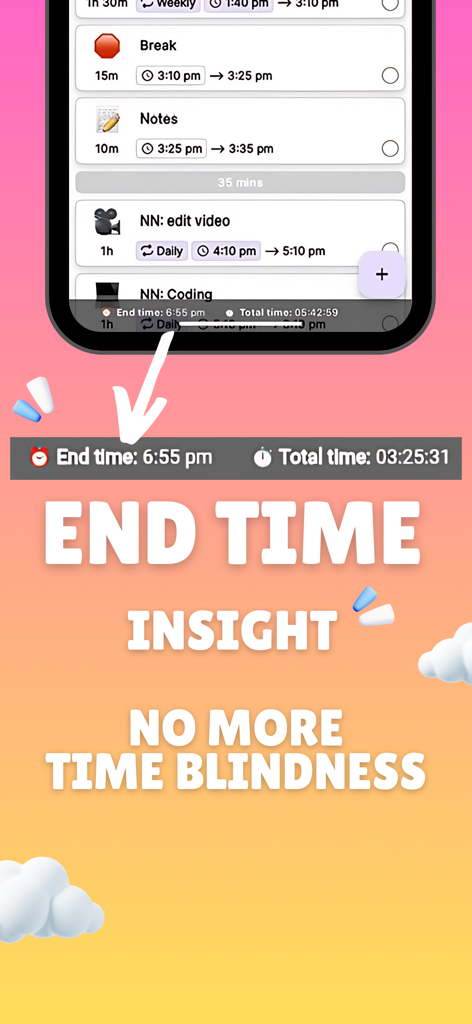
시간 관리 오류를 줄이는 데 도움이 되는 종료 시간 통찰력과 연대기 작업 목록을 표시하는 ChronoCat 생산성 앱의 스크린샷

시간 관리 오류를 줄이는 데 도움이 되는 종료 시간 통찰력과 연대기 작업 목록을 표시하는 ChronoCat 생산성 앱의 스크린샷

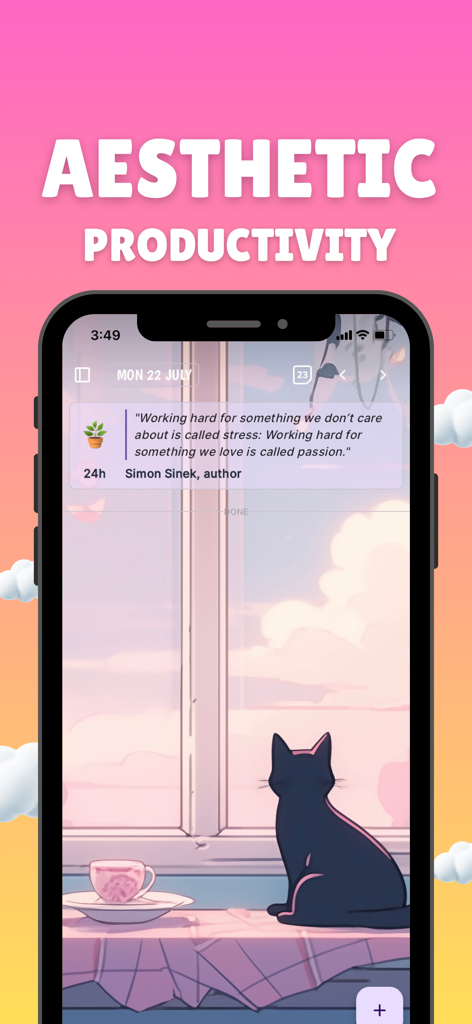
미적 생산성을 위한 동기 부여 인용구와 함께 경치 좋은 고양이 배경을 특징으로 하는 ChronoCat 앱 인터페이스

미적 생산성을 위한 동기 부여 인용구와 함께 경치 좋은 고양이 배경을 특징으로 하는 ChronoCat 앱 인터페이스

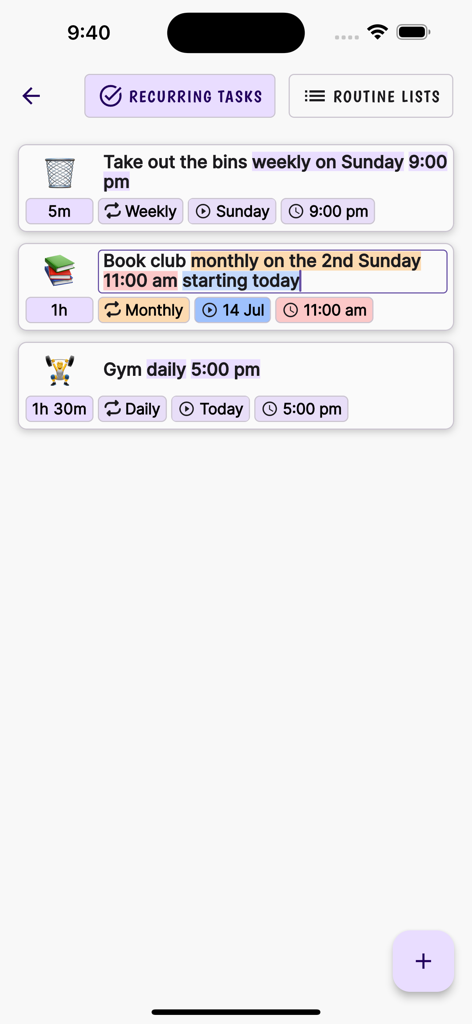
자연어 입력을 사용하여 청소, 북 클럽 및 체육관을 위한 자동 일정 예약 기능을 보여주는 ChronoCat 반복 작업 화면의 스크린샷

자연어 입력을 사용하여 청소, 북 클럽 및 체육관을 위한 자동 일정 예약 기능을 보여주는 ChronoCat 반복 작업 화면의 스크린샷

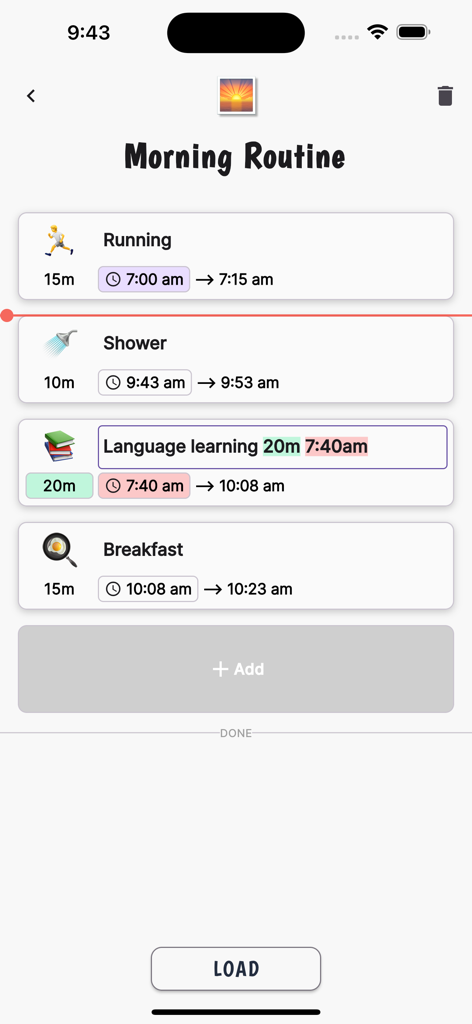
자동 시간 차단 기능을 사용하여 달리기 및 샤워와 같은 예정된 작업을 보여주는 아침 루틴을 표시하는 ChronoCat 앱 인터페이스

자동 시간 차단 기능을 사용하여 달리기 및 샤워와 같은 예정된 작업을 보여주는 아침 루틴을 표시하는 ChronoCat 앱 인터페이스

쉬운 계획, 마찰 제로

이 앱을 돋보이게 하는 도구, 100 명의 사용자가 선택.

💬

말하듯이 입력하세요

'10시에 30분 회의'라고 입력하기만 하면 AI가 즉시 일정을 만들어 줍니다. 더 이상 지루한 메뉴나 수동 입력을 할 필요가 없습니다.

🌊

꺾이지 않는 유연한 일정

인생에는 예상치 못한 일이 생기기 마련입니다. 시간이 초과되면 전체 일정이 자동으로 재조정되어 뒤처짐에 대한 죄책감을 덜어줍니다.

🚀

미루기 습관 타파

자동으로 시작되는 작업과 다음 단계로 나아가도록 돕는 부드러운 알림으로 흐름을 유지하세요.

앱 소개

에 대해 알아야 할 모든 것 Focus Interval Timer ChronoCat.

설명

ChronoCat is a natural language powered time blocking app with a focus timer. It lets you quickly plan your day with statements like 'Meeting every thurs @11 for 1h 30m'. Tasks without a start time automatically adjust times making it flexible to unforeseen changes. Going Overtime? No worries. See how your remaining task's start and end times are affected automatically. Natural language parsing: Create tasks like messaging an assistant "Meeting @12 for 30m" Recurring events/tasks: Naturally say 'every 2nd Sun of the month' to set a recurring event/task Routines: Create routine lists to quickly add a list of tasks to the current day. Calendar week view Emoji-Enhanced Tasks: Auto-generated emojis for each task. Flexible Scheduling: Easily adjust and transfer tasks across days for ultimate flexibility. Intuitive Timer: Stay focused with a simple press of the 'play' button. Gentle Alarms: Customize your alarm to signal task completion, a gentle nudge towards your next activity. Chronological daily planner Cross Platform sync Templates for routines Estimated time for tasks Automatic starting of next task to stop procrastination Push back times for following tasks if run overtime (Flexible Calendar) Templates for pomodoro Optional chime that plays during task at custom intervals to keep you on track Give you updated times of when you'll start your next time by the minute Give you updated estimated time of completion of ALL your tasks for your current day. Automatic AI emojis to save you time

최신 버전

7.16.11

크기

107.5 MB

출시일

2024년 1월 31일

달력과 싸우는 것을 멈추고, 흐름에 맞춰 나아가세요.

ChronoCat을 사용하여 생산성 죄책감을 없애는 수천 명의 민첩한 성취자들과 함께하세요. 자연어로 몇 초 만에 계획하고, 일이 생겼을 때 유연한 타이머가 자동으로 하루를 조정하도록 하세요.

다운로드: App Store

App information, icons, screenshots, and descriptions displayed on this page are sourced from the Apple App Store and are the property of their respective developers. Download estimates and rankings are based on MWM's proprietary models and may not reflect actual figures. This page is provided for informational and analytical purposes only.

Believe this page infringes your intellectual property? File a dispute