
이 페이지는 앱이나 개발자의 공식 페이지가 아니며, 정보 제공 및 논평을 목적으로 작성된 독립 편집 간행물입니다. 명시적으로 달리 언급되지 않는 한, 해당 앱이나 개발자는 MWM, Apple, Google Play, 앱 퍼블리셔 또는 앱 개발자와 제휴, 보증, 후원, 승인 또는 공식적으로 연결되어 있지 않으며, 이 페이지의 어떤 내용도 해당 앱이 MWM의 서비스를 사용하여 개발되었음을 의미하지 않습니다. 모든 상표, 로고, 스크린샷 및 기타 콘텐츠는 해당 소유자의 자산입니다.


Form for Google Forms
Google Forms에 대한 통제력을 쟁취하십시오. 모바일 장치에서 그 힘을 완전히 휘두르는 자가 되십시오.
다운로드
10M+사용자 평점
총 평가 수
122.6K개발사
카테고리
Productivity지원 언어
37최신 버전
1.8.2크기
92.1 MB출시일
2021년 1월 25일이 앱은 구글 폼즈 사용자를 위한 모바일 생산성 및 데이터 관리 솔루션을 제공합니다.
Form for Google Forms: 주요 기능 분석
응답 데이터 내보내기
응답 데이터를 CSV 또는 Excel 파일 형식으로 내보내어, 외부 도구에서 심층 분석 및 보고서 작성을 용이하게 합니다.
응답 필터링 및 심층 분석
날짜, 이메일, 질문, 점수 등 다양한 기준으로 응답을 필터링하여, 특정 데이터 세트에 대한 심층 분석을 가능하게 합니다.
모바일 설문지 생성 및 편집
iOS 기기에서 새로운 설문지를 생성하고, 기존 설문지의 질문을 유연하게 편집하여 언제 어디서든 설문지 관리를 가능하게 합니다.
시각적 응답 요약 및 분석
요약, 질문별, 개별 응답의 세 가지 모드로 응답을 시각적으로 제공하며, 아름다운 그래프를 통해 데이터를 쉽게 이해하고 핵심 통찰력을 빠르게 얻을 수 있습니다.
실시간 응답 알림
새로운 응답이 제출될 때마다 알림을 통해 실시간으로 상황을 파악하고 신속하게 대응할 수 있도록 지원합니다.
질문 스캔을 통한 빠른 가져오기
카메라, 이미지, 파일, 클립보드 등 다양한 소스에서 질문을 스캔하여 기존 콘텐츠를 빠르고 효율적으로 설문지로 가져올 수 있습니다.
공동 작업자 추가 기능
설문지에 공동 작업자를 추가할 수 있도록 지원하여, 팀 기반의 설문지 작성 및 관리 효율성을 높입니다.
응답 유효성 검사
응답 유효성 검사 기능을 추가하여, 수집되는 데이터의 정확성과 품질을 향상시키고 유의미한 정보를 확보할 수 있습니다.
퀴즈 및 평가 기능
점수 설정, 정답 지정, URL 링크가 포함된 피드백 제공 등 퀴즈 기능을 통해 교육 및 평가 목적의 설문지 활용도를 높입니다.
기존 설문지 질문 가져오기 및 재사용
기존 설문지의 질문을 가져와 재사용할 수 있게 하여, 설문지 구성 시간을 단축하고 일관된 질문 유형을 유지할 수 있습니다.
자주 묻는 질문
에 대해 알아야 할 모든 것 Form for Google Forms
What is Form for Google Forms?
Form for Google Forms is a free iOS app that allows users to create, edit, and manage all their Google Forms directly on their iPhone, iPod, or iPad. It provides comprehensive tools for form management and response analysis.
Can I create new Google Forms using the Form for Google Forms app?
Yes, Form for Google Forms allows users to create new Google Forms directly on their iOS device. It offers various templates and the ability to import questions from existing forms.
Does Form for Google Forms support editing existing Google Forms?
Yes, Form for Google Forms supports editing existing Google Forms. Users can open any form from their Google Drive on their iOS device to modify questions, re-order them, and add images or videos.
Can Form for Google Forms users receive notifications for new responses?
Yes, Form for Google Forms provides response notifications. Users can get notified via push notifications whenever someone submits a new response to their Google Forms.
What are the options for viewing form responses in Form for Google Forms?
Form for Google Forms allows viewing responses in three modes: Summary, Questions, and Individual. The app displays responses using beautiful graphs in summary mode for comprehensive analysis.
Can I export responses from Form for Google Forms?
Yes, Form for Google Forms allows users to export responses. Responses can be exported in CSV or Excel file format, providing flexibility for further data analysis outside the app.
Is it possible to add collaborators to forms in Form for Google Forms?
Yes, users can add collaborators or editors to their forms directly within the Form for Google Forms app. This feature facilitates teamwork and shared form management.
Can Form for Google Forms scan questions from physical documents or images?
Yes, Form for Google Forms can scan questions. It supports scanning questions using the device's camera, images from the photos library, and files like doc, pdf, or ppt from the Files app.
Does Form for Google Forms allow setting points and feedback for quiz questions?
Yes, Form for Google Forms allows setting points and correct answers for quiz questions. Users can also add feedback with URL links for both correct and incorrect responses.
Is Form for Google Forms an official Google application?
No, Form for Google Forms is a third-party app. It is not associated with Google. All trademarks mentioned are the property of their respective owners.
다음 스크린샷과 설명은 앱의 공식 스토어 목록에서 직접 가져온 것이며 앱 개발자의 자산입니다.
앱 스토어
스크린샷
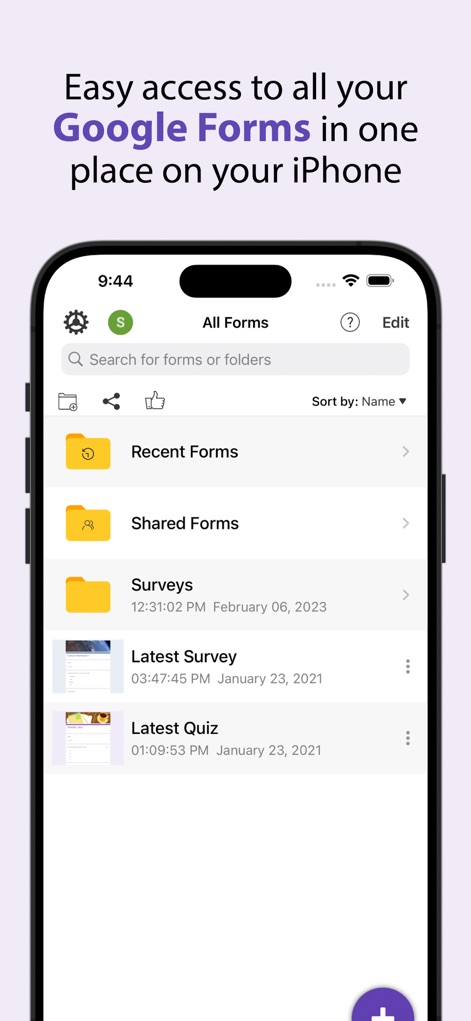
이 앱은 사용자에게 모든 Google Forms에 대한 중앙 집중식 허브를 제공하며, 최근 양식 목록과 편리한 검색 바를 통해 효율적인 접근을 지원합니다.
통합된 양식 관리
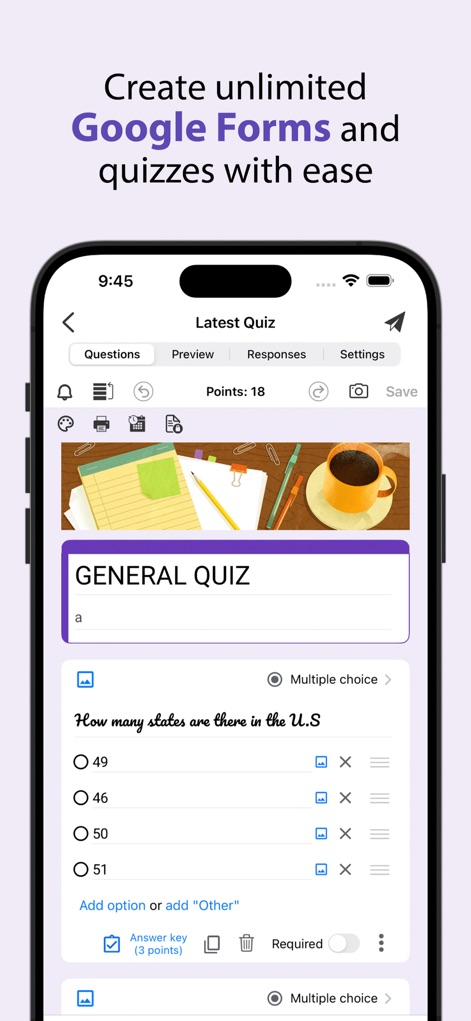
이 도구는 사용자에게 직관적인 퀴즈 편집 인터페이스를 제공하여, 객관식 질문과 같은 다양한 형식으로 새로운 Google Forms를 손쉽게 생성할 수 있도록 돕습니다.
손쉬운 양식 생성

사용자는 이 앱에서 퀴즈 질문에 점수를 설정하고, 정답 및 오답에 대한 맞춤형 피드백 섹션을 추가하여 학습 경험을 향상시킬 수 있습니다.
질문에 점수 부여

이 앱은 사용자가 제출된 응답을 아름다운 막대 차트로 시각화하여 쉽게 이해할 수 있도록 하며, 요약, 질문별, 개별 보기 모드를 통해 상세한 분석을 지원합니다.
응답 데이터 시각화

사용자는 응답 데이터를 나타내는 원형 차트를 포함한 다양한 차트를 생성하고, 이 차트들을 손쉽게 클립보드에 복사하거나 사진 라이브러리에 저장할 수 있습니다.
차트 공유 및 저장
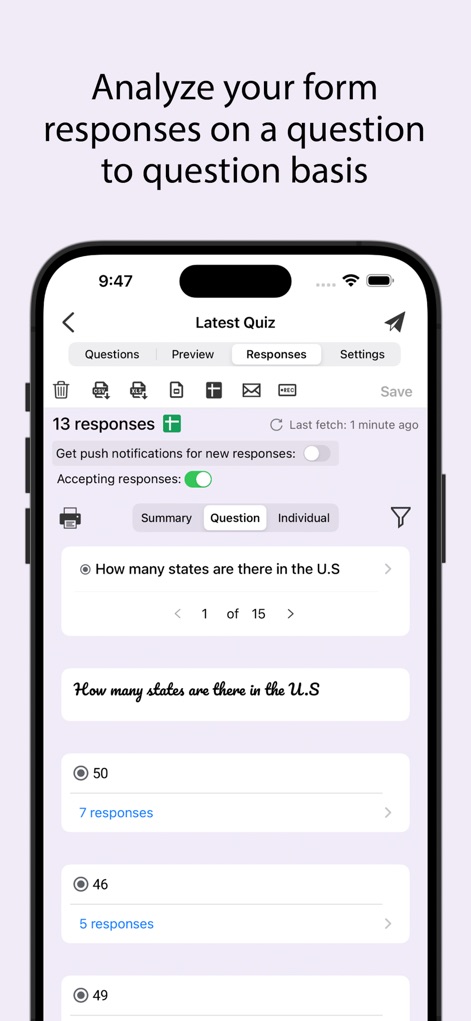
이 도구는 사용자가 각 질문에 대한 응답을 상세히 분석할 수 있도록 하며, 개별 질문별 응답 수와 그 내용을 명확하게 보여줍니다.
질문별 응답 분석

사용자는 이 앱을 통해 개별 응답자의 이메일을 확인하고, 퀴즈 답변에 대한 점수를 쉽고 효율적으로 채점할 수 있습니다.
개별 응답 채점
설명
Download
비슷한 앱
유사한 기능과 사용자 경험을 가진 앱

Forms for Google Docs
Aurora Innovation Limited

Forms fоr Google Form
Sanpeliano LTD
Forms for Google Drive
BurningFlower Inc

Form For Google Forms & Docs
Seven Mile Apps LLC
Forms ®
SMM service, s.r.o.
Forms for Google Fоrms
LightApps OU

Forms for Google Forms App
AppTraining Limited

Forms for Google Drive ™
Mariia Tereshkova

Forms for Google Forms & Quiz
Niharika Jindal
이 페이지는 앱이나 개발자의 공식 페이지가 아니며, 정보 제공 및 논평을 목적으로 작성된 독립 편집 간행물입니다. 명시적으로 달리 언급되지 않는 한, 해당 앱이나 개발자는 MWM, Apple, Google Play, 앱 퍼블리셔 또는 앱 개발자와 제휴, 보증, 후원, 승인 또는 공식적으로 연결되어 있지 않으며, 이 페이지의 어떤 내용도 해당 앱이 MWM의 서비스를 사용하여 개발되었음을 의미하지 않습니다. 모든 상표, 로고, 스크린샷 및 기타 콘텐츠는 해당 소유자의 자산입니다.