
이 페이지는 앱이나 개발자의 공식 페이지가 아니며, 정보 제공 및 논평을 목적으로 작성된 독립 편집 간행물입니다. 명시적으로 달리 언급되지 않는 한, 해당 앱이나 개발자는 MWM, Apple, Google Play, 앱 퍼블리셔 또는 앱 개발자와 제휴, 보증, 후원, 승인 또는 공식적으로 연결되어 있지 않으며, 이 페이지의 어떤 내용도 해당 앱이 MWM의 서비스를 사용하여 개발되었음을 의미하지 않습니다. 모든 상표, 로고, 스크린샷 및 기타 콘텐츠는 해당 소유자의 자산입니다.


Forms for Google Docs
당신은 구글 폼에 갇혀 있지 않습니다. 이 앱은 족쇄를 끊어버립니다.
다운로드
5M+사용자 평점
총 평가 수
118.5K개발사
카테고리
Productivity지원 언어
31최신 버전
2.4.1크기
121.5 MB출시일
2022년 5월 15일이 앱은 Google Forms 사용자 및 중소기업을 위한 효율적인 양식 생성, 관리 및 분석 도구를 제공합니다.
Forms for Google Docs 앱 주요 기능 분석
포괄적인 응답 분석 및 시각화
이 앱은 자동 요약, 실시간 분석, 다양한 차트, 필터링 기능 등을 통해 응답 데이터를 심층적으로 분석하고 시각화할 수 있게 해줍니다.
간편한 온라인 양식 생성 및 공유
이 도구는 다양한 목적의 온라인 양식을 쉽게 생성하고 이메일, 링크 등을 통해 공유할 수 있게 해줍니다.
Google Sheets 통합 및 데이터 내보내기
이 앱은 Google Sheets와의 통합 및 CSV/Excel 내보내기 기능을 제공하여 사용자가 원시 데이터를 활용해 심층 분석 또는 자동화를 수행할 수 있도록 돕습니다.
고급 양식 사용자 정의 및 조건부 로직
이 도구는 다양한 질문 유형, 이미지 및 비디오 삽입, 테마 사용자 정의, 퀴즈 기능, 조건부 질문 로직 추가 등 고급 사용자 정의 옵션을 제공합니다.
모바일 기기에서의 양식 접근성 및 생성
이 앱은 사용자가 모바일 기기에서 Google Drive의 기존 양식을 열거나 새 양식을 생성하여 언제 어디서든 작업할 수 있게 해줍니다.
다채로운 양식 배포 및 공유 옵션
이 앱은 이메일, 링크, 소셜 미디어, 맞춤형 QR 코드 등 다양한 채널을 통해 양식을 배포하고 공유할 수 있는 기능을 갖추고 있습니다.
AI 기반 질문 생성
이 도구는 AI 대화를 통해 양식 질문을 신속하게 생성하여 사용자가 시간과 노력을 절약할 수 있도록 돕습니다.
응답 관리 및 알림 설정
이 앱은 응답 알림, 응답 수 제한, 응답 기간 설정을 통해 사용자가 양식 관리를 자동화하고 응답 흐름을 제어할 수 있게 해줍니다.
실시간 양식 공동 작업
이 도구는 사용자가 팀원들과 실시간으로 양식을 공동 작업하고 편집 링크를 공유하여 효율적인 협업을 가능하게 합니다.
질문 스캔을 통한 빠른 양식 생성
이 앱은 카메라, 이미지, 텍스트, 클립보드에서 질문을 스캔하여 빠르고 쉽게 양식을 생성할 수 있는 독특한 기능을 제공합니다.
자주 묻는 질문
에 대해 알아야 할 모든 것 Forms for Google Docs
What is FormsApp for Google Docs?
FormsApp allows users to create, edit, share, and manage online forms and surveys directly from their iOS, iPhone, iPod, or iPad devices. It facilitates real-time analysis of results.
Is FormsApp for Google Docs an official Google application?
No, FormsApp is a third-party application. It is not officially associated with Google. All trademarks mentioned are the property of their respective owners.
Can FormsApp create forms using AI?
Yes, FormsApp enables users to generate form questions quickly through AI conversation. Users input a research topic and content, then AI helps create the form.
Does FormsApp support real-time analysis of survey responses?
FormsApp provides real-time responses, analytics, and graphs for surveys and quizzes. Users view results in summary, questions, or individual response modes.
How can I customize forms within FormsApp?
FormsApp allows users to customize form themes by selecting fonts, colors, and backgrounds. It also provides various templates for different form types.
Can I collaborate on forms with other users in FormsApp?
Yes, FormsApp allows users to add collaborators or editors to their forms. Teams can build questions together in real-time by sharing an edit link.
Does FormsApp provide notifications for new form responses?
FormsApp notifies users via app push notifications or email whenever someone submits a new response. This feature is part of its distinctive notification settings.
Can FormsApp limit responses or set timeframes for forms?
Yes, FormsApp enables users to set a limit on the number of responses. It also allows users to specify a start and end time for form responses.
What export options are available for form responses in FormsApp?
FormsApp users can export responses in CSV or Excel file format. The app also supports opening raw data with Google Sheets for deeper analysis.
Where can I find the privacy policy for FormsApp?
FormsApp provides a Privacy Policy which details how the application handles user data. The policy is accessible via a dedicated link.
다음 스크린샷과 설명은 앱의 공식 스토어 목록에서 직접 가져온 것이며 앱 개발자의 자산입니다.
앱 스토어
스크린샷
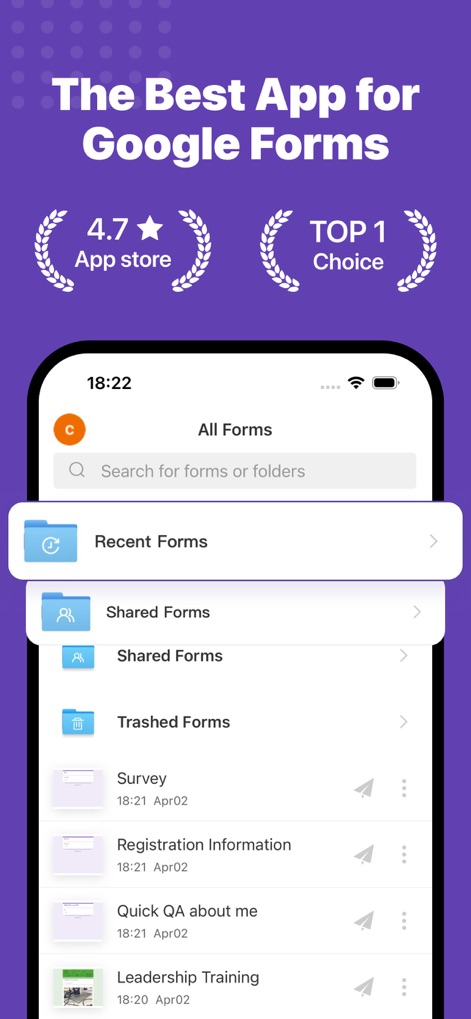
이 앱의 깔끔한 인터페이스는 **최근 양식**과 **공유 양식**을 포함하여 모든 Google 양식을 손쉽게 탐색하고 관리할 수 있도록 합니다.
모든 양식 관리
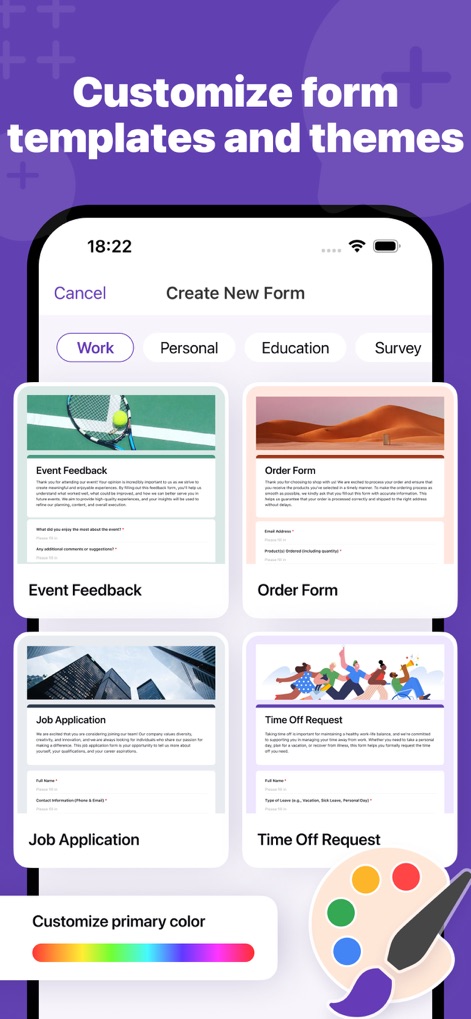
사용자는 **다양한 카테고리별 템플릿**을 활용하여 새로운 양식을 생성하고, **기본 색상 팔레트**를 변경하여 테마를 개인화할 수 있습니다.
맞춤형 양식 템플릿
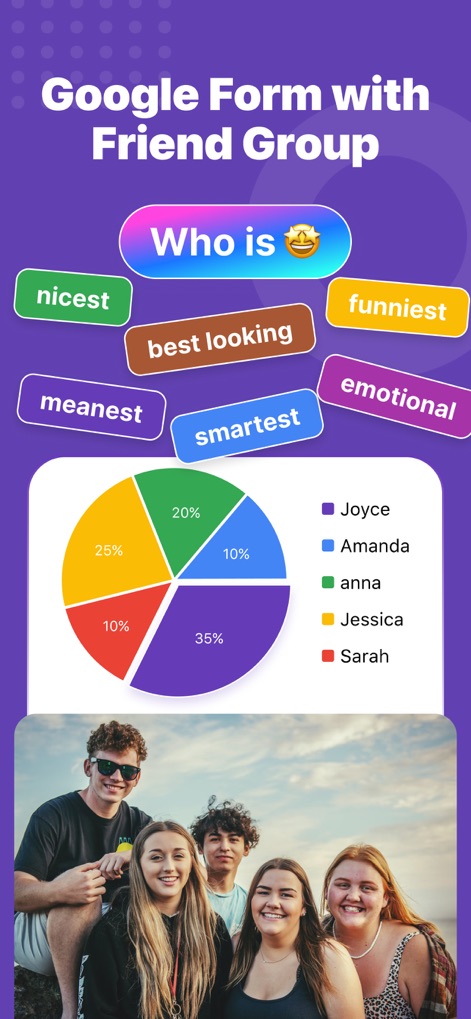
이 앱은 **원형 차트**를 통해 설문조사 응답을 시각적으로 명확하게 표시하며, 친구들과 함께하는 **그룹 활동** 테마를 배경으로 재미있는 양식 활용 예시를 보여줍니다.
설문 결과 시각화

이 앱은 **AI 분석 기능**을 통해 사용자 피드백 설문조사에서 인사이트를 도출하고, **대화형 인터페이스**로 데이터에 대한 질문을 즉시 생성할 수 있게 합니다.
AI 데이터 분석

사용자는 **연구 주제와 내용을 입력**하여 AI의 도움을 받아 질문을 구성할 수 있으며, **다양한 질문 유형 설정**을 통해 양식을 신속하게 맞춤화할 수 있습니다.
AI로 양식 생성

사용자는 **새로운 응답 알림**을 즉시 받을 수 있으며, **다양한 유형의 차트**를 통해 수집된 데이터를 시각적으로 쉽게 분석할 수 있습니다.
응답 알림 및 차트

이 앱은 **Google Sheets로 데이터 내보내기**를 지원하여 심층 분석을 가능하게 하며, **CSV 및 Excel 파일 형식**으로도 응답을 쉽게 공유할 수 있습니다.
다양한 형식으로 내보내기
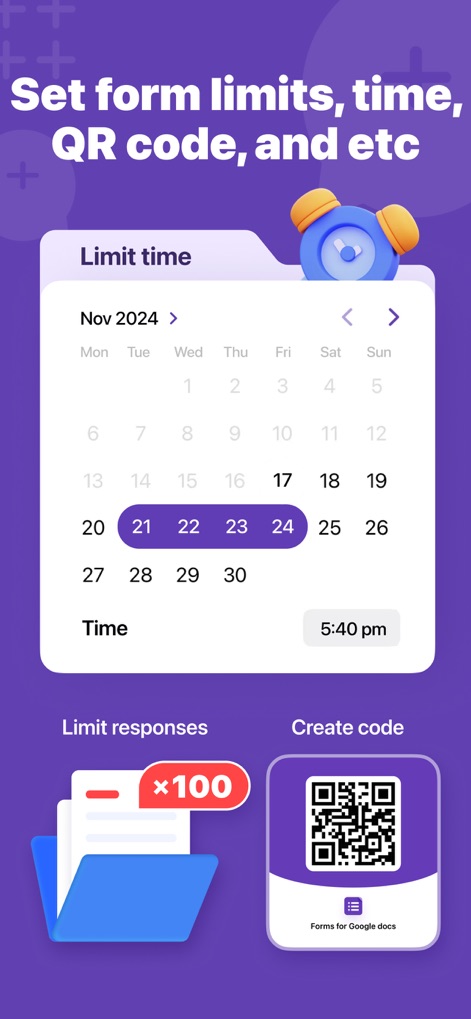
사용자는 **응답 기간을 제한**하기 위해 특정 날짜와 시간을 설정할 수 있으며, **QR 코드 생성** 기능을 통해 양식 접근성을 높일 수 있습니다.
고급 양식 설정
설명
Download
비슷한 앱
유사한 기능과 사용자 경험을 가진 앱

Form for Google Forms
Amad Marwat

Forms fоr Google Form
Sanpeliano LTD
Forms for Google Drive
BurningFlower Inc

Form For Google Forms & Docs
Seven Mile Apps LLC
Forms ®
SMM service, s.r.o.
Forms for Google Fоrms
LightApps OU

Forms for Google Forms App
AppTraining Limited

Forms for Google Drive ™
Mariia Tereshkova

Forms for Google Forms & Quiz
Niharika Jindal
이 페이지는 앱이나 개발자의 공식 페이지가 아니며, 정보 제공 및 논평을 목적으로 작성된 독립 편집 간행물입니다. 명시적으로 달리 언급되지 않는 한, 해당 앱이나 개발자는 MWM, Apple, Google Play, 앱 퍼블리셔 또는 앱 개발자와 제휴, 보증, 후원, 승인 또는 공식적으로 연결되어 있지 않으며, 이 페이지의 어떤 내용도 해당 앱이 MWM의 서비스를 사용하여 개발되었음을 의미하지 않습니다. 모든 상표, 로고, 스크린샷 및 기타 콘텐츠는 해당 소유자의 자산입니다.