Goodnotes Classroom
Goodnotes Classroom
다운로드: App Store

이 페이지는 앱이나 개발자의 공식 페이지가 아니며, 정보 제공 및 논평을 목적으로 작성된 독립 편집 간행물입니다. 명시적으로 달리 언급되지 않는 한, 해당 앱이나 개발자는 MWM, Apple, Google Play, 앱 퍼블리셔 또는 앱 개발자와 제휴, 보증, 후원, 승인 또는 공식적으로 연결되어 있지 않으며, 이 페이지의 어떤 내용도 해당 앱이 MWM의 서비스를 사용하여 개발되었음을 의미하지 않습니다. 모든 상표, 로고, 스크린샷 및 기타 콘텐츠는 해당 소유자의 자산입니다.

로고: Goodnotes Classroom
다운로드: App Store

Goodnotes Classroom

모든 학생과 개인적인 수준에서 연결하세요. 실시간 진행 상황을 모니터링하고, 즉각적인 필기 피드백을 제공하며, AI 기반 채점으로 시간을 확보하세요. 모두 기존의 iPad 중심 워크플로 내에서 가능합니다.

주요 수치

다운로드

40K+

사용자 평점

4.1/5

총 평가 수

100

개발사

Goodnotes Limited

카테고리

Education

지원 언어

15

최신 버전

1.1.4

크기

614.3 MB

출시일

2024년 8월 12일
기능

수업 워크플로 혁신

학생과의 연결을 강화하고 행정 업무 부담을 줄이도록 설계된 도구로 iPad 우선 수업을 강화하세요.

실시간 수업 가시성

iPad에서 모든 학생의 화면을 실시간으로 모니터링하세요. 즉시 어려움을 겪는 학생을 파악하고 학생의 디지털 페이지에 직접 필기 피드백을 제공하세요.

AI 기반 채점

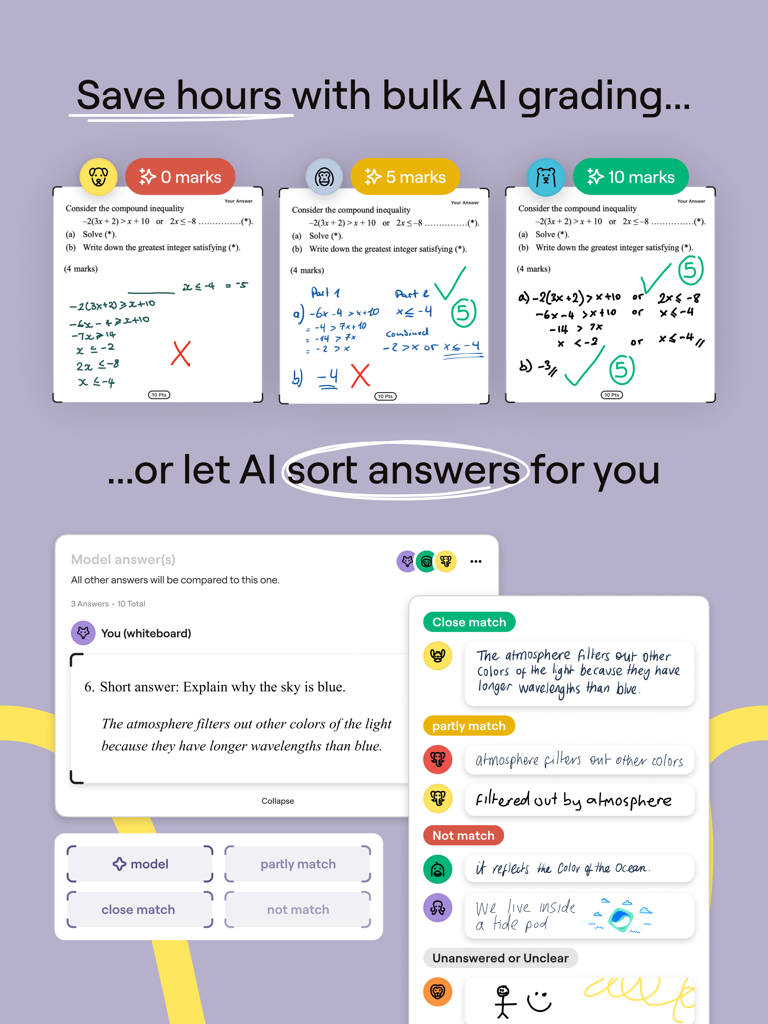
AI를 사용하여 학생 제출물을 모범 답안과 비교하여 주말을 확보하세요. 유사한 답변을 일괄 채점하고 질문별로 표시하여 기록적인 시간 내에 채점을 완료하세요.

다음 스크린샷과 설명은 앱의 공식 스토어 목록에서 직접 가져온 것이며 앱 개발자의 자산입니다.

앱 스토어

스크린샷
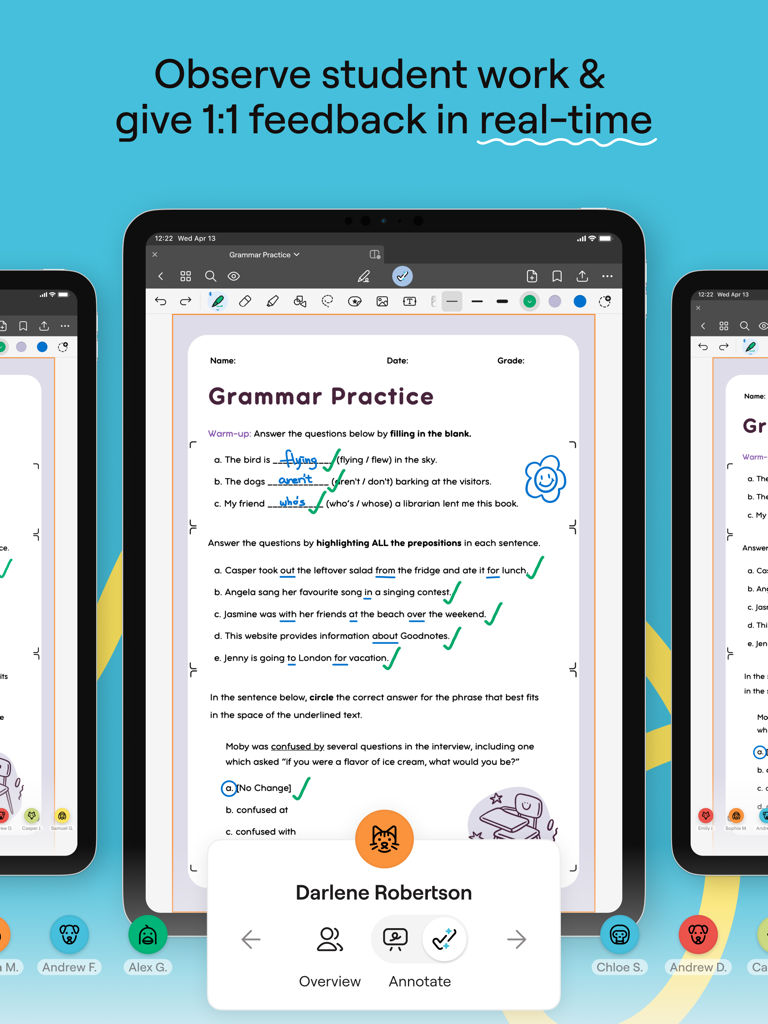
Goodnotes Classroom - 교사가 iPad를 사용하여 학생의 디지털 문법 워크시트에 실시간으로 피드백을 제공하는 Goodnotes Classroom 앱
교사가 iPad를 사용하여 학생의 디지털 문법 워크시트에 실시간으로 피드백을 제공하는 Goodnotes Classroom 앱

Goodnotes Classroom - 학생 답안의 AI 일괄 채점 및 자동 정렬을 보여주는 Goodnotes Classroom 인터페이스
학생 답안의 AI 일괄 채점 및 자동 정렬을 보여주는 Goodnotes Classroom 인터페이스

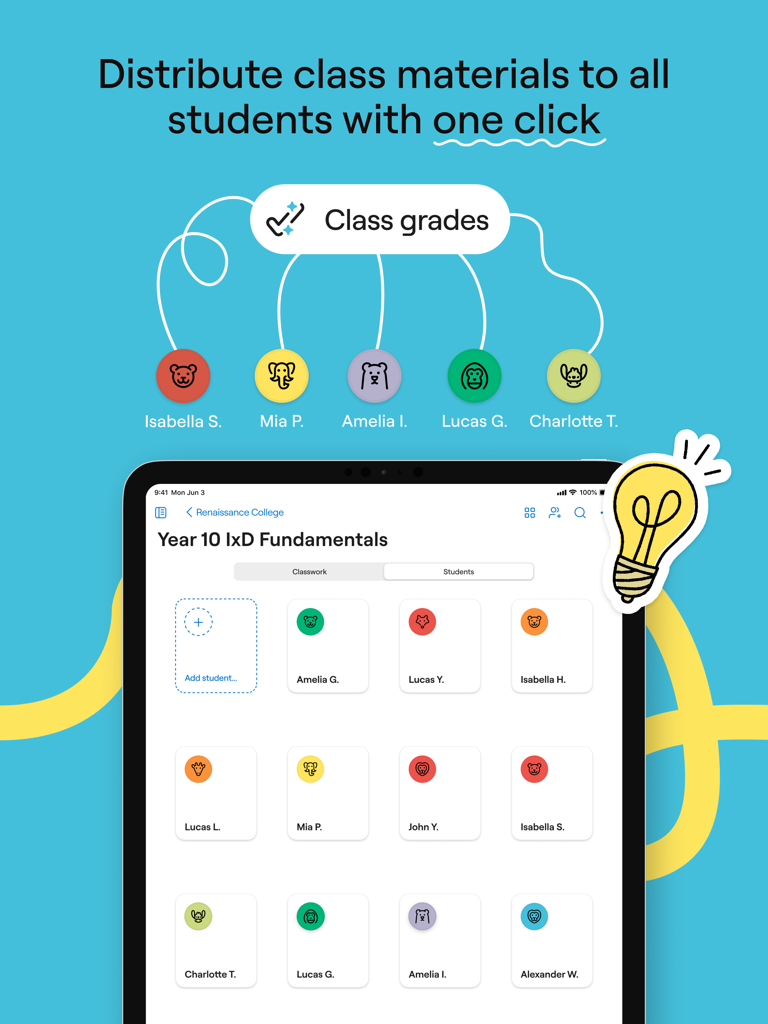
Goodnotes Classroom - 학생 목록에 수업 자료를 배포하는 Goodnotes Classroom 인터페이스를 보여주는 iPad
학생 목록에 수업 자료를 배포하는 Goodnotes Classroom 인터페이스를 보여주는 iPad

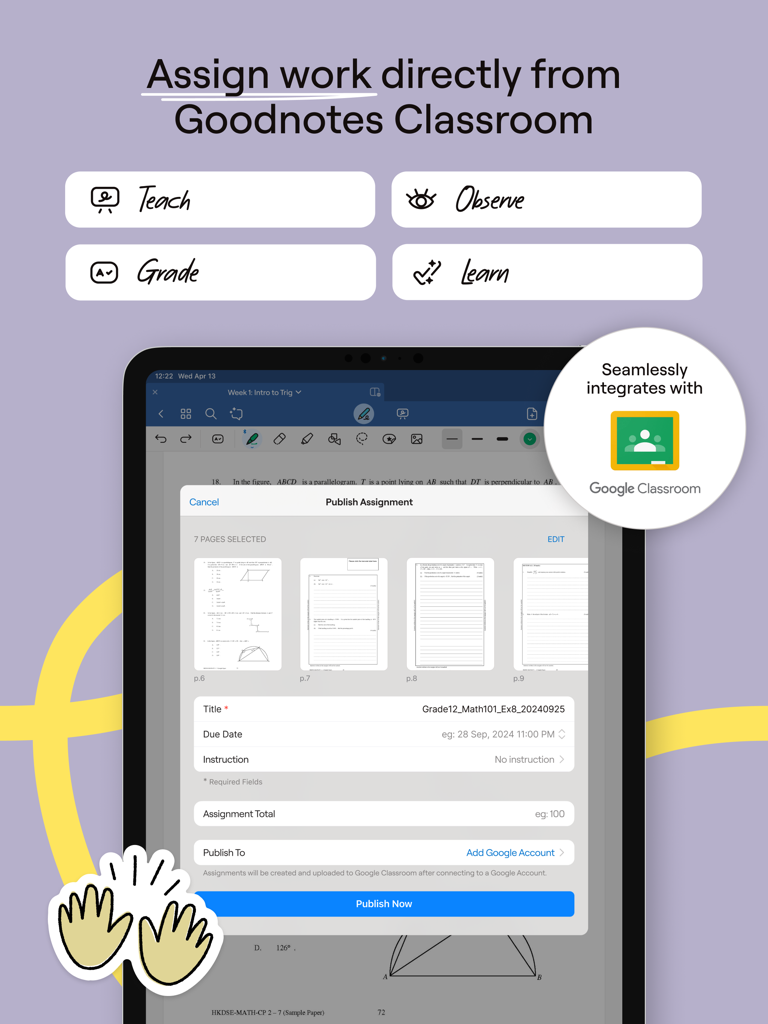
Goodnotes Classroom - Google Classroom 통합 기능이 있는 Goodnotes Classroom의 과제 게시 기능을 보여주는 iPad 화면
Google Classroom 통합 기능이 있는 Goodnotes Classroom의 과제 게시 기능을 보여주는 iPad 화면

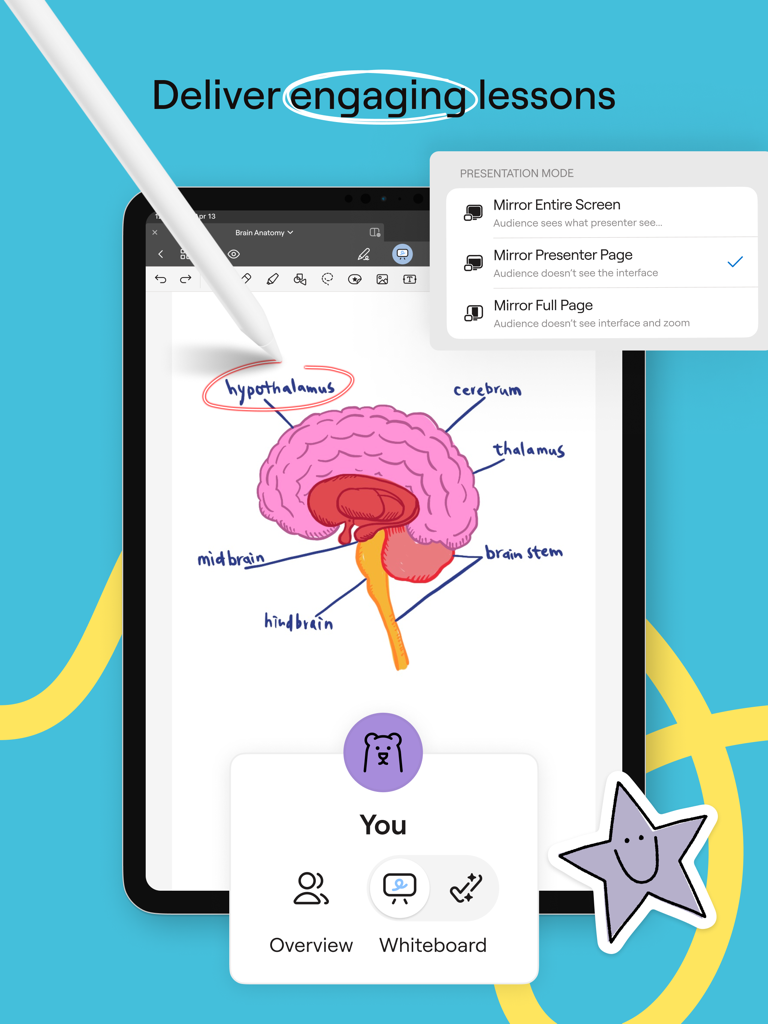
Goodnotes Classroom - 교사가 Goodnotes Classroom 프레젠테이션 모드를 사용하여 대화형 해부학 수업을 제공하기 위해 iPad와 Apple Pencil을 사용하는 모습
교사가 Goodnotes Classroom 프레젠테이션 모드를 사용하여 대화형 해부학 수업을 제공하기 위해 iPad와 Apple Pencil을 사용하는 모습

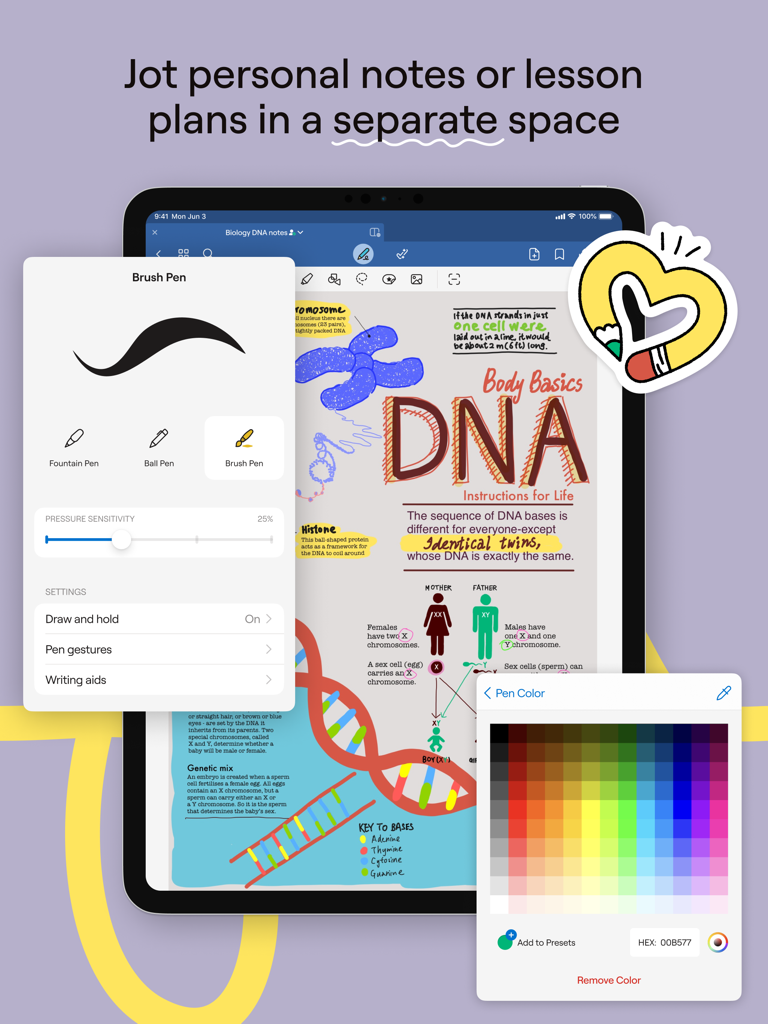
Goodnotes Classroom - 색상 팔레트 오버레이와 펜 설정이 있는 생물학 노트를 보여주는 iPad의 Goodnotes Classroom 앱

색상 팔레트 오버레이와 펜 설정이 있는 생물학 노트를 보여주는 iPad의 Goodnotes Classroom 앱

설명

Introducing Goodnotes Classroom, the new way for teachers to connect with each and every student on a personal level, grade papers faster, and make lessons even more engaging—all in one easy-to-use platform. Designed to be used with Goodnotes 6. Stay Connected with Each and Every Student - Effortlessly review every student's work from one screen or navigate between each student’s screen from your iPad. - See each word, diagram, or picture as students write or draw, so you’re always on the same page. - Jump in and write individualized feedback directly on the student's page from your iPad when you need to course-correct. - Easily present student work on the big screen in real-time. Bring the Freedom and Creativity of Handwriting to your Classroom - Project your screen and write freely on a digital canvas as your students follow along in real-time. - Freely write, highlight, draw, zoom in, and zoom out anywhere on the page to make lessons more engaging. - Enhance teaching and learning with multimedia like images, links, stickers, and audio recordings. - Enable students to learn and express themselves in their own way with the intuitive and creative freedom to write, scribble, doodle, and more. Save Time on Grading - Teachers can leverage Goodnotes Classroom AI to compare and grade student submissions against a model answer, saving hours on grading. - Teachers can bulk-grade similar answers to save time. - "Mark by question" allows teachers to view every student's answer to one question at once, making it easy to review and grade without context switching. Seamless and Flexible Classroom Management - Create and share entire Class Folders with students to sync and share coursework. - Create assignments directly from Goodnotes Classroom. Students will receive notifications to start and submit their homework. Intuitive Digital Note-Taking - Personal notes space allowing you to jot down ideas, create lesson plans, and keep materials organized in one place. - Search handwriting and find any of your personal notes or class materials in seconds. - Import PDFs to markup, highlight, and comment, integrating smoothly with classroom activities. Fits into Your Existing Workflow - Seamlessly integrates with Google Classroom, automatically updating assignment statuses and grades, making it easy to track and manage homework. - Easily export pages to share with parents or archive student work. - Purpose-built for classes that use Goodnotes 6, ensuring it fits perfectly into any teacher’s workflow. Ready to transform the learning experience for your students and focus on what you love about teaching? Give Goodnotes Classroom a try.

Download

다운로드: App Store

이 페이지는 앱이나 개발자의 공식 페이지가 아니며, 정보 제공 및 논평을 목적으로 작성된 독립 편집 간행물입니다. 명시적으로 달리 언급되지 않는 한, 해당 앱이나 개발자는 MWM, Apple, Google Play, 앱 퍼블리셔 또는 앱 개발자와 제휴, 보증, 후원, 승인 또는 공식적으로 연결되어 있지 않으며, 이 페이지의 어떤 내용도 해당 앱이 MWM의 서비스를 사용하여 개발되었음을 의미하지 않습니다. 모든 상표, 로고, 스크린샷 및 기타 콘텐츠는 해당 소유자의 자산입니다.








