
이 페이지는 앱이나 개발자의 공식 페이지가 아니며, 정보 제공 및 논평을 목적으로 작성된 독립 편집 간행물입니다. 명시적으로 달리 언급되지 않는 한, 해당 앱이나 개발자는 MWM, Apple, Google Play, 앱 퍼블리셔 또는 앱 개발자와 제휴, 보증, 후원, 승인 또는 공식적으로 연결되어 있지 않으며, 이 페이지의 어떤 내용도 해당 앱이 MWM의 서비스를 사용하여 개발되었음을 의미하지 않습니다. 모든 상표, 로고, 스크린샷 및 기타 콘텐츠는 해당 소유자의 자산입니다.

Grammarly: AI Keyboard & Notes
이 앱은 당신의 메시지를 무자비하게 정제하여, 어떤 상황에서도 글의 우위를 점하게 합니다.
다운로드
50M+사용자 평점
총 평가 수
368.3K개발사
카테고리
Productivity지원 언어
1최신 버전
9.3.0크기
263.8 MB출시일
2017년 11월 2일Grammarly: AI Keyboard & Notes 주요 기능 분석
전문가 시각으로 본 사용자 경험 향상 요소
실시간 AI 키보드 및 다국어 교정
이 앱은 사용자가 영어, 스페인어, 프랑스어, 독일어, 포르투갈어, 이탈리아어를 포함한 여러 언어로 작성할 때 실시간으로 맞춤법, 문법, 간결성 제안을 제공하여 모든 앱에서 정확한 소통을 할 수 있도록 돕습니다.
생성형 AI 재작성 기능
이 도구는 사용자가 작성한 메시지 전체를 몇 번의 탭으로 다양한 길이, 유창성, 어조로 재작성할 수 있게 해주며, 19개 언어를 지원하여 효과적인 커뮤니케이션을 돕습니다.
종합 문서 편집기
이 앱은 장문 글쓰기 및 노트를 위한 전용 편집기를 제공하며, 사용자가 포괄적인 글쓰기 피드백을 받고 클라우드 기반으로 문서를 관리하며 개인 글쓰기 통계를 확인할 수 있도록 지원합니다.
어조 감지 및 변환
이 앱은 사용자의 글쓰기 어조를 감지하고 필요에 따라 어조를 변환하는 기능을 제공하여, 메시지가 의도된 방식으로 전달될 수 있도록 돕습니다.
어휘 및 명료성 권장 사항
이 도구는 사용자의 글쓰기 명료성과 어휘 선택을 개선하기 위한 고급 제안을 제공하여, 더욱 설득력 있고 전문적인 표현을 할 수 있도록 지원합니다.
표절 및 AI 글쓰기 탐지
이 앱은 문서 편집기 내에서 표절 및 AI 글쓰기 여부를 탐지하는 기능을 갖추고 있어, 사용자가 원본 콘텐츠를 유지하고 학문적 및 직업적 윤리를 준수할 수 있도록 돕습니다.
자주 묻는 질문
에 대해 알아야 할 모든 것 Grammarly: AI Keyboard & Notes
What is the Grammarly: AI Writing Keyboard app?
The Grammarly: AI Writing Keyboard is an AI-powered tool for iPhone and iPad that provides real-time writing feedback, including spelling, grammar, and conciseness suggestions, directly within your apps.
Does the Grammarly: AI Writing Keyboard work on both iPhone and iPad?
Yes, the Grammarly Keyboard is designed to work directly in your iPhone and iPad apps, providing seamless writing assistance across both devices.
What writing suggestions does the Grammarly Keyboard offer?
The Grammarly Keyboard offers spelling, grammar, and conciseness suggestions. It also provides multiword text predictions, smart autocorrect, swipe typing, and emoji predictions and search bar.
Does Grammarly Premium offer advanced vocabulary and clarity recommendations?
Yes, Grammarly Premium provides advanced suggestions for clarity, conciseness, tone, and vocabulary, enhancing your writing to be more engaging and effective.
Can the Grammarly app detect and transform the tone of my writing?
Yes, the Grammarly Keyboard features tone detection. Grammarly Premium also offers tone transformations to adjust your message for desired effects, such as professionalism or diplomacy.
How does Grammarly's Generative AI Rewrites feature work?
Grammarly's Generative AI Rewrites create new versions of your entire message with a couple of taps. These versions adjust for length, fluency, and tone, and function in all your favorite apps.
Does Grammarly include a document editor for long-form writing?
Yes, Grammarly includes a document editor providing comprehensive writing feedback, cloud-based document management, personal writing statistics, and plagiarism and AI detection. It is compatible with hardware keyboards.
Is there a Grammarly extension available for Safari on iPhone and iPad?
Yes, Grammarly offers a Safari extension specifically for typing on websites, which includes a spelling and grammar checker to assist your writing online.
How do I manage my Grammarly Premium subscription renewal?
Your Grammarly Premium subscription automatically renews unless you cancel it at least 24 hours before the current period ends. You can manage your subscription in your App Store account settings after purchase.
How does Grammarly protect my privacy and data?
Grammarly practices privacy by design, stating that your words are your own. The company asserts it will never rent or sell your data, prioritizing user trust.
What applications can the Grammarly Keyboard be used with?
The Grammarly Keyboard works in all your iPhone and iPad apps. This includes popular applications like Gmail, Notes, Slack, WhatsApp, LinkedIn, and Safari, as visually confirmed.
Can Grammarly help make my writing more concise?
Yes, Grammarly provides conciseness suggestions. For example, it can recommend changing phrases like "cause an adverse effect on" to the more direct word "hurt" for improved clarity.
Does Grammarly assist in making writing sound more confident?
Yes, Grammarly offers suggestions to sound more confident. It can recommend replacing phrases such as "I think I should be able to" with "I can" for a more assertive and direct tone.
다음 스크린샷과 설명은 앱의 공식 스토어 목록에서 직접 가져온 것이며 앱 개발자의 자산입니다.
앱 스토어
스크린샷

최고의 AI 글쓰기 도구
이 앱은 사용자가 키보드 설정을 Grammarly로 변경하는 과정을 시각적으로 제시하며, 'Apps We Love' 및 'Must-Have Productivity App' 같은 수상 내역을 통해 그 가치를 입증합니다.
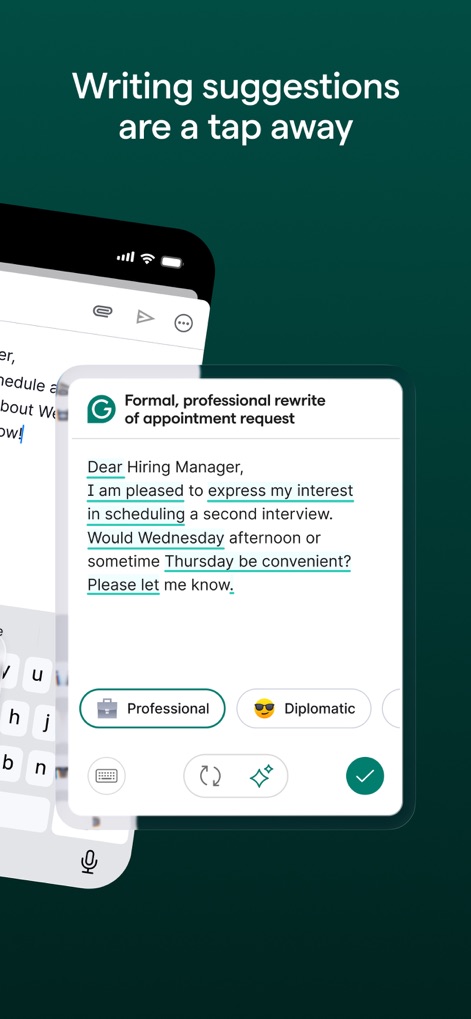
즉시 문장 개선
이 화면은 사용자가 이메일의 특정 문단을 '정중하고 전문적인 수정' 제안을 통해 개선할 수 있음을 보여주며, 'Professional' 및 'Diplomatic'과 같은 다양한 어조 옵션을 제공합니다.

정확한 단어 선택
이 앱은 WhatsApp 대화에서 발생한 'peek'과 'pique' 사이의 혼동을 즉시 파악하고, 올바른 단어인 'pique'를 추천하여 사용자의 정확한 표현을 돕습니다.

어조 분석 및 조절
이 스크린샷은 'Grammarly Tone Detector'가 메시지에서 'Disapproving'과 'Confused'와 같은 어조를 감지하여 사용자에게 의도치 않은 오해를 방지하도록 돕는 모습을 보여줍니다.

글을 매력적으로
이 화면은 LinkedIn 게시물의 내용을 더욱 '매력적'으로 만드는 재작성 제안을 보여주며, 'Confident' 및 'Fluent'와 같은 다양한 어조 옵션을 통해 사용자가 원하는 스타일을 선택하도록 지원합니다.

명확하고 간결하게
이 앱은 이메일에서 'cause an adverse effect on'과 같은 장황한 표현을 'hurt'로 간결하게 수정하도록 제안하며, 이러한 명확성 및 간결성 개선 설명을 함께 제공합니다.

자신감 있는 표현
이 화면은 Slack 대화에서 'I think I should be able to'와 같은 불확실한 표현을 'I can do that!'으로 변경하여 더욱 자신감 있는 어조를 제안하며, 사용자에게 직접적인 언어를 사용하도록 안내합니다.

맞춤법 및 문법 교정
이 앱은 이메일에서 'de due'와 같은 맞춤법 오류를 즉시 감지하여 'due'로 수정할 것을 제안하며, 문법 및 구두점 오류도 함께 설명하여 정확한 글쓰기를 돕습니다.

모든 앱에서 활용
이 앱은 Gmail, Notes, Slack 등 다양한 인기 애플리케이션 아이콘을 보여주며, 사용자가 즐겨 사용하는 모든 앱에서 Grammarly 키보드를 통합하여 글쓰기 지원을 받을 수 있음을 강조합니다.

데스크톱 연동 기능
이 스크린샷은 데스크톱 버전의 Grammarly에서 이메일 작성 시 '표절 검사기'와 '개인 글쓰기 통계'와 같은 추가 기능을 활용하여 사용자가 더 심층적인 피드백을 받을 수 있음을 보여줍니다.
설명
Download
비슷한 앱
유사한 기능과 사용자 경험을 가진 앱
AiText: Grammar & Spell Check
Mikhail Chelbaev
Grammar Check Corrector AI
DAMIEN, NATHANAEL ELLEDGE

LanguageTool - Grammar Checker
LanguageTooler GmbH

AI Email Writer - Boss
Curious Creators Co.
AI Keyboard Type AI – AnyWrite
Appnest Technologies LLC
TypeEasy-AI Keyboard & Writer
Jie Huang

微信输入法
Tencent Technology (Shenzhen) Company Limited
QuillBot: AI Writing, Keyboard
QuillBot, a Learneo Inc. business

G.AI - AI ChatBot Assistant
Nanjing Diant Network Technology Co., LTD
이 페이지는 앱이나 개발자의 공식 페이지가 아니며, 정보 제공 및 논평을 목적으로 작성된 독립 편집 간행물입니다. 명시적으로 달리 언급되지 않는 한, 해당 앱이나 개발자는 MWM, Apple, Google Play, 앱 퍼블리셔 또는 앱 개발자와 제휴, 보증, 후원, 승인 또는 공식적으로 연결되어 있지 않으며, 이 페이지의 어떤 내용도 해당 앱이 MWM의 서비스를 사용하여 개발되었음을 의미하지 않습니다. 모든 상표, 로고, 스크린샷 및 기타 콘텐츠는 해당 소유자의 자산입니다.