
이 페이지는 앱이나 개발자의 공식 페이지가 아니며, 정보 제공 및 논평을 목적으로 작성된 독립 편집 간행물입니다. 명시적으로 달리 언급되지 않는 한, 해당 앱이나 개발자는 MWM, Apple, Google Play, 앱 퍼블리셔 또는 앱 개발자와 제휴, 보증, 후원, 승인 또는 공식적으로 연결되어 있지 않으며, 이 페이지의 어떤 내용도 해당 앱이 MWM의 서비스를 사용하여 개발되었음을 의미하지 않습니다. 모든 상표, 로고, 스크린샷 및 기타 콘텐츠는 해당 소유자의 자산입니다.


Hayaemon - Music Player
사용자 정의 가능한 효과음, 속도 및 음조로 음악에 생기를 불어넣으세요. 모든 트랙에 완벽한 "양념"을 더하고 재미를 위해 제작된 플레이어로 음악 라이브러리의 즐거움을 재발견하세요.
다운로드
1M+사용자 평점
총 평가 수
42K+개발사
카테고리
Music지원 언어
17최신 버전
4.70크기
71.8 MB출시일
2013년 11월 8일좋아하는 노래가 절대 지루해지지 않게
모든 트랙을 독특한 경험으로 바꾸세요. '오디오 양념'을 사용하여 좋아하는 음악을 완벽하게 제어하면서 리믹스, 연습, 재발견하세요.
템포 마스터
고품질 손실 없이 복잡한 댄스 루틴과 기타 솔로를 마스터하기 위해 트랙 속도를 높이거나 늦추세요.
사운드에 양념 추가
사용자 정의 음조 이동 및 효과음을 적용하여 나만의 '느리게 + 잔향' 버전을 만들고 좋아하는 트랙을 영원히 신선하게 유지하세요.
자주 묻는 질문
에 대해 알아야 할 모든 것 Hayaemon - Music Player
Hayaemon은 무엇인가요?
Hayaemon은 사용자가 좋아하는 노래에 싫증을 느끼지 않도록 돕는 음악 플레이어입니다. 마치 "후리가케"가 밥에 맛을 더하듯, 다양한 음향 효과를 적용하여 이를 달성합니다.
Hayaemon에서 음악의 속도와 음높이를 변경할 수 있나요?
네, Hayaemon을 사용하면 오디오의 속도와 음높이를 변경할 수 있습니다. 이 기능은 앱의 제어 인터페이스를 통해 접근할 수 있습니다.
Hayaemon - Music Player에 트랙을 어떻게 추가하나요?
사용자는 자신의 음악 라이브러리, 비디오, Dropbox 등 다양한 소스에서 Hayaemon에 음악을 추가할 수 있습니다. 이러한 옵션은 앱의 재생 목록 기능 내에서 사용할 수 있습니다.
Hayaemon - Music Player에 AB 루프 기능이 있나요?
네, Hayaemon에는 AB 루프 기능이 포함되어 있습니다. 이 기능은 사용자가 노래 내에서 특정 시작점과 끝점을 설정하여 반복 재생할 수 있도록 하여, 집중적인 감상이나 연습에 유용합니다.
Hayaemon에 이퀄라이저가 있나요?
네, Hayaemon에는 31개 밴드 이퀄라이저가 있습니다. 이 광범위한 이퀄라이저를 통해 사용자는 오디오 주파수를 미세 조정하여 사운드 경험을 맞춤 설정할 수 있습니다.
Hayaemon - Music Player에 보컬 취소 기능이 포함되어 있나요?
네, Hayaemon은 "보컬 취소" 효과를 제공합니다. 이 기능은 노래에서 보컬 트랙을 줄이거나 제거하여 사용자가 노래 연습하는 데 도움을 줍니다.
Hayaemon의 광고 없는 버전은 얼마인가요?
Hayaemon은 월 $1.49의 요금으로 광고 없는 버전을 제공합니다. 이 구독은 앱 운영 및 서비스 개선을 지원합니다.
Hayaemon - Music Player의 무료 버전이 있나요?
네, Hayaemon의 모든 기능을 무료로 사용해 볼 수 있습니다. 앱은 광고가 포함된 무료 버전을 제공하며, 구독을 통해 광고 없는 버전을 사용할 수 있습니다.
Hayaemon 구독을 어떻게 취소하나요?
Hayaemon 구독을 취소하려면 설정 앱을 실행하고, Apple ID를 탭하고, 구독을 선택한 다음, Hayaemon 구독을 탭하고 "구독 취소"를 선택하십시오.
Hayaemon 구독은 자동 갱신되나요?
Hayaemon 구독은 매월 자동으로 갱신됩니다. 다음 달 요금이 부과되는 것을 방지하려면 갱신일보다 24시간 이상 전에 취소해야 합니다.
다음 스크린샷과 설명은 앱의 공식 스토어 목록에서 직접 가져온 것이며 앱 개발자의 자산입니다.
앱 스토어
스크린샷
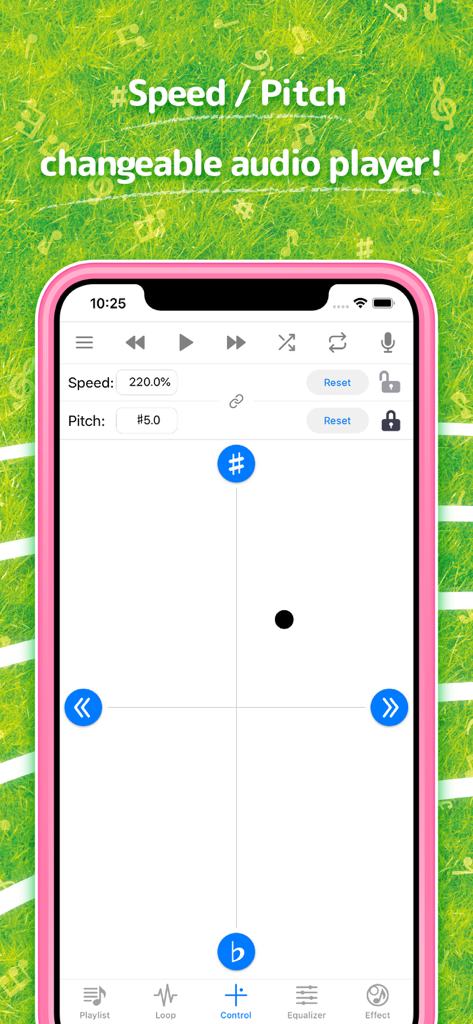
Hayaemon 뮤직 플레이어 앱 인터페이스, 속도 및 음조 조절 컨트롤 표시
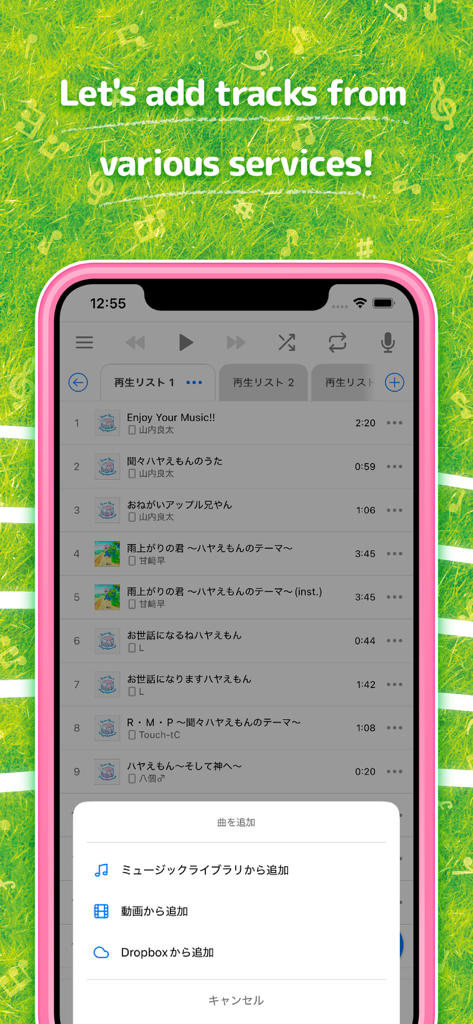
Hayaemon 뮤직 플레이어 앱 인터페이스, 다양한 서비스에서 트랙을 추가하는 옵션 표시
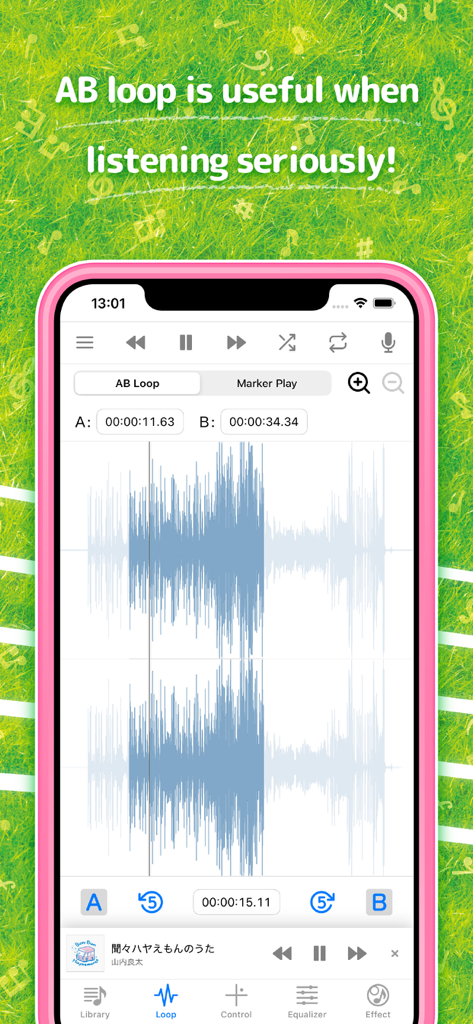
Hayaemon 앱 인터페이스, 음악 파형 시각화 기능과 함께 AB 루프 기능 표시
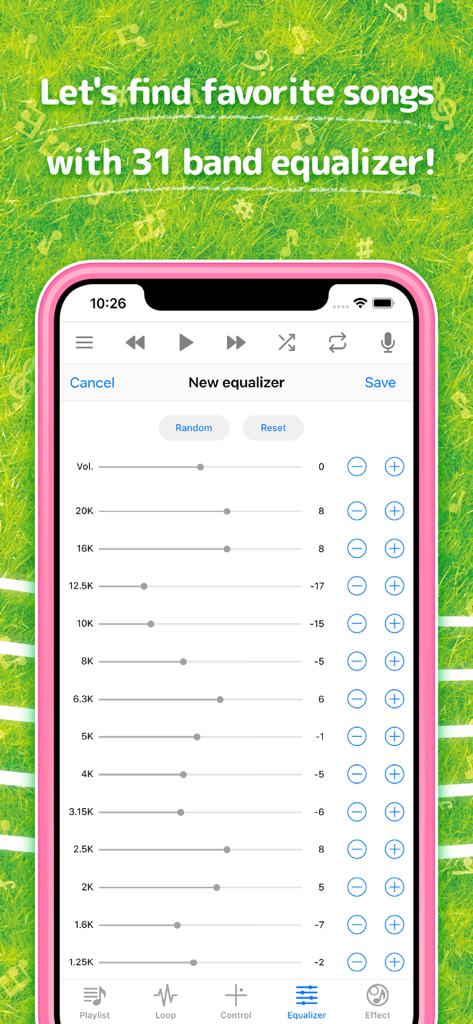
Hayaemon 뮤직 플레이어 앱 내 31 밴드 이퀄라이저 설정을 표시하는 스마트폰 화면
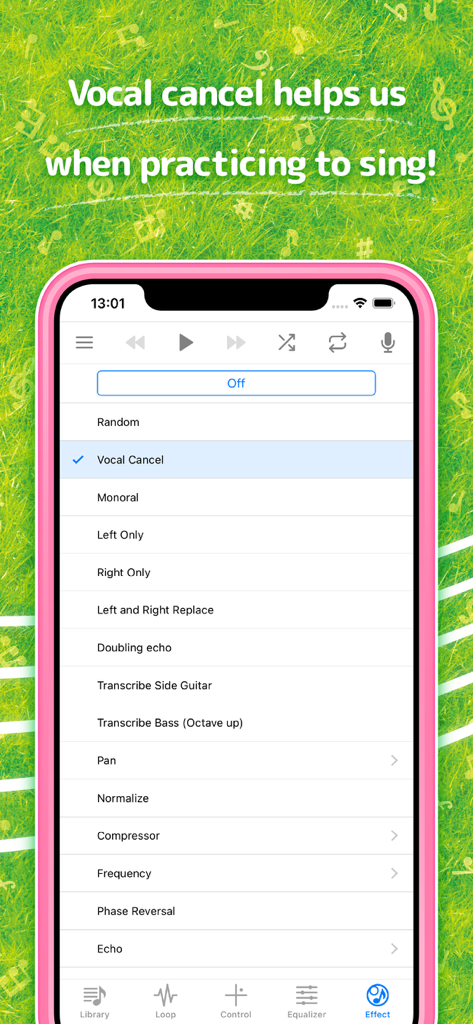
Hayaemon 뮤직 플레이어 앱 화면, 노래 연습을 위한 보컬 취소 효과 표시
설명
Download
비슷한 앱
유사한 기능과 사용자 경험을 가진 앱

Bass Booster & Music EQ: BASSY
Maryana Yurieva

Volume Booster Bass Booster
KUPERTINO BIL. YAZ. HALIL IBRAHIM KARAHAN SAFFET ARSLAN MUSTAFA AYTEN MUHAMMET YALCIN OZDEMIR K. S.
Bass Booster - Volume Booster
雨双 柯
Bass Booster, Volume Amplifier
Dorothy Clive

Bass Booster & Sound Equalizer
Zipo Apps Ltd.

Equalizer & Bass Booster FX
VDR APP DEVELOPMENT S.R.L.-D.

Volume Booster: Bass Amplifier
BELKALABS PTE. LTD.

Max Volume Booster: Super Loud
Fawad Ali
Bass Booster + Sound Equalizer
Uladzimir Luhin
이 페이지는 앱이나 개발자의 공식 페이지가 아니며, 정보 제공 및 논평을 목적으로 작성된 독립 편집 간행물입니다. 명시적으로 달리 언급되지 않는 한, 해당 앱이나 개발자는 MWM, Apple, Google Play, 앱 퍼블리셔 또는 앱 개발자와 제휴, 보증, 후원, 승인 또는 공식적으로 연결되어 있지 않으며, 이 페이지의 어떤 내용도 해당 앱이 MWM의 서비스를 사용하여 개발되었음을 의미하지 않습니다. 모든 상표, 로고, 스크린샷 및 기타 콘텐츠는 해당 소유자의 자산입니다.