Health Sync by appyhapps
다운로드: App Store

이 페이지는 앱이나 개발자의 공식 페이지가 아니며, 정보 제공 및 논평을 목적으로 작성된 독립 편집 간행물입니다. 명시적으로 달리 언급되지 않는 한, 해당 앱이나 개발자는 MWM, Apple, Google Play, 앱 퍼블리셔 또는 앱 개발자와 제휴, 보증, 후원, 승인 또는 공식적으로 연결되어 있지 않으며, 이 페이지의 어떤 내용도 해당 앱이 MWM의 서비스를 사용하여 개발되었음을 의미하지 않습니다. 모든 상표, 로고, 스크린샷 및 기타 콘텐츠는 해당 소유자의 자산입니다.

로고: Health Sync by appyhapps
다운로드: App Store

Health Sync by appyhapps

Garmin, Oura, Strava 지표를 Apple Health와 완벽하게 연결하세요. 자동 백그라운드 동기화, 과거 데이터 복구, 일회성 평생 라이선스로 100% 개인 정보를 경험하세요.

주요 수치

다운로드

12K+

사용자 평점

4.2/5

총 평가 수

400

개발사

appyhapps.nl B.V.

카테고리

Health & Fitness

지원 언어

12

최신 버전

8.2.5

크기

14.5 MB

출시일

2024년 7월 11일
기능

건강 유니버스를 통합하세요

데이터 사일로에서 벗어나세요. Health Sync는 즐겨 사용하는 웨어러블 및 피트니스 플랫폼을 완벽하고 자동화된 백그라운드 동기화로 하나의 응집력 있는 생태계로 연결합니다.

범용 생태계 브리지

한계 없이 최고의 하드웨어를 선택하세요. Apple Health, Garmin, Oura, Strava 등의 지표를 동기화하여 데이터를 원하는 위치에 정확하게 보관하세요.

운동 기록 보존

과거 기록을 남겨두지 마세요. 기기나 앱을 전환할 때 최대 5년의 과거 심박수, 수면 및 활동 데이터를 손쉽게 마이그레이션하세요.

다음 스크린샷과 설명은 앱의 공식 스토어 목록에서 직접 가져온 것이며 앱 개발자의 자산입니다.

앱 스토어

스크린샷
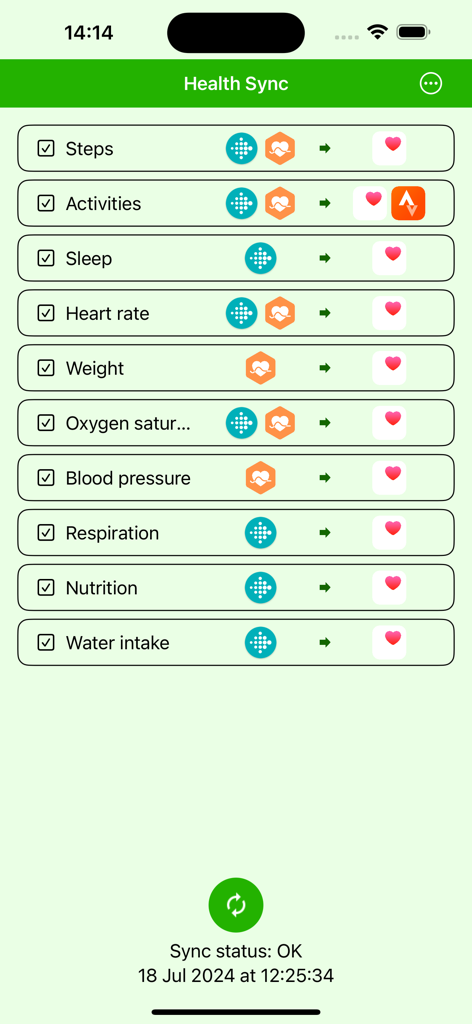
Health Sync by appyhapps - 다양한 건강 데이터 지표의 동기화 상태를 보여주는 Health Sync 앱 인터페이스.
다양한 건강 데이터 지표의 동기화 상태를 보여주는 Health Sync 앱 인터페이스.

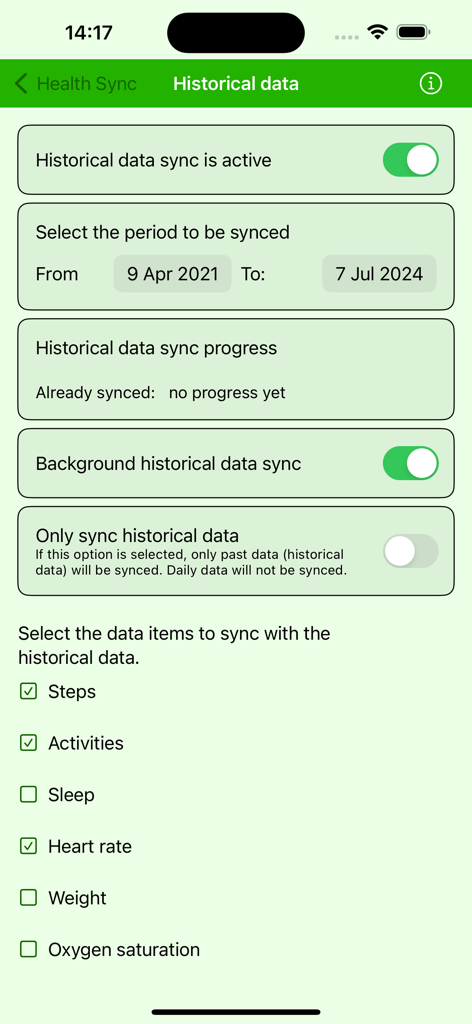
Health Sync by appyhapps - 날짜 범위 선택 및 건강 데이터 범주를 보여주는 Health Sync 앱의 과거 데이터 동기화 설정.
날짜 범위 선택 및 건강 데이터 범주를 보여주는 Health Sync 앱의 과거 데이터 동기화 설정.

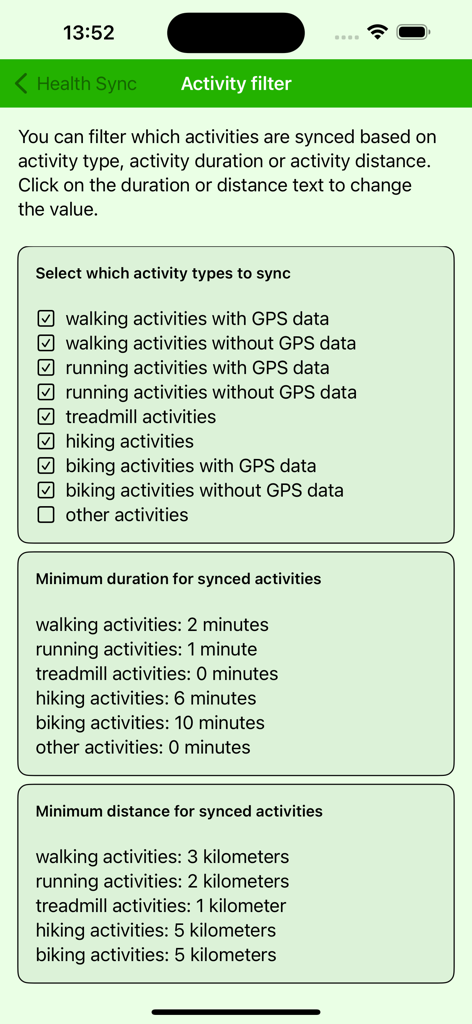
Health Sync by appyhapps - 유형, 기간 및 거리별로 동기화된 운동을 필터링하는 옵션을 보여주는 Health Sync 앱의 활동 필터 설정 화면
유형, 기간 및 거리별로 동기화된 운동을 필터링하는 옵션을 보여주는 Health Sync 앱의 활동 필터 설정 화면

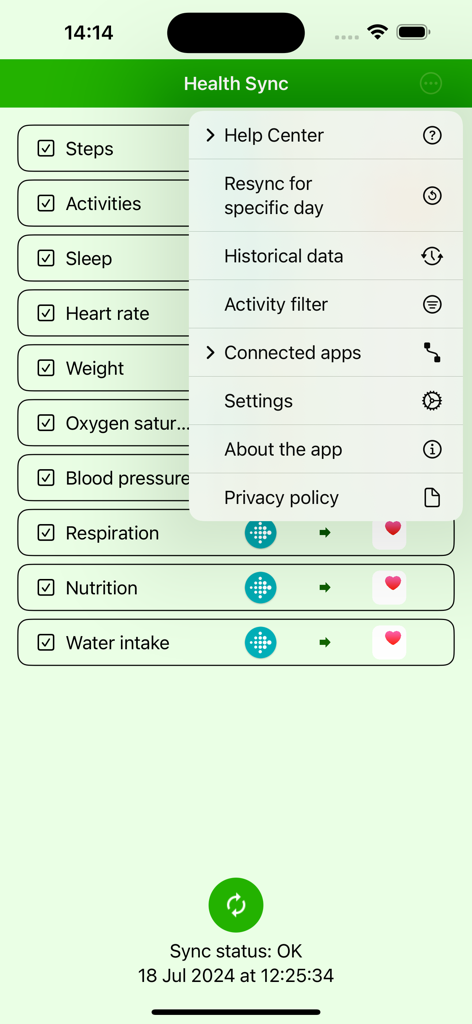
Health Sync by appyhapps - Fitbit에서 Apple Health로 동기화된 건강 데이터 범주와 설정 메뉴를 보여주는 Health Sync 앱 인터페이스

Fitbit에서 Apple Health로 동기화된 건강 데이터 범주와 설정 메뉴를 보여주는 Health Sync 앱 인터페이스

설명

Health Sync synchronizes data between health and fitness apps. Health Sync currently supports syncing from Apple Health, Coros, Fitbit, Garmin Connect, Huawei Health, Oura, Polar Flow, Strava and Suunto to Apple Health, Coros, Fitbit, Intervals.icu, Runalyze, Strava and Suunto. Additional source and destination apps will be added with future updates. It will sync data from the time you first use the app. Historical data (all data before the day of installation) can be synced after the free trial period. With Garmin Connect you can sync the last five years of activity data, and the last two years of other data (steps, sleep, heart rate etc.). With Polar Flow you can't sync historical data. The sync runs automatically in the background a few times per hour (due to iOS restrictions on background processes). Activity GPS data is synced to Apple Health when the phone screen is unlocked. If activity data is synced while the phone is locked, Health Sync will add the GPS data to the Apple Health workout data the next time you open the Health Sync app. Syncing from Apple Health requires your phone to be unlocked. Health Sync is very easy to use. It offers a one-week free trial period. After the trial period, you can make a one-time purchase (lifetime license) to continue using the app and access the historical data sync option. Try the app and see if it fits your needs. The data you can sync depends on the source app from which you sync data and the destination app(s) to which you sync the data. Health Sync uses a privacy-by-design approach. The sync processes data on your phone, not on cloud servers. Your data won't be used and can't be accessed by others. Read the privacy policy for details. Syncing between health data apps sometimes doesn't work as expected. Don't worry; almost all issues can be solved easily. You can check the Help Center menu in Health Sync. If you can't resolve the issue, you can send a Health Sync problem report (the last option in the Help Center menu) or email info@appyhapps.nl. You will receive support to solve the sync issue.

Download

다운로드: App Store

이 페이지는 앱이나 개발자의 공식 페이지가 아니며, 정보 제공 및 논평을 목적으로 작성된 독립 편집 간행물입니다. 명시적으로 달리 언급되지 않는 한, 해당 앱이나 개발자는 MWM, Apple, Google Play, 앱 퍼블리셔 또는 앱 개발자와 제휴, 보증, 후원, 승인 또는 공식적으로 연결되어 있지 않으며, 이 페이지의 어떤 내용도 해당 앱이 MWM의 서비스를 사용하여 개발되었음을 의미하지 않습니다. 모든 상표, 로고, 스크린샷 및 기타 콘텐츠는 해당 소유자의 자산입니다.








