Home Theater SPL
Home Theater SPL
다운로드: App Store

이 페이지는 앱이나 개발자의 공식 페이지가 아니며, 정보 제공 및 논평을 목적으로 작성된 독립 편집 간행물입니다. 명시적으로 달리 언급되지 않는 한, 해당 앱이나 개발자는 MWM, Apple, Google Play, 앱 퍼블리셔 또는 앱 개발자와 제휴, 보증, 후원, 승인 또는 공식적으로 연결되어 있지 않으며, 이 페이지의 어떤 내용도 해당 앱이 MWM의 서비스를 사용하여 개발되었음을 의미하지 않습니다. 모든 상표, 로고, 스크린샷 및 기타 콘텐츠는 해당 소유자의 자산입니다.

로고: Home Theater SPL
다운로드: App Store

Home Theater SPL

전문 홈시어터 애호가와 DIY 보정 전문가를 위해 설계된 정밀 데시벨 측정기로 완벽한 사운드 스테이지와 선명한 대사를 경험하세요.

주요 수치

다운로드

3K+

사용자 평점

1.0/5

총 평가 수

0

개발사

J.S. Technology Ltd.

카테고리

Utilities

지원 언어

1

최신 버전

1.26

크기

9.2 MB

출시일

2015년 6월 24일
기능

홈 시네마 오디오를 완벽하게 만드세요

더 이상 레벨을 짐작하지 마세요. 5.1 및 7.1 서라운드 시스템을 위해 설계된 고정밀 SPL 측정으로 전문가처럼 스피커를 보정하세요.

정밀 사운드 밸런싱

전문가 등급의 데시벨 정확도로 개별 스피커 레벨을 일치시켜 궁극의 '중앙 사운드 스테이지'를 구현하세요.

7.1 시스템 최적화

홈시어터 전용 인터페이스를 사용하여 센터, 서라운드, LFE 채널을 포함한 복잡한 레이아웃을 쉽게 보정하세요.

다음 스크린샷과 설명은 앱의 공식 스토어 목록에서 직접 가져온 것이며 앱 개발자의 자산입니다.

앱 스토어

스크린샷
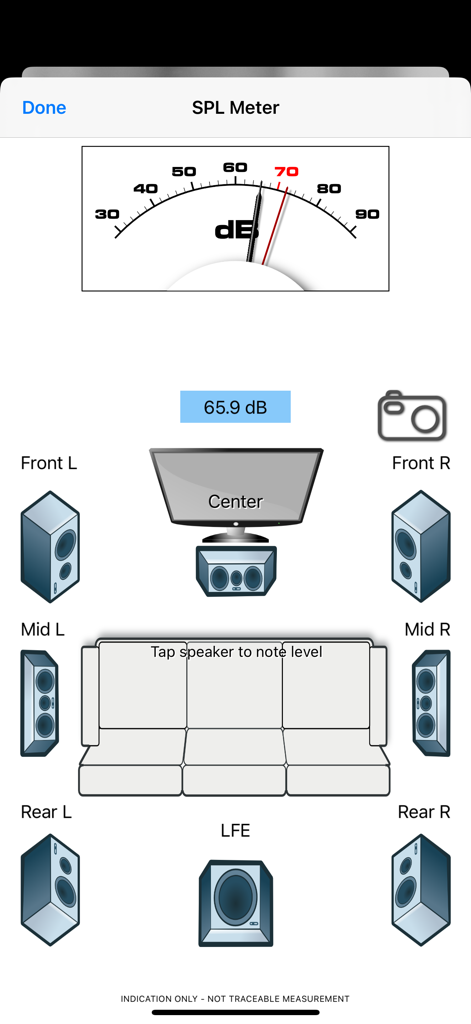
Home Theater SPL - 데시벨 측정기와 오디오 보정을 위한 7.1 서라운드 사운드 스피커 레이아웃을 보여주는 Home Theater SPL 앱 인터페이스.
데시벨 측정기와 오디오 보정을 위한 7.1 서라운드 사운드 스피커 레이아웃을 보여주는 Home Theater SPL 앱 인터페이스.

Home Theater SPL - 빈티지 진공관과 탐색 버튼이 특징인 Home Theater SPL 앱의 스플래시 화면
빈티지 진공관과 탐색 버튼이 특징인 Home Theater SPL 앱의 스플래시 화면

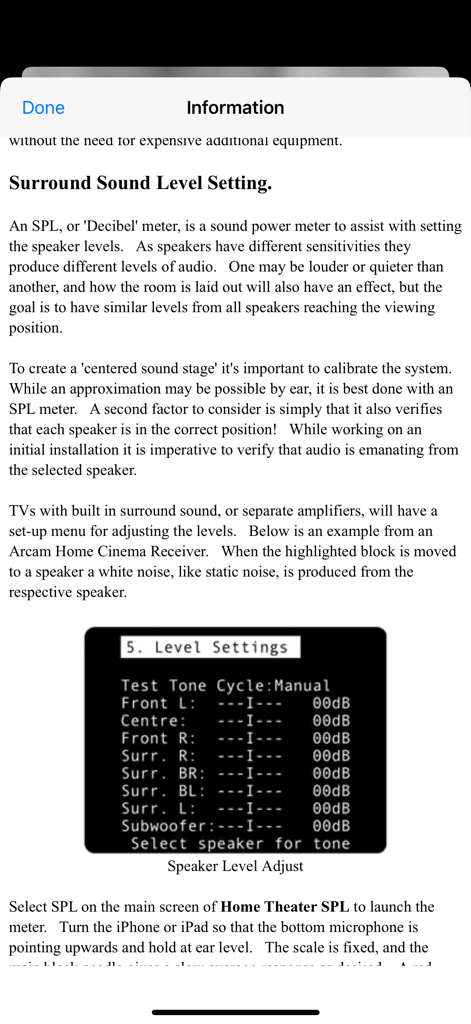
Home Theater SPL - 리시버 메뉴 예시와 함께 서라운드 사운드 스피커 레벨 보정을 설명하는 정보 화면.
리시버 메뉴 예시와 함께 서라운드 사운드 스피커 레벨 보정을 설명하는 정보 화면.

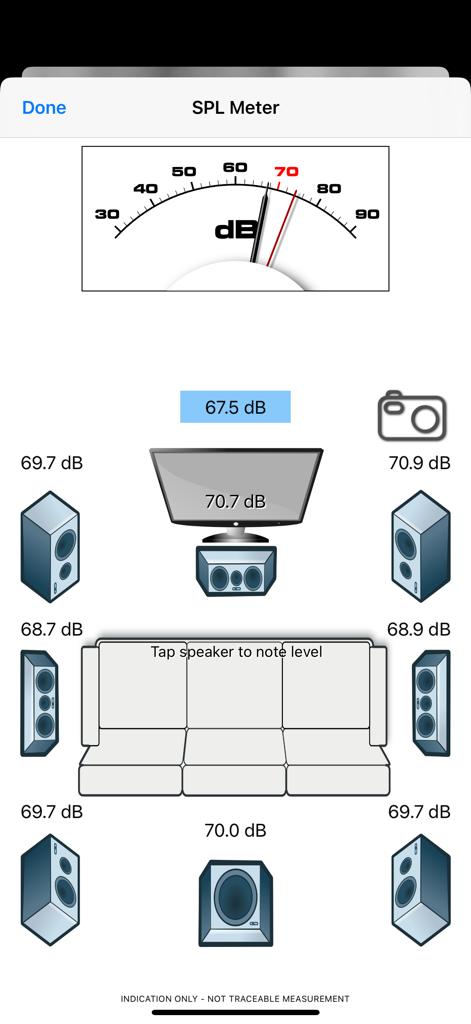
Home Theater SPL - 데시벨 측정기와 스피커 레벨 수치를 통해 7.1 서라운드 사운드 시스템 보정을 보여주는 Home Theater SPL 앱 인터페이스

데시벨 측정기와 스피커 레벨 수치를 통해 7.1 서라운드 사운드 시스템 보정을 보여주는 Home Theater SPL 앱 인터페이스

설명

Home Theater SPL Information   Professionals use SPL meters to calibrate audio reproduction systems in cinemas, so why shouldn’t Home Theaters or Home Cinemas owners use them too? Now the very same SPL meter that’s in our TestCard ProHD app is available separately.   An SPL or “decibel” meter is an essential tool when setting up surround sound systems.   Home Theater SPL a solution for calibrating the audio level of surround sound systems within the home without the need for additional equipment. Our app TestCard ProHD is the innovative means to calibrating your screen and audio to ensure a consistent and correct representation of display media and surround sound and includes an SPL meter. If you wish to calibrate both audio and visual aspects of your Home Theater then please consider TestCard ProHD.   Surround Sound Level Setting.   An SPL, or “Decibel” meter, is a sound power meter to assist with setting the speaker levels.   As speakers have different sensitivities they produce different levels of audio.   One may be louder or quieter than another, and how the room is laid out will also have an effect, but the goal is to have similar levels from all speakers reaching the viewing position.   To create that “centered sound stage” it’s important to calibrate the system.   While an approximation may be possible by ear, it is best done with an SPL meter.   A second factor to consider is simply that it also verifies that each speaker is in the correct position!   While working on an initial installation it is imperative to verify that audio is emanating from the selected speaker.   Select SPL on the main screen of Home Theater SPL to launch the meter.   Turn the iPhone or iPad so that the bottom microphone is pointing upwards and hold at ear level.   The scale is fixed, and the main black needle gives a slow average response as desired.   A red needle is provided for peak noise level information and is not required during calibration. Start with the front left speaker and allow it to set the benchmark level; the target for all other speakers to be set to.   Typically the audio will be in the 70-80dB range and as a guide 70dB is marked in red on dial.   With Home Theater SPL it is possible to note the current sound level by tapping on respective speaker, making it easier to recall where individual speakers were.   Move to the center speaker and adjust its level to closely match the first.   It is normal for amplifiers to increase or decrease sound levels by 1dB increments and it may not be possible to get an exact match.   Move to the next speaker in the list and repeat.   Variance of 1 or 2dB during calibration is normal, but it will settle around a value.   Some systems will have 5 speakers and some will also have the LFE, or bass effects, speaker to give the “0.1” to make 5.1 audio.   With the SPL meter there are 7 main speakers shown with one LFE to make 7.1.   With a 5.1 system the Mid speakers will not be present and therefore can be skipped. To check it’s always advisable to run round checking the speaker levels again, perhaps even adjusting the initial left speaker if it was not possible to set others within the range allowed by the amplifier.   When complete ensure that you save the settings within the amplifier if they’re not automatically saved.   For reference a screen shot of the SPL meter on Home Theater SPL can be taken to record any stored audio level by pressing the camera button.

Download

다운로드: App Store

이 페이지는 앱이나 개발자의 공식 페이지가 아니며, 정보 제공 및 논평을 목적으로 작성된 독립 편집 간행물입니다. 명시적으로 달리 언급되지 않는 한, 해당 앱이나 개발자는 MWM, Apple, Google Play, 앱 퍼블리셔 또는 앱 개발자와 제휴, 보증, 후원, 승인 또는 공식적으로 연결되어 있지 않으며, 이 페이지의 어떤 내용도 해당 앱이 MWM의 서비스를 사용하여 개발되었음을 의미하지 않습니다. 모든 상표, 로고, 스크린샷 및 기타 콘텐츠는 해당 소유자의 자산입니다.








