HUAWEI CLOUD Meeting

HUAWEI CLOUD Meeting

다운로드: App Store
로고: HUAWEI CLOUD Meeting

HUAWEI CLOUD Meeting: 글로벌 팀을 위한 원활한 고화질 협업

1080p HD 비디오와 4K 화면 공유로 미국과 APAC 지역 간의 운영 격차를 해소하세요. iPhone, iPad, Mac에서 엔터프라이즈급 안정성으로 최대 10,000명의 참가자와 회의를 주최할 수 있습니다.

개발사

Huawei Cloud Computing Technologies Co., Ltd

카테고리

Business

다운로드

831K+

사용자 평점

2.7/5

총 평가 수

300

지원 언어

2

글로벌 선명함을 경험하세요

이 인터페이스를 사용하는 831K+ 명의 사용자.

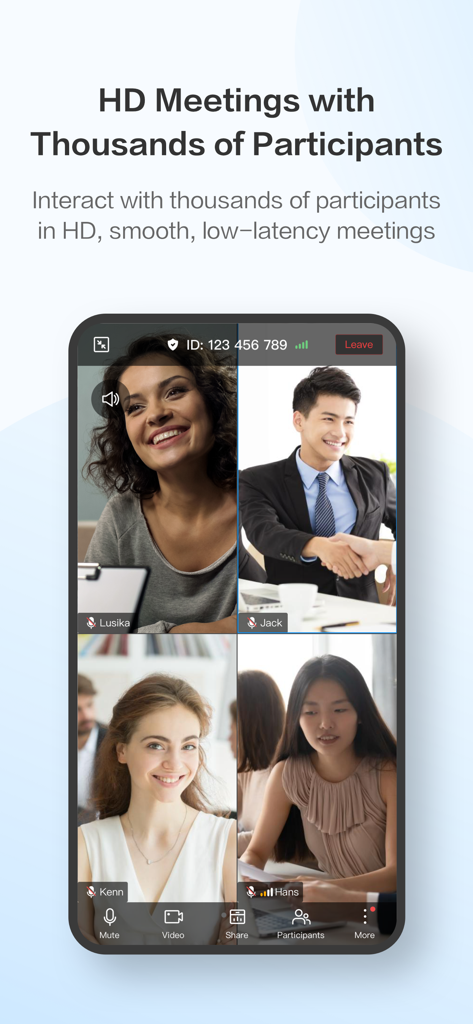
HUAWEI CLOUD Meeting 앱에서 4자 HD 화상 통화가 진행 중인 스마트폰 화면.
HUAWEI CLOUD Meeting 앱에서 4자 HD 화상 통화가 진행 중인 스마트폰 화면.

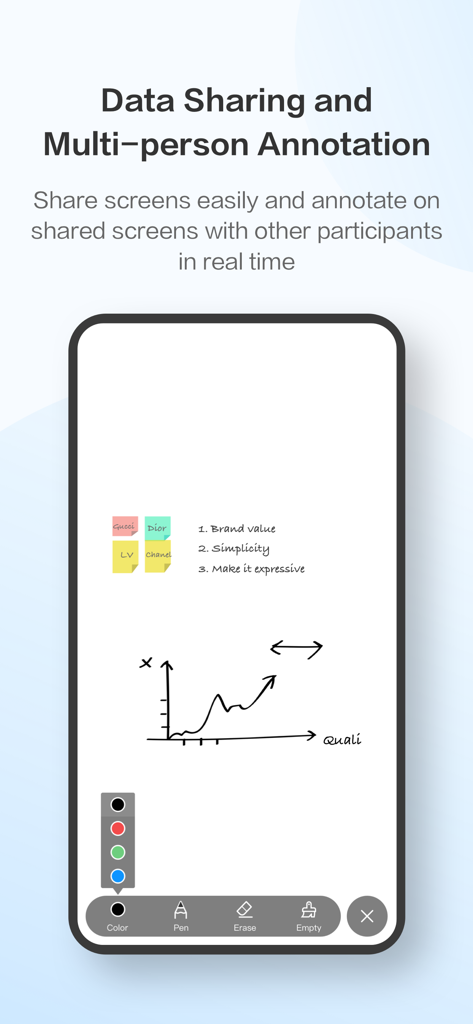
HUAWEI CLOUD Meeting 모바일 앱의 데이터 공유 및 다자간 주석 인터페이스.
HUAWEI CLOUD Meeting 모바일 앱의 데이터 공유 및 다자간 주석 인터페이스.

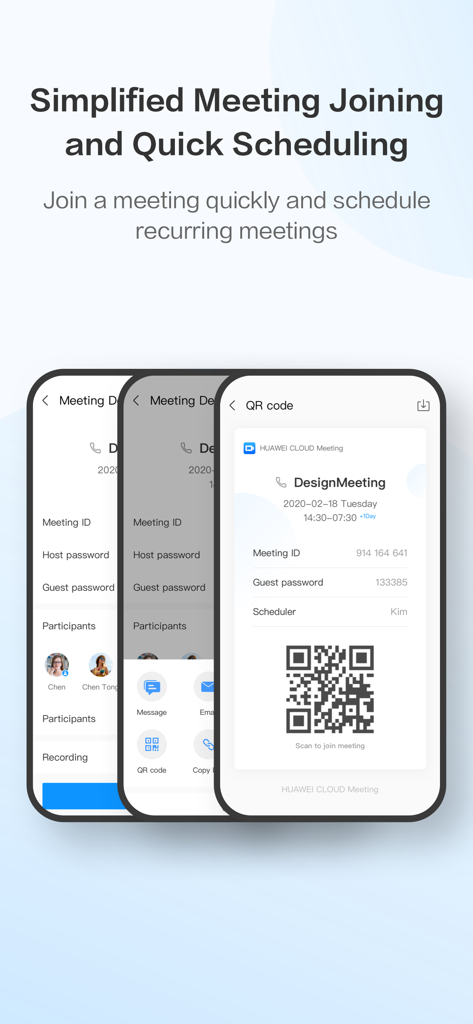
회의 일정 및 QR 코드 참가 인터페이스를 보여주는 Huawei Cloud Meeting 앱
회의 일정 및 QR 코드 참가 인터페이스를 보여주는 Huawei Cloud Meeting 앱

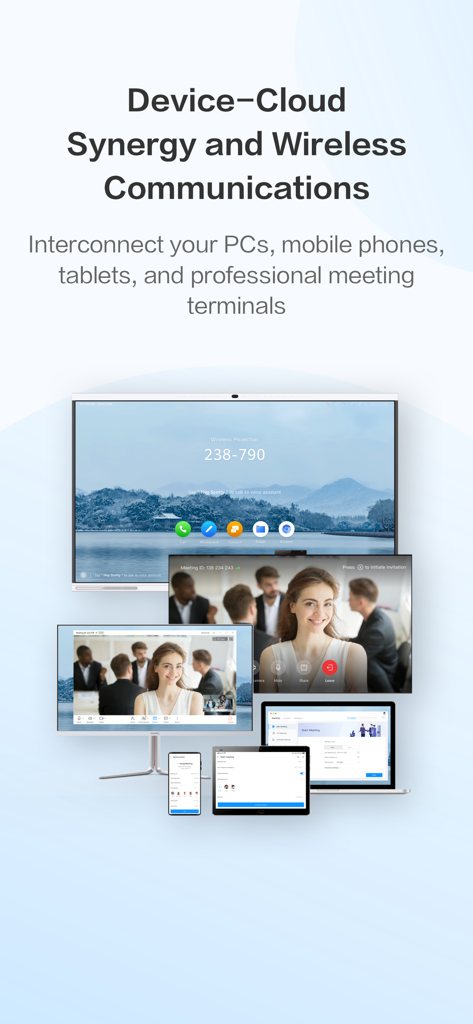
폰, 태블릿, 노트북, 전문가용 모니터를 포함한 여러 기기에서 크로스 플랫폼 협업을 위해 HUAWEI CLOUD Meeting 앱이 실행 중인 모습

폰, 태블릿, 노트북, 전문가용 모니터를 포함한 여러 기기에서 크로스 플랫폼 협업을 위해 HUAWEI CLOUD Meeting 앱이 실행 중인 모습

글로벌 비즈니스 연결을 강화합니다

이 앱을 돋보이게 하는 도구, 831K+ 명의 사용자가 선택.

🌐

국경 없는 HD 품질

태평양 횡단 전문가 소통에 최적화된 저지연 아키텍처로 선명한 1080p 비디오 및 4K 공유를 달성하세요.

✏️

고급 대화형 화이트보드

다자간 도구와 QR 코드 동기화를 통해 즉시 액세스할 수 있는 회의록으로 디자인 및 문서를 실시간으로 주석 처리하세요.

🔒

엔터프라이즈급 보안 및 제어

화면 워터마크, 잠금 회의 및 전문적인 레이아웃 관리 기능을 통해 최대 10,000명의 참가자를 안전하게 호스팅하세요.

전 세계 사용자들에게 사랑받는 앱

Trusted by 831K+ 명이 이 앱을 사랑합니다.

"

"샌프란시스코 사무실과 아시아에 있는 제조 파트너 간에 안정적인 연결을 유지하는 것은 늘 어려운 일이었습니다. HUAWEI CLOUD Meeting이 그것을 바꿔놓았습니다. 4K 화면 공유는 상세한 도면을 검토하는 데 놀랍도록 선명하며, 낮은 지연 시간 덕분에 국경을 넘는 논의가 항상 생산적입니다."

마커스 첸, 선임 공급망 이사
"

"다중 장치 시너지는 제 작업 흐름을 완전히 바꿔놓았습니다. 출퇴근길에 iPhone으로 세션을 시작하고 사무실에 도착하면 즉시 Mac으로 전환할 수 있습니다. 실시간 주석 및 화이트보드 기능 덕분에 수천 명의 참가자가 있더라도 마치 같은 방에 있는 것처럼 원격 협업을 할 수 있습니다."

사라 젠킨스, 글로벌 운영 컨설턴트

앱 소개

에 대해 알아야 할 모든 것 HUAWEI CLOUD Meeting.

설명

HUAWEI CLOUD Meeting is based on Huawei's native public cloud architecture and Huawei's 30 years of experience in audio and video technologies. HUAWEI CLOUD Meeting provides interconnection among multiple terminals, including PCs, mobile phones, tablets, professional meeting terminals, and IdeaHubs. It supports 1080p HD video conferencing with up to 10,000 concurrent online participants, real-time beautification, and multi-party annotation. It provides you with a secure, reliable, and all-scenario HD audio and video conferencing experience for communications and collaboration across terminals and regions, and between enterprises. Features • Uninterrupted HD - 1080p HD video and 4K screen sharing - The industry's first 720p mobile client - Up to 10,000 participants in a meeting • Device-cloud synergy - Consistent experience on soft clients of mobile phones, tablets, and PCs - Access from Huawei's full series of videoconferencing terminals - Compatibility with existing meeting terminals of popular touchscreen manufacturers • Simplified operation - Instant, scheduled, and recurring meetings - SMS, email, or calendar notifications and customizable meeting reminders - Private meetings that only allow specific participants to join • Interaction and collaboration - Screen sharing: desktop and mobile screen sharing and remote desktop control - Electronic whiteboard: multiple tools such as text editing and graphics insertion; multi-party real-time annotation with multiple brush settings - In-meeting chat: The host can control if in-meeting chat is allowed. - Live caption: Your speech in meetings is recognized and converted into closed captions. - eMeetings: You can take away whiteboard annotations and meeting minutes by just scanning a QR code. The whiteboard annotations and meeting minutes are synchronized across multiple terminals. • Professional meeting control - 30+ video layouts - Multiple broadcast and roll call modes - The host can mute or unmute all participants. - The host can invite participants to share screens or files, or cancel screen sharing at any time. • Secure and reliable - Customizable meeting passwords - Meeting access control by specifying participants - On-screen watermarks - Locked sharing and meetings Contact Us Dial customer service hotline +86 4000-955-988, and press 1, 4, and then 2. Customer service email: cloudmeeting@huawei.com If you enjoy your experience with HUAWEI CLOUD Meeting, please don't forget to give us a five-star rating. Your suggestions drive us forward. If you have any questions or suggestions, please feel free to join us at WeChat (WeChat ID: HWCloudMeeting). You can be our experience officer, and you can raise your requirements for product improvement to earn chances to visit exhibition halls in Huawei R&D centers, and obtain Huawei T-shirts, backpacks, and mouse pads.

최신 버전

10.12.8

크기

104.6 MB

출시일

2018년 3월 9일

HD로 글로벌 팀을 원활하게 연결하세요

엔터프라이즈급 클라우드 아키텍처의 안정성을 경험하세요. 지금 iPhone, iPad 또는 Mac에 HUAWEI CLOUD Meeting을 다운로드하고 거리를 좁히세요.

다운로드: App Store
FAQ

자주 묻는 질문

에 대해 알아야 할 모든 것 HUAWEI CLOUD Meeting

HUAWEI CLOUD Meeting이란 무엇인가요?

HUAWEI CLOUD Meeting은 안전하고 안정적인 올씬 시나리오 HD 오디오 및 비디오 회의 서비스입니다. Huawei의 네이티브 공개 클라우드 아키텍처를 기반으로 구축되었으며 협업을 위한 다중 단말 간 상호 운용을 지원합니다.

HUAWEI CLOUD Meeting은 몇 명의 참가자를 지원하나요?

HUAWEI CLOUD Meeting은 최대 10,000명의 동시 온라인 참가자를 지원합니다. 대규모 모임을 위해 원활하고 지연 시간이 적은 HD 비디오 회의 경험을 제공합니다.

HUAWEI CLOUD Meeting에서 화면을 공유할 수 있나요?

예, HUAWEI CLOUD Meeting은 화면 공유를 지원합니다. 데스크톱 및 모바일 화면 공유와 원격 데스크톱 제어를 지원합니다. 공유 화면에 대한 다자간 주석 기능도 사용할 수 있습니다.

HUAWEI CLOUD Meeting은 다양한 장치와 호환되나요?

예, HUAWEI CLOUD Meeting은 장치-클라우드 시너지를 제공합니다. PC, 휴대폰, 태블릿, 전문 회의 단말기 및 IdeaHub와의 상호 운용을 지원하여 소프트 클라이언트 간에 일관된 경험을 보장합니다.

HUAWEI CLOUD Meeting에서 실시간 자막을 제공하나요?

예, HUAWEI CLOUD Meeting은 실시간 자막을 제공합니다. 회의 중에 음성이 인식되어 실시간으로 자막으로 변환되어 참가자의 접근성과 이해도를 높입니다.

HUAWEI CLOUD Meeting은 회의 보안을 어떻게 보장하나요?

HUAWEI CLOUD Meeting은 사용자 지정 가능한 회의 비밀번호, 참가자 지정에 의한 액세스 제어, 화면 워터마크 및 공유/회의 잠금 옵션과 같은 기능을 통해 보안을 보장합니다.