iComic -comic reader-
다운로드: App Store

이 페이지는 앱이나 개발자의 공식 페이지가 아니며, 정보 제공 및 논평을 목적으로 작성된 독립 편집 간행물입니다. 명시적으로 달리 언급되지 않는 한, 해당 앱이나 개발자는 MWM, Apple, Google Play, 앱 퍼블리셔 또는 앱 개발자와 제휴, 보증, 후원, 승인 또는 공식적으로 연결되어 있지 않으며, 이 페이지의 어떤 내용도 해당 앱이 MWM의 서비스를 사용하여 개발되었음을 의미하지 않습니다. 모든 상표, 로고, 스크린샷 및 기타 콘텐츠는 해당 소유자의 자산입니다.

로고: iComic -comic reader-
다운로드: App Store

iComic -comic reader-

디지털 컬렉션을 완벽하게 제어하세요. CBZ 및 ZIP 아카이브의 안정적이고 고해상도 읽기 경험을 번개처럼 빠른 오프라인 액세스와 필요한 정밀한 탐색 기능으로 만나보세요.

주요 수치

다운로드

187K+

사용자 평점

3.3/5

총 평가 수

4K+

개발사

Yoshitake Yamamoto

카테고리

Utilities

지원 언어

6

최신 버전

6.1.5

크기

2.9 MB

출시일

2008년 12월 3일
기능

디지털 컬렉터를 위한 파워하우스

iComic은 소유권과 품질을 중요하게 생각하는 독자를 위해 설계된 고성능 유틸리티입니다. 구독 없이 프리미엄 오프라인 읽기 경험을 위해 개인 ZIP 및 CBZ 아카이브를 로드하세요.

매끄러운 아카이브 읽기

직관적인 멀티터치 제스처와 코너 탭 컨트롤로 개인 ZIP 또는 CBZ 컬렉션을 직접 열고 탐색하세요.

완벽한 오프라인 자유

개인 서버 또는 웹을 통해 콘텐츠를 다운로드하여 모든 비행기나 통근길에 함께할 수 있는 라이브러리를 구축하세요.

다음 스크린샷과 설명은 앱의 공식 스토어 목록에서 직접 가져온 것이며 앱 개발자의 자산입니다.

앱 스토어

스크린샷
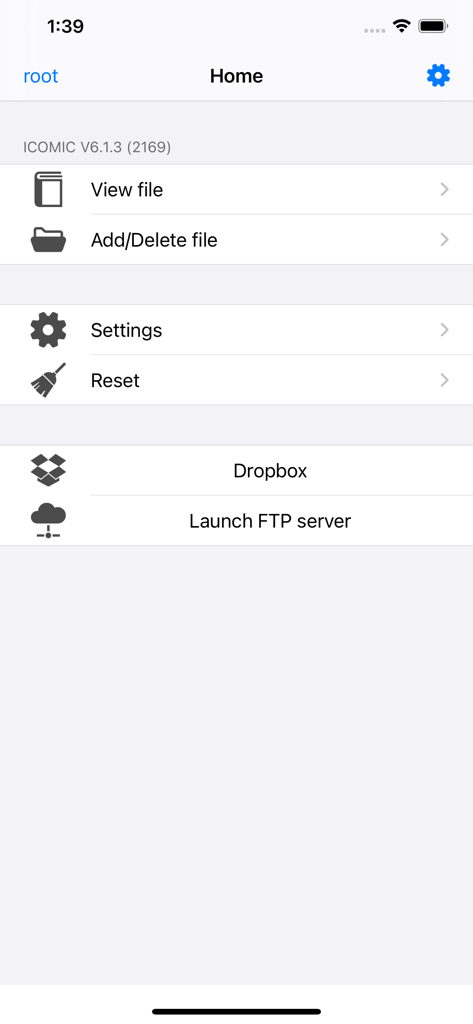
iComic -comic reader- - iComic 앱 홈 화면 (파일 관리, 설정, Dropbox, FTP 서버 옵션 표시)

iComic 앱 홈 화면 (파일 관리, 설정, Dropbox, FTP 서버 옵션 표시)

설명

Welcome to iComic, the premier application for reading comics on your iPhone or iPod Touch. iComic makes great use of the multi-touch function for simple and effective page navigation and zooming to provide the best portable comic book read you will find. iComic displays high resolution comic pages (jpg, tif, or png image files) contained inside compressed zip or cbz format archives. Using the built-in download function, comics can be downloaded from the internet or from a personal server and stored locally on your iPhone or iPod Touch. Your downloaded comics are stored on your device and so are always available for reading, even when you have no internet connection. As iTunes resizes images to a compressed format, iComic is also useful for displaying images for other uses e.g. maps, high detailed photos and ebooks (convert your pdf books to jpeg and you have a perfect reader for those large pdf files, normally unreadable due to the high memory requirement). iComic currently provides three methods for turning pages: swiping your finger on the screen; by taps in the screen corners using the Corner-Tap method; or by Multi-Touch (tap once to page forward, twice to page back). Zooming is by the familiar pinch method used in Safari and other applications or by double tapping the screen when in Corner-Tap mode. The application is very stable and can easily handle zip files up to 60MB with infrequent problems observed with files of much larger size. Individual image files inside the zip files are constrained to a maximum 3 million pixels (e.g. 3,000 pixels high x 1,000 pixels wide or equivalent) though for the sake of battery conservation much smaller sizes (~1000 pixels high) are generally used. A manual for setting up and using iComic can be downloaded from http://red.halfmoon.jp/AppStore_iComic_V1.3_FAQ.pdf The author of this application is Japanese so for excellent community support and discussion in English please visit the helpful and friendly ~*~ Ultimate icomic Thread ~*~ at www.ipodtouchfans.com/forums/showthread.php?t=23759

Download

다운로드: App Store

이 페이지는 앱이나 개발자의 공식 페이지가 아니며, 정보 제공 및 논평을 목적으로 작성된 독립 편집 간행물입니다. 명시적으로 달리 언급되지 않는 한, 해당 앱이나 개발자는 MWM, Apple, Google Play, 앱 퍼블리셔 또는 앱 개발자와 제휴, 보증, 후원, 승인 또는 공식적으로 연결되어 있지 않으며, 이 페이지의 어떤 내용도 해당 앱이 MWM의 서비스를 사용하여 개발되었음을 의미하지 않습니다. 모든 상표, 로고, 스크린샷 및 기타 콘텐츠는 해당 소유자의 자산입니다.









