iFacialMocap

iFacialMocap

다운로드: App Store
로고: iFacialMocap

iFacialMocap: 3D 아티스트 및 VTuber를 위한 전문 실시간 얼굴 캡처

iPhone을 고정밀 얼굴 스캐너로 바꿔보세요. 비싼 장비 없이 52가지 블렌드셰이프 표정을 Blender, Unity 또는 Maya로 직접 스트리밍할 수 있습니다.

개발사

DevelopW LLC

카테고리

Productivity

다운로드

214K+

사용자 평점

3.2/5

총 평가 수

200

지원 언어

15

움직이는 정밀함

이 인터페이스를 사용하는 214K+ 명의 사용자.

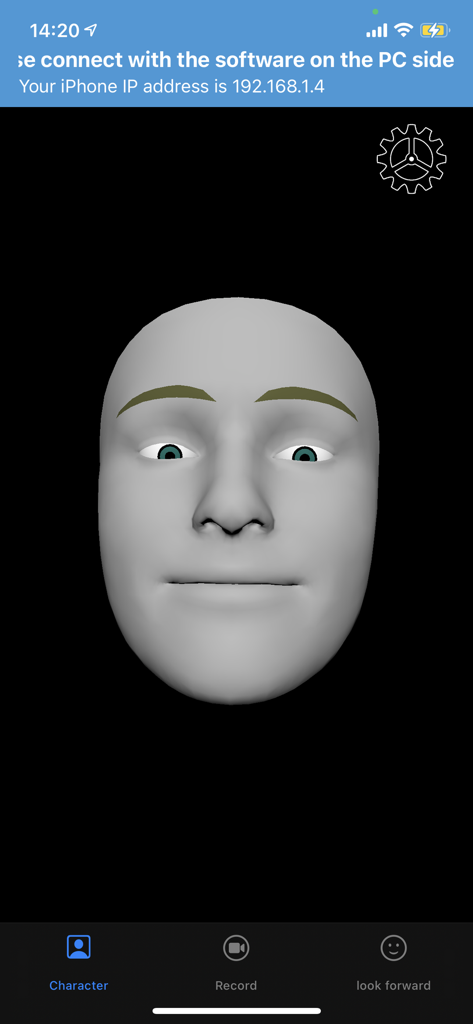
실시간 모션 캡처를 위한 회색 3D 얼굴 모델을 보여주는 iFacialMocap 앱 인터페이스.
실시간 모션 캡처를 위한 회색 3D 얼굴 모델을 보여주는 iFacialMocap 앱 인터페이스.

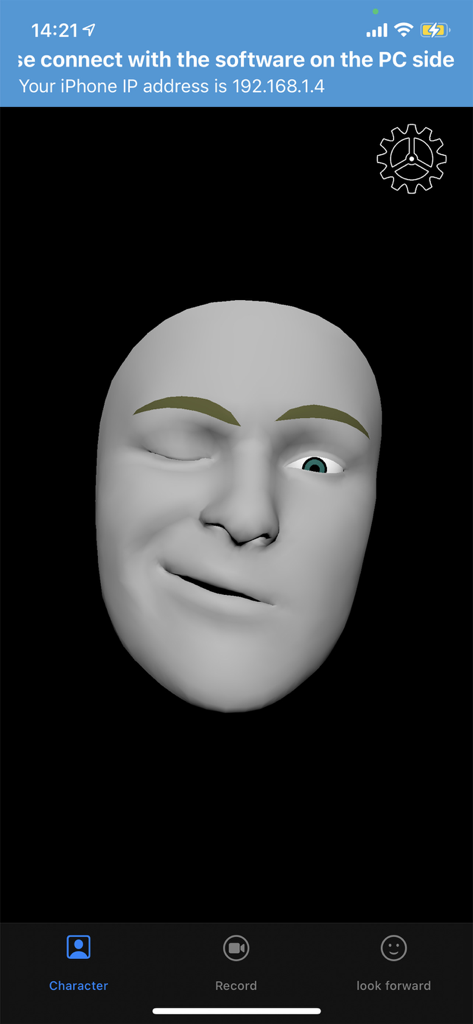
실시간 모션 캡처를 위해 얼굴 표정을 흉내내는 회색 3D 헤드 모델을 보여주는 iFacialMocap 앱 인터페이스

실시간 모션 캡처를 위해 얼굴 표정을 흉내내는 회색 3D 헤드 모델을 보여주는 iFacialMocap 앱 인터페이스

전문적인 얼굴 애니메이션, 간편하게

이 앱을 돋보이게 하는 도구, 214K+ 명의 사용자가 선택.

실시간 라이브 링크

Blender, Unity, Maya 및 3dsMax와 얼굴 표정을 원활하게 동기화하여 즉각적인 캐릭터 애니메이션 및 라이브 스트리밍을 구현하세요.

🎯

TrueDepth 정밀도

Apple의 ARKit을 활용하여 52개의 고유 블렌드셰이프를 추적하여 미묘한 미소부터 복잡한 말하기까지 모든 뉘앙스를 캡처하세요.

📤

전문 워크플로우 통합

기기에서 직접 퍼포먼스를 녹화하고 업계 표준 FBX 파일로 내보내거나 VMagicMirror와 연결하여 고급 VTubing을 구현하세요.

앱 소개

에 대해 알아야 할 모든 것 iFacialMocap.

설명

iFacialMocap allows you to capture facial expressions in an iOS app and communicate in real time with 3DCG software on your PC. You can also do an FBX export by email.PC-side software allows you to import VRM models. To export FBX, turn on the REC mode and record. And when you press the mail button, the version selection screen of FBX appears, and when you press the OK button, the FBX file is saved in the File folder and the mailer starts. Detailed usage is available at the following URL: https://ifacialmocap.com/ This app can create face animations by communicating with Maya, Unity, 3dsMax and Blender in real time. In addition, animations created in real time can be baked. This app can load VRM avatars within the iOS app. In addition, this app is linked with VMagicMirror on the PC and VRM related apps such as Luppet and HANA_APP. To use, first start this app, then start "iFacialMocap to SoftWare app" on your PC and enter your iPhone's IP address. (Donwload from PC use :https://ifacialmocap.com/download/ ) Next, create up to 52 morph targets (BlendShape or ShapeKey) according to the naming convention. Finally, use 3DCG software to load the script / add-on and press the connection button. Very accurate facial motion capture can be performed very easily. This app is only available for models equipped with FaceID. The camera image and resulting depth data are only used to send motion capture data to the user's PC. That data is not stored in the iPhone. To get depth data from Apple's API, access to the camera is required. This application is only used for communication with PCs within the same network and does not send information to third parties. This app can only be used on iOS devices equipped with FaceID. Supported devices are as follows: ・iPhone iPhone13 mini Phone13 Pro Max iPhone13 Pro iPhone13 iPhone12 Pro Max iPhone12 Pro iPhone12 iPhone 11 Pro Max iPhone 11 Pro iPhone 11 iPhone XS Max iPhone XS iPhone XR iPhone X ・iPad iPad Pro 12.9-inch (5th generation) iPad Pro 12.9-inch (4th generation) iPad Pro 12.9-inch (3rd generation) iPad Pro 11-inch (2nd generation) iPad Pro 11-inch * Face ID is not installed in the new iPhone SE 2nd generation released in 2020, but you can use iFacial Mocap by updating to iOS 14 or later. Not limited to iPhone SE 2nd generation, iFacial Mocap can be used if it has an A12 or higher chip and has been updated to iOS14.

최신 버전

1.4.9

크기

295.2 MB

출시일

2020년 1월 13일

디지털 아바타에 생명을 불어넣을 준비가 되셨나요?

iPhone을 전문 등급 모션 캡처 리그로 전환한 수천 명의 3D 아티스트 및 VTuber와 함께하세요. 지금 iFacialMocap을 다운로드하고 Blender, Unity 또는 Maya로 실시간 표정 스트리밍을 시작하세요.

다운로드: App Store
추천

비슷한 앱

유사한 기능과 사용자 경험을 가진 앱

App information, icons, screenshots, and descriptions displayed on this page are sourced from the Apple App Store and are the property of their respective developers. Download estimates and rankings are based on MWM's proprietary models and may not reflect actual figures. This page is provided for informational and analytical purposes only.

Believe this page infringes your intellectual property? File a dispute